当前位置:网站首页>MySQL增删查改(初阶)
MySQL增删查改(初阶)
2022-06-26 02:41:00 【相知-】
文章目录
MySQL增删查改初阶
在MySQL中的注释方法
我们可以用–或者## 在MySQL中实现注释
1.插入数据
1.1 单行输入+全列插入
– 插入一条记录,value_list 数量必须和定义表的列的数量及顺序一致
insert into 表名 values(数据,数据…)

1.2 多行数据 + 指定列插入
– 插入两条记录,value_list 数量必须和指定列数量及顺序一致
假设我们的student表中有id name 和score
insert into student(id,name) values (1,‘小王’),(2,‘小李’)

3.查询
3.1 全列查询
select * from 表名
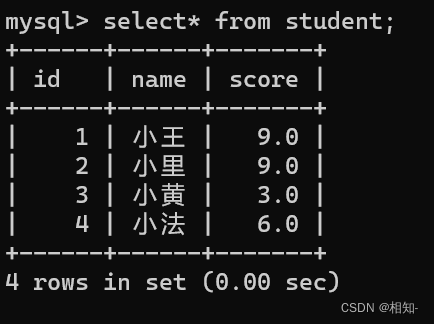
查看所有表数据内容( * 是通配符,就是用*代替列名就可以查询所有列)这个操作危险,比如数据量太大会导
1.内存满载,导致崩溃
2.MySQL服务器就会疯狂读取硬盘,占满硬盘IO带宽,然后MYSQL服务器返回给客户端会占满网络带宽)
3.2 指定列查询
select 列名,列名 from 表名

3.3 查询字段为表达式
形如:
– 表达式不包含字段
select id, name, 10 from student;
– 表达式包含一个字段
select id, name, english + 10 from student;
– 表达式包含多个字段
select id, name, chinese + math + english from student;

3.4 别名(as)
列名 [as] 别名 (as可以省略)
如
– 结果集中,表头的列名=别名
select id, name, chinese + math + english [as] 总分 from student;

3.5 去重(distinct)
当数据中有重复的情况时,我们可以通过distinct来得到一个去重后的结果
select distinct 列名 from 表名

3.6 排序(order by)
通过一个基准值排序的情况
select 列名(*)… from 表名 order by 列名 asc(升序)/desc(降序) 如果省略不写就是默认升序,如果记录中有NULL,NULL认为是最小的 就是在众多列中以某个列为基准进行排序
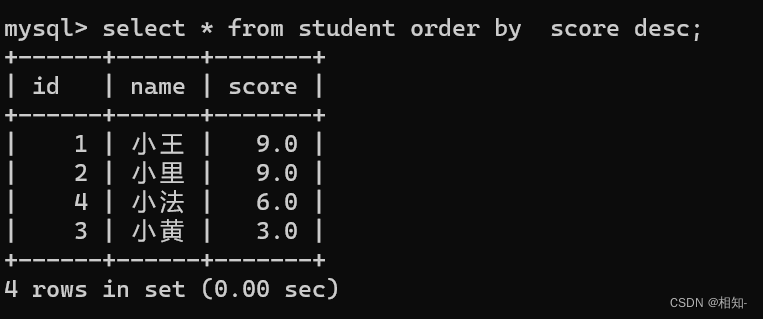
通过多个基准值排序的情况
select 列名(*)… from 表名 order by 列名… asc(升序)/desc(降序) 就是在众多列中以某个些列(存在优先级)为基准进行排序

3.7 条件查询(where)
1.比较运算符
| 运算符 | 说明 |
|---|---|
| >, >=, <, <= | 大于,大于等于,小于,小于等于 |
| = | 等于,NULL 不安全,例如 NULL = NULL 的结果是 NULL |
| <=> | 等于, NULL 安全,例如 NULL <=> NULL 的结果是 TRUE(1) |
| !=, <> | 不等于 |
| between a0 and a1 | 范围匹配, [a0, a1],如果 a0 <= value <= a1,返回 TRUE(1) |
| in (option, …) | 如果是 option 中的任意一个,返回 TRUE(1) |
| is NULL | 是 NULL |
| is not NULL | 不是 NULL |
| like | 模糊匹配。 % 表示任意多个( 包括 0 个)任意字符; _ 表示任意一个字符 |
2.逻辑运算符
| 运算符 | 说明 |
|---|---|
| and | 逻辑与 多个条件必须都为 TRUE(1),结果才是 TRUE(1) |
| or | 逻辑或 任意一个条件为 TRUE(1), 结果为 TRUE(1) |
| not | 逻辑取反 条件为 TRUE(1),结果为 FALSE(0) |
4.分页查询(limit)
– 从 0 开始,筛选 n 条结果
select … from table_name [where …] [order by …] limit n;
– 从 s 开始,筛选 n 条结果
select … from table_name [where …] [order by …] limit s, n;
– 从 s 开始,筛选 n 条结果,比where 种用法更明确,建议使用
select … from table_name [where …] [order by …] limit n offset s;
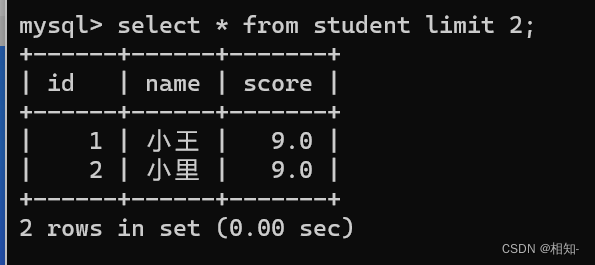


5.修改(Update)
update [表名] set [列名] = [修改的值], [列名] = [修改的值] where 子句;

6.删除(delete)
delete from [表名] where [筛选条件];

边栏推荐
- Analysis and optimization of ue5 global illumination system lumen
- Simple use example of Aidl
- UE5全局光照系统Lumen解析与优化
- Possible values for @supply in kotlin
- [QT] custom control - air quality dashboard
- 丝网印刷的种类及其应用方法
- Authorization of database
- 使用IDEA画结构图
- 请指教同花顺开户选选择哪家券商比较好?网上开户是否安全么?
- Multi surveyor Gongshu campus Xiao sir_ Page error in Jenkins
猜你喜欢

Redis configuration and optimization of NoSQL

Analysis and optimization of ue5 global illumination system lumen
用元分析法驱动教育机器人的发展
![[solution] cmake was unable to find a build program corresponding to](/img/d4/e58777d5ff4d7f0e943d2f62f378d4.png)
[solution] cmake was unable to find a build program corresponding to "UNIX makefiles"
使用IDEA画结构图

Oracle connectivity issues and Solutions

DF reports an error stale file handle

工作室第3次HarmonyOS培训笔记

Camtasia 2022全新版超清錄制電腦視頻

OpenAPI 3.0 specification - Food Guide
随机推荐
使用 AnnotationDbi 转换 R 中的基因名称
A few simple ways for programmers to exercise their waist
P2483-[模板]k短路/[SDOI2010]魔法猪学院【主席树,堆】
What can Arthas do for you?
How to add a regression equation to a plot in R
Win10 computer power management turns on excellence mode
业务流程图设计
[solution] cmake was unable to find a build program corresponding to "UNIX makefiles"
[flask introduction series] flask processing request and response
记一个RestControll和Controller 引起的折磨BUG
网上股票开户安全吗?
[QT] custom control - air quality dashboard
Literature reading --- optimize RNA SEQ research to study herbicide resistance (review)
Oracle练习
如何在 ggplot2 中向绘图中添加表格
Camtasia 2022 nouvelle vidéo d'ordinateur d'enregistrement ultra - clair
Multi surveyor Gongshu campus Xiao sir_ Page error in Jenkins
文献阅读---优化RNA-seq研究以研究除草剂耐药性(综述)
Camtasia 2022全新版超清录制电脑视频
Arduino string to hexadecimal number for large color serial port screen.