当前位置:网站首页>Interpretation of the source code of all logging systems in XXL job (line by line source code interpretation)
Interpretation of the source code of all logging systems in XXL job (line by line source code interpretation)
2022-07-25 22:18:00 【It's hard not to write code all day】
Catalog
1 Look for log related files
xxl-job in , Where will logs be used , That is, in each implementation process , Will log , Executing an error on the server will save the log , And we open the page , When checking the log , Will call the interface , View log information from the background
- The first is the relevant code file that records the log

We are using xxl-job When logging, you only need to use... During task execution XxlJobHelper.log() that will do , Methods and log4j/slf4j It's as simple as .
You write code , Want to log , Then write directly
XxlJobHelper.log("hello world");
Behind the above code will Format the log content first , That is to format the messy log information better , Or become an entity class , After that , The formatted log information Save as a file
- client Interface to view logs in real time
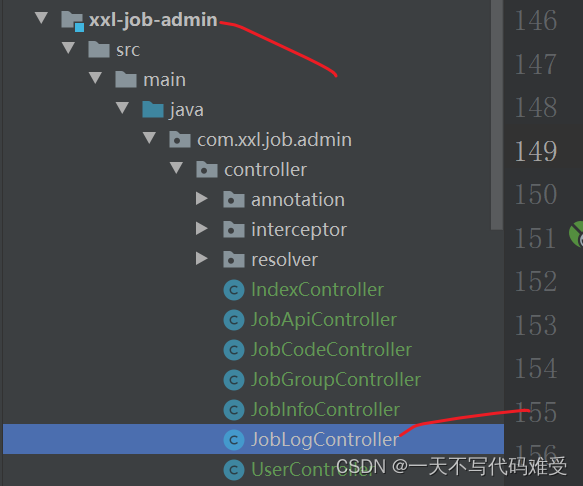
We open the project of task scheduling center , To view the log of a task in real time , Click log information , Will call the interface
 The front end calls this method    Call to view
logDetailCat()

When the execution status is incomplete ,xxl-job The log console will call the interface repeatedly until the task is completed .
2 Save the log related code file
In the core source code , It involves these documents

We are in our own project , Log , It uses
XxlJobHelper.log(“hello world”);
So start with this method , The file of this method is

Go in and find this method , There are two methods of the same name , One is our ordinary log recorder , One is to log exceptions , Is in the catch In which the log is recorded

Let's first look at logging exceptions , It's usually in catch Log inside
 /** * append exception stack *  Add exception stack  * @param e */
    public static boolean log(Throwable e) {


        StringWriter stringWriter = new StringWriter();
        e.printStackTrace(new PrintWriter(stringWriter));
//  Change exception to   character string
        String appendLog = stringWriter.toString();

//  Get and call this log Methodical   All information about class methods
        StackTraceElement callInfo = new Throwable().getStackTrace()[1];

//  Last call   Another way to save
        return logDetail(callInfo, appendLog);
    }
And then look at Record general information Log information
 /** * append log with pattern *  Append log with mode  * @param appendLogPattern like "aaa {} bbb {} ccc" * @param appendLogArguments like "111, true" String[] str2={"rrrr","yyyyy"}; */
    public static boolean log(String appendLogPattern, Object ... appendLogArguments) {

        //  Use slf4j The parser formats the log contents
        FormattingTuple ft = MessageFormatter.arrayFormat(appendLogPattern, appendLogArguments);
        String appendLog = ft.getMessage();  // aaa rrrr bbb yyyyy ccc

        /*appendLog = appendLogPattern; if (appendLogArguments!=null && appendLogArguments.length>0) { appendLog = MessageFormat.format(appendLogPattern, appendLogArguments); }*/
        //  Get stack frame information
//  This is the method to get the call stack frame , Indexes 0 For the current stack frame ,
// 1 Call stack frame for , And so on , What you get here is the index 1,
//  In other words, the stack frame information of calling the method is obtained ,
//  Can pass StackTraceElement Get the calling class name , Method name , Lines and so on
        StackTraceElement callInfo = new Throwable().getStackTrace()[1];

//  Record   journal
        return logDetail(callInfo, appendLog);
    }
The above two log() The end calls
logDetail(callInfo, appendLog)
Parameters callInfo Is all the information of the caller ,appendLog Is the specific log information
  /** * append log *  Additional   journal  * @param callInfo  Which method calls this log Method , Just put all the information of which method   Save to StackTraceElement in  * @param appendLog  The log we want to record  */
    private static boolean logDetail(StackTraceElement callInfo, String appendLog) {

        //  Get the current context object
        XxlJobContext xxlJobContext = XxlJobContext.getXxlJobContext();
        if (xxlJobContext == null) {

            return false;
        }

        /*// "yyyy-MM-dd HH:mm:ss [ClassName]-[MethodName]-[LineNumber]-[ThreadName] log"; StackTraceElement[] stackTraceElements = new Throwable().getStackTrace(); StackTraceElement callInfo = stackTraceElements[1];*/


        //  Splice and format log information
//  It's splicing   Which method records which   journal
        StringBuffer stringBuffer = new StringBuffer();

        stringBuffer.append(DateUtil.formatDateTime(new Date())).append(" ")
                .append("["+ callInfo.getClassName() + "#" + callInfo.getMethodName() +"]").append("-")
                .append("["+ callInfo.getLineNumber() +"]").append("-")
                .append("["+ Thread.currentThread().getName() +"]").append(" ")
                .append(appendLog!=null?appendLog:"");

//  The log information of the last splicing   It contains   Which method records which log
        String formatAppendLog = stringBuffer.toString();

        // appendlog //  Get log file path
        String logFileName = xxlJobContext.getJobLogFileName();

        if (logFileName!=null && logFileName.trim().length()>0) {


            //  Write the log to the local file in the form of stream
//  According to the log file path  , Write the spliced things in
            XxlJobFileAppender.appendLog(logFileName, formatAppendLog);
            return true;
        } else {

            logger.info(">>>>>>>>>>> {}", formatAppendLog);
            return false;
        }
    }
The above code means ; After formatting the incoming log information , call XxlJobFileAppender.appendLog(logFileName, formatAppendLog);
Preservation
I went to this file 
	/** * append log *  Add log content  * @param logFileName  Log path  * @param appendLog  Log contents  */
	public static void appendLog(String logFileName, String appendLog) {


		// log file
		if (logFileName==null || logFileName.trim().length()==0) {

			return;
		}
		File logFile = new File(logFileName);

		if (!logFile.exists()) {

			try {

				logFile.createNewFile();
			} catch (IOException e) {

				logger.error(e.getMessage(), e);
				return;
			}
		}

		// log
		if (appendLog == null) {

			appendLog = "";
		}
		appendLog += "\r\n";

		// append file content
		FileOutputStream fos = null;
		try {

			fos = new FileOutputStream(logFile, true);
			fos.write(appendLog.getBytes("utf-8"));
			fos.flush();
		} catch (Exception e) {

			logger.error(e.getMessage(), e);
		} finally {

			if (fos != null) {

				try {

					fos.close();
				} catch (IOException e) {

					logger.error(e.getMessage(), e);
				}
			}
		}

	}
The above code is Save it in a specific file 了
3 The server calls the log information in real time

/** *  When we open the task log in the background , The server will pull logs from the client  * @author xuxueli 2015-12-19 16:13:16 *  The server   Address  *  Trigger time  *  Mission id *  Read from line number  * *  When the execution status is incomplete ,xxl-job The log console will call the interface repeatedly until the task is completed . */
	@RequestMapping("/logDetailCat")
	@ResponseBody
	public ReturnT<LogResult> logDetailCat(String executorAddress, long triggerTime, long logId, int fromLineNum){

		try {


//  according to   Address   Create a remote call object
			ExecutorBiz executorBiz = XxlJobScheduler.getExecutorBiz(executorAddress);
//  Read   Log information
			ReturnT<LogResult> logResult = executorBiz.log(new LogParam(triggerTime, logId, fromLineNum));

			// is end  Judge whether the log is over
            if (logResult.getContent()!=null && logResult.getContent().getFromLineNum() > logResult.getContent().getToLineNum()) {

//  Log id  Get log information from the database
            	XxlJobLog jobLog = xxlJobLogDao.load(logId);
//  If   Execution status   Greater than 0
                if (jobLog.getHandleCode() > 0) {

//  Set up   result   by  TRUE
                    logResult.getContent().setEnd(true);
                }
            }

			return logResult;
		} catch (Exception e) {

			logger.error(e.getMessage(), e);
			return new ReturnT<LogResult>(ReturnT.FAIL_CODE, e.getMessage());
		}
	}
边栏推荐
- Get together for ten years, tell your story, millions of gifts are waiting for you
- Uninstall NPM and install NPM_ Use 'NPM uninstall' to uninstall the NPM package 'recommended collection'
- 核电站在席卷欧洲的热浪中努力保持安全工作
- SQL basic statement DQL select and extract DML insert delete
- All you want to know about interface testing is here
- Why does redis choose single thread?
- Unity performance optimization direction
- Whether the five distribution methods will produce internal fragments and external fragments
- [51nod1676 undirected graph isomorphism] undirected graph hash [easy to understand]
- Output Yang Hui triangle with two-dimensional array
猜你喜欢

面了个腾讯三年经验的测试员,让我见识到了真正的测试天花板

2022 the latest software tests eight part essay. Whether you can offer depends on how you recite it

访问者模式(visitor)模式

Randomly generate 10 (range 1~100) integers, save them to the array, and print the array in reverse order. And find the average value, the maximum value and the subscript of the maximum value, and fin

kubernetes之VictoriaMetrics单节点

『SignalR』.NET使用 SignalR 进行实时通信初体验

What should I do if I encounter the problem of verification code during automatic testing?
Summary of function test points of wechat sending circle of friends on mobile terminal

Don't know mock test yet? An article to familiarize you with mock

MySQL - subquery - column subquery (multi row subquery)
随机推荐
还不懂mock测试?一篇文章带你熟悉mock
ArcGIS中的WKID
What is the difference between minor GC and full GC?
Unity performance optimization direction
Randomly generate 10 (range 1~100) integers, save them to the array, and print the array in reverse order. And find the average value, the maximum value and the subscript of the maximum value, and fin
访问者模式(visitor)模式
成为比开发硬气的测试人,我都经历了什么?
JMeter websocket interface test
手机端微信发朋友圈功能测试点总结
编译和反编译
Leetcode 106. construct binary tree from middle order and post order traversal sequence
The second short contact of gamecloud 1608
Three ways to allocate disk space
Imitation Tiktok homepage interface
vim用法记录
Which is reliable between qiniu business school and WeiMiao business school? Is it safe to open an account recommended by the teacher?
[test development methodology] experience of test development platform PK - choice
Whether the five distribution methods will produce internal fragments and external fragments
3. Editors (vim)
What is partition and barrel division?