当前位置:网站首页>UE4 loadingscreen dynamic loading startup animation
UE4 loadingscreen dynamic loading startup animation
2022-07-25 10:37:00 【Flying Pig】
One UE4 Load mode of
When switching levels , Often because the level resources are too large , Create a Caton , Black screen , That is because the main thread is blocked due to excessive resources , Cause the interface to go blank and get stuck , If you use streamingLevel Loaded loading The way , Still unable to fundamentally solve the thread blocking problem , It needs to be used at this time UE4 Preloading process of , To start a separate thread to solve this problem .
Two Load the structure of the properties that the screen will have FLoadingScreenAttributes
FLoadingScreenAttributes LoadingScreen;
LoadingScreen.bAutoCompleteWhenLoadingCompletes = false;// Whether to play all movies and finish loading , The load screen will disappear
LoadingScreen.bWaitForManualStop = false;// Whether to play all the time movies, Until the manual stop LoadingScreen.bMoviesAreSkippable = false;// Whether loading is complete , Skip the movie by clicking on the load screen
LoadingScreen.MinimumLoadingScreenDisplayTime = 3.0f; // movie Minimum playback time
LoadingScreen.PlaybackType = EMoviePlaybackType::MT_Looped;// Whether to circulate
3、 ... and Code operation
One 、 establish C++ class ,GameInstance

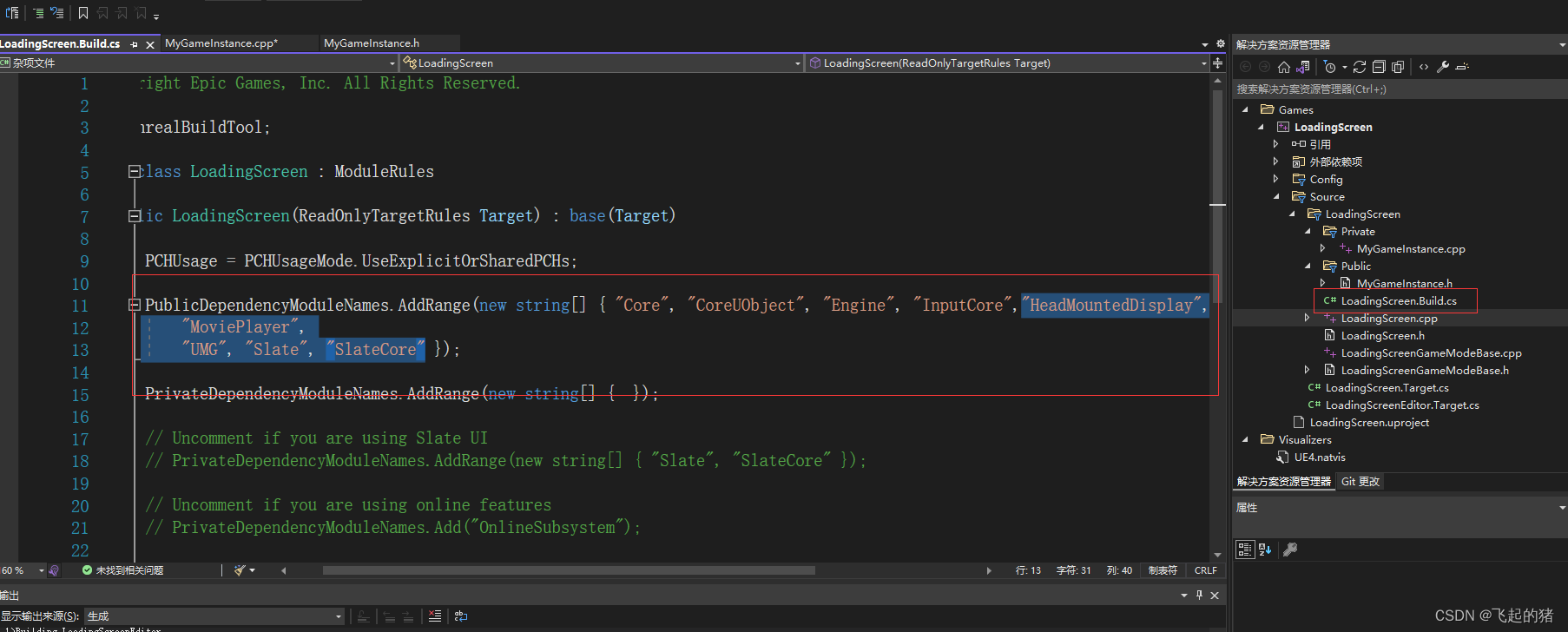
Two 、 In your project Build.cs Add modules to
"HeadMountedDisplay",
"MoviePlayer",
"UMG", "Slate", "SlateCore"
3、 ... and 、 stay MyGameInstance.h In file
// Fill out your copyright notice in the Description page of Project Settings.

#pragma once

#include "CoreMinimal.h"
#include "Engine/GameInstance.h"
#include "Runtime/UMG/Public/UMG.h"
#include "Runtime/UMG/Public/UMGStyle.h"
#include "Runtime/UMG/Public/Slate/SObjectWidget.h"
#include "Runtime/UMG/Public/IUMGModule.h"
#include "Runtime/UMG/Public/Blueprint/UserWidget.h"
#include "Runtime/MoviePlayer/Public/MoviePlayer.h"
#include "Runtime/SlateCore/Public/Widgets/SWidget.h"
#include "MyGameInstance.generated.h"

/**
 *
 */
UCLASS()
class LOADINGSCREEN_API UMyGameInstance : public UGameInstance
{
	GENERATED_BODY()
public:
	virtual void Init() override;

	UFUNCTION()
		virtual void BeginLoadingScreen(const FString& MapName);
	UFUNCTION()
		virtual void EndLoadingScreen(UWorld* LoadedWorld);

	UPROPERTY()
		UUserWidget* CurrentWidget;
	// loading widget
	UPROPERTY(EditAnywhere, BlueprintReadOnly, Category = "UMGGame")
		TSubclassOf<UUserWidget> LoadingWidget;

};
Four 、 stay MyGameInstance.cpp In file
// Fill out your copyright notice in the Description page of Project Settings.


#include "MyGameInstance.h"

void UMyGameInstance::Init()
{
    Super::Init();

    FCoreUObjectDelegates::PreLoadMap.AddUObject(this, &UMyGameInstance::BeginLoadingScreen);
    FCoreUObjectDelegates::PostLoadMapWithWorld.AddUObject(this,&UMyGameInstance::EndLoadingScreen);
}

void UMyGameInstance::BeginLoadingScreen(const FString& MapName)
{
	FLoadingScreenAttributes LoadingScreen;

	LoadingScreen.bAutoCompleteWhenLoadingCompletes = false;// Whether to play all movies and finish loading , The load screen will disappear
	LoadingScreen.bWaitForManualStop = false;// Whether to play all the time movies, Until the manual stop
	LoadingScreen.bMoviesAreSkippable = false;// Whether loading is complete , You can skip the movie by clicking the load screen
	LoadingScreen.MinimumLoadingScreenDisplayTime = 3.0f; // movie Minimum playback time
	//LoadingScreen.PlaybackType = EMoviePlaybackType::MT_Looped;

	LoadingScreen.WidgetLoadingScreen = FLoadingScreenAttributes::NewTestLoadingScreenWidget(); // movie When there is no , According to the widget

	if (LoadingWidget != nullptr)
	{
		CurrentWidget = CreateWidget<UUserWidget>(this, LoadingWidget);
		TSharedPtr<SWidget> LoadScreen = CurrentWidget->TakeWidget();
		LoadingScreen.WidgetLoadingScreen = LoadScreen;
	}
	else
	{
		UE_LOG(LogTemp, Warning, TEXT("LoadingWidget == nullptr"));
	}
	//LoadingScreen.MoviePaths.Add("squad_intro_movie");
	GetMoviePlayer()->SetupLoadingScreen(LoadingScreen);
}

void UMyGameInstance::EndLoadingScreen(UWorld* LoadedWorld)
{
	UE_LOG(LogTemp,Warning,TEXT("LoadSuccess"));
	GetMoviePlayer()->StopMovie();
}
5、 ... and 、 Set the project settings in the blueprint , establish Gameinstance The blueprint

Set up

6、 ... and 、 establish widget, As GameInstance Medium for loading widget


Finally, compile and run :

Refer to official documentation :https://docs.unrealengine.com/5.0/en-US/API/Runtime/MoviePlayer/FLoadingScreenAttributes/
边栏推荐
- 1.Shell编程规范与变量
- bug要素
- js 哈希表 02
- 7.shell实用的小工具cut等
- Storage, computing and distributed computing (collection and sorting is suitable for Xiaobai)
- Open virtual private line network load balancing
- Erlang (offline deployment)
- Attention is all you need paper intensive reading notes transformer
- Angr (IV) -- angr_ ctf
- Angr (VI) -- angr_ ctf
猜你喜欢





随机推荐
Storage, computing, distributed Virtualization (collection and sorting is suitable for Xiaobai)
CONDA configures the deep learning environment pytorch transformers
js 哈希表 01
6. Regular expression of shell
Principle of struct2
Angr (IV) -- angr_ ctf
Deadlock event of thread pool
C# 类库的生成,使用类库对象对DataGridView 进行数据绑定
for循环:水仙花案例
Angr (VI) -- angr_ ctf
Angr(七)——angr_ctf
测试计划、测试方案
After switching the shell command line terminal (bash/zsh), CONDA cannot be used: command not found
4.隔壁小孩都会的,各种shell符号{}[]等
Modify MySQL group error expression 1 of select list is not in group
Add CONDA virtual environment env to the Jupiter kernel
5.NFS共享服务和ssh远程控制服务
虚拟专线网络部署
Notes on building dompteur container
2021 written examination summary of niuke.com 01