当前位置:网站首页>ZABBIX offline installation
ZABBIX offline installation
2022-06-11 01:05:00 【CheerTan】
zabbix Offline installation
1 close selinux
vi /etc/selinux/config # take SELINUX = enforcing Change it to SELINUX = disabled Restart is required after setting to take effect
setenforce 0 # Temporary closure order
getenforce # testing selinux Whether to shut down disabled The closed position
2 Turn off firewall
firewall-cmd --state # View firewall status Show... When off not running Turn on the display running
systemctl stop firewalld.service Turn off firewall temporarily
systemctl disable firewalld.service prohibit firewall Boot up
3 Upload zabbix Offline package Upload offline package to /usr/local/zabbix-rpm Catalog
mkdir -p /usr/local/zabbix-rpm
4 install
cd /usr/local/zabbix-rpm/
yum clean all ; yum localinstall –y --skip-broken ./*
5 Start database Add to boot up
systemctl start mariadb.service
systemctl enable mariadb.service
6 Initialize database
mysql_secure_installation

7 Create the initial database ( Set the password here to [email protected])
mysql -uroot -p
mysqladmin -u root password [email protected] # Set up the database root password ( The password can be changed by yourself )
mysql -u root -p #root User login database
show databases;
CREATE DATABASE zabbix character set utf8 collate utf8_bin; # establish zabbix database ( Chinese encoding format )
GRANT all ON zabbix.* TO ‘zabbix’@‘%’ IDENTIFIED BY ‘[email protected]’; # grant zabbix user zabbix All permissions of the database
flush privileges; # Refresh the permissions
quit # Exit database
Be careful : To guarantee zabbix Users can also log into the database , If you can't log in locally , The solution is as follows :
mysql -u root -p # Use root Account login database ;
select user,host,password from mysql.user; # There is an empty user name occupied, resulting in local unable to log in, remote login
drop user ‘’@localhost; # Delete empty users

8 Import initial database
zcat /usr/share/doc/zabbix-server-mysql*/create.sql.gz | mysql -uzabbix -p zabbix
Check whether the database is imported successfully
9 edit httpd
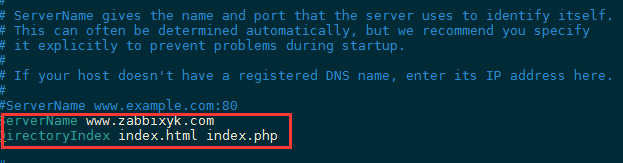
vim /etc/httpd/conf/httpd.conf
add to :ServerName www.zabbixyk.com # Change to host name
DirectoryIndex index.html index.php # Add home page support format
10 To configure zabbix_server
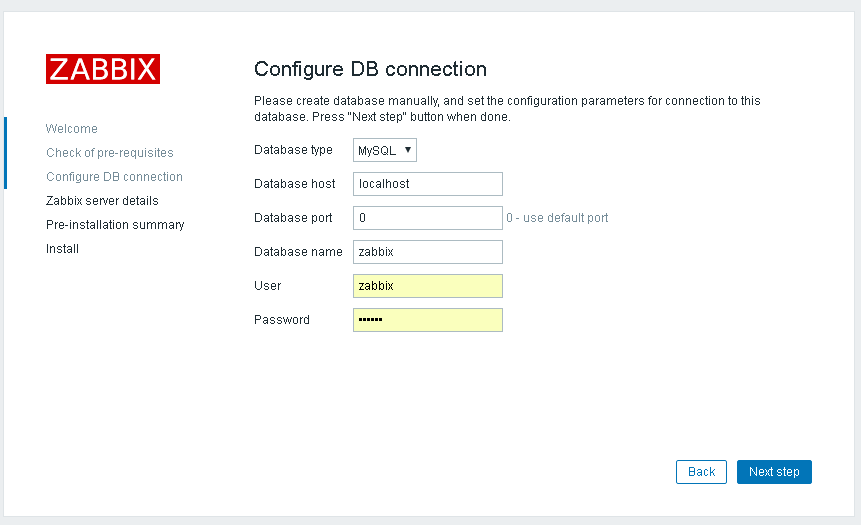
vim /etc/zabbix/zabbix_server.conf # Configure database user and password

grep -n ‘^’[a-Z] /etc/zabbix/zabbix_server.conf # Confirm the database user and password

11 To configure zabbix front end php
vim /etc/php.ini
max_execution_time = 300
memory_limit = 128M // Default
post_max_size = 16M
upload_max_filesize = 2M // Default
max_input_time = 300
max_input_vars = 10000
always_populate_raw_post_data = -1
grep -n ‘^’[a-Z] /etc/php.ini // Easy to check
12 To configure zabbix The time zone
vim /etc/httpd/conf.d/zabbix.conf Change the time zone
Change the time zone php_value date.timezone Asia/Shanghai

13 start-up zabbix-server , zabbix-agent ,httpd service And set the power on self starting
systemctl restart zabbix-server zabbix-agent httpd // start-up
systemctl enable zabbix-server zabbix-agent httpd // Add power on self start

systemctl status httpd # Check the status
ps aux|grep mysql // see mysql process

systemctl status zabbix-server // Check the status
netstat -anpt | grep zabbix // Monitor in 10051 On port , If the monitoring fails , It can be restarted zabbix-server Try the service

more /var/log/zabbix/zabbix_server.log // Check the day




边栏推荐
- Embedded learning materials and project summary
- SqlServer中的锁
- Fastdfs quick start
- 记录oracle的几个参数 db_files,Cursor_sharing ,open_cursor
- 文件“Setup”不存在,怎么办?
- What is thread in concurrent programming
- About the log traffic monitoring and early warning small project | standardized return of interaction with the database in flask
- C语言实现设置桌面壁纸
- MySQL
- async await
猜你喜欢

Dynamic programming classical topic triangle shortest path

Small project on log traffic monitoring and early warning | environment foundation 2

循环结构语句
![[introduction to ROS] - 03 single chip microcomputer, PC host and ROS communication mechanism](/img/ad/d798284ceb370f7c68cbab755a11de.png)
[introduction to ROS] - 03 single chip microcomputer, PC host and ROS communication mechanism

What exactly does Devops mean?

WPF - timeline class

SQL审核 | “云上”用户可以一键使用 SQLE 审核服务啦

Dictionary sort of array

C语言实现设置桌面壁纸

Logback log framework
随机推荐
The driver has not received any packets from the server
Network Engineer required course firewall security zone and basic operation of security policy
Teach you the front and back separation architecture (V) system authentication implementation
DevOps到底是什么意思?
How to solve the deep paging problem in large factories (easy to understand)
MySQL trigger
Blend for visual studio overview
Embedded learning materials and project summary
循环结构语句
No module named CV2
【ROS入门教程】---- 03 ROS工作空间与功能包
Google搜索为什么不能无限分页?
记录oracle的几个参数 db_files,Cursor_sharing ,open_cursor
UUID quick explanation
adb循环输出内存信息到文件夹
How to guarantee the quality of real-time data, the cornerstone of the 100 million level search system (Youku Video Search)? v2020
day01
STM32 cannot download again after downloading the code
zabbix离线安装
cosine 相似度计算总结