当前位置:网站首页>json格式化小工具--pyqt5实例
json格式化小工具--pyqt5实例
2022-07-26 22:12:00 【雨师@】
json格式应用在数据的前后端传输数据以及存储数据中,开发中经常用到,制作一个pyqt5的json工具,具体看示例
一.界面生成部分;
1.绘画界面以及命名设置

2.组件设置名称--修改

3-总览---关联关系;

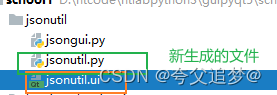
4.界面绘制完成,同时生成py文件

5. 这里的jsonutil.ui是图像界面,jsonutil.py是由界面生成的python文件
6.界面文件至此完成
7.注意的地方:
修改字体,颜色扥需要如何修改,方式跟css中的方式一样;
*{
font-size:14px;
}
截图:
8.更改字体颜色:
*{
color:rgb(0, 85, 255)
}
其他调整自行查找css的样式表,可以在'菜鸟教程上寻找更多的内容“”
https://www.runoob.com/css/css-text.html二.后端开发部分;
import json

from PyQt5.QtWidgets import QApplication,QDialog,QMessageBox

import sys

#导入图形解码生成的py文件
from jsonutil import Ui_Form

#继承ui生成py文件的类Ui_Form
class Myjsonlab(Ui_Form,QDialog):
    def __init__(self):
        super().__init__()
        self.setupUi(self)

        #初始化两个连接槽函数,注意这个地方带有一个字符串的参数
        self.pushButton_format.clicked.connect(
            self.do_format_json("format")
        )

        self.pushButton_format.clicked.connect(
            self.do_format_json("unformat")
        )

        self.pushButton_3.clicked.connect(
            self.do_copy_json
        )

    def do_copy_json(self):
        board=QApplication.clipboard()
        board.setText(self.plainTextEdit.toPlainText())
        QMessageBox.information(self,"信息提示","复制成功")

    #使用的是装饰器函数,返回的还是一个函数
    def do_format_json(self,type):
        def inner_format():
            json_cont=self.plainTextEdit.toPlainText()
            if not json_cont:
                QMessageBox.warning(self,"信息提示","请输入内容")
                return

            try:
                if type=="format":
                    new_count=json.dump(
                        json.loads(json_cont),
                        indent=4,
                        ensure_ascii=False)
                else:
                    new_count=json.dumps(
                        json.loads(json_cont),
                        ensure_ascii=False)

                self.plainTextEdit.setPlainText(new_count)
            except Exception as e:
                QMessageBox.warning(self, f"json文本有问题,加载报错{e}")
                return

            QMessageBox.information(self,"信息提示","操作成功")

        return inner_format


if __name__ == '__main__':
    app=QApplication(sys.argv)

    myjsonlab=Myjsonlab()
    myjsonlab.show()


    sys.exit(app.exec_())
边栏推荐
- A13 processor has become the biggest highlight of iphone11 series: its performance is twice that of Kirin 980!
- Day07 MySQL knowledge points re summary and multi table query
- App information reconnaissance & night God simulator burp packet capture configuration
- Blog Garden beautification skills summary
- [hcip] OSPF relationship establishment
- Why did kylin 990 series fail to meet cortex-a77 and Mali G77?
- Incremental secure file system SFS based on C language design
- Huawei conspires to acquire Brazilian operators?
- 2022-07-26:以下go语言代码输出什么?A:5;B:hello;C:编译错误;D:运行错误。 package main import ( “fmt“ )
- Weilai cup 2022 Niuke summer multi school training camp 2
猜你喜欢

Plato farm is expected to further expand its ecosystem through elephant swap
![[untitled]](/img/88/68952146da17a4a504ee7d1bc8858d.png)
[untitled]

Arduino实验一:双色灯实验

kalibr标定realsenseD435i --多相机标定

APP信息侦察&夜神模拟器Burp抓包配置

Implementation of V-model syntax sugar

基于C语言设计的增量型安全文件系统 SFS

Those environment configurations and plug-ins of idea

Write golang simple C2 remote control based on grpc

MySQL数据库介绍
随机推荐
[hcip] OSPF route calculation
商汤科技CEO徐立:公司估值已超70亿美元,不急于上市
Ribbon负载均衡
杰理下载器强制下载工具的使用介绍_AC695N696NAD14AD15全系列支持
[hcip] OSPF external route introduction
Blog Garden beautification skills summary
7.27抢先看 | openEuler 志高远,开源汇智创未来-开放原子全球开源峰会欧拉分论坛最详细议程出炉
New thrust of Moore's law, detailed explanation of Intel Advanced Packaging Technology!
模块8(消息队列存储消息数据的mysql表格)
【HCIP】OSPF 关系建立
DTS is equipped with a new self-developed kernel, which breaks through the key technology of the three center architecture of the two places Tencent cloud database
Plato farm is expected to further expand its ecosystem through elephant swap
Weilai cup 2022 Niuke summer multi school training camp 1
[paper reading] logan:membership influence attacks against generative models
Mate30系列发布:华为的重构影像之路还能走多远?
KT6368A蓝牙芯片开发注意事项以及问题集锦--长期更新
你知道磁环电感的常见磁芯类型有哪些吗?
systemctl命令
The secret weapon of apple iphone11 series: U1 chip may usher in the era of ultra wideband
利用Go制作微信机器人(一)发送消息