当前位置:网站首页>QT driving school subject examination system -- from implementation to release
QT driving school subject examination system -- from implementation to release
2022-07-26 20:31:00 【Domineering Xiao Ming】
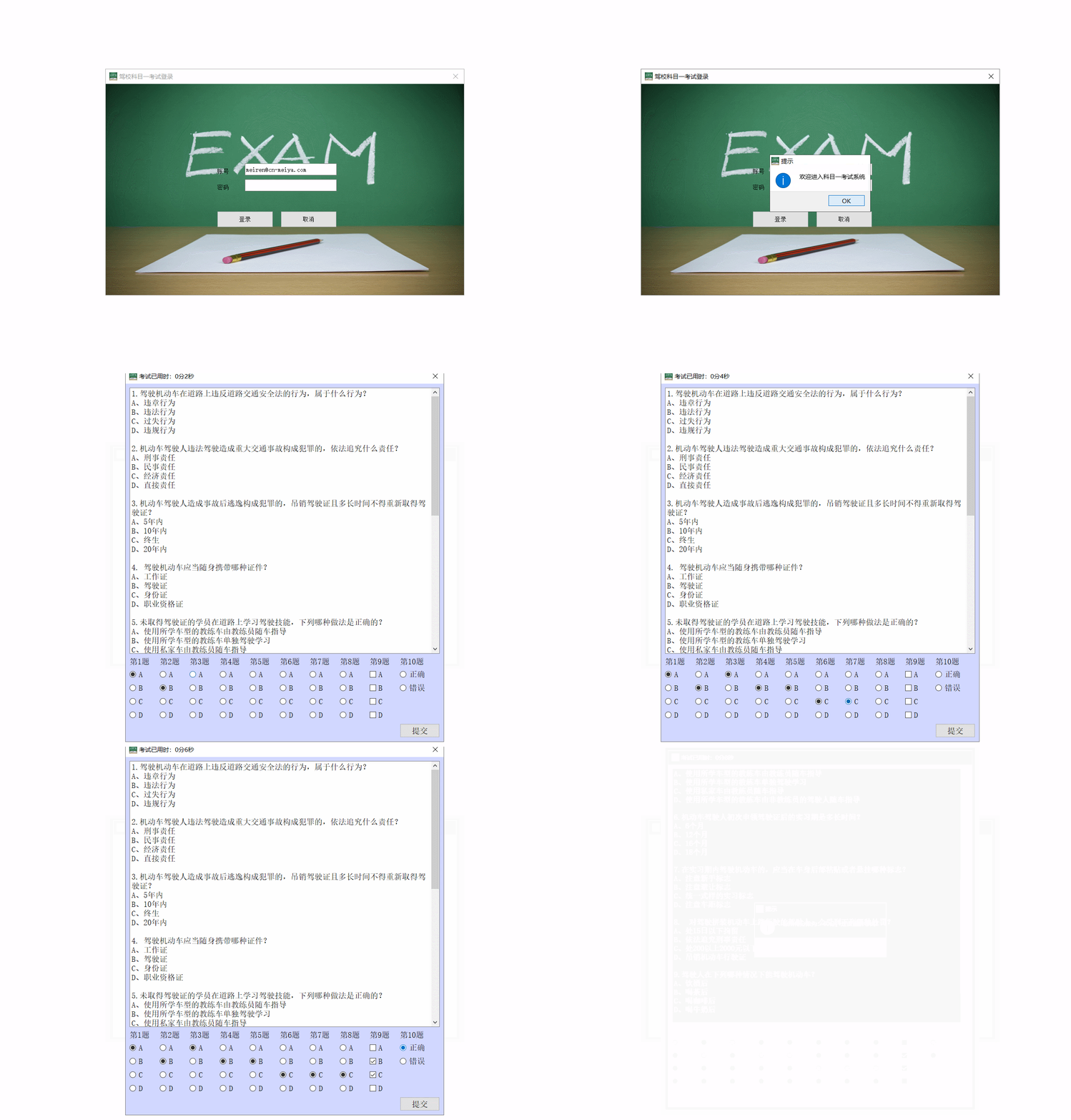
Catalog
3. Examination interface development
4.1 Change the compilation path
4.3 adopt dos Package the project
1. Set login interface

LoginDialog::LoginDialog(QWidget *parent) :
    QDialog(parent),
    ui(new Ui::LoginDialog)
{
    ui->setupUi(this);
    ui->imgLabel->setScaledContents(true);// Set the fill
    this->resize(ui->imgLabel->width(),ui->imgLabel->height());// Set window size

    // Set the window title
    this->setWindowTitle((" Driving school subject one test login "));
    // Set the window style
    this->setWindowFlags(Qt::Dialog |Qt::WindowCloseButtonHint);
}
2. Login function realization
2.1 Verify email address
First, judge whether the entered account conforms to the email format , If yes, login and verify , Otherwise, the prompt format is incorrect
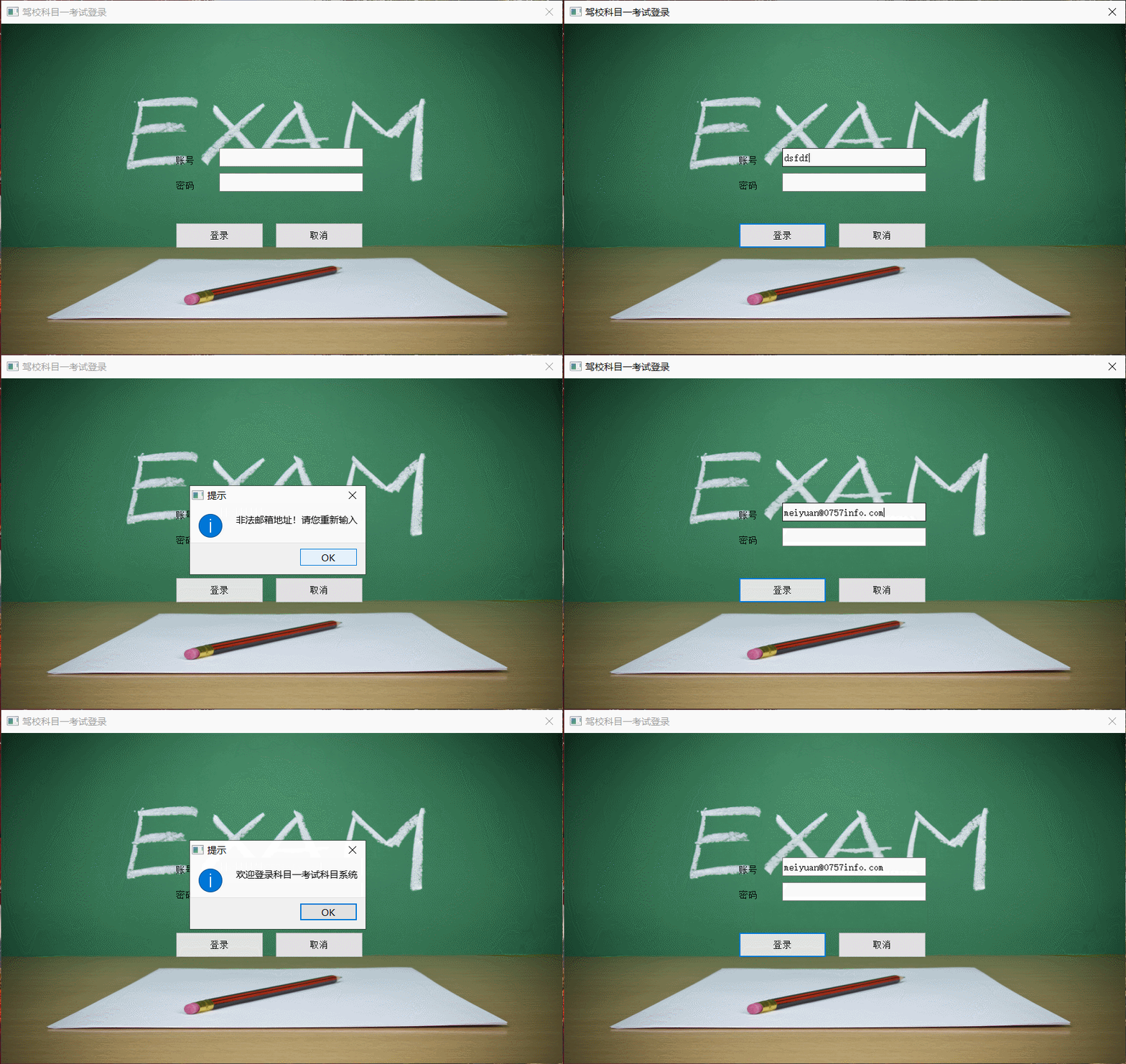
void LoginDialog::on_loginButton_clicked()
{
    // First, determine whether the account is a legal email format through regular expressions
    //^: Indicates the beginning of the rule string 、$: Indicates the end of the rule string
    //+: Indicates the number of matches ≥1 Time 、*: It means matching any number of times ( for 0 Time ) {n,m} Indicates the least number of matches n Time   most m Time
    QRegExp rx("^[A-Za-z0-9]+([_\.][A-Za-z0-9]+)*@([A-Za-z0-9\-]+\.)+[A-Za-z]{2,6}$");// Specify the rule string during initialization
    bool res = rx.exactMatch(ui->accountEdit->text());// Match the account number entered by the user
    if(res){// The match is successful
        QMessageBox::information(this," Tips "," Welcome to the subject one examination subject system ");
    }else{// The match didn't work
        QMessageBox::information(this," Tips "," Illegal email address ! Please re-enter ");
        ui->accountEdit->clear();// Clear the account input box
        ui->codeEdit->clear();// Clear the password input box
        ui->accountEdit->setFocus();// The account input box focuses
        return ;
    }

}
2.2 Account password login
When the account format is legal , Read the document that saves the account and password to match 
if(res){// The match is successful
//QMessageBox::information(this," Tips "," Welcome to the subject one examination subject system ");
QString filename;// File path
QString AccInput;// User input account number
QString strCode;// User enters password
QString strLine;// Read one line of data at a time
QStringList strList;// Split and read a row of data

filename="../account.txt";// Set file path
AccInput=ui->accountEdit->text();// Get account number
strCode=ui->codeEdit->text();// Get password

QFile file(filename);// initialization
QTextStream stream(&file);// Text type file stream
// Specify read-only mode to open , Specify file type text type
if(file.open(QIODevice::ReadOnly|QIODevice::Text)){
    // Open the success
    while(!stream.atEnd()){
        strLine=stream.readLine();// Read one line at a time
        strList = strLine.split(",");// Press "," Division
        if(AccInput==strList.at(0)){
            if(strCode==strList.at(1)){
                // The account and password match successfully
                QMessageBox::information(this," Tips "," Welcome to subject one examination system ");
                file.close();
                return ;
            }else{
                // Account matching succeeded & Password failed
                QMessageBox::information(this," Tips "," Wrong password ! Please re-enter !");
                ui->codeEdit->clear();
                ui->codeEdit->setFocus();
                file.close();
                return ;
            }
        }
    }
    QMessageBox::information(this," Tips "," Incorrect account number entered ! Please re-enter !");
    ui->accountEdit->clear();// Clear the account input box
    ui->codeEdit->clear();// Clear the password input box
    ui->accountEdit->setFocus();// The account input box focuses
    file.close();
    return;
}
2.3 Password hiding

Set the password control's echoMode Property value changed to Password that will do

3. Examination interface development
3.1 Exam time

First, add an exam dialog class ; Add QTimer and int Properties are used to represent timers and elapsed time ; Set the timer interval to 1s, adopt connect Function to connect the timer with the used time display signal slot
examDialog.h
#ifndef EXAMDIALOG_H
#define EXAMDIALOG_H
#include<QDialog>
#include<QTimer>
class ExamDialog : public QDialog
{
    Q_OBJECT// Use the signal slot
public:
    ExamDialog(QWidget* parent=0);
    void initTimer();
private:
    QTimer*m_timer;// timer
    int m_timeGo;// The exam has taken time
private slots:  // Private slot method
    void freshTime();
};

#endif // EXAMDIALOG_H
examDialog.cpp
#include "examdialog.h"

ExamDialog::ExamDialog(QWidget* parent):QDialog(parent)
{
    setWindowTitle(" The exam has taken time :0 branch 0 second ");
    initTimer();
}

void ExamDialog::initTimer()
{
    m_timeGo=0;
    m_timer=new QTimer(this);
    m_timer->setInterval(1000);// Set timer interval 1s
    m_timer->start();// Start the timer
    // adopt connect Method , Connect the signal slot .m_timer Per send timeout() Signal time , from this Execute slot method freshTime()
    connect(m_timer,SIGNAL(timeout()),this,SLOT(freshTime()));


}

void ExamDialog::freshTime()
{
    // Refresh exam time
    m_timeGo++;
    QString min=QString::number(m_timeGo/60);// Count the minutes , Convert an integer to QString
    QString sec=QString::number(m_timeGo%60);
    setWindowTitle(" The exam has taken time :"+min+" branch "+sec+" second ");
}
3.2 Topic layout

Add attributes and initialization methods
public:
    void initLayout();  // Initialize layout manager
    bool initTextEdit();// Initialize the text editor
    void initButton();  // Initialize buttons and labels
private:

    QTextEdit*m_textEdit;       // The exam question bank displays
    QLabel*m_titleLabels[10];   // Title Tag
    QRadioButton *m_radioBtns[32];// Radio button
    QCheckBox *m_checkBtn[4];   // Multiple choice button
    QRadioButton *m_radioA;     // Judgment questions A Options
    QRadioButton *m_radioB;     // Judgment questions B Options
    QGridLayout*m_layout;       // Layout manager
    QStringList m_answerList;   // answer
stay initLayout Function , Set the current window as the parent window of the manager , Specify the distance between controls and the distance between controls and forms
void ExamDialog::initLayout()
{
    // Take the current window as the parent window
    m_layout=new QGridLayout(this);
    m_layout->setSpacing(10);// Set spacing between controls
    m_layout->setMargin(10);// Set the margins of the form and control keys

}
stay initTextEdit Function , Read the question information in the text and store the answer line separately , Display the read topic information in the control , And give the control to the layout manager to layout on the form .
bool ExamDialog::initTextEdit()
{
    QString strLine;// Save file answer line data
    QStringList strList;// Save the read answer line
    QString fileName("../exam.txt");
    QFile file(fileName);
    QTextStream stream(&file);// Text type file stream
    stream.setCodec("UTF-8");// Specified encoding

    if(file.open(QIODevice::ReadOnly|QIODevice::Text)){
        // Take the current window as the parent window
        m_textEdit=new QTextEdit(this);
        m_textEdit->setReadOnly(true);// Set text read-only
        QString strText;// Used to save the data displayed in the text editor
        int nLines = 0;
        while(!stream.atEnd()){
            if(nLines==0){// Filter first line
                stream.readLine();
                nLines++;
                continue;
            }else if((nLines%6==0&&nLines>=6&&nLines<=6*9)||nLines==6*9+4){// Filter the answer line
                strLine = stream.readLine();
                strList=strLine.split(" ");// Split the answer of the answer line through the space
                m_answerList.append(strList.at(1));// Get the answer
                strText+="\n";
                nLines++;
                continue;
            }
            strText+= stream.readLine();// Read a line
            strText+="\n";
            nLines++;
        }
        // Show text content
        m_textEdit->setText(strText);
        // Add the control to the layout manager
        m_layout->addWidget(m_textEdit,0,0,1,10);
        file.close();
        return true;// Finished reading
    }else{

        return false;
    }
}
Set the background and font of the form in the initialization function
ExamDialog::ExamDialog(QWidget* parent):QDialog(parent)
{
    // Set font size
    QFont font;
    font.setPointSize(12);
    setFont(font);// Set the font of the current window

    // Set the form background color
    setPalette(QPalette(QColor(209,215,255)));

    setWindowTitle(" The exam has taken time :0 branch 0 second ");
    setWindowFlags(Qt::Dialog|Qt::WindowCloseButtonHint);
    resize(800,900);// Set the window size

    initTimer();
    initLayout();
    if(initTextEdit()){

    }else{
        // Read failed
        QMessageBox::information(this," Tips "," Failed to initialize the question bank data file !");
        // The current application immediately responds to the slot method quit
        QTimer::singleShot(0,qApp,SLOT(quit()));
    }
}
3.3 Button layout

The layout method is to initialize the control first , Then give it to the layout manager for layout . But note the grouping of radio buttons : The four buttons of each radio choice question form a group , The two buttons of the true and false questions are a group
The newly added QbuttonGroup attribute
private:
    QButtonGroup* m_btnGroups[9];// Radio button grouping
In the initial button change function
void ExamDialog::initButton()
{
    QStringList strList={"A","B","C","D"};

    for(int i=0;i<10;++i){
        // Title Tag
        m_titleLabels[i]=new QLabel(this);// The current window is initialized as the parent window
        m_titleLabels[i]->setText(" The first "+QString::number(i+1)+" topic ");
        m_layout->addWidget(m_titleLabels[i],1,i);// Give it to the layout manager , The default is to occupy one row and one column

        // Judgment questions
        if(i==9){
            m_radioA=new QRadioButton(this);
            m_radioB=new QRadioButton(this);

            m_radioA->setText(" correct ");
            m_radioB->setText(" error ");

            m_layout->addWidget(m_radioA,2,9);
            m_layout->addWidget(m_radioB,3,9);

            // True or false button grouping
            m_btnGroups[8]=new QButtonGroup(this);
            m_btnGroups[8]->addButton(m_radioA);
            m_btnGroups[8]->addButton(m_radioB);
        }
        if(i<8){
            // Radio button grouping
            m_btnGroups[i]=new QButtonGroup(this);
        }
        // choice question
        for(int j=0;j<4;++j){
            if(i==8){
                // Multiple choice
                m_checkBtns[j]=new QCheckBox(this);
                m_checkBtns[j]->setText(strList.at(j));
                m_layout->addWidget(m_checkBtns[j],2+j,8);
            }else if(i<8){
                // Single topic selection
                m_radioBtns[i*4+j]=new QRadioButton(this);
                m_radioBtns[i*4+j]->setText(strList.at(j));
                m_layout->addWidget(m_radioBtns[i*4+j],2+j,i);

                m_btnGroups[i]->addButton(m_radioBtns[i*4+j]);
            }
        }
        // Submit button
        QPushButton*submitBtn=new QPushButton(this);
        submitBtn->setText(" Submit ");
        submitBtn->setFixedSize(100,35);
        m_layout->addWidget(submitBtn,6,9);
    }
}
3.4 Submit scores
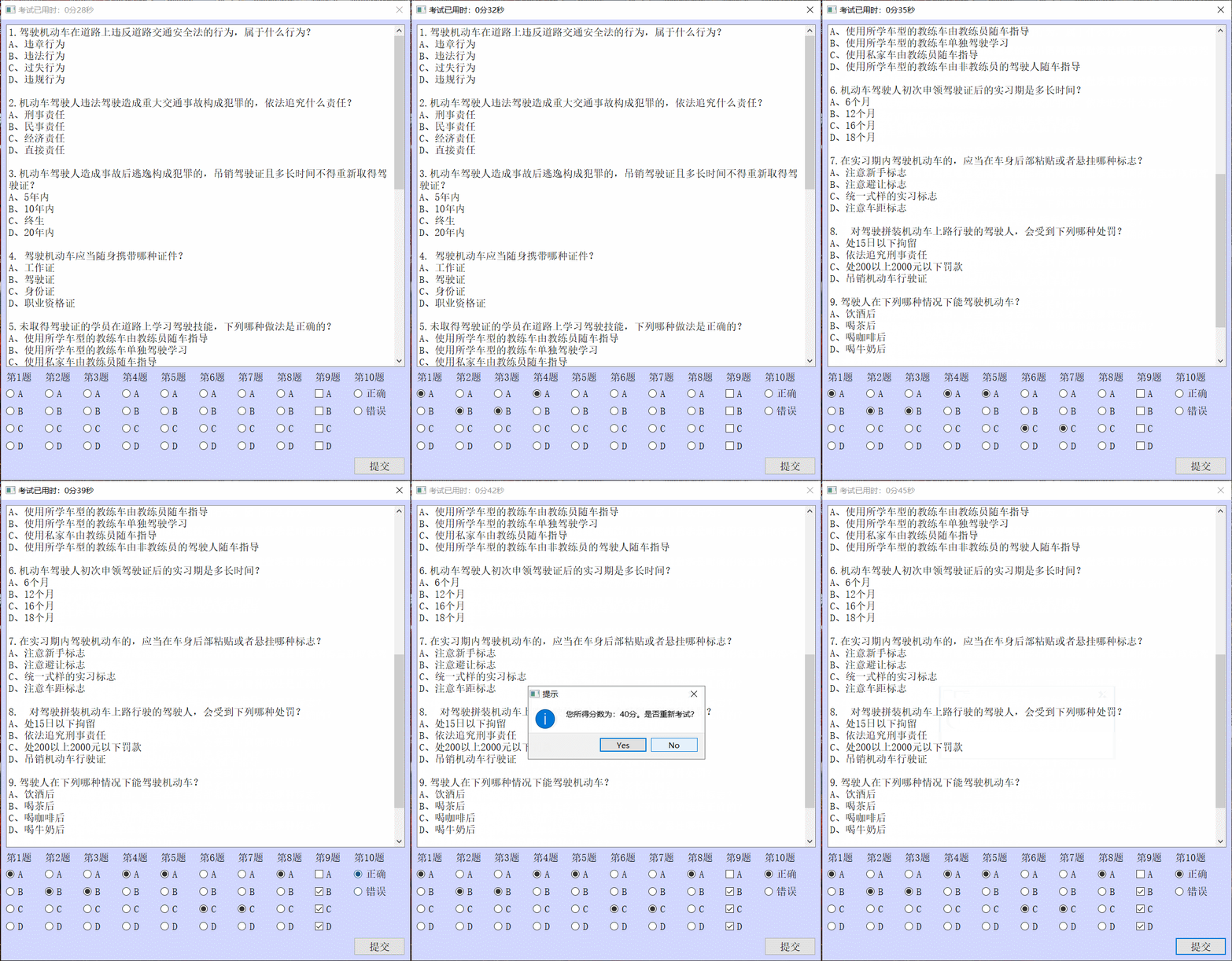
First, connect the submit button to the signal slot
connect(submitBtn,SIGNAL(clicked(bool)),this,SLOT(getScore()));Judge whether all the questions are completed before calculating the score , Then calculate the score according to the read answer
bool ExamDialog::hasNoSelect()
{
    int radioSelects=0;
    // Count the number of single choice questions completed
    for(int i=0;i<8;++i){
        if(m_btnGroups[i]->checkedButton()){
            radioSelects++;
        }
    }
    // Judge whether the single choice questions are all completed
    if(radioSelects!=8){
        return true;
    }
    // Count the number of multiple topic choices
    int checkSelect=0;
    for(int i=0;i<4;++i){
        if(m_checkBtns[i]->isChecked()){
            checkSelect++;
        }
    }
    // Multiple choice questions are not selected or only one is not completed
    if(checkSelect==0||checkSelect==1){
        return true;
    }
    // Judgment questions
    if(!m_radioA->isChecked()&&!m_radioB->isChecked()){
        return true;
    }
    return false;
}

void ExamDialog::getScore()
{
    if(hasNoSelect()){
        // There are unfinished questions
        QMessageBox::information(this," Tips "," You have unfinished questions ! Please complete the exam "," yes ");
        return ;
    }else{
        // Begin to divide
        int scores =0;
        for(int i=0;i<10;++i){
            // Single choice questions are divided
            if(i<8){
                // Judge whether the selected button is consistent with the answer
                if(m_btnGroups[i]->checkedButton()->text()==m_answerList.at(i)){
                    scores+=10;
                }
            }
            // Multiple choice questions are divided
            if(i==8){
                QString answer=m_answerList.at(i);// Get answers to multiple topics
                bool hasA=false;
                bool hasB=false;
                bool hasC=false;
                bool hasD=false;
                hasA=answer.contains("A");
                hasB=answer.contains("B");
                hasC=answer.contains("C");
                hasD=answer.contains("D");

                bool checkA=m_checkBtns[0]->checkState();
                bool checkB=m_checkBtns[1]->checkState();
                bool checkC=m_checkBtns[2]->checkState();
                bool checkD=m_checkBtns[3]->checkState();
                if(hasA!=checkA||hasB!=checkB||hasC!=checkC||hasD!=checkD){
                    // The answer is inconsistent
                    continue;
                }else{
                    scores+=10;
                }
            }
            // The judgement questions are divided into
            if(i==9){
                if(m_btnGroups[8]->checkedButton()->text()==m_answerList.at(i)){
                    scores+=10;
                }
            }
        }
        int res = QMessageBox::information(this," Tips "," Your score is :"+QString::number(scores)+" branch . Whether to retake the exam ?",QMessageBox::Yes|QMessageBox::No);
        if(res==QMessageBox::Yes){
            // Retest
            return;
        }else{
            // Don't want to retake the exam
            close();
        }
    }
}
3.5 Window interaction
Realize the connection between login window and examination window
When the user logs in successfully, it passes done Function to send a Accepted, Send a when the user clicks cancel Rejected, Then judge in the main function
int main(int argc, char *argv[])
{
    QApplication a(argc, argv);
    LoginDialog loginDialog;
    int res = loginDialog.exec();   // Run in modal mode
    if(res==QDialog::Accepted){
        ExamDialog examDialog;
        return a.exec();
    }else{
        return 0;
    }
    return a.exec();
}
4. Publish the project
4.1 Change the compilation path
Change the current compilation path from debug Change to the path of the current file


4.2 Set icon
Pass in the project file RC_ICONS Load icon
RC_ICONS += examsys.ico

The icon has changed
4.3 adopt dos Package the project
Project by DeBug Change the mode to Release Pattern , And compile

Create a folder as a publishing file , take Release The generated .exe Copy in the files and required documents

Enter the folder path to publish , Then input windeployqt file name .exe, Click enter

Packing is done

If you are prompted windeployqt If it is not a command, you need to install qt Of bin Add path to environment variable


Project completion
边栏推荐
- How to implement an asynchronous task queue system that can handle massive data (supreme Collection Edition)
- Game partner topic: breederdao and ultiverse have established a new metauniverse
- Read the four service types of kubernetes!
- Student's t distribution
- Servlet
- Exchange 2010 SSL证书安装文档
- QT信号与槽连接(松耦合)
- Leetcode刷题之——链表总结
- 打字比赛圆满结束!
- 7.25模拟赛总结
猜你喜欢

「企业管理」精诚CRM+——一体化管理企业业务流程

【刷题记录】22. 括号生成
Small scenes bring great improvement! Baidu PaddlePaddle easydl helps AI upgrade of manufacturing assembly line

BGP的路由黑洞和防环

SwiftUI 4 新功能之实时获取点击位置 .onTapGesture { location in} (教程含源码)
一维数组定义与使用

How can small companies break through with small and beautiful products?
小公司小而美的产品,如何突围?

BGP的基本配置和聚合

一文读懂 Kubernetes的四种服务类型!
随机推荐
numpy.newaxis
5.20晚上单身狗都在哪里?
cv2.resize()
Solve attributeerror: module 'win32com.gen_ py. 00020813-0000-0000-C000-000000000046x0x1x9‘ has no attribu
ES6 method & Class array into real array & method of judging array
YGG 与 AMGI 的旗舰 NFT 项目 My Pet Hooligan 合作进入 The Rabbit Hole
HM中如何获取CU块划分信息并用Matlab绘图
医疗直播平台需要什么功能
884. 两句话中的不常见单词-哈希表
Gbase learning - install gbase 8A MPP cluster v95
A super simple neural network code with 5 coordinates for one layer node training
Ape tutoring's technological hard power: let AI start from reading children's homework
Using questpdf operation to generate PDF is faster and more efficient!
How to implement an asynchronous task queue system that can handle massive data (supreme Collection Edition)
BUU刷题记4
Summary of message queue knowledge points
猿辅导的科技硬实力:让AI从读懂孩子作业开始
如何实现一个能处理海量数据的异步任务队列系统(至尊典藏版)
Gartner发布最新《中国AI初创企业市场指南》,弘玑Cyclone再次被评为代表性企业
T246836 [lsot-1] potatoes of Tyrannosaurus Rex