当前位置:网站首页>Goldfish rhca memoirs: do447 build advanced job workflow -- create workflow job template and start workflow job
Goldfish rhca memoirs: do447 build advanced job workflow -- create workflow job template and start workflow job
2022-06-29 18:47:00 【Hua Weiyun】
Personal profile : Hello everyone , I am a Brother goldfish ,CSDN New star creator in operation and maintenance field , Hua Wei Yun · Cloud sharing experts
Personal qualifications :CCNA、HCNP、CSNA( Network Analyst ), Soft test primary 、 Intermediate network engineer 、RHCSA、RHCE、RHCA、RHCI、ITIL
Maxim : Hard work doesn't necessarily succeed , But if you want to succeed, you must work hardStand by me : I like it 、 Can collect ️、 Leave message
Official website :
https://docs.ansible.com/ansible-tower/3.8.1/html_zh/userguide/workflows.html
https://docs.ansible.com/ansible-tower/3.8.1/html_zh/userguide/workflow_templates.html
10.3.1 Workflow job template
As an organization uses Ansible The growth of , It has Ansible The number of scripts is also growing . Each script usually performs a set of tasks related to a specific function .
You may want to run multiple scripts in sequence , Instead of writing a large script to automate a complex operation . for example , To supply the server , You may need to use Networking The team's script assigns a... To the server IP Address and set a DNS Record , Then use from Operations Another scenario for the team to install and configure the server's operating system . Last , You will use the Development The team's script to deploy the application . let me put it another way , To make the process successful , You need to follow a specific workflow .
This can be done in Ansible Tower This is achieved by allowing users to manually start multiple jobs in sequence . However, jobs must be executed in the correct order defined by your workflow , So that everything can work properly .
Must first execute Networking Homework .
Only successful completion Networking After operation , Just can have Operations Homework .
Again , Only successfully completed Networking and Operations Homework ,Application Development Homework will follow .
Last , If one of the scripts fails , You may want to run other scripts to restore .
For ease of management ,Red Hat Ansible Tower Support workflow job templates . Workflow job templates connect multiple job templates into a workflow . Startup time , The workflow job template uses the first job template to start the job , And determine which job template to start next according to the success or failure of the job template . This allows you to start a series of jobs , And automatically take recovery steps when the job fails .
Workflow templates can be started in many ways : Manual , from Ansible Tower Of web Ul; As a scheduled job ; Use... Through external programs Ansible Tower API.
Workflow job templates are not just job templates that run serially . Use graphical workflow editor , Workflow job templates link multiple job templates together , And run different job templates according to whether the previous job template is successful or failed .
10.3.2 Create a workflow job template
Before defining and associating workflows , You need to create a workflow job template . They can be created with the organization , You can also create without the organization . Creating a workflow job template in the context of an organization requires users to have the management role of the organization .
To create a workflow job template that does not belong to the organization , Single instance system administrator user type is required .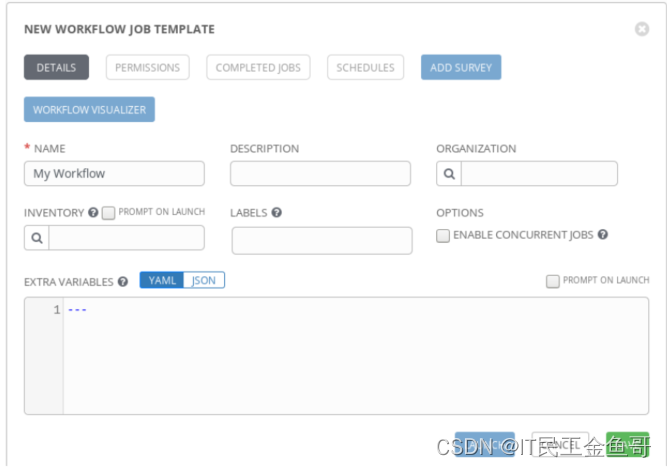
Workflow job templates are created in a similar way to job templates .
Click... In the left navigation “ Templates ”, Get into “ Templates ” Management interface .
Click on + Button and select Workflow Template.
stay name Enter a unique name for the workflow job template in the field . Optionally at EXTRA VARIABLES Enter any desired key value pair in the field .
single click SAVE Create a workflow job template . After creating the workflow job template , You can use the workflow visualizer to define the associated workflow .
Use workflow visualization tools
After creating the workflow job template , Workflow visualization will be activated in the workflow job template editing interface . The workflow editor opens in a new window .Workflow Visualizer It's a graphical interface , It is used to define the job template and decision tree structure to be merged into the workflow , The decision tree structure should be used to chain job templates together .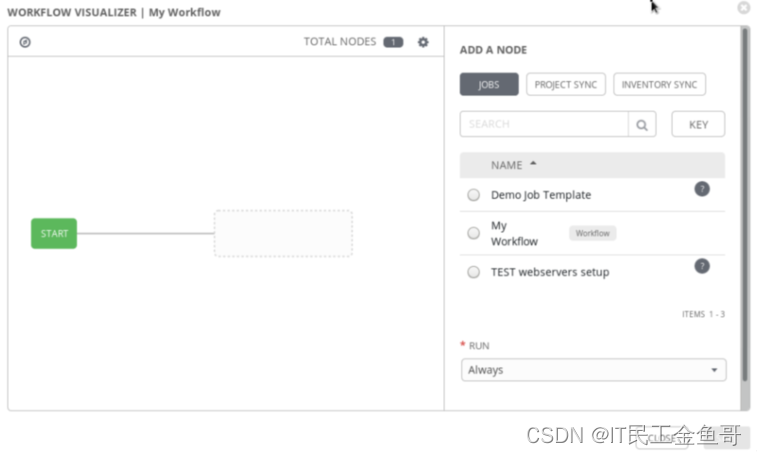
When Workflow Visualizer Startup time , It contains a START node , Represents the starting point for executing the workflow . single click START Start the workflow editing process ;Workflow Visualizer Display a Ansible Tower resource list , Can be added as the first step in the workflow . You can choose the type of resource you want , Specific resources , And then click select Add one Ansible Tower The resource is the first node in the workflow .
In addition to the job template , Jobs that synchronize items or lists can also be incorporated into the workflow . This is important to ensure that job templates that depend on them are updated before they are used Project and Inventory Resources are very useful . For easy identification ,Project Sync and Inventory Sync Nodes are represented by the... At the bottom left of the node P or I Express . The keys at the top of the workflow editor screen can interpret this notation . The job template node does not have any special tags , Because they are the main node type in the workflow .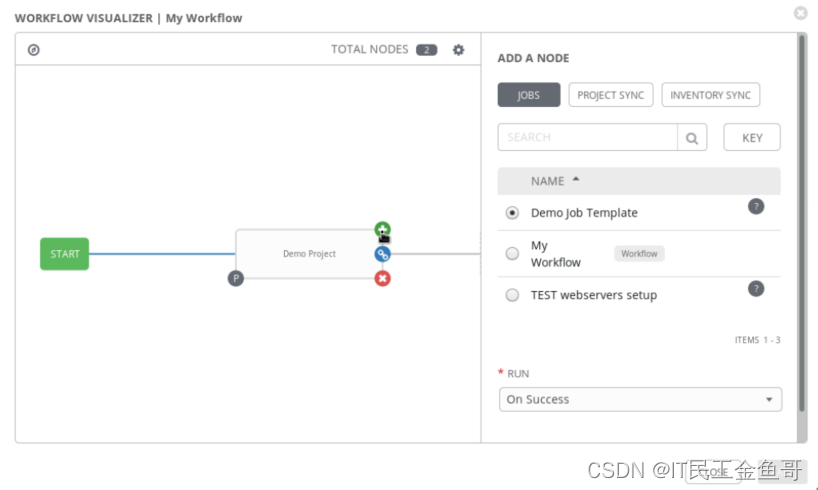
After adding the resource as the first workflow node , Hover the mouse over it and two buttons will appear . The red button deletes the node , Green button to add subsequent nodes . When adding subsequent nodes ,RUN The prompt will appear in the asset selection panel , Prompt you for additional input when selecting resources . The prompt provides the following three options , Specifies the relationship between the new node and the previous node .
| RUN | The relationship between nodes |
|---|---|
| On Success | After successfully completing the operation associated with the previous node , The node resource will be executed . |
| On Failure | When the operation associated with the previous node fails , The node resource will be executed . |
| Always | Regardless of the result of the operation associated with the previous node , Will execute node resource . |
A node can have multiple children . for example , A child node can add a parent node, and the association type is On Success, Another child node can add an association type of On Failure. for example , have access to On Success Association type adds a child node to a parent node . You can use On Failure Association type adds a second child node to the same parent node . This creates a branch in the workflow structure , In this way, an operation process is taken when an operation is successful , Take another operation process when one operation fails .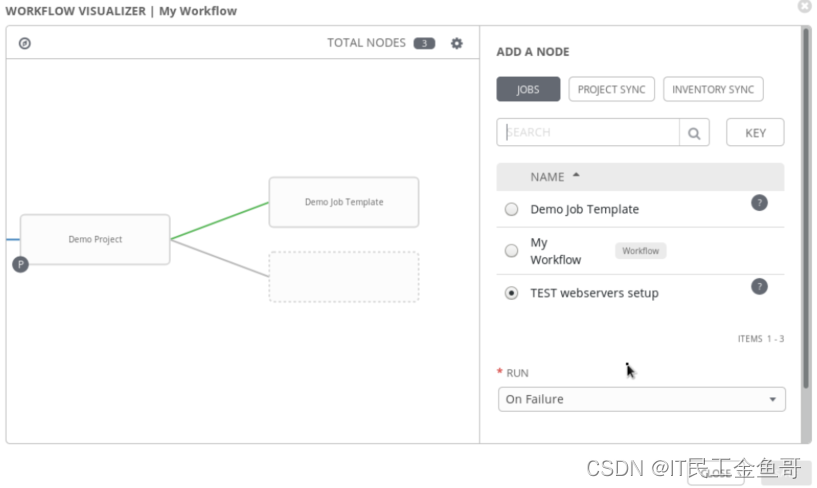
As nodes are added to the workflow , Different colored lines connecting nodes in the workflow editor represent the relationship between parent nodes and child nodes . The green line indicates the distance between the parent node and the child node On Success Type relation , The red line means On Failure Type relation . The blue line means Always Type relation .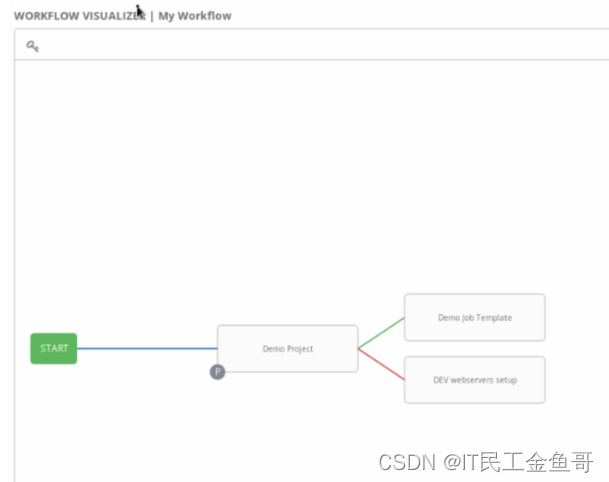
After creating the whole decision tree structure of the workflow in the workflow editor , single click SAVE Save workflow .
survey
Workflow job templates can access many of the features that have been discussed for job templates . Same as job template , The workflow job template can also add surveys , To allow the user to interactively set additional variables .
** Be careful :** When adding a questionnaire to a workflow job template , Each job executed by the workflow can access the resulting additional variables .
10.3.3 Start workflow job
Same as job template , Users need the execution role on the workflow job template to execute it . When assigning execution roles , Users can start jobs through the workflow job template , Even if they don't have permission to start the job template they use independently .
The process of starting a workflow job template is similar to that of starting a job template
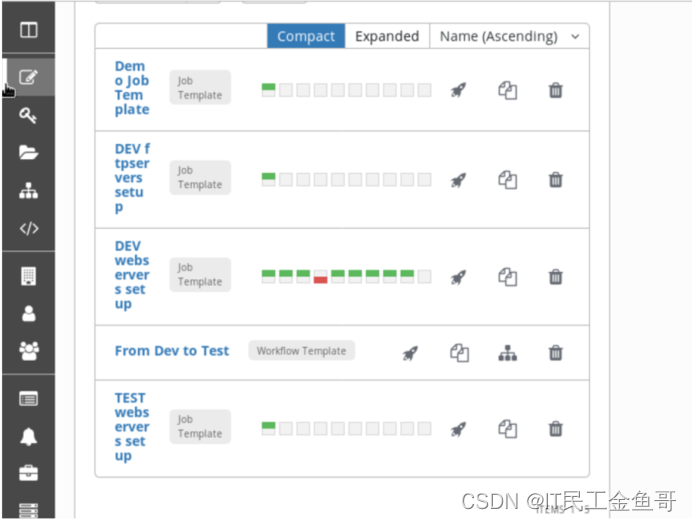
Click in the navigation “ Templates ”, Get into “ Templates ” Management interface .
Click the rocket icon of the workflow job template to start the job .
Evaluate workflow job execution
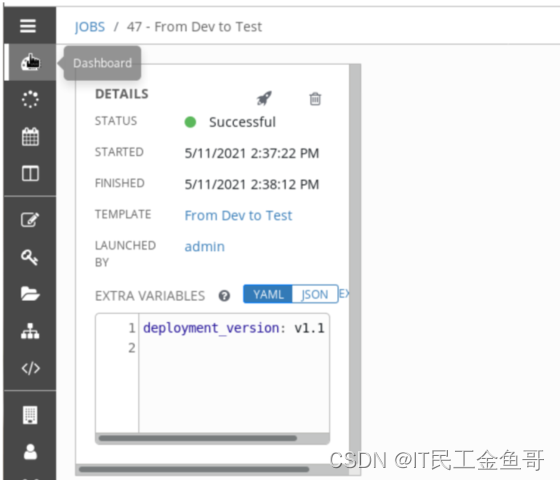
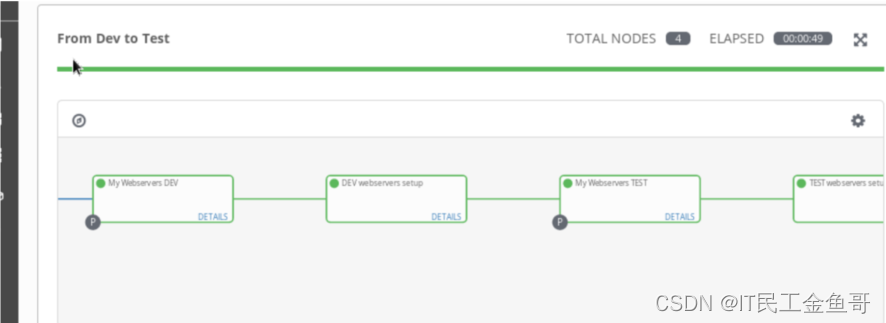
After starting the workflow job ,Ansible Tower web UIl The of the job being executed is displayed job Details page . This page consists of two panes .DETAILS The pane displays the details of workflow job execution . The workflow progress pane displays the progress of the job through the steps in the workflow
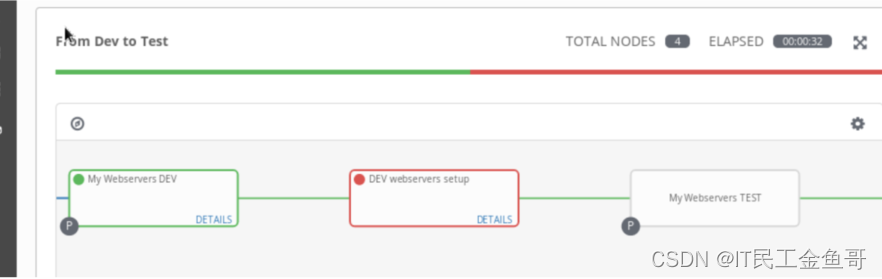
When each step is completed , Its nodes are marked in green or red , Indicates the success or failure of the action associated with this step in the workflow . The process from one step to another is represented by colored lines , These lines represent decisions that are responsible for the process . Green means On Success process , Red means On Failure process . Blue representation Always process .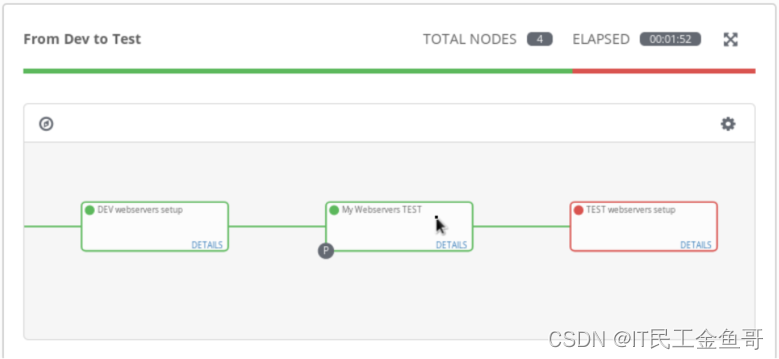
You can display the details of the workflow job run during or after execution . Each node representing the currently running or completed job in the workflow diagram provides a DETAILS link . You can click this link to display the results of the job run and the standard output .
10.3.4 Textbook exercises
[[email protected] ~]$ lab project-workflow start1. With admin Account number and redhat Password to login Ansible Tower web.
2. Create a file called From Dev to Test Workflow job template .
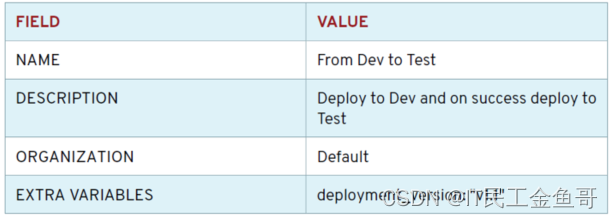
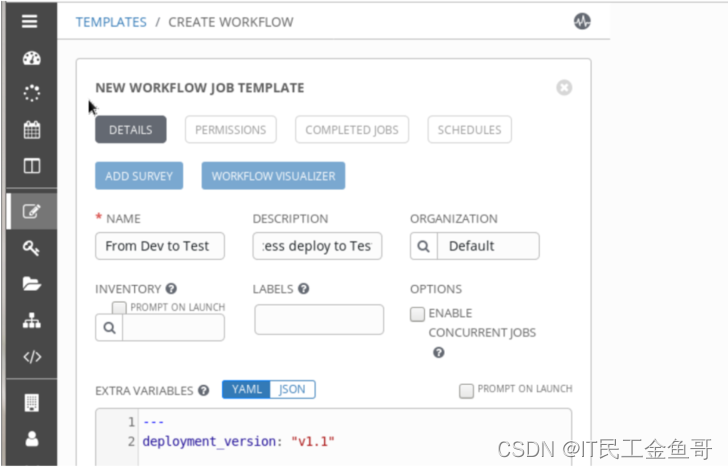
3. Configure workflow job template .
3.1 The workflow visualizer opens automatically .
3.2 single click START Add the first operation . This will display a list of actions to be performed in the right panel .
3.3 In the right panel , single click PROJECT SYNC To display a list of available items
3.4 choice My Webservers DEV And click the SELECT. In the workflow visualizer window , With a blue line ( Always carry out ) take START The node is linked to the node of the project ,My webservers DEV
3.5 Move the mouse over the new node , Click green + Button , stay My webservers DEV Of Project Sync Add an action after . This will display a list of actions to be performed in the right panel .
3.6 In the panel on the right , Make sure you're in JOBS part , And select DEV webservers setup Job template .
3.7 In the following RUN In the part , choice On Success And click select. This will My Webservers DEV The node of the project is linked to a new node , Used in the workflow visualizer window DEV Webservers setup Job template . Green links indicate , Only after the first step is successful will there be progress
3.8 Move the mouse over the new node , Click green + Button , stay DEV webservers setup Add an operation after the job template
3.9 In the right panel , single click PROJECT SYNC To display a list of available items .
3.10 choice My Webservers TEST. In the following RUN In the part , choice On Success And click select.
3.11 Move the mouse over the new node , Click the green + Button , stay My webservers TEST Add an operation after the project is synchronized .
3.12 In the panel on the right , Make sure you're in JOBS Part and choose TEST webservers setup Job Template. In the following RUN In the part . choice “On Success”, single click “select”.
3.13 single click SAVE Save the workflow job template .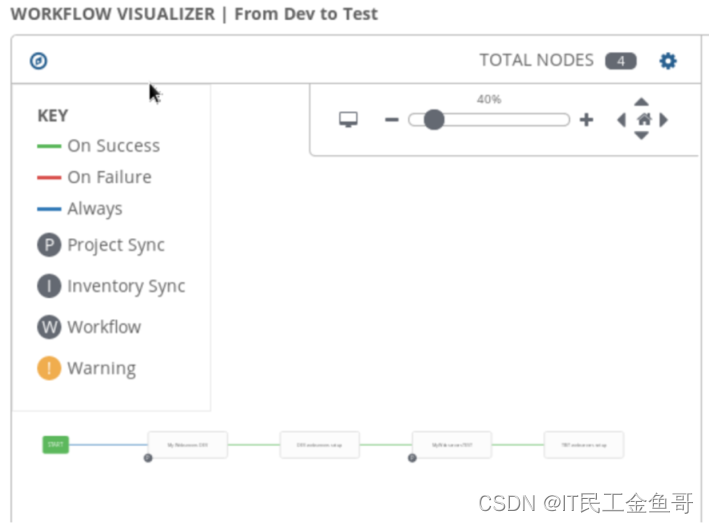
4. Start the job using the workflow job template .
5. Verify operation .
[[email protected] ~]$ curl serveraThis is a test message RedHat 8.0 <br>Current Host: servera <br>Server list: <br>serverb.lab.example.com <br>servera.lab.example.com <br>Deployment Version: v1.1 <br>[[email protected] ~]$ curl serverbThis is a test message RedHat 8.0 <br>Current Host: serverb <br>Server list: <br>serverb.lab.example.com <br>servera.lab.example.com <br>Deployment Version: v1.1 <br>[[email protected] ~]$ curl servercThis is a test message RedHat 8.0 <br>Current Memory: 821 <br>Current Free Memory: 138 <br>Current Host: serverc <br>Server list: <br>serverd.lab.example.com <br>serverc.lab.example.com <br>Deployment Version: v1.1 <br>[[email protected] ~]$ curl serverdThis is a test message RedHat 8.0 <br>Current Memory: 821 <br>Current Free Memory: 134 <br>Current Host: serverd <br>Server list: <br>serverd.lab.example.com <br>serverc.lab.example.com <br>Deployment Version: v1.1 <br>6. Simulation failed .
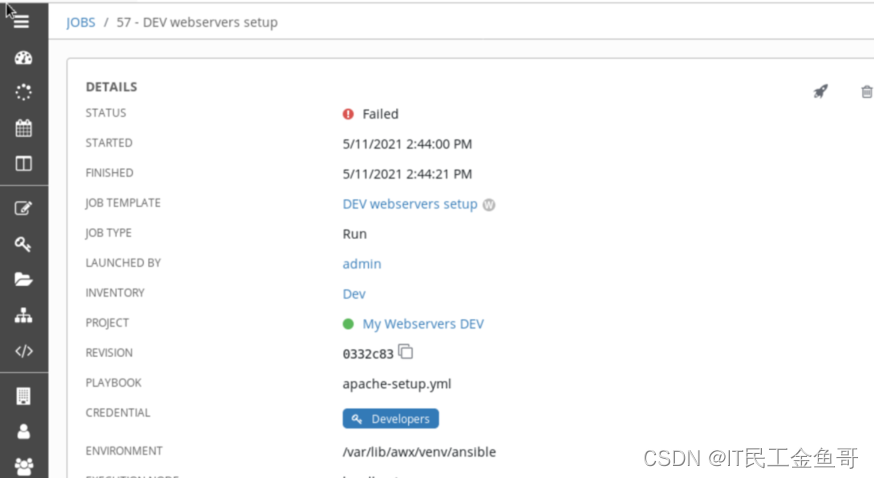
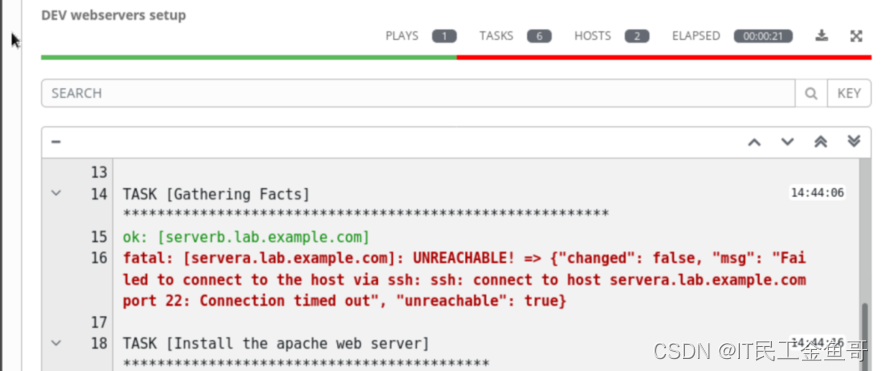
close servera.lab.example.com And start a job using the workflow job template . Observe DEV webservers setup How the job node failed , This will cause the entire workflow to fail .
[[email protected] ~]$ ssh [email protected][[email protected] ~]# init 0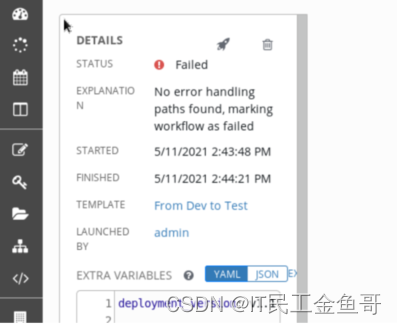
7. start-up servera.
summary
RHCA Certification requires experience 5 Study and examination of the door , It still takes a lot of time to study and prepare for the exam , Come on , Can GA 🤪.

That's all 【 Brother goldfish 】 Yes Chapter ten Build advanced job workflow – Create a workflow job template and start the workflow job Brief introduction and explanation of . I hope it can be helpful to the little friends who see this article .
Red hat Certification Column series :
RHCSA special column : entertain RHCSA authentication
RHCE special column : entertain RHCE authentication
This article is included in RHCA special column :RHCA memoir
If this article 【 article 】 It helps you , I hope I can give 【 Brother goldfish 】 Point a praise , It's not easy to create , Compared with the official statement , I prefer to use 【 Easy to understand 】 To explain every point of knowledge with your writing .
If there is a pair of 【 Operation and maintenance technology 】 Interested in , You are welcome to pay attention to ️️️ 【 Brother goldfish 】️️️, I will bring you great 【 Harvest and surprise 】!

边栏推荐
- Encryption and decryption of 535 tinyurl
- Mac: MySQL 66 questions, 20000 words + 50 pictures!
- AMAZING PANDAVERSE:META”无国界,来2.0新征程激活时髦属性
- Understanding of strong caching and negotiation caching
- 报错Failed to allocate graph: MYRIAD device is not opened.
- C Primer Plus Chapter 12_ Storage categories, links, and memory management_ Codes and exercises
- Hello, do you have any official website samples for MySQL CDC, PostgreSQL CDC? Give me a link to learn
- 关于微服务
- Adobe Premiere Basics - common video effects (corner positioning, mosaic, blur, sharpen, handwriting tools, effect control hierarchy) (16)
- 熊猫跑酷js小游戏代码
猜你喜欢

svg画圆路径动画

MySQL -connector/j driver download

山东大学项目实训(六)点击事件展示折线图

Adobe Premiere foundation - material nesting (animation of Tiktok ending avatar) (IX)

Adobe Premiere foundation - opacity (matte) (11)

AMAZING PANDAVERSE:META”无国界,来2.0新征程激活时髦属性

如何将OAK相机当做网络摄像头使用?

Adobe Premiere基础-炫酷文字快闪(十四)

Adobe Premiere Basics - common video effects (corner positioning, mosaic, blur, sharpen, handwriting tools, effect control hierarchy) (16)

剑指 Offer 34. 二叉树中和为某一值的路径-dfs法
随机推荐
Adobe Premiere基础-不透明度(混合模式)(十二)
第02章_MySQL的数据目录
优雅书写Controller(参数验证+统一异常处理)
Amazing pandaverse:meta "borderless, to activate fashion attributes in the new journey of 2.0
Mac: MySQL 66 questions, 20000 words + 50 pictures!
JWT登录验证
Error building SqlSession问题
Programmer Resource Recommendation Guide
[daily training] 535 Encryption and decryption of tinyurl
Data warehouse model layered ODS, DWD, DWM practice
Adobe Premiere foundation - opacity (matte) (11)
关于微服务
WBF: new method of NMS post filter frame for detection task?
Shell basic syntax -- process control
Shell基本语法--流程控制
Jar package background startup and log output
SD6.23集训总结
Error [warning] neural network information was performed on socket 'RGB', depth frame is aligned to socket
Understanding of strong caching and negotiation caching
Sd6.23 summary of intensive training