当前位置:网站首页>Realize the size of an adjustable Switch Switch
Realize the size of an adjustable Switch Switch
2022-07-29 19:32:00 【Mr Turtle plus】
switch It is basically used in the project,All major component libraries have implemented this basic component,But sometimes it is possibleuiThe requirements and each component library are quite different,This can only be done manually.
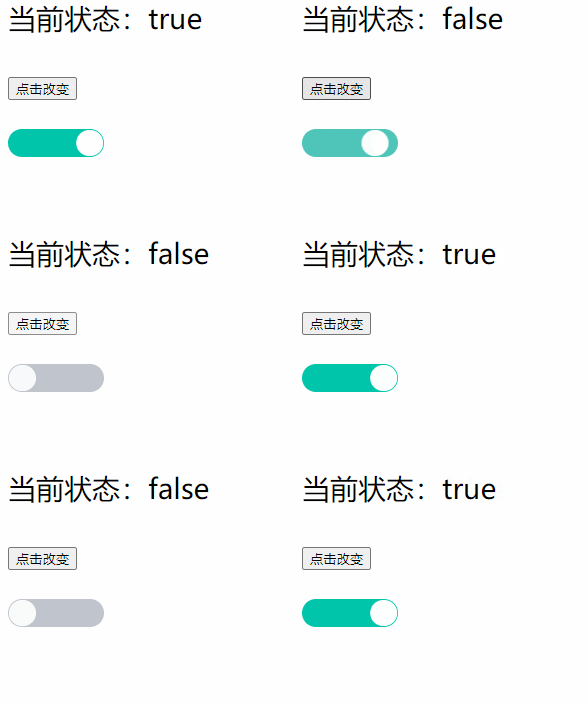
1、老规矩先看效果
2、思路分析
The author also looked at other component libraries,Some are through native components(input type=“checkbox”)进行改造,Most are still written directlydiv来实现.
自己实现uiThe hierarchy can be divided into two parts:
1、The outer layer is implemented by a label switch 盒子
2、The memory is a small ball that moves in the middle through a tag
    <div  class="switch" >
        <div class="ball"></div>
    </div>
其他就是一些 css 问题(背景颜色、The color of the ball in the middle)
3、实现开、closing process
Above we implemented the basic style,Next, combine the actual implementation logic.
1、点击时,Status on or off,At this point the ball moves to the left or right
It is not difficult to realize the movement of the ball,直接使用 css 定位即可(left:0或者rigth:0,笔者这里采用 translateX 实现 ,使用translateX 的话,建议使用css calc 函数,It is convenient to calculate the distance of displacement(switch的宽度-The width of the ball));It is relatively simple to omit the code demonstration here
4、优化
直接设置css,Switching is too blunt,于是我们加上css过渡效果
// 背景过渡
transition: background-color 0.2s ease;
// Ball transition
transition: transform 0.2s ease-in-out;
有时候,We might want to expand,Not just switch states,Text may also need to be added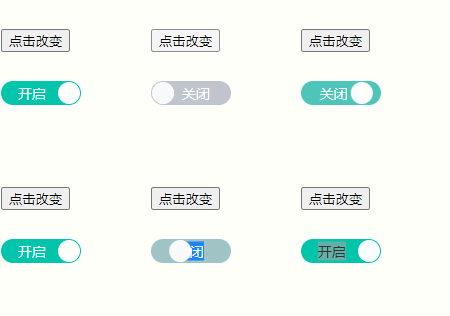
We just need to simply extend this component(不过,建议字数2text as well,Because you want to set the moving animation effect of the text,You have to calculate the width,或者实际项目中,uiThe size is basically the same,不会随意变动,You can consider writing to die)
props: {

    hasText: {

        type: Boolean,
        default: false
    },
    // 最好使用2个汉字
    statusText: {

        type: Object,
        default: () => (
            {

                open: '开启',
                close: '关闭'
            }
        )
    },
  }
<div class="switch" >
   <span v-if="hasText" class="switch-text" >
        {
   {stastus ? statusText.open : statusText.close}}
    </span>
    <div class="ball" ></div>
</div>
5、改变大小
You can switch the size at will,Also avoid width js 计算问题(大小变了,小球、The text displacement distance will definitely change),笔者这里采用 css em单位(Units relative to the current text font size,假设 1em = 10px,则2em = 20px)
/* 默认宽度80px 高24px 设置 1em = 10px 则 80px = 8em 24px = 2.4em */
    .switch{

        width: 8em;
        height: 2.4em;
        background: #00C5AB;
        border-radius: 1.2em;
        cursor: pointer;
        position: relative;
        transition: background-color 0.2s ease;
        color: #fff;
    }
注意:em 和 px The conversion rules need to be adjusted according to your actual situation,The author here is designed according to their own needs,所以,我们可以通过 props Pass the unit size,to make adjustments switch 的大小,Avoid displacement calculations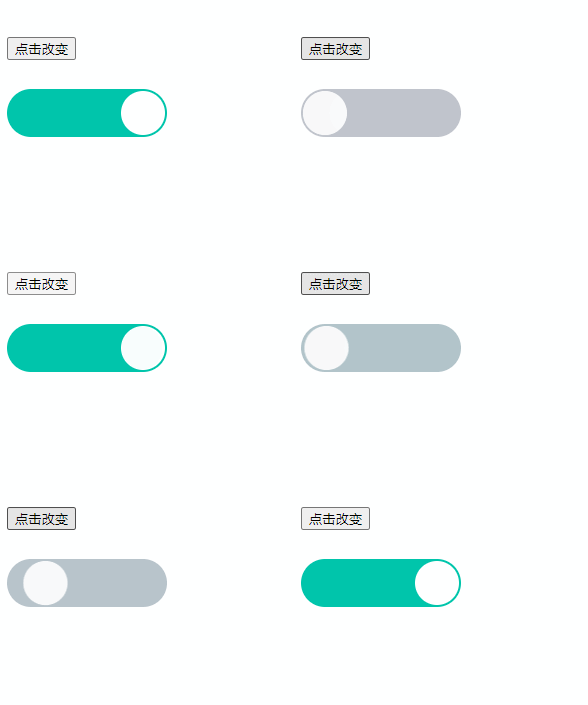
6、Event handling related here is not long-winded
7、完整代码如下—仅供参考.可根据实际修改
<template>
    <div
        class="switch"
        @click="onTabSwitch"
        :class="[ switchClass.switch ]"
        :style="switchStyle">
        <span
            v-if="hasText"
            class="switch-text"
            :class="[ switchClass.text ]">
            {
    {
    stastus ? statusText.open : statusText.close}}
        </span>
        <div class="ball" :class="[ switchClass.ball ]"></div>
    </div>
</template>

<script>
    // ex: <VSwitch v-model="isOpen" @change="changeSwitch" />
    export default {

        name: 'VSwitch',
        model: {

            prop: 'value',
            event: 'update'
        },
        props: {

            value: {

                type: Boolean,
                default: false
            },
            hasText: {

                type: Boolean,
                default: false
            },
            // 最好使用2个汉字
            statusText: {

                type: Object,
                default: () => (
                    {

                        open: '开启',
                        close: '关闭'
                    }
                )
            },
            // 调整大小时,It is best not to use Chinese characters,Because the Chinese characters need to be dynamically calculated at this timespan的宽度,以设置 left 距离(To add animation)
            size: {

                type: String,
                default: '10px'
            },
            disable: {

                type: Boolean,
                default: false
            }
        },
        data() {

            return {

                stastus: false
            }
        },
        watch: {

            value(val) {

                if(this.disable) {

                    return
                }
                this.stastus = Boolean(val)
            }
        },
        computed: {

            switchClass({
      stastus }) {

                let state = stastus ? 'on' : 'off'
                return {

                    switch: `switch-${
      state}`,
                    text: `switch-text-${
      state}`,
                    ball: `ball-${
      state}`
                }
            },
            switchStyle({
      size,disable }) {

                return {

                    fontSize: size,
                    cursor: disable ? 'not-allowed' : 'pointer',
                    opacity: disable ? '.6' : ''
                }
            }
        },
        mounted() {

            if(this.value) {

                this.stastus = Boolean(this.value)
            }
        },
        methods: {

            onTabSwitch(e) {

                // A pre-click callback can be added
                this.$emit('click',e)
                if(this.disable) {

                    return
                }
                this.stastus = !this.stastus
                this.$emit('change',this.stastus)
                this.$emit('update',this.stastus)
            }
        }
    }
</script>

<style scoped>
    /* 默认宽度80px 高24px 设置 1em = 10px 则 80px = 8em 24px = 2.4em */
    .switch{

        width: 8em;
        height: 2.4em;
        background: #00C5AB;
        border-radius: 1.2em;
        cursor: pointer;
        position: relative;
        transition: background-color 0.2s ease;
        color: #fff;
    }
    .ball{

        font-size: inherit;
        width: 2.2em;
        height: 2.2em;
        background: #FFFFFF;
        border-radius: 50%;
        position: absolute;
        top: 0.1em;
        left: 0.1em;
        transition: transform 0.2s ease-in-out;
    }
    .switch-text{

        font-size: 14px;
        position: absolute;
        top: 50%;
        transform: translateY(-50%);
        transition: left 0.2s ease-in-out;
    }
    .switch-text-on{

        left: 1.2em;
        /* left: 0.6em; */
    }
    .switch-text-off{

        left: 2.2em;
        /* right: 0.6em; */
    }
    .ball-on{

        transform: translateX(calc( 8em - 2.4em));
    }
    .switch-off{

        background-color: #C0C4CC;
    }
</style>
边栏推荐
- 第01章 Linux下MySQL的安装与使用【1.MySQL架构篇】【MySQL高级】
- 云商店专访 | 云速ERP,小场景里帮企业做“大生意”
- for key in object 遍历对象遇到的问题
- 每日优鲜“坠落”,生鲜前置仓的面子和里子
- 31个!Golang常用工具来啦(建议收藏)
- 请问一下,我这个调度任务显示执行成功,但是并没有成功,我这个任务是odps sql ins
- 手机银行体验性测试:如何获取用户真实感受
- centos8安装redis
- 算力顶天地,存力纳乾坤:国家超级计算济南中心的一体两面
- 测试内推 | 阿里飞猪、百度、58(招聘)、知乎、欢忻网络、百果园、阿里(Lazada)、深智城、元戎启行招人啦
猜你喜欢



随机推荐
京东方Q1净利将超50亿!手机、电视等五大显示屏出货量全球第一
R语言时间序列数据提取:使用xts包的first函数提取时间序列中最前面一个月的数据(first 1 month)
word文档里插入图片显示不完整,只显示一半,怎么处理?
PIL库和opencv库
手机银行体验性测试:如何获取用户真实感受
For key in object traversal of objects encountered problems
scroll bar style
美国再度打压中国超算!申威、飞腾等7家实体被制裁
原理银行一直在收我利息!!!
已经删除了的SQL节点,有没有办法恢复
【盘古Coder】:高性能函数级程序语言生成模型
实现get/post请求调用第三方接口
【斜率优化】$\text{Sol. LuoguP5504}$ 柠檬
实时数仓:咸鱼的实时数仓经验分享
真·摸鱼带师:程序员小哥每天工作10分钟年薪57万,我破防了...
今年一季度全球PC出货量同比增长32%,创21年来最快增速
字节跳动 Flink 单点恢复功能及 Regional CheckPoint 优化实践
5年迭代5次,抖音推荐系统演进历程
开放原子开源基金会为白金、黄金、白银捐赠人授牌,CSDN荣获黄金捐赠人
新王加冕还是动物乐园?7大顶级蓝筹NFT项目详解