当前位置:网站首页>数据存储全方案----详解持久化技术
数据存储全方案----详解持久化技术
2022-08-11 02:03:00 【高朵】
数据存储全方案----详解持久化技术
保证一些关键的数据不丢失----数据持久化技术
一、 持久化技术简介
Android系统中主要提供了3种方式用于简单地实现数据持久化功能:文件存储、SharedPreference存储、数据库存储。除了这3种方式之外,还可以将数据保存在手机的SD卡中。
二、 文件存储
文件存储是Android中最基本的一种数据存储方式,不对存储的内容进行任何格式化处理,所有数据原封不动地保存到文件中,适合存储一些简单地文本数据或二进制数据。
1. 将数据存储到文件中
Context类中提供了一个openFileOutput();能将数据存储在指定的文件中。这个方法能接收两个参数。
(1) 第一个参数是文件名:且所有文件的默认路径存储到:/data/data//files/目录下的。
(2) 第二个参数是文件的操作模式:表示当指定同样文件名的时候,所写内容会覆盖原文件中的内容,而MODE_APPEND表示文件已存在。
(1) 将activity.xml中的代码改为一个文本框
<EditText
        android:id="@+id/edit"
        android:layout_width="match_parent"
        android:layout_height="wrap_content"
        android:hint="Type something here"/>
(2) 修改MainActivity中的代码
public class MainActivity extends AppCompatActivity {


    private EditText edit;

    @Override
    protected void onCreate(Bundle savedInstanceState) {

        super.onCreate(savedInstanceState);
        setContentView(R.layout.activity_main);
        edit =(EditText) findViewById(R.id.edit);
    }

    @Override
    protected void onDestroy() {

        super.onDestroy();
        String inputText =edit.getText().toString();
        save(inputText);
    }

    public void save(String inputText){

        FileOutputStream out =null;
        BufferedWriter writer =null;
        try {

            out =openFileOutput("data", Context.MODE_PRIVATE);
            writer =new BufferedWriter(new OutputStreamWriter(out));
            writer.write(inputText);
        }catch (IOException e){

            e.printStackTrace();
        }finally {

            try {

                if (writer!=null){

                    writer.close();
                }
            }catch (IOException e){

                e.printStackTrace();
            }
        }
    }
}
需要在sdk中的C:\Users\duo.gao\sdk\platform-tools目录下进行开通权限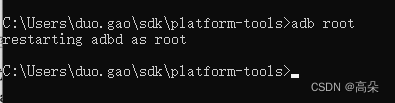
点击导入到电脑上,并打开data文件。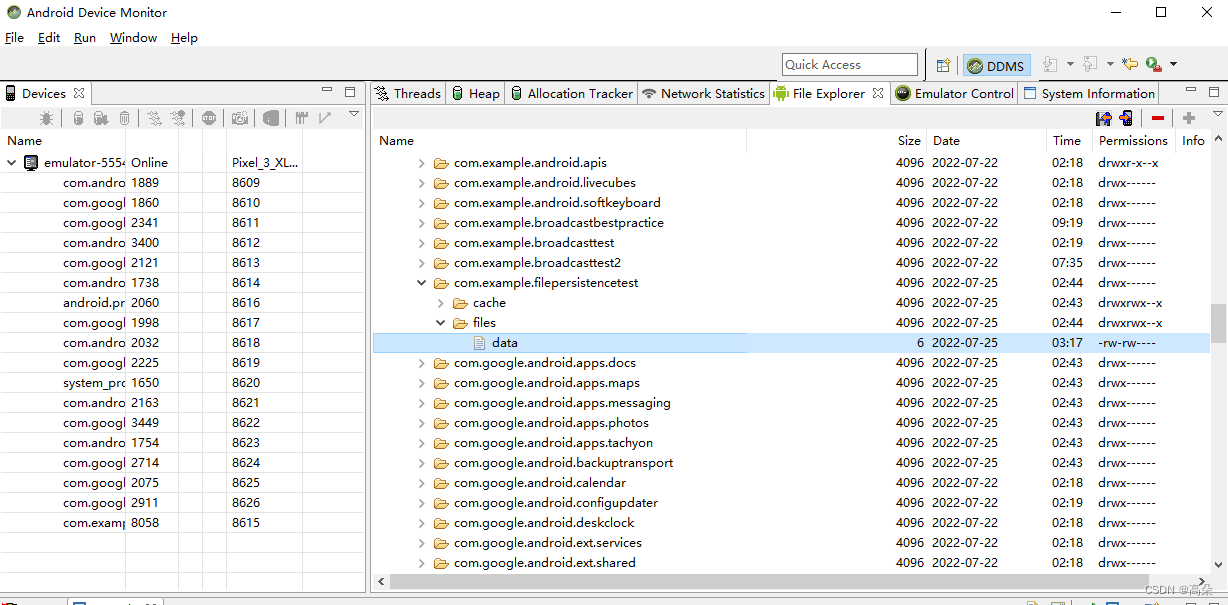
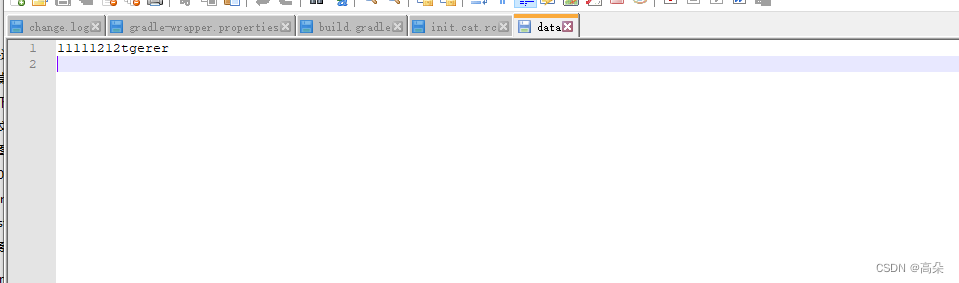
2. 从文件中读取数据
Context类提供了一个openFileInput();方法,用于从文件中读取数据。他只接收一个参数,即要读取文件名,到目录下去加载这个文件,并返回一个FileInputStream对象,在通过Java流的方式将数据读取出来。
(1) 修改MainActivity代码
public class MainActivity extends AppCompatActivity {

    private EditText edit;
    @Override
    protected void onCreate(Bundle savedInstanceState) {

        super.onCreate(savedInstanceState);
        setContentView(R.layout.activity_main);
        edit =(EditText) findViewById(R.id.edit);
        String inputText=load();
        if (!TextUtils.isEmpty(inputText)){

            edit.setText(inputText);
            edit.setSelection(inputText.length());
            Toast.makeText(this, "Restoring succeeded!!1", Toast.LENGTH_SHORT).show();
        }
    }

    @Override
    protected void onDestroy() {

        super.onDestroy();
        String inputText =edit.getText().toString();
        save(inputText);
    }

    //保存文件
    public void save(String inputText){

        FileOutputStream out =null;
        BufferedWriter writer =null;
        try {

            out =openFileOutput("data", Context.MODE_PRIVATE);
            writer =new BufferedWriter(new OutputStreamWriter(out));
            writer.write(inputText);
        }catch (IOException e){

            e.printStackTrace();
        }finally {

            try {

                if (writer!=null){

                    writer.close();
                }
            }catch (IOException e){

                e.printStackTrace();
            }
        }
    }

    //读取数据
    public String load(){

        FileInputStream in =null;
        BufferedReader reader =null;
        StringBuilder content =new StringBuilder();
        try {

            in=openFileInput("data");
            reader =new BufferedReader(new InputStreamReader(in));
            String line ="";
            while ((line =reader.readLine())!=null){

                content.append(line);
            }
        }catch (IOException e){

            e.printStackTrace();
        }finally {

            if (reader!=null){

                try {

                    reader.close();
                }catch (IOException e){

                    e.printStackTrace();
                }
            }
        }
        return content.toString();
    }
}
在EditText中输入Hello,按Back键退出程序,再重新启动程序,刚才输入的内容并不会丢失。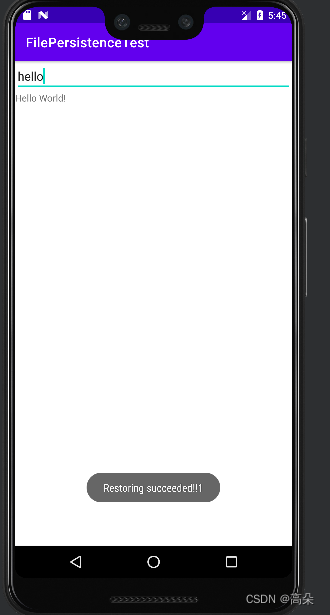
三、 SharedPreferences存储
使用键值对方式进行存储—SharedPreferences存储
支持多种不同数据类型存储
3.1将数据存储到SharedPreferences中
- Context类中的getSharedPreferences()方法
- Activity类中的getpreferences()方法
- preferenceManger类中的getDefaultSharedPreferences()方法
(1) 调用SharedPreferences对象的edit()方法来获取一个SharedPreferences.Editor对象。
(2) 向SharedPreferences.Editor对象中添加数据,比如布尔类型(putBoolean()方法);字符串(putString())。
(3) 调用apply()方法将 添加的数据提交,完成存储操作。
eg:修改MainActivity中的代码
public class MainActivity extends AppCompatActivity {

    @Override
    protected void onCreate(Bundle savedInstanceState) {

        super.onCreate(savedInstanceState);
        setContentView(R.layout.activity_main);
        Button saveData =(Button) findViewById(R.id.save_data);
        saveData.setOnClickListener(new View.OnClickListener() {

            @Override
            public void onClick(View v) {

                SharedPreferences.Editor editor =getSharedPreferences("data",MODE_PRIVATE).edit();
                editor.putString("name","kehlani");
                editor.putInt("age",23);
                editor.apply();//提交
            }
        });
    }
}

并打开data.xml文件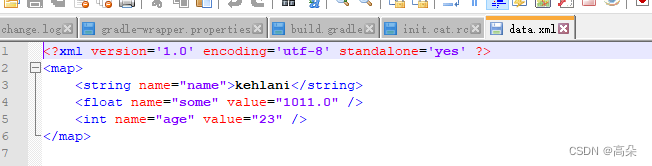
3.2从SharedPreferences中读取数据
 Button restoreData =(Button) findViewById(R.id.restore_data);
    restoreData.setOnClickListener(new View.OnClickListener() {

        @Override
        public void onClick(View v) {

            SharedPreferences pref =getSharedPreferences("data",MODE_PRIVATE);
          String name =pref.getString("name","");
          int age =pref.getInt("age",0);
          boolean married =pref.getBoolean("married",false);
            Log.d("MainActivity","name is "+name);
            Log.d("MainActivity","age is "+age);
            Log.d("MainActivity","married is "+married);
        }
    });
}
在logcat中查看打印信息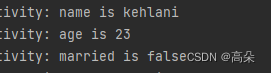
3.3实现记住密码功能
(1) 首先添加一个记住密码框checkbox
   <LinearLayout
        android:orientation="horizontal"
        android:layout_width="match_parent"
        android:layout_height="wrap_content">
        <CheckBox
            android:id="@+id/remember_pass"
            android:layout_width="wrap_content"
            android:layout_height="wrap_content"/>
        <TextView
            android:layout_width="wrap_content"
            android:layout_height="wrap_content"
            android:textSize="18sp"
            android:text="Remember password"/>
    </LinearLayout>
(2) 修改登陆页面代码
public class LoginActivity extends BaseActivity {


    private SharedPreferences pref;
    private  SharedPreferences.Editor editor;
    private CheckBox rememberPass;

    private EditText accountEdit;
    private EditText passwordEdit;
    private Button login;

    @Override
    protected void onCreate(Bundle savedInstanceState) {

        super.onCreate(savedInstanceState);
        setContentView(R.layout.activity_login);
        pref = PreferenceManager.getDefaultSharedPreferences(this);

        accountEdit = (EditText) findViewById(R.id.account);
        passwordEdit = (EditText) findViewById(R.id.password);
        rememberPass =(CheckBox)findViewById(R.id.remember_pass);

        login = (Button) findViewById(R.id.login);
        boolean isRemenber =pref.getBoolean("remember_password",false);
        if (isRemenber){

            String account =pref.getString("account","");
            String password =pref.getString("password","");
            accountEdit.setText(account);
            passwordEdit.setText(password);
            rememberPass.setChecked(true);
        }

        login.setOnClickListener(new View.OnClickListener() {

            @Override
            public void onClick(View v) {

                String account = accountEdit.getText().toString();
                String password = passwordEdit.getText().toString();
                if (account.equals("admin") && password.equals("123")) {

                    editor =pref.edit();
                    if (rememberPass.isChecked()){

                        editor.putBoolean("remember_password",true);
                        editor.putString("account",account);
                        editor.putString("password",password);
                    }else {

                        editor.clear();
                    }
                    editor.apply();
                    Intent intent = new Intent(LoginActivity.this, MainActivity.class);
                    startActivity(intent);
                    finish();
                } else {

                    Toast.makeText(LoginActivity.this, "try again ", Toast.LENGTH_SHORT).show();
                }
            }
        });
    }
}
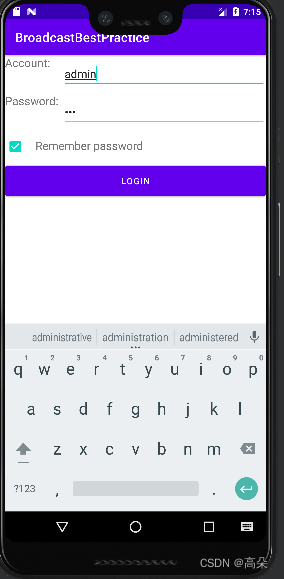
(3) 能看到密码已经被保存
四、 SQLite数据库存储
SQLite3 是一种轻量型、进程内的关系型数据库
1. 新建MyDatabaseHelper类,继承自SQLiteOpenHelper
public class MyDatabaseHelper extends SQLiteOpenHelper {

    public static final  String CREATE_BOOK ="create table Book("
            +"id integer primary key autoincrement,"
            +"author text,"
            +"price real,"
            +"pages integer,"
            +"name text)";
    private Context mcontext;

    public MyDatabaseHelper(Context context,String name,SQLiteDatabase.CursorFactory factory, int version) {

        super(context, name, factory, version);
        mcontext = context;
    }

    @Override
    public void onCreate(SQLiteDatabase db) {

            db.execSQL(CREATE_BOOK);
        Toast.makeText(mcontext, "Create succeeded", Toast.LENGTH_SHORT).show();
    }

    @Override
    public void onUpgrade(SQLiteDatabase db, int oldVersion, int newVersion) {


    }
}
2. 修改MainActivity
public class MainActivity extends AppCompatActivity {

    private MyDatabaseHelper dbHelper;

    @Override
    protected void onCreate(Bundle savedInstanceState) {

        super.onCreate(savedInstanceState);
        setContentView(R.layout.activity_main);
        dbHelper =new MyDatabaseHelper(this,"BookStore.db",null,1);
        Button createDatabase =(Button) findViewById(R.id.create_database);
        createDatabase.setOnClickListener(new View.OnClickListener() {

            @Override
            public void onClick(View v) {

                dbHelper.getWritableDatabase();
            }
        });
    }
}
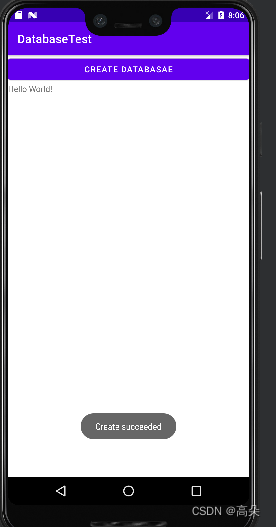
点击按钮,会出现创建数据库
查看数据库创建成功和book表创建成功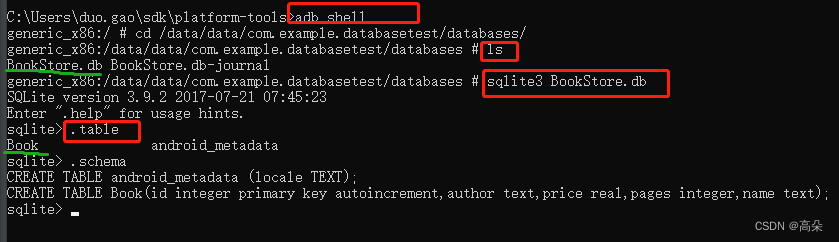
2.升级数据库
新建数据库category同上,并在onUpgrade中进行升级数据库
   @Override
    public void onUpgrade(SQLiteDatabase db, int oldVersion, int newVersion) {

        db.execSQL("drop table if exists Book");
        db.execSQL("drop table if exists Category");
        onCreate(db);
    }
dbHelper =new MyDatabaseHelper(this,“BookStore.db”,null,2);版本号也变为2。
可以看到category表创建成功
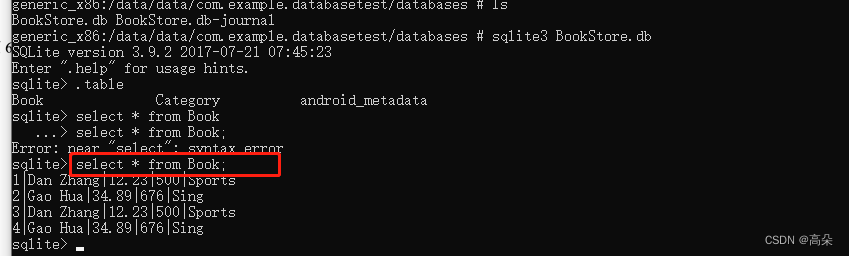
3. 添加数据
(1) 增加一个添加按钮
(2) 修改主活动代码
 Button addData =(Button) findViewById(R.id.add_data);
        addData.setOnClickListener(new View.OnClickListener() {

            @Override
            public void onClick(View v) {

                SQLiteDatabase db =dbHelper.getWritableDatabase();
                ContentValues values =new ContentValues();
                //开始组装第一条数据
                values.put("name","Sports");
                values.put("author","Dan Zhang");
                values.put("price",12.23);
                values.put("pages",500);
                db.insert("Book",null,values);
                values.clear();
                //开始组装第二条数据
                values.put("name","Sing");
                values.put("author","Gao Hua");
                values.put("price",34.89);
                values.put("pages",676);
                db.insert("Book",null,values);
            }
        });
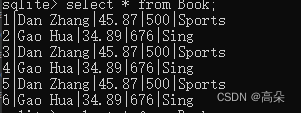
4. 修改数据
Button updataData = (Button) findViewById(R.id.update_data);
        updataData.setOnClickListener(new View.OnClickListener() {

            @Override
            public void onClick(View v) {

                SQLiteDatabase db = dbHelper.getWritableDatabase();
                ContentValues values = new ContentValues();
                values.put("price", 45.87);
                db.update("Book", values, "name=?", new String[]{
    "Sports"});
            }
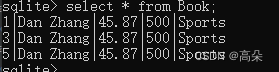
5. 删除数据
Button deleteData = (Button) findViewById(R.id.delete_data);
deleteData.setOnClickListener(new View.OnClickListener() {

    @Override
    public void onClick(View v) {

        SQLiteDatabase db = dbHelper.getWritableDatabase();
        db.delete("Book", "pages > ?", new String[]{
    "600"});
    }
});
6. 查询数据
  Button queryData = (Button) findViewById(R.id.query_data);
        queryData.setOnClickListener(new View.OnClickListener() {

            @Override
            public void onClick(View v) {

                SQLiteDatabase db = dbHelper.getWritableDatabase();
                Cursor cursor = db.query("Book",
                        null,
                        null,
                        null,
                        null,
                        null,
                        null);
                if (cursor.moveToFirst()) {

                    do {

                      @SuppressLint("Range") String name = cursor.getString(cursor.getColumnIndex("name"));
                        @SuppressLint("Range") String author = cursor.getString(cursor.getColumnIndex("author"));
                        @SuppressLint("Range") int pages = cursor.getInt(cursor.getColumnIndex("pages"));
                        @SuppressLint("Range") double price = cursor.getDouble(cursor.getColumnIndex("price"));
                        Log.d("MainActivity", "book name is" + name);
                        Log.d("MainActivity", "book author is" + author);
                        Log.d("MainActivity", "book pages is" + pages);
                        Log.d("MainActivity", "book price is" + price);
                    } while (cursor.moveToNext());
                }cursor.close();
            }
        });

五、 使用SQL操作数据库
//添加数据的方法如下:
db.execSQL("insert into Book (name, author, pages, price) values(?, ?, ?, ?)", new String[]{
    "The Da Vinci Code", "Dan Brown", "454", "16.96"});
db.execSQL("insert into Book (name, author, pages, price) values(?, ?, ?, ?)", new String[]{
    "The Lost Symbol", "Dan Brown", "510", "19.95"});
//更新数据的方法如下:
db.execSQL("update Book set price = ? where name = ?", new String[] {
    "10.99", "The Da Vinci Code"});
//删除数据的方法如下:
db.execSQL("delete from Book where pages > ?", new String[] {
    "500"});
//查询数据的方法如下
db.execSQL("select * from Book",null);
边栏推荐
- Sigma development pays attention to details
- 两日总结九
- 一次简单的 JVM 调优,拿去写到简历里
- Is container technology really the savior of environmental management?
- 软件测试面试题:单元测试的策略有哪些?
- Lianshengde W801 series 6-Analyze the Bluetooth communication source code of W801 from the perspective of WeChat applet (indicate method)
- 【HFSS学习记录1】实例:宽带非对称多节定向耦合器设计
- Oops Framework模板项目新手引导
- 软件测试面试题:缺陷等级应如何划分?
- gRPC基础概念:闭包
猜你喜欢

![报错处理:org.xml.sax.SAXParseException: 不允许有匹配 “[xX][mM][lL]“ 的处理指令目标](/img/35/650c92ac4c5fc2d5826f3216a09e65.png)


随机推荐
Is container technology really the savior of environmental management?
Matlab矩阵(数组)元素过滤常见方法详解
The classification of inter-process communication (IPC) and the development of communication methods
软件测试面试题:缺陷等级应如何划分?
软件测试面试题:I P协议、RARP协议、ICMP协议与ARP协议的功能是什么?
Ambari Migrates Spark2 to Other Machines (Graphic and Text Tutorial)
[The method of calling the child page from the parent page of the iframe] Stepping on the pit: It is the key to use `[x]` when getting elements. You cannot use `.eq(x)`, otherwise it will not be obtai
从键入网址到网页显示的详细过程
Sigma development pays attention to details
小幻美图 API
英伟达 GPU 架构简史
nvidia-smi详解
阿里的数据同步神器——Canal
联盛德W801系列6-从微信小程序的角度来分析W801的蓝牙通信源码(indicate方式)
网络安全笔记第四天day4(kali基本操作)
[Detailed explanation of C data storage] (1) - in-depth analysis of the storage of shaping data in memory
【微波工程学习记录1】功率分配器和定向耦合器
How to create an index when sql uses where and groupby?
22、库存服务
How to solve the problem of Tomcat booting and crashing