当前位置:网站首页>基于鲲鹏开发套件实现x86平台到Kunpeng平台的源码迁移【玩转华为云】
基于鲲鹏开发套件实现x86平台到Kunpeng平台的源码迁移【玩转华为云】
2022-06-29 10:36:00 【华为云】
前言
鲲鹏分析扫描工具和代码迁移工具,提供全面的应用可移植性评估和代码移植指导,实现90%的C/C++代码、50%的汇编代码和80%的依赖库自动移植,降低人力成本50%,加速代码移植和优化。而且鲲鹏云有很强的生态体系,以下图片介绍了目前鲲鹏云的一些云服务,感兴趣的可以去鲲鹏社区了解一哈。由于之前接受过鲲鹏系列的培训,时日已久,遂即重新来体验一下鲲鹏的代码迁移开发套件。


具体流程
操作前提:登录华为云账号 且实名

实验摘要
- 操作前提:
- 1.安装工具xshell
- 2.配置Visual Studio Code环境
- 3.源码准备
- 4.源码迁移
安装工具xshell
连接之前需要去创建一个华为云的云服务器,这里就不演示了。
使用xshell工具直接输入你创建的弹性公网IP和密码进行连接,xshell是windows系统经常使用的ssh连接工具,可自行下载安装,这里不提供下载链接,聪明的你一定会。

准备工具源码包
在xshell窗口中执行以下命令下载源码包:
wget https://mirror.iscas.ac.cn/kunpeng/archive/Porting_Dependency/Packages/Porting-advisor_2.3.0_linux-Kunpeng.tar.gz
下载成功如下图所示:

执行以下命令解压源码包:
tar -zxvf Porting-advisor_2.3.0_linux-Kunpeng.tar.gz
安装porting工具
执行以下命令进入已解压源码包目录:

执行以下命令安装porting工具:
执行过程需要输入时直接回车即可。【约等待2-3分钟】安装成功如下图所示:
./install web

安装依赖工具cmake
执行以下命令下载cmake工具:
cd ~ && wget https://sandbox-experiment-resource-east-1.obs.cn-east-3.myhuaweicloud.com/code-migration-cn-east-3/cmake-3.3.2.tar.gz下载成功如下所示

执行以下命令解压cmake安装包:
tar -xzvf cmake-3.3.2.tar.gz执行以下命令编译cmake:
cd cmake-3.3.2 && ./configure【约等待2-3分钟】编译成功如下图所示:

依次执行以下命令安装cmak工具:
gmakemake install【约等待3-4分钟】安装成功如下图所示:


配置Visual Studio Code环境
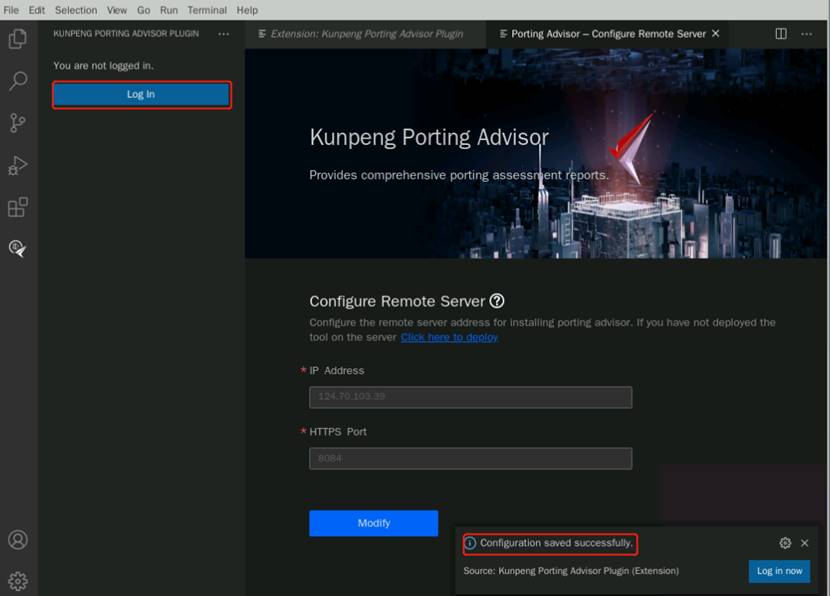
切换至xshell,点击打开“Visual Studio Code”,打开后点击鲲鹏Porting工具图标,点击“Configure Server”配置远端服务器连接,如下图所示:

① “Ip Address”:填写1.1步骤查看到的公网IP;② “HTTPS Port”:默认(8084);说明:云服务器的弹性公网IP地址,可以通过鼠标移动到云桌面浏览器页面中左侧菜单栏,点击“服务列表”->“计算”->“弹性云服务器ECS”进入服务器列表,进行查看并复制;③“Service Certificate Settings”,可选择“Trust the current service certificate”。填写完成点击“Save”,保存成功后如下图所示:
注:若点击Save后,出现如下提示:

则需要手动修改VSCode的代理服务器,点击settings->Application->proxy“Proxy Strict SSL”选项不勾选,“Proxy Support”设置项,下拉框内选择“off”,然后再配置服务器页面重新点击保存即可,如下图所示:


点击“Log In”,创建用户“portadmin”,密码自定义,如下图所示:


设置完成点击“OK”完成远端服务器连接配置。
源码准备
下载的待扫描源码包是能在x86平台上能正常编译的,通过“鲲鹏代码迁移工具”扫描后,识别出在鲲鹏平台上需要适配修改的代码,通过修改,达到能在鲲鹏平台上正常编译和使用的目的,从而实现源码迁移。
cd /opt/portadv/portadmin/sourcecode/执行以下命令下载Megahit源码:
git clone https://codehub.devcloud.cn-north-4.huaweicloud.com/experiment00001/megahit.git
执行以下命令将代码进行合并:
cd megahit && git submodule update --init执行以下命令创建构建文件夹并进入:
mkdir build && cd build执行以下命令生成Makefile文件:
cmake .. -DCMAKE_BUILD_TYPE=Release
执行以下命令修改megahit目录群组:说明:porting工具的待扫描的源码目录群组必须为porting才能扫描。
cd ../ && chown -R porting:porting /opt/portadv/portadmin/sourcecode/* && ll ./源码迁移
代码扫描工具扫描源码并迁移
选择“Source Code Porting”,手动输入选择“megahit/build”源码包路径 ,其他参数默认,如下图所示:说明:若登录成功时有弹窗点击“OK”即可

点击“Analyze”分析成功如下图所示

分析完成后,点击文件列表, 查看文件中需要迁移的文件,点击“View Suggestion Code”查看具体文件的迁移建议。修改文件“megahit_core_popcnt.dir/flags.make”,鼠标拖动到待修改处(向右拖动到当前代码末尾即可看到), 可以看到一处待修改点。
删除提示修改代码,修改完成“Ctrl+s”保存该文件,如下


修改文件“cpu_dispatch.h”,光标悬停到代码上, 可以看到修改建议
分别在每部分需要修改的代码,鼠标悬停后出现“Quick Fix…”,选择“Replace the code with the suggested code”点击进行快速修改,如下图所示:
说明:“Quick Fix…”未出现时鼠标滚轮向下滑动即可看到。

修改完成去掉修改代码注释,“Ctrl+s”保存该文件,最终如下图所示:


切换至xshell,执行以下命令将“KunpengTrans.h”头文件添加到目录下到/opt/portadv/portadmin/sourcecode/megahit/src/utils:
cp /opt/portadv/tools/inline_asm/config/KunpengTrans.h /opt/portadv/portadmin/sourcecode/megahit/src/utils/
重新编译并验证
在xshell命令行执行make命令
cd /opt/portadv/portadmin/sourcecode/megahit/build && make
执行以下命令修改“/opt/portadv/portadmin/sourcecode/megahitkmlib/kmrns.h”:
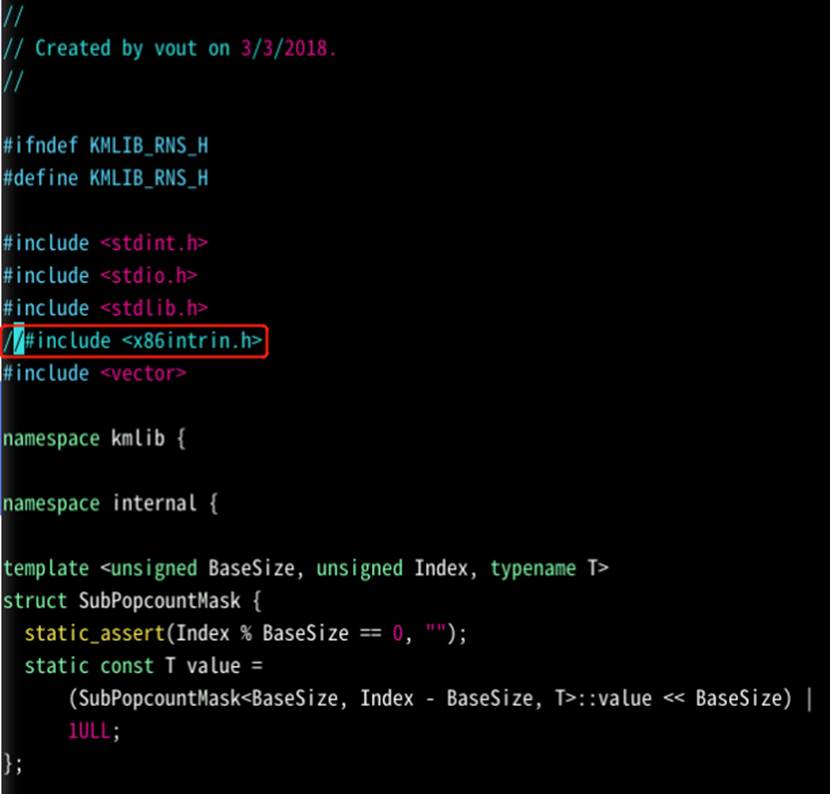
vim /opt/portadv/portadmin/sourcecode/megahit/src/kmlib/kmrns.h“<x86intrin.h>”为x86平台的系统头文件,在arm平台上没有此系统头文件。点击键盘“i”命令进入文本输入模式,注释如下图所示代码:
说明:“#include <x86intrin.h>”改为“//#include <x86intrin.h>”。
修改完成,点击键盘“ESC”退出输入模式,输入:wq命令后回车保存:
再次执行make命令
【约等待6分钟】编译通过如下图所示:

编译完成执行以下命令进行验证:说明:Make simple_test里用到的.fa文件是github上下载软件包的时候就自带了无需额外下载。
make simple_test运行成功如下图所示:

总结
基于华为云弹性云服务器实现从x86平台到Kunpeng平台的源码迁移。通过此次流程,我了解了:
① 鲲鹏代码迁移工具中源码迁移功能的操作流程
② Megahit项目代码的调优实践
鲲鹏的开发套件整体流程体验下来很顺畅,扫描和迁移功能也很清晰,能快速修复你的代码,值得推荐。
边栏推荐
- 什么?漫画居然能免费看全本了,这还不学起来一起做省钱小能手
- Modbus RTU protocol 485 learning 2-way infrared module
- Google Earth engine (GEE) - Gedi L2a vector canopy top height (version 2) global ecosystem data set
- Qt学习06 窗口部件及窗口类型
- 在编写shell脚本时如何正确姿势地管理临时文件
- [NLP] text generation topic 1: basic knowledge
- MySQL get table information
- Qt学习09 计算器界面代码重构
- Course design for the end of the semester: product sales management system based on SSM
- 直击产业落地!飞桨重磅推出业界首个模型选型工具
猜你喜欢

Limit introduction summary

Encore une fois, le chemin de l'amélioration de redis Cloud

多线程高并发服务器:3个问题

多线程实现客户端与服务端通信(初级版本)

Modbus RTU protocol 485 learning 2-way infrared module

云原生开发必备:首个通用无代码开发平台 iVX 编辑器

Self-Improvement! Junior college "counter attack" master of Zhejiang University, 3 SCI, and finally become a doctor of Tsinghua University!
![[NLP] text generation topic 1: basic knowledge](/img/cf/2e29e55344ea4cc8ce48777878b867.png)
[NLP] text generation topic 1: basic knowledge

适合小白的树莓派opencv4.0安装

Nature | 全球海洋微生物组的生物合成潜力
随机推荐
(JS) isnan() method determines the reason why undefined is true
How to test the performance of container platform, including stability, expansion efficiency and component performance
Course design for the end of the semester: product sales management system based on SSM
Lizuofan, co-founder of nonconvex: Taking quantification as his lifelong career
Modbustcp protocol network learning single channel infrared module (medium shell version)
What is the experience of working in an IT company in Japan?
When a technician becomes a CEO, what "bugs" should be modified?
在编写shell脚本时如何正确姿势地管理临时文件
(JS) iterator mode
(JS) imitate an instanceof method
The necessary operation for those big guys to fly 666 inadvertently at the bash command line terminal
How to obtain method parameter values through WinDbg
Modbustcp protocol WiFi wireless learning single channel infrared module (small shell version)
matlab基础 max 求一维或二维数组的最大值+sleep(pause)
软件工程导论——第五章——总体设计
misc3~7
喜报|海泰方圆通过CMMI-3资质认证,研发能力获国际认可
Pipeline aggregations pipeline aggregation-sibling-1
影响LED封装散热主要因素有哪些?
The use of variables in shell that you have to be familiar with