当前位置:网站首页>clion+opencv+aruco+cmake配置
clion+opencv+aruco+cmake配置
2022-07-29 05:21:00 【_盐焗鸡】
首先先列下本文使用的软件配置吧:
- clion 2020.0.1 (没钱哇
- opencv 4.5.2
- aruco3.10,别下最新版,有的函数名改变了
- cmake 3.24
- win10
一、配置opencv
opencv我没有这个人讲得好和细致,所以可以直接看他的文章。
https://blog.csdn.net/bby1987/article/details/108985356
但是有一点值得注意,他的CMakeList写的有问题,少了一个引号,这会导致无法编译,我在后面会放出包含两个包的CMakeList。
二、aruco编译
下载链接:https://sourceforge.net/projects/aruco/files/、
配置和opencv的一样,下载,用cmake编译,然后用mingw生成,具体细节看opencv的文档
mingw32-make
或
mingw32-make -j8
//编译

mingw32-make install
//拷贝到install,方便使用
这里不需要配置aruco的环境变量什么的,直接用就行了
三、CMakeList
cmake_minimum_required(VERSION 3.16)#版本大于3.16
project(arucotest)#创建项目,我的项目是arucotest,你到时候改成你自己的项目名称就行
set(CMAKE_CXX_STANDARD 20)#设置Cpp版本

set(OpenCV_DIR "D:\\opencv isn\\opencv-4.5.2\\build_mingw64\\install")#opencv库的地址

#寻找opencv库和aruco库
find_package(OpenCV REQUIRED)
find_package(aruco REQUIRED )

#包含和链接opencvlib
include_directories(${OpenCV_INCLUDE_DIRS})
set(OpenCV_LIBS opencv_core opencv_imgproc opencv_highgui opencv_imgcodecs)
#这一行是
add_executable(arucotest main.cpp)

#链接arucolib
target_link_libraries(arucotest ${OpenCV_LIBS} ${aruco_LIBS})
这个CMakeList是我实践过的,跑过代码,测试代码如下
#include <iostream>
#include "aruco.h"
#include<opencv2/opencv.hpp>
using namespace std;
using namespace cv;
int main(){

    string imagePath = "D:\\Pictures\\1.JPG";//注意,这里面的imagepath改为你的图片地址
    Mat image = imread(imagePath);
    resize(image, image, Size(1024, 1024));
    namedWindow("TestOpenCV", 0);
    imshow("TestOpenCV", image);
    waitKey(0);
    destroyAllWindows();
    return 0;

}

PS:如果有人想学习cmake,我的建议是看看这个视频和GitHub,看了一小时你大概就能自己写cmake了
https://www.bilibili.com/video/BV14h41187FZ?spm_id_from=333.1007.top_right_bar_window_history.content.click&vd_source=1ef56da7b9f25f108ff0dc3ccaf38102
边栏推荐
- Training log II of the project "construction of Shandong University mobile Internet development technology teaching website"
- Lock lock of concurrent programming learning notes and its implementation basic usage of reentrantlock, reentrantreadwritelock and stampedlock
- Ribbon学习笔记一
- Thinkphp6 output QR code image format to solve the conflict with debug
- 【图像分类】如何使用 mmclassification 训练自己的分类模型
- Centos7 silently installs Oracle
- ASM插桩:学完ASM Tree api,再也不用怕hook了
- 初探fastJson的AutoType
- 【Transformer】SegFormer:Simple and Efficient Design for Semantic Segmentation with Transformers
- DataX installation
猜你喜欢
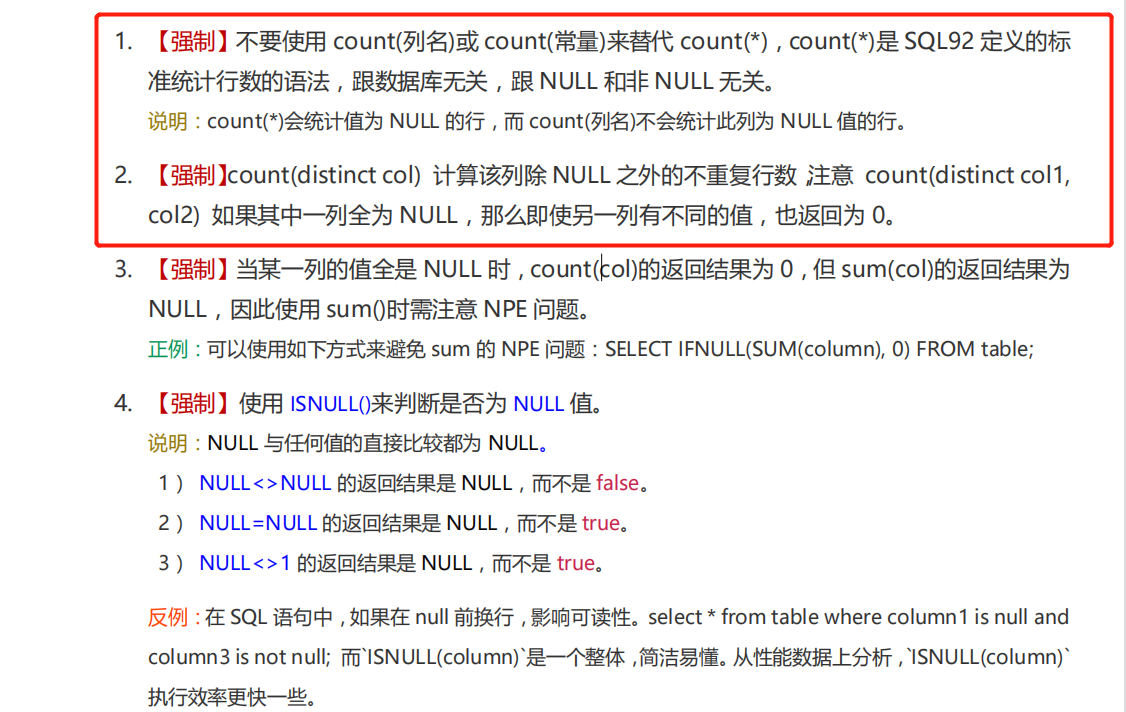
Detailed explanation of MySQL statistical function count

【Transformer】AdaViT: Adaptive Vision Transformers for Efficient Image Recognition

【综述】图像分类网络

Semaphore (semaphore) for learning notes of concurrent programming

Intelligent security of the fifth space ⼤ real competition problem ----------- PNG diagram ⽚ converter

Interesting talk about performance optimization thread pool: is the more threads open, the better?

Markdown syntax

【卷积核设计】Scaling Up Your Kernels to 31x31: Revisiting Large Kernel Design in CNNs

Reporting service 2016 custom authentication

Synchronous development with open source projects & codereview & pull request & Fork how to pull the original warehouse
随机推荐
【Transformer】ATS: Adaptive Token Sampling For Efficient Vision Transformers
Flutter正在被悄悄放弃?浅析Flutter的未来
【Attention】Visual Attention Network
30 knowledge points that must be mastered in quantitative development [what is level-2 data]
rsync+inotyfy实现数据单项监控实时同步
【目标检测】6、SSD
yum本地源制作
Spring, summer, autumn and winter with Miss Zhang (1)
Training log 7 of the project "construction of Shandong University mobile Internet development technology teaching website"
MySql统计函数COUNT详解
【Clustrmaps】访客统计
The third week of postgraduate freshman training: resnet+resnext
The difference between asyncawait and promise
在uni-app项目中,如何实现微信小程序openid的获取
【网络设计】ConvNeXt:A ConvNet for the 2020s
ASM piling: after learning ASM tree API, you don't have to be afraid of hook anymore
[DL] build convolutional neural network for regression prediction (detailed tutorial of data + code)
手撕ORM 框架(泛型+注解+反射)
Flutter 绘制技巧探索:一起画箭头(技巧拓展)
与张小姐的春夏秋冬(3)