当前位置:网站首页>一种分布式深度学习编程新范式:Global Tensor
一种分布式深度学习编程新范式:Global Tensor
2022-07-26 09:32:00 【InfoQ】
1、Global Tensor概述
2、创建Global Tensor
randntest_randn_global.pyimport oneflow as flow
# Place a global tensor on cuda device of rank(process) 0 and 1
placement = flow.placement(type="cuda", ranks=[0, 1])
# Each rank's local data is a part data as a result of spliting global data on dim 0
sbp = flow.sbp.split(dim=0)
# Create a global tensor by randn
x = flow.randn(4, 5, placement=placement, sbp=sbp)
# Print local data
print("Local data of global tensor:\n ", x.to_local().numpy())
# Print global data
print("Global data of global tensor:\n ", x.numpy())placementtype“cuda”rankstype"cpu"sbpsbp = flow.sbp.split(dim=0)to_local()export MASTER_ADDR=127.0.0.1 MASTER_PORT=17789 WORLD_SIZE=2 RANK=0 LOCAL_RANK=0export MASTER_ADDR=127.0.0.1 MASTER_PORT=17789 WORLD_SIZE=2 RANK=1 LOCAL_RANK=1test_randn_global.pypython3 test_randn_global.pyLocal data of global tensor:
[[-0.07157125 -0.92717147 1.5102768 1.4611115 1.014263 ]
[-0.1511031 1.570759 0.9416077 0.6184639 2.4420679 ]]
Global data of global tensor:
[[-0.07157125 -0.92717147 1.5102768 1.4611115 1.014263 ]
[-0.1511031 1.570759 0.9416077 0.6184639 2.4420679 ]
[-0.38203463 0.453836 0.9136015 2.35773 -0.3279942 ]
[-0.8570119 -0.91476554 -0.06646168 0.50022084 -0.4387695 ]]Local data of global tensor:
[[-0.38203463 0.453836 0.9136015 2.35773 -0.3279942 ]
[-0.8570119 -0.91476554 -0.06646168 0.50022084 -0.4387695 ]]
Global data of global tensor:
[[-0.07157125 -0.92717147 1.5102768 1.4611115 1.014263 ]
[-0.1511031 1.570759 0.9416077 0.6184639 2.4420679 ]
[-0.38203463 0.453836 0.9136015 2.35773 -0.3279942 ]
[-0.8570119 -0.91476554 -0.06646168 0.50022084 -0.4387695 ]]3、由Local Tensor得到Global Tensor
import oneflow as flow

x = flow.randn(2, 5).cuda()
print(x.is_local) # True
print(x.is_global) # False
placement = flow.placement(type="cuda", ranks=[0, 1])
sbp = flow.sbp.split(0)
x_global = x.to_global(placement=placement, sbp=sbp)
print(x_global.shape) # (4, 5)
print(x.is_local) # True
print(x_global.is_global) # Trueshape=(2,5)to_globalx_globalx_global(4, 5)x_globalxto_globalx.shapex_global.shapexx_global4、由Global Tensor得到Local Tensor
import oneflow as flow

placement = flow.placement(type="cuda", ranks=[0, 1])
sbp = flow.sbp.split(0)
x = flow.randn(4, 5, placement=placement, sbp=sbp)
print(x.to_local())x.to_local()(2, 5)tensor([[-0.2730, 1.8042, 0.0721, -0.5024, -1.2583],
[-0.3379, 0.9371, 0.7981, -0.5447, -0.5629]],
dtype=oneflow.float32)tensor([[ 0.6829, 0.4849, 2.1611, 1.4059, 0.0934],
[-0.0301, -0.6942, -0.8094, -1.3050, -0.1778]],
dtype=oneflow.float32)to_local()5、由Global Tensor转成另一个Global Tensor
- 参数
type 指定了物理设备的类型,cuda 表示 GPU 设备内存, cpu 表示 CPU 设备内存;
- 参数
ranks 指定了进程 ID 集合,因为隐含了一个 Rank 对应一个物理设备,所以 ranks 就是设备 ID 集合; 实际上 ranks 是一个由 rank id 组成 nd-array,支持高维设备排布。
- S 即 split(dim),局部和全局是切分关系, 表示在 dim 维度做了切分的数据分布关系;
- B 即 broadcast,局部和全局是广播关系,表示做了广播的数据分布关系;
- P 即 partial_sum,局部和全局是部分关系,表示做了 element-wise 累加的数据分布关系。
to_globalplacementsbpimport oneflow as flow
x = flow.randn(2, 5).cuda()
placement = flow.placement(type="cuda", ranks=[0, 1])
sbp = flow.sbp.split(0)
x_global = x.to_global(placement=placement, sbp=sbp)
print(x_global.shape) # (4, 5)
print(x_global.to_local())
sbp_b = flow.sbp.broadcast
x_global_b = x_global.to_global(placement=placement, sbp=sbp_b)
print(x_global_b.shape) # (4, 5)
print(x_global_b.to_local())x_globalx_global_bflow.sbp.split(0)flow.sbp.broadcast(4, 5)to_local()to_globalall-gathernumpy()x_globalx_global.numpy()x_global.to_global(spb=flow.sbp.broadcast).to_local().numpy()numpy()x_global.numpy()6、Global Tensor参与计算
import oneflow as flow

placement = flow.placement(type="cuda", ranks=[0, 1])
x = flow.randn(4, 5, placement=placement, sbp=flow.sbp.split(dim=0))
w = flow.randn(5, 8, placement=placement, sbp=flow.sbp.broadcast)
y = flow.matmul(x, w)
print(y.is_global) # True
print(y.shape) # (4, 8)
print(y.sbp) # (flow.sbp.split(dim=0))
print(y.to_local().numpy())xwoneflow.matmulyflow.matmul- 如果算子的输入是 Local Tensor,那么算子会按照普通的单机单设备执行模式进行计算;
- 如果算子的输入是 Global Tensor,那么算子会采用 Global View(多机多设备)模式进行计算;
flow.matmulxwyflow.matmulxw- Placement:输出和输入的 placement 相同;
- SBP:输出的 SBP 的推理规则,因算子类型而异,这个推理规则是 OneFlow 内置的,详情可见: SBP Signature
flow.sbp.split(0)flow.sbp.broadcastflow.sbp.split(0)xwyxw7、结语
- Global View 提供的 SPSD 编程视角;
- Global Tensor 的跨进程可见的执行特点;
- Global Tensor 和 Local Tensor 的互转;
- 通过 Global Tensor 的全局数据分布类型转换来实现分布式通信;
- OneFlow 算子的多态特性支持了 Global Tensor 的执行。
n 机 m 卡n * m2 机 2 卡flow.placement(type="cuda", ranks=[2])n 机 m 卡flow.placement(type="cuda", ranks=[k])k / nk % mMASTER_ADDR:多机训练的第 0 号机器的 IP;
MASTER_PORT:多机训练的第 0 号机器的监听端口,不与已经占用的端口冲突即可;
WORLD_SIZE:整个集群中计算设备的数目,因为目前还不支持各个机器上显卡数目不一致,因此 WORLD_SIZE 的数目实际上是 $ 机器数目 \times 每台机器上的显卡数目$。创建 Global Tensor 中的示例是单机 2 卡的情况,因此 WORLD_SIZE=2;
RANK:集群内所有机器下的进程编号;
LOCAL_RANK:单个机器内的进程编号。
RANKLOCAL_RANK- 在单机训练(单机单卡或单机多卡)时,两者相等;
- 在多机训练时,每台机器上的
LOCAL_RANK 的上限,就是每台机器上的计算设备的数目;RANK 的上限,就是所有机器上所有计算设备的总和,它们的编号均从 0 开始(因为编号从 0 开始,所以不包含上限)。
2 机 2 卡LOCAL_RANKRANK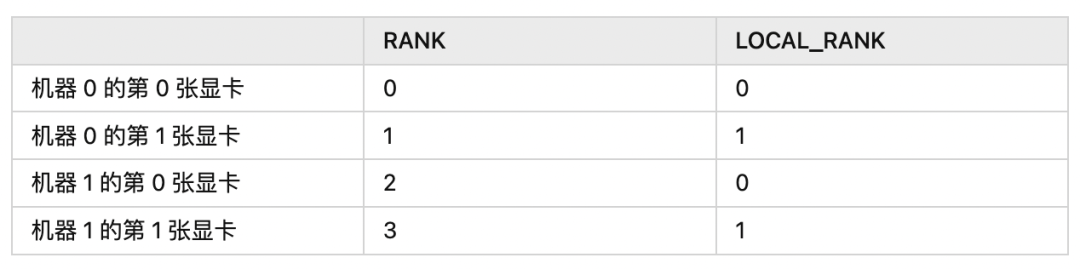
- OneFlow v0.8.0正式发布
- 如何在OneFlow中新增算子
- 我,AI博士生,在线众筹研究主题
- OneFlow源码一览:GDB编译调试
- 解读Pathways:向前一步是OneFlow
- LLVM之父:为什么我们要重建AI基础设施软件
- 大模型训练难?效率超群、易用的“李白”模型库来了
边栏推荐
猜你喜欢

Windows backs up the database locally by command

matlab simulink实现模糊pid对中央空调时延温度控制系统控制

Your login IP is not within the login mask configured by the administrator

arc-gis基础操作3

ZXing简化版,转载
PMM(Percona Monitoring and Management )安装记录

el-table实现增加/删除行,某参数跟着变

Fiddler download and installation
![[Online deadlock analysis] by index_ Deadlock event caused by merge](/img/67/0a02ad248c3ab21d3240e12aa23313.png)
[Online deadlock analysis] by index_ Deadlock event caused by merge

使用openLayer画箭头
随机推荐
会议OA项目(三)---我的会议(会议排座、送审)
I'm faded
服务器、客户端双认证(2)
登录模块用例编写
设置视图动态图片
E. Two Small Strings
Wechat applet avatarcropper avatar clipping
v-for动态设置img的src
JS output diamond on the console
[shutter -- layout] detailed explanation of the use of align, center and padding
[Online deadlock analysis] by index_ Deadlock event caused by merge
EOJ 2020 1月月赛 E数的变换
搜索模块用例编写
matlab simulink实现模糊pid对中央空调时延温度控制系统控制
TableviewCell高度自适应
大二上第一周学习笔记
arc-gis的基本使用2
Process32First返回false,错误x信息24
电机转速模糊pid控制
OFDM Lecture 16 - OFDM