当前位置:网站首页>教你如何通过MCU将S2E配置为UDP的工作模式
教你如何通过MCU将S2E配置为UDP的工作模式
2022-07-25 10:49:00 【WIZnet】
W5500S2E-S1是一款工业级串口转以太网模块,支持TCP Server、TCP Client和UDP三种工作模式,串口波特率最高可达1.152Mbps,并提供配套的上位机配置软件,也可通过网页或AT命令等方式轻松配置。
W5500S2E-S1模块集成了全硬件TCP/IP 协议栈以太网接口芯片W5500,网络通信更加快速、稳定、安全。用户只需根据手册中推荐的参考设计原理图,即可快速完成硬件电路的设计,降低开发难度,节省开发时间。
今天我们就实际的来接触一下W5500S2E-S1基于UDP工作模式的具体操作流程是什么样的,下面我们就来看看吧:
1、 具体操作流程
(1)、接线方式:
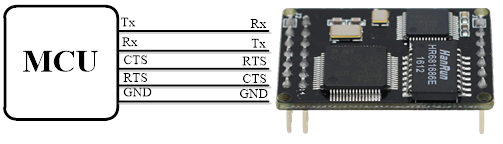
(2)、例程说明:
打开“通过MCU配置S2E为UDP例程”,主程序中第一部分TIM3_Init();是设定一个帧中断的时间定时器,这是因为该例程MCU的串口是通过帧中断来接收AT命令配置S2E后返回的数据的。

第二部分USARTX_Init();初始化MCU用到的串口,这里用USART1_Config();是printf功能,用于查看调试信息。USART2_Config();用于配置S2E,需要注意的是该串口的配置参数需要同S2E的串口配置参数一致,否则配置失败。

01 /****************************************************
02 函数名: UDP_Mode
03 形参: 无
04 返回值: 无
05 函数功能: 配置S2E为UDP模式
06 ****************************************************/
07 volatile uint8_t SendFlag=0;
08 09 void UDP_Mode(void)
10 {
11 uint8_t RecvFlag=1;
12 char *state;
13
14 switch(SendFlag)
15 {
16 case 0:
17 {
18 Usart_Send(USART2,"AT\r\n");
19 //终端检测命令
20 while(RecvFlag)
21 {
22 if(RX2_Point & FRAME_LEN)
23 //如果接收到数据
24 {
25 state=strstr((char *)RecvBuff,"OK");
26 if(state!=NULL)
27 {
28 RX2_Point=0;
29 //接收标志位置零
30 RecvFlag=0;
31 //状态标志位置零
32 SendFlag=1;
33 printf("Recv:%s\r\n",RecvBuff);
34 memset(RecvBuff,0,RECV_LEN);
35 }
36 else{
37 SendFlag=100;
38 RecvFlag=0;
39 }
40 }
41 }
42 }break;
43 case 1:
44 {
45 Usart_Send(USART2,"AT+ECHO=0\r\n");
46 //开启(1)/关闭(0)回显命令
47 RecvFlag=1;
48 while(RecvFlag)
49 {
50 if(RX2_Point & FRAME_LEN)//如果接收到数据
51 {
52 state=strstr((char *)RecvBuff,"OK");
53 if(state!=NULL)
54 {
55 RX2_Point=0;
56 RecvFlag=0;
57 SendFlag=2;
58 printf("Recv:%s\r\n",RecvBuff);
59 memset(RecvBuff,0,RECV_LEN);
60 }
61 else{
62 SendFlag=100;
63 RecvFlag=0;
64 }
65 }
66 }
67 }break;
68 case 2:
69 {
70 Usart_Send(USART2,"AT+C1_OP=2\r\n");
71 //配置为UDP模式命令
72 RecvFlag=1;
73 while(RecvFlag)
74 {
75 if(RX2_Point & FRAME_LEN)//如果接收到数据
76 {
77 state=strstr((char *)RecvBuff,"OK");
78 if(state!=NULL)
79 {
80 RX2_Point=0;
81 RecvFlag=0;
82 SendFlag=3; //状态标志位置零
83 printf("Recv:%s\r\n",RecvBuff);
84 memset(RecvBuff,0,RECV_LEN);
85 }
86 else{
87 SendFlag=100;
88 RecvFlag=0;
89 }
90 }
91 }
92 }break;
93 case 3:
94 {
95 Usart_Send(USART2,"AT+IP_MODE=1\r\n");
96 //配置为DHCP模式
97 RecvFlag=1;
98 while(RecvFlag)
99 {
100 if(RX2_Point & FRAME_LEN)//如果接收到数据
101 {
102 state=strstr((char *)RecvBuff,"OK");
103 if(state!=NULL)
104 {
105 RX2_Point=0;
106 RecvFlag=0;
107 SendFlag=4; //状态标志位置零
108 printf("Recv:%s\r\n",RecvBuff);
109 memset(RecvBuff,0,RECV_LEN);
110 }
111 else{
112 SendFlag=100;
113 RecvFlag=0;
114 }
115 }
116 }
117 }break;
118 case 4:
119 {
120 Usart_Send(USART2,"AT+C1_PORT=5000\r\n");
121 //配置本地端口号
122 RecvFlag=1;
123 while(RecvFlag)
124 {
125 if(RX2_Point & FRAME_LEN)//如果接收到数据
126 {
127 state=strstr((char *)RecvBuff,"OK");
128 if(state!=NULL)
129 {
130 RX2_Point=0;
131 RecvFlag=0;
132 SendFlag=5; //状态标志位置零
133 printf("Recv:%s\r\n",RecvBuff);
134 memset(RecvBuff,0,RECV_LEN);
135 }
136 else{
137 SendFlag=100;
138 RecvFlag=0;
139 }
140 }
141 }
142 }break;
143 case 5:
144 {
145 Usart_Send(USART2,"AT+C1_CLI_IP1=192.168.1.100\r\n");
146 //配置远端主机IP地址
147 RecvFlag=1;
148 while(RecvFlag)
149 {
150 if(RX2_Point & FRAME_LEN)//如果接收到数据
151 {
152 state=strstr((char *)RecvBuff,"OK");
153 if(state!=NULL)
154 {
155 RX2_Point=0;
156 RecvFlag=0;
157 SendFlag=6; //状态标志位置零
158 printf("Recv:%s\r\n",RecvBuff);
159 memset(RecvBuff,0,RECV_LEN);
160 }
161 else{
162 SendFlag=100;
163 RecvFlag=0;
164 }
165 }
166 }
167 }break;
168 case 6:
169 {
170 Usart_Send(USART2,"AT+C1_CLI_PP1=5000\r\n");
171 //配置本地远端端口号
172 RecvFlag=1;
173 while(RecvFlag)
174 {
175 if(RX2_Point & FRAME_LEN)//如果接收到数据
176 {
177 state=strstr((char *)RecvBuff,"OK");
178 if(state!=NULL)
179 {
180 RX2_Point=0;
181 RecvFlag=0;
182 SendFlag=7; //状态标志位置零
183 printf("Recv:%s\r\n",RecvBuff);
184 memset(RecvBuff,0,RECV_LEN);
185 }
186 else{
187 SendFlag=100;
188 RecvFlag=0;
189 }
190 }
191 }
192 }break;
193 case 7:
194 {
195 Usart_Send(USART2,"AT+START_MODE=0\r\n");
196 //配置启动模式(0--AT模式,1--数据模式)
197 RecvFlag=1;
198 while(RecvFlag)
199 {
200 if(RX2_Point & FRAME_LEN)//如果接收到数据
201 {
202 state=strstr((char *)RecvBuff,"OK");
203 if(state!=NULL)
204 {
205 RX2_Point=0;
206 RecvFlag=0;
207 SendFlag=8; //状态标志位置零
208 printf("Recv:%s\r\n",RecvBuff);
209 memset(RecvBuff,0,RECV_LEN);
210 }
211 else{
212 SendFlag=100;
213 RecvFlag=0;
214 }
215 }
216 }
217 }break;
218 case 8:
219 {
220 Usart_Send(USART2,"AT+EXIT\r\n");
221 //保存配置并进入数据模式
222 RecvFlag=1;
223 while(RecvFlag)
224 {
225 if(RX2_Point & FRAME_LEN)//如果接收到数据
226 {
227 state=strstr((char *)RecvBuff,"OK");
228 if(state!=NULL)
229 {
230 RX2_Point=0;
231 RecvFlag=0;
232 SendFlag=99; //状态标志位置零
233 printf("Recv:%s\r\n",RecvBuff);
234 memset(RecvBuff,0,RECV_LEN);
235 }
236 else{
237 SendFlag=100;
238 RecvFlag=0;
239 }
240 }
241 }
242 }break;
243 case 99:
244 {
245 printf("UDP Config Success!\r\n");
246 Config_OK=1;
247 }
248 default:
249 RecvFlag=100;break;
250 case 100:
251 {
252 printf("UDP Config Fail!\r\n");
253 Config_OK=1;
254 }break;
255 }
256 }
在下一篇“教你如何通过MCU将S2E配置为TCP Server的工作模式”中,我将继续与大家分享WIZnet W5500S2E-S1功能的实现,请大家拭目以待。
WIZnet官方网站:http://www.iwiznet.cn/
更多物联网应用,关注WIZnet官方微信号:

边栏推荐
- Redis之压缩列表ziplist
- Detailed explanation of the implementation method of DNS separation and resolution
- 只知道预制体是用来生成物体的?看我如何使用Unity生成UI预制体
- Summary of combination problems of Li Kou brush questions (backtracking)
- Use three.js to realize the cool cyberpunk style 3D digital earth large screen
- 将字符串转换为数字
- 信息熵的定义
- 第4章线性方程组
- 城市雕塑典型作品信息管理系统(图片分享系统SSM)
- How to judge the performance of static code quality analysis tools? These five factors must be considered
猜你喜欢

【电子器件笔记5】二极管参数和选型

MIIdock简述

Learn PHP -- phpstudy tips mysqld Exe: Error While Setting Value ‘NO_ ENGINE_ Solution of substitution error

工作面试总遇秒杀?看了京东T8大咖私藏的秒杀系统笔记,已献出膝盖

Only know that the preform is used to generate objects? See how I use unity to generate UI prefabs

What kind of product power does Hongguang miniev, the top seller of new energy, have?
信息熵的定义

大话DevOps监控,团队如何选择监控工具?

JVM性能调优方法
Job interviews are always a second kill? After reading the seckill system notes secretly stored by JD T8, I have given my knees

随机推荐
LVS load balancing lvs-nat building Web Cluster
Fillet big killer, use filter to build fillet and wave effect!
谣言检测文献阅读十一—Preventing rumor spread with deep learning
SQL language (6)
Details of the list of state products that Apple announced to be eligible for the sales tax holiday in the United States
PostgreSQL stepping on the pit | error: operator does not exist: UUID = character varying
RedisUtil
同事看了我的代码惊呼:居然是这么在Unity中用单例的
Small and micro enterprise smart business card management applet
Detailed explanation of lvs-nat and lvs-dr modes of LVS load balancing
LVS负载均衡之LVS-DR搭建Web群集与LVS结合Keepalived搭建高可用Web群集
[tree] 100. Same tree
Activity registration | play with kubernetes container service improvement class officially opened!
How does the whole network display IP ownership?
从宏观到微观 零基础 详解bert
shell-第五章作业
贪心问题01_活动安排代码分析
Common linear modulation methods based on MATLAB
Common web attacks and defense
MIIdock简述