当前位置:网站首页>Seata deployment and microservice integration
Seata deployment and microservice integration
2022-07-26 14:23:00 【Liu Chu, Ge Nian】
List of articles
Deploy Seata Of tc-server
1. download
First we need to download seata-server package , The address in http/seata.io/zh-cn/blog/download.html

Also prepared Baidu online disk download link for you :
link :https://pan.baidu.com/s/1gm3MWasl0AzAVBNb6vUC6Q?pwd=hcd6
Extraction code :hcd6
– From Baidu network disk super member V6 The share of

2. decompression
Unzip this in a non Chinese Directory zip package , Its directory structure is as follows :

3. Modify the configuration
modify conf In the catalog registry.conf file :
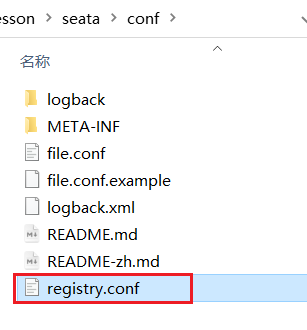
The contents are as follows :
registry {
  # tc Registry class of the service , Choose here nacos, It can also be eureka、zookeeper etc.
  type = "nacos"

  nacos {
    # seata tc  Service registered to  nacos Service name of , You can customize
    application = "seata-tc-server"
    serverAddr = "127.0.0.1:8848"
    group = "DEFAULT_GROUP"
    namespace = ""
    cluster = "SH"
    username = "nacos"
    password = "nacos"
  }
}

config {
  #  Read tc The configuration file of the server , From here nacos Configuration center read , So if tc It's clustering , Configuration can be shared
  type = "nacos"
  #  To configure nacos Address and other information
  nacos {
    serverAddr = "127.0.0.1:8848"
    namespace = ""
    group = "SEATA_GROUP"
    username = "nacos"
    password = "nacos"
    dataId = "seataServer.properties"
  }
}
Cover :

4. stay nacos Add the configuration
Particular attention , In order to make tc Clusters of services can share configurations , We chose nacos As a unified configuration center . Therefore, the server configuration file seataServer.properties Documents need to be in nacos Middle match .
The format is as follows :

The configuration is as follows :
#  Data storage mode ,db On behalf of the database
store.mode=db
store.db.datasource=druid
store.db.dbType=mysql
store.db.driverClassName=com.mysql.jdbc.Driver
store.db.url=jdbc:mysql://127.0.0.1:3306/seata?useUnicode=true&rewriteBatchedStatements=true
store.db.user=root
store.db.password=root
store.db.minConn=5
store.db.maxConn=30
store.db.globalTable=global_table
store.db.branchTable=branch_table
store.db.queryLimit=100
store.db.lockTable=lock_table
store.db.maxWait=5000
#  Business 、 Log and other configurations
server.recovery.committingRetryPeriod=1000
server.recovery.asynCommittingRetryPeriod=1000
server.recovery.rollbackingRetryPeriod=1000
server.recovery.timeoutRetryPeriod=1000
server.maxCommitRetryTimeout=-1
server.maxRollbackRetryTimeout=-1
server.rollbackRetryTimeoutUnlockEnable=false
server.undo.logSaveDays=7
server.undo.logDeletePeriod=86400000

#  Transmission mode between client and server
transport.serialization=seata
transport.compressor=none
#  close metrics function , Improve performance
metrics.enabled=false
metrics.registryType=compact
metrics.exporterList=prometheus
metrics.exporterPrometheusPort=9898
The database address 、 user name 、 Passwords need to be changed to your own database information .
5. Create database tables
Particular attention :tc Services when managing distributed transactions , You need to record transaction related data into the database , You need to create these tables in advance .
Create a new one called seata The database of , Run the following method to create a table
These tables mainly record global transactions 、 Branch business 、 Global lock information :
SET NAMES utf8mb4;
SET FOREIGN_KEY_CHECKS = 0;

-- ----------------------------
--  Branch transaction table
-- ----------------------------
DROP TABLE IF EXISTS `branch_table`;
CREATE TABLE `branch_table`  (
  `branch_id` bigint(20) NOT NULL,
  `xid` varchar(128) CHARACTER SET utf8 COLLATE utf8_general_ci NOT NULL,
  `transaction_id` bigint(20) NULL DEFAULT NULL,
  `resource_group_id` varchar(32) CHARACTER SET utf8 COLLATE utf8_general_ci NULL DEFAULT NULL,
  `resource_id` varchar(256) CHARACTER SET utf8 COLLATE utf8_general_ci NULL DEFAULT NULL,
  `branch_type` varchar(8) CHARACTER SET utf8 COLLATE utf8_general_ci NULL DEFAULT NULL,
  `status` tinyint(4) NULL DEFAULT NULL,
  `client_id` varchar(64) CHARACTER SET utf8 COLLATE utf8_general_ci NULL DEFAULT NULL,
  `application_data` varchar(2000) CHARACTER SET utf8 COLLATE utf8_general_ci NULL DEFAULT NULL,
  `gmt_create` datetime(6) NULL DEFAULT NULL,
  `gmt_modified` datetime(6) NULL DEFAULT NULL,
  PRIMARY KEY (`branch_id`) USING BTREE,
  INDEX `idx_xid`(`xid`) USING BTREE
) ENGINE = InnoDB CHARACTER SET = utf8 COLLATE = utf8_general_ci ROW_FORMAT = Compact;

-- ----------------------------
--  Global transaction table
-- ----------------------------
DROP TABLE IF EXISTS `global_table`;
CREATE TABLE `global_table`  (
  `xid` varchar(128) CHARACTER SET utf8 COLLATE utf8_general_ci NOT NULL,
  `transaction_id` bigint(20) NULL DEFAULT NULL,
  `status` tinyint(4) NOT NULL,
  `application_id` varchar(32) CHARACTER SET utf8 COLLATE utf8_general_ci NULL DEFAULT NULL,
  `transaction_service_group` varchar(32) CHARACTER SET utf8 COLLATE utf8_general_ci NULL DEFAULT NULL,
  `transaction_name` varchar(128) CHARACTER SET utf8 COLLATE utf8_general_ci NULL DEFAULT NULL,
  `timeout` int(11) NULL DEFAULT NULL,
  `begin_time` bigint(20) NULL DEFAULT NULL,
  `application_data` varchar(2000) CHARACTER SET utf8 COLLATE utf8_general_ci NULL DEFAULT NULL,
  `gmt_create` datetime NULL DEFAULT NULL,
  `gmt_modified` datetime NULL DEFAULT NULL,
  PRIMARY KEY (`xid`) USING BTREE,
  INDEX `idx_gmt_modified_status`(`gmt_modified`, `status`) USING BTREE,
  INDEX `idx_transaction_id`(`transaction_id`) USING BTREE
) ENGINE = InnoDB CHARACTER SET = utf8 COLLATE = utf8_general_ci ROW_FORMAT = Compact;

SET FOREIGN_KEY_CHECKS = 1;
6. start-up TC service
Get into bin Catalog , Run the seata-server.bat that will do :
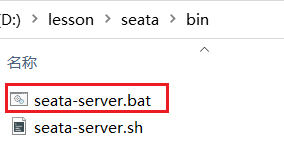
After successful startup ,seata-server Should have registered to nacos Registration Center .
Open the browser , visit nacos Address :http://localhost:8848, Then go to the service list page , You can see seata-tc-server Information about :

Microservice Integration seata
1. Introduce dependencies
First , We need to introduce... Into microservices seata rely on :
<dependency>
    <groupId>com.alibaba.cloud</groupId>
    <artifactId>spring-cloud-starter-alibaba-seata</artifactId>
    <exclusions>
        <!-- Lower version ,1.3.0, Thus eliminate -->
        <exclusion>
            <artifactId>seata-spring-boot-starter</artifactId>
            <groupId>io.seata</groupId>
        </exclusion>
    </exclusions>
</dependency>
<!--seata starter  use 1.4.2 edition -->
<dependency>
    <groupId>io.seata</groupId>
    <artifactId>seata-spring-boot-starter</artifactId>
    <version>${seata.version}</version>
</dependency>
2. Modify the configuration file
Need modification application.yml file , Add some configuration :
seata:
  registry: # TC Configuration of service registry , According to this information, microservices go to the registry to obtain tc Service address
    #  Reference resources tc Serve your own registry.conf Configuration in
    type: nacos
    nacos: # tc
      server-addr: 127.0.0.1:8848
      namespace: ""
      group: DEFAULT_GROUP
      application: seata-tc-server # tc The service is nacos Service name in
      cluster: SH
  tx-service-group: seata-demo #  Transaction group , According to this, get tc Service cluster name
  service:
    vgroup-mapping: #  Transaction group and TC service cluster The mapping relation of
      seata-demo: SH

边栏推荐
- Job 7.25 sorting and searching
- 全校软硬件基础设施一站式监控 ,苏州大学以时序数据库替换 PostgreSQL
- Mysql5.7 is installed through file zip - Ninth Five Year Plan xiaopang
- URL的使用下载资源
- Research on technology subject division method based on patent multi-attribute fusion
- Construction practice of pipeline engine of engineering efficiency ci/cd
- win10安装Dexdump并脱壳
- Joint entity and event extraction model based on multi task deep learning
- How can red star Macalline design cloud upgrade the traditional home furnishing industry in ten minutes to produce film and television level interior design effects
- Leetcode1170- compare the occurrence frequency of the minimum letter of the string (the corresponding occurrence frequency of each string minimum element in the map set storage array)
猜你喜欢
![[deep learning] fully connected network](/img/88/43f80b6a28773f9c4d2c31a8cb206b.png)
[deep learning] fully connected network

GOM登录器配置免费版生成图文教程

Sequence traversal of binary tree (implemented in C language)

Jzoffer (array; string; linked list)

Iscc2021 lock problem solution

What is the problem of the time series database that has been developed for 5 years?
![[ostep] 02 virtualized CPU - process](/img/0b/3f151ccf002eb6c0469bf74072a3c5.png)
[ostep] 02 virtualized CPU - process

How can red star Macalline design cloud upgrade the traditional home furnishing industry in ten minutes to produce film and television level interior design effects

Research on technology subject division method based on patent multi-attribute fusion
Unity学习笔记–无限地图
随机推荐
Flink SQL(三) 连接到外部系统System和JDBC
C语言_结构体指针变量引入
C language_ Combination of structure and array
URL的使用下载资源
全校软硬件基础设施一站式监控 ,苏州大学以时序数据库替换 PostgreSQL
图神经网络Core数据集介绍
OA项目之我的会议
Kubernetes----Pod配置资源配额
当AI邂逅生命健康,华为云为他们搭建三座桥
MySQL-03 数据库操作
请问下大家,flink sql有没有办法不输出update_before?
MLX90640 红外热成像仪测温传感器模块开发笔记(六)
Research on technology subject division method based on patent multi-attribute fusion
[ostep] 03 virtualized CPU - restricted direct execution mechanism
MySQL sets auto increment for existing primary keys
基于SPO语义三元组的疾病知识发现
[deep learning] fully connected network
TDengine 助力西门子轻量级数字化解决方案 SIMICAS 简化数据处理流程
注解和反射
关于存储芯片的入门基础知识