当前位置:网站首页>移动Web实训DAY-1
移动Web实训DAY-1
2022-06-28 12:55:00 【HHppGo】
1. 移动端特点
1.1 移动端和PC端网页不同点
- 尺寸不同:
- PC屏幕大,移动端屏幕小
- 内容位置不同:
- PC端内容在版心
- 移动端内容铺满屏幕的,占屏幕宽度的100%
- 总结:
- 通过比较不同点,我们就认识到了,不同的移动端,屏幕宽度不同
- 将来需要做移动端Web页面的适配(核心)

1.2 谷歌模拟器
- 作用:可以很方便的模拟出不同移动端设备,进行代码和效果调试
1.3 分辨率
即像素格数
为什么要了解设备分辨率?
- 不同的设备分辨率不相同的,为了知道将来开发参照什么分辨率写代码,需要了解分辨率
屏幕尺寸:
- 屏幕对角线的距离,单位英寸
屏幕分辨率:
- 物理分辨率
- 设备出厂的分辨率,属于硬件层面,不能改
- 逻辑分辨率
- 通过系统的驱动去缩放之后的分辨率,可以修改
- 开发时,参照那种分辨率?
- 逻辑分辨率
- 物理分辨率
1.4 视口
概念:
- 网页的可视区域

- 网页的可视区域
开发中,网页的宽度需要跟设备的逻辑像素宽度一致,如何实现?
<head>
  <meta charset="UTF-8">
  <meta http-equiv="X-UA-Compatible" content="IE=edge">
  <!-- 视口标签:保证网页宽度和设备的逻辑像素一样的 -->
  <!-- name="viewport" 表示 视口,页面的可视区域 -->
  <!-- content="width=device-width 表示 页面的可视区域的宽度是设备宽度(逻辑像素宽度) -->
  <!-- initial-scale=1.0" 表示分辨率的缩放比,1.0 == 100%,不缩放 -->
  <meta name="viewport" content="width=device-width, initial-scale=1.0">
  <title>测试视口宽度</title>
</head>
1.5 二倍图
设计师为什么要设计二倍图?
- 保证图片放在不同的屏幕上时,不会模糊
前端开发者,写代码参照哪个分辨率?
- 逻辑分辨率(对应的就是一倍图)
2. 百分比布局(了解)
效果:
宽度自适应,高度固定
宽度使用百分比的方式自适应
.toolbar li {

  float: left;
  /* 百分比布局:宽度自适应 让五个li标签,每个li标签占据父级的五分之一 20% */
  width: 20%;
  /* 百分比布局:高度固定 */
  height: 50px;
}
3. Flex布局
3.1 组成部分
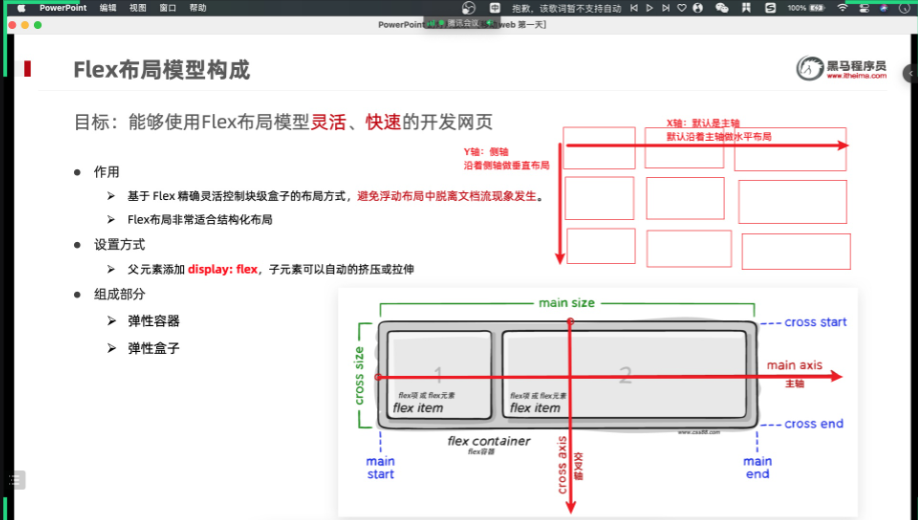
- 作用:
- 基于 Flex 精确灵活控制块级盒子的布局方式,避免浮动布局中脱离文档流现象发生。
- Flex布局非常适合结构化布局
- 设置方式:
- 父元素添加 display: flex;
- 组成部分:
- 弹性容器
- 弹性盒子
- 主轴
- 侧轴
3.2 主轴对齐方式
/* flex布局 */
display: flex;

/* 调整水平方向的间距 */

/* 默认值,从左往右依次排列,没有间距 */
justify-content: flex-start;

/* 默认值,从右向左依次排列,没有间距 */
justify-content: flex-end;

/* 沿着主轴方向居中排列,没有间距 */
 justify-content: center;

/* 沿着主轴方向,每个盒子都有相同的左右间距 */
 justify-content: space-around;

/* 沿着主轴方向,最左和最右的盒子紧贴着父级的左右,间距平局分配给其他盒子 */
 justify-content: space-between;

/* 沿着主轴方向,每个弹性盒子间距相同的 */
justify-content: space-evenly;
效果:
justify-content: center;沿着主轴方向居中排列,没有间距

justify-content: space-around;沿着主轴方向,每个盒子都有相同的左右间距
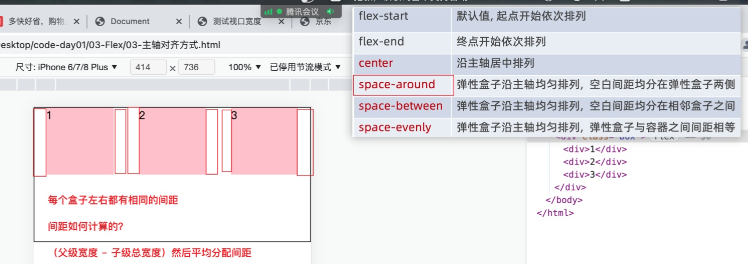
justify-content: space-between;沿着主轴方向,最左和最右的盒子紧贴着父级的左右,间距平局分配给其他盒子

justify-content: space-evenly;沿着主轴方向,每个弹性盒子间距相同的

边栏推荐
- arcgis pro 可以实现直连postgresql,编辑图层要素吗
- 投资98万美元的Saas项目失败了
- Matplotlib_ Study01
- Enterprise source code confidentiality scheme sharing
- 认识启动函数,找到用户入口
- 2022-06-28日报:LeCun最新论文:通往自主机器智能的道路
- Shareit a une force exceptionnelle et se connecte au top 7 de la liste mondiale des forces IAP
- pytorch模型调参、训练相关内容
- 同花顺上怎么进行开户啊, 安全吗
- 关于IP定位查询接口的测评Ⅰ
猜你喜欢

Ipetronik data acquisition equipment and softing q-vision software are committed to ADAS test scheme

ASP. NET CORE Study03

一款自动生成单元测试的 IDEA 插件,开发效率提升 70% 以上!

$100000 AI competition: the task of finding "worse" big models

ASP.NET CORE Study04

Copying open source for basic software is not advisable. Self reliance is the right way
Continuous integration practice of Baidu app based on pipeline as code

Login interface accesses and clears the token

命名空间和作用域
ASP. NET CORE Study04
随机推荐
Flink stream processing API collection: master all Flink stream processing technologies. Just read this article
如何在Microsoft Exchange 2010中安装SSL证书
深入理解贝叶斯定理
高考失利進哈工大,畢業卻留校要當“探索者”,丁效:科研就是厚積薄發
Understand leveldb write operation
Validateur async. Vérificateur de données JS
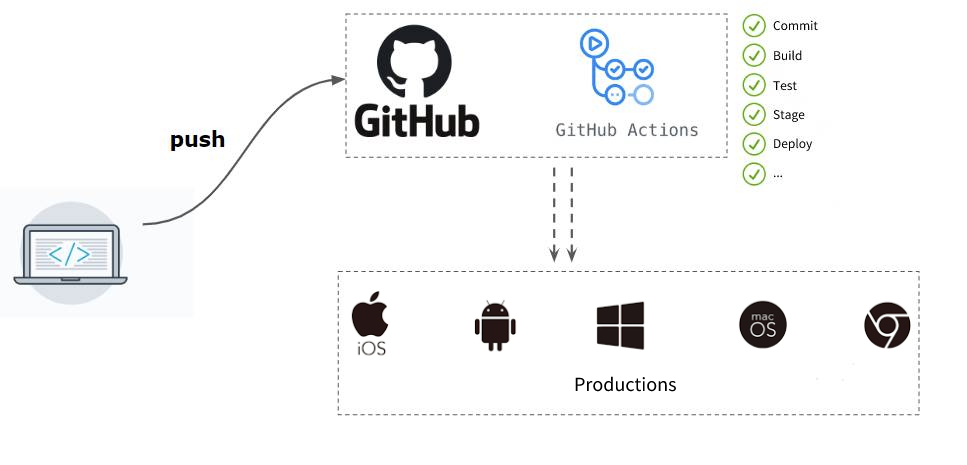
百度APP 基于Pipeline as Code的持续集成实践
unity发布 webgl在手机端 inputfield唤醒键盘输入
manjaro easyconnecy报错:libgtk-x11-2.0.so.0: cannot open shared object file: No such file or directory
Jerry's wif interferes with Bluetooth [chapter]
K3s one click installation script
[cloud native] can self-service reports and Bi do so many things?
Shareit a une force exceptionnelle et se connecte au top 7 de la liste mondiale des forces IAP
2022-06-28日报:LeCun最新论文:通往自主机器智能的道路
一文搞懂leveldb写操作
After failing in the college entrance examination, he entered Harbin Institute of technology, but stayed in the university after graduation to be an "Explorer". Ding Xiao: scientific research is accum
pytorch模型
自定义MySQL连接池
Unity releases webgl and wakes up keyboard input on the mobile terminal inputfield
k3s一键安装脚本