当前位置:网站首页>Detailed explanation of coordinate tracking of TF2 operation in ROS (example + code)
Detailed explanation of coordinate tracking of TF2 operation in ROS (example + code)
2022-06-12 07:09:00 【Fat fat is the sun】
Catalog
The file structure in the project is as follows :
4. launch Compilation of documents :
5. The running results are as follows :
The file structure in the project is as follows :

To realize coordinate tracking, we must first clarify the logic of code writing , Secondly, in our practice, we use “tf2 Dynamic coordinate transformation rather than static coordinate transformation ”!
Detailed explanation of dynamic coordinate transformation :
ROS Dynamic coordinate transformation in ( Dynamic parameter adjustment + Dynamic coordinate transformation )_ Super powerful blog -CSDN Blog  https://blog.csdn.net/weixin_45590473/article/details/122912545 Detailed explanation of static coordinate transformation :
1. start-up turtle1 Nodes and turtle1 Keyboard operation node for 、 subscribe turtle1 Pose information of 、 Release turtle1 Coordinate information of (getTurtle1Pose.cpp):
#include "geometry_msgs/Twist.h"
#include "turtlesim/Pose.h"
#include "ros/ros.h"
#include "tf2_ros/static_transform_broadcaster.h"
#include "geometry_msgs/TransformStamped.h"
#include "tf2/LinearMath/Quaternion.h"

void SubCallbackFunc(const turtlesim::Pose::ConstPtr& TurtlePoseInfo)
{
    // “static attribute ” Ensure that the publisher object remains unchanged
    static tf2_ros::StaticTransformBroadcaster pub;
    geometry_msgs::TransformStamped TransformInfo;
    tf2::Quaternion qtn;

    TransformInfo.child_frame_id = "Turtle1Frame";
    TransformInfo.header.frame_id = "world";
    TransformInfo.header.stamp = ros::Time::now();
    TransformInfo.transform.translation.x = TurtlePoseInfo->x;
    TransformInfo.transform.translation.y = TurtlePoseInfo->y;
    qtn.setRPY(0,0,TurtlePoseInfo->theta);
    TransformInfo.transform.rotation.w = qtn.getW();
    TransformInfo.transform.rotation.x = qtn.getX();
    TransformInfo.transform.rotation.y = qtn.getY();
    TransformInfo.transform.rotation.z = qtn.getZ();

    pub.sendTransform(TransformInfo);
}

int main(int argc,char* argv[])
{
    setlocale(LC_ALL,"");
    ros::init(argc,argv,"getTurtle1Pose");
    ros::NodeHandle nh("turtle1");
    //  subscribe turtle1 The position of ( Subscribe to messages via private topics )
    ros::Subscriber sub = nh.subscribe<turtlesim::Pose>("pose",10,boost::bind(SubCallbackFunc,_1));
    ros::spin();
    return 0;
}
Be careful :
1) To ensure the release turtle1 The publisher object of coordinate information is constant , In the function we will turtle1 The publishing object of coordinate information is declared as static Type of , Indicates that the publishing object is created only once , Prevented “ subscribe tf_static The disadvantage of frequent creation of topic publishing side objects ”;
2) The structure of the code is as follows :

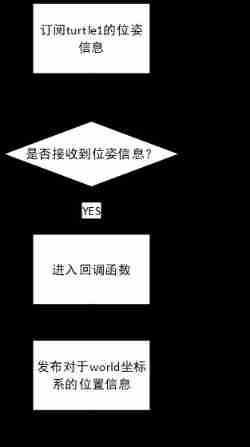
3) The code implementation logic is as follows :
2. start-up turtle2 node 、 subscribe turtle2 Pose information of 、 Release turtle2 Coordinate information of (getTurtle2Pose.cpp):
#include "geometry_msgs/Twist.h"
#include "turtlesim/Pose.h"
#include "ros/ros.h"
#include "tf2_ros/static_transform_broadcaster.h"
#include "geometry_msgs/TransformStamped.h"
#include "tf2/LinearMath/Quaternion.h"

void SubCallbackFunc(const turtlesim::Pose::ConstPtr& TurtlePoseInfo)
{
    // “static attribute ” Ensure that the publisher object remains unchanged
    static tf2_ros::StaticTransformBroadcaster pub;
    geometry_msgs::TransformStamped TransformInfo;
    tf2::Quaternion qtn;

    TransformInfo.child_frame_id = "Turtle1Frame";
    TransformInfo.header.frame_id = "world";
    TransformInfo.header.stamp = ros::Time::now();
    TransformInfo.transform.translation.x = TurtlePoseInfo->x;
    TransformInfo.transform.translation.y = TurtlePoseInfo->y;
    qtn.setRPY(0,0,TurtlePoseInfo->theta);
    TransformInfo.transform.rotation.w = qtn.getW();
    TransformInfo.transform.rotation.x = qtn.getX();
    TransformInfo.transform.rotation.y = qtn.getY();
    TransformInfo.transform.rotation.z = qtn.getZ();

    pub.sendTransform(TransformInfo);
}

int main(int argc,char* argv[])
{
    setlocale(LC_ALL,"");
    ros::init(argc,argv,"getTurtle1Pose");
    ros::NodeHandle nh("turtle1");
    //  subscribe turtle1 The position of ( Subscribe to messages via private topics )
    ros::Subscriber sub = nh.subscribe<turtlesim::Pose>("pose",10,boost::bind(SubCallbackFunc,_1));
    ros::spin();
    return 0;
}
Be careful :
1) The structure of the code is as follows :

2) The implementation logic of the code is as follows :

3. subscribe /tf_static Topic and get the relative relation of coordinate system 、 Release turtle2 Motion information (frameTransform.cpp):
#include "tf2_ros/buffer.h"
#include "tf2_ros/transform_listener.h"
#include "geometry_msgs/TransformStamped.h"
#include "geometry_msgs/Twist.h"
#include "tf2_geometry_msgs/tf2_geometry_msgs.h"
#include "math.h"

int main(int argc,char* argv[])
{
    setlocale(LC_ALL,"");
    ros::init(argc,argv,"frameTrasnform");
    //  Create exclusive to listener Of buffer
    tf2_ros::Buffer buffer;
    tf2_ros::TransformListener listener(buffer);
    //  establish cmd_vel The publisher of the topic
    geometry_msgs::Twist ExpectedRunState;
    ros::NodeHandle nh("turtle2");
    ros::Publisher pub = nh.advertise<geometry_msgs::Twist>("cmd_vel",10);

    ros::Rate rate(1);
    while(ros::ok())
    {
        try
        {
            geometry_msgs::TransformStamped Turtle1ToTurtle2 = buffer.lookupTransform("Turtle2Frame","Turtle1Frame",ros::Time());
            ExpectedRunState.angular.z = std::atan2(Turtle1ToTurtle2.transform.rotation.y,Turtle1ToTurtle2.transform.rotation.x);
            ExpectedRunState.linear.x = Turtle1ToTurtle2.transform.translation.x;
            ExpectedRunState.linear.y = Turtle1ToTurtle2.transform.translation.y;
        }
        catch(const std::exception& e)
        {
            std::cerr << e.what() << '\n';
        }
        pub.publish(ExpectedRunState);
        rate.sleep();
    }
}
Be careful :
1) In the code lookupTransform The third argument to the function represents “ The time interval for publishing the position information of the two coordinate systems to be converted ”, We usually set it to ros::Time(0)/ros::Time(), That is, invalid timestamp , This parameter indicates “ It is required to select the source coordinate system and target coordinate system with the shortest publishing time interval within the allowable range from all the source coordinate system and target coordinate system location information lists for conversion ”:

therefore , We use “3s Source coordinate system position information and 4s The location information of the target coordinate system published at ” Transform the relative position relationship of the coordinate system .
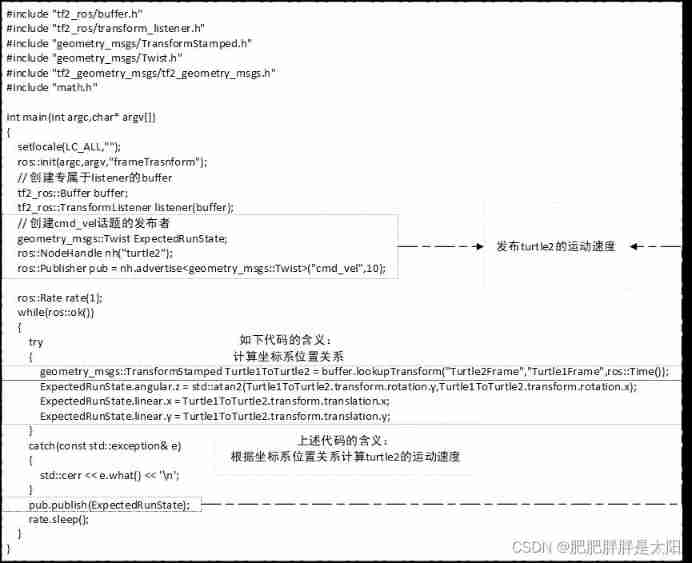
2) The code structure is as follows :
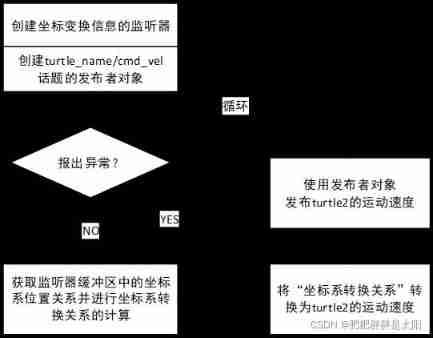
3) The code design logic is as follows :
4. launch Compilation of documents :
<launch>
    <!--  Start the first tortoise node and keyboard control node  -->
    <node pkg="turtlesim" type="turtlesim_node" name="turtlesim_node" output="screen" />
    <node pkg="turtlesim" type="turtle_teleop_key" name="turtle_teleop_key" output="screen"/>
    <!--  Release the coordinate information of the first turtle  -->
    <node pkg="tf2_turtle" type="getTurtle1Pose" name="getTurtle1Pose" output="screen"/>
    <!--  Create a second turtle and subscribe to publish coordinate information  -->
    <node pkg="tf2_turtle" type="getTurtle2Pose" name="getTurtle2Pose" output="screen"/>
    <!--  Coordinate transformation  -->
    <node pkg="tf2_turtle" type="frameTransform" name="frameTransform" output="screen"/>
</launch>
Generally, the logic of the whole project can be from launch From the document , Above launch The document tells us :
1) start-up turtlesim Under the function package turtlesim_node node :
Starting this node can be done in GUI In the middle of turtle1 node 、 Instantiate the publisher object of tortoise motion pose information ;
2) start-up turtlesim Under the function package turtle_teleop_key node :
Starting this node can instantiate the subscriber object of tortoise motion control information ;
3) Start the custom feature pack tf2_turtle Under the getTurtle2Pose node :
Starting this node can be done in GUI In the middle of turtle2 Node and subscribe to turtle2 Position and pose information of tortoise motion node ;
4) Start the custom feature pack tf2_turtle Under the getTurtle1Pose node :
Start this node to subscribe to turtle1 Position and pose information of tortoise motion node ;
5) Start the custom feature pack tf2_turtle Under the frameTransform node :
Start this node to listen to the relative position of the coordinate system 、 Calculated from the position relation of the coordinate system turtle2 Speed information 、 Release turtle2 Speed information .launch The writing syntax of the document is explained in detail :
5. The running results are as follows :

边栏推荐
- Planning and design of 1000 person medium-sized campus / enterprise network based on ENSP and firewall (with all configuration commands)
- leetcode:剑指 Offer 60. n个骰子的点数【数学 + 层次dp + 累计贡献】
- Interview intelligence questions
- Day 5 of pyhon
- Network packet loss troubleshooting
- 4 expression
- [image denoising] image denoising based on nonlocal Euclidean median (nlem) with matlab code
- Expansion of D @nogc
- Decoupling in D
- leetcode.39 --- 组合总和
猜你喜欢

Throw away the ugly toast. The movable toast is more interesting
5 ROS simulation modeling (4-navigation navigation simulation)

Jackson XML is directly converted to JSON without writing entity classes manually
![[image denoising] image denoising based on partial differential equation (PDE) with matlab code](/img/65/f8617beb05e163bd5f7dbade99a4a1.png)
[image denoising] image denoising based on partial differential equation (PDE) with matlab code
![[image denoising] salt and pepper noise image denoising based on Gaussian filter, mean filter, median filter and bilateral filter with matlab code attached](/img/f2/16db0b11d4e69946ec45b67ab41b81.png)
[image denoising] salt and pepper noise image denoising based on Gaussian filter, mean filter, median filter and bilateral filter with matlab code attached
descheduler 二次调度让 Kubernetes 负载更均衡
Postman splice replacement parameter loop call interface

Kali与编程:如何快速搭建OWASP网站安全实验靶场?

When SQL server2019 is installed, the next step cannot be performed. How to solve this problem?
"I was laid off by a big factory"
随机推荐
RT thread studio learning (IX) TF Card File System
Junior high school education, less than 3k, to 30k+ monthly salary, how wonderful life is without restrictions
Meituan won the first place in fewclue in the small sample learning list! Prompt learning+ self training practice
【图像去噪】基于高斯滤波、均值滤波、中值滤波、双边滤波四种滤波实现椒盐噪声图像去噪附matlab代码
leetcode:剑指 Offer 66. 构建乘积数组【前后缀积的应用】
Database syntax related problems, solve a correct syntax
基于eNSP加防火墙的千人中型校园/企业网络规划与设计(附所有配置命令)
Esp8266 firmware upgrade method (esp8266-01s module)
Explain in detail the use of dynamic parameter adjustment and topic communication in ROS (principle + code + example)
库里扛起了勇士对凯尔特人的第四场
How to update kubernetes certificates
SQL Server 2019 installation error. How to solve it
Go common usage
Leetcode: offer 60 Points of N dice [math + level DP + cumulative contribution]
A journey of database full SQL analysis and audit system performance optimization
node:打不开/node:已拒绝访问
TypeScript基础知识全集
Leetcode: Sword finger offer 67 Convert string to integer [simulation + segmentation + discussion]
Category 7
Interview intelligence questions