当前位置:网站首页>自定义kindeditor编辑器的工具栏,items即去除不必要的工具栏或者保留部分工具栏
自定义kindeditor编辑器的工具栏,items即去除不必要的工具栏或者保留部分工具栏
2022-06-24 09:40:00 【徊忆羽菲】
自定义kindeditor编辑器的工具栏,items即去除不必要的工具栏或者保留部分工具栏
kindeditor编辑器的工具栏简介

kindeditor编辑器的工具栏主要是指编辑器输入框上方的那些可以操作的菜单,默认情况下编辑器是给予了所有的工具栏。针对不同的用户,不同的项目,不同的环境,可能就需要保留部分工具栏。那么我们应该如何自定义自己想要的工具栏呢?工具栏如何编辑呢?我们分几种情况来加以阐述: 第一种:修改原始文件kindeditor.js对工具栏进行统一调整 kindeditor编辑器包内有一个kindeditor.js或者kindeditor-min.js文件,这个文件主要是包含了编辑器的整个基本配置以及一些基本的函数好方法。通过查找定位kindeditor编辑器的基本配置属性options,然后可以看到其内有一个items项: items: [“source”, “|”, “undo”, “redo”, “|”, “preview”, “print”,…
kindeditor编辑器的工具栏主要是指编辑器输入框上方的那些可以操作的菜单,默认情况下编辑器是给予了所有的工具栏。针对不同的用户,不同的项目,不同的环境,可能就需要保留部分工具栏。那么我们应该如何自定义自己想要的工具栏呢?工具栏如何编辑呢?我们分几种情况来加以阐述:
第一种:修改原始文件kindeditor.js对工具栏进行统一调整
kindeditor编辑器包内有一个kindeditor.js或者kindeditor-min.js文件,这个文件主要是包含了编辑器的整个基本配置以及一些基本的函数好方法。通过查找定位kindeditor编辑器的基本配置属性options,然后可以看到其内有一个items项:
	items : [
		'source', '|', 'undo', 'redo', '|', 'preview',  'template', 'code', 'cut', 'copy', 'paste',
		'plainpaste', 'wordpaste', '|', 'justifyleft', 'justifycenter', 'justifyright',
		'justifyfull', 'insertorderedlist', 'insertunorderedlist', 'indent', 'outdent', 'subscript',
		'superscript', 'clearhtml', 'quickformat', 'selectall', '|', 'fullscreen', '/',
		'formatblock', 'fontname', 'fontsize', '|', 'forecolor', 'hilitecolor', 'bold',
		'italic', 'underline', 'strikethrough', 'lineheight', 'removeformat', '|', 'image',
		'media',  'table', 'hr', 'emoticons', 'baidumap',
		'link', 'unlink', '|'
	],
这个items所配置的就是kindeditor编辑器所有的工具栏菜单项。我们可以在这里统一修改保留自己想要的几个菜单即可。另外这对每一个菜单code所表示的含义进行一个说明:
source:表示可以切换编辑器的编辑模式进入源代码HTML查看模式;
undo:表示后退,也就是我们常用的CTRL+Z快捷键功能;
redo:表示前进,也就是我们常用的CTRL+Y快捷键功能;
preview:表示预览,点击可以提前预览编辑器内的内容所展示的效果。
print:表示打印编辑器内的内容。
template:表示可以插入编辑器内的模板窗体;
code:表示可以插入代码段;
cut:表示剪切;
copy:表示复制,如同CTRL+C;
paste:表示粘贴,如同CTRL+V;
plainpaste:表示粘贴为无格式文本,主要是用于比如想赋值其他有HTML格式的纯文本进入编辑器,可以先在这里面进行HTML标签的过滤;
wordpaste:表示从WORD内粘贴;
justifyleft:表示选中文本居左;
justifycenter:表示选中文本居中;
justifyright:表示选中文本居右;
justifyfull:表示两端对齐;
insertorderedlist:表示编号(1、2、3);
insertunorderedlist:表示项目符号;
indent:表示增加缩进;
outdent:表示减少缩进;
subscript:表示下标;如同:X2
superscript:表示上标;如同:X2
clearhtml:表示清除HTML标签;
quickformat:表示快速排版;
selectall:表示全选;
fullscreen:表示全屏;
formatblock:表示段落;
fontname:表示字体;
fontsize:表示文字大小;
forecolor:表示文字颜色;
hilitecolor:表示文字背景色;
bold:表示文字加粗;
italic:表示文字斜体;
underline:表示给文字追加下划线;
strikethrough:表示给文字追加删除线;
lineheight:表示调整行距;
removeformat:表示删除选中段的格式;
image:表示单个上传图片;
multiimage:表示批量上传图片;
flash:表示插入flash;
media:表示插入音视频文件;
insertfile:表示插入文件;
table:表示插入表格;
hr:表示插入横线;
emoticons:表示插入表情;
baidumap:表示插入地图;
pagebreak:表示插入分页符;
anchor:表示插入锚点;
link:表示插入超链接;
unlink:表示取消超级链接;一般和link配合出现;
about:表示关于kindeditor编辑器的信息;
第二种:在使用kindeditor编辑器的页面内进行配置工具栏菜单
我们在页面内如果要用kindeditor编辑器都会编写一个KindEditor.ready的方法
 KindEditor.ready(function(K) {

     editor = K.create('textarea[name="content"]', {


          });
 });
如果在create方法内尚未对其items进行任何指定,那么就会默认继承kindeditor.js内的items的配置,也就是全部菜单。当我们在create方法内指定了items属性后就会值显示这里所配置的工具栏菜单,如:
 KindEditor.ready(function(K) {

     editor = K.create('textarea[name="content"]', {

                items:["image", "multiimage"] //配置kindeditor编辑器的工具栏菜单项
         });
 });
如下图:只保留了,上传图片和批量上传图片的菜单项,头像是之前上传的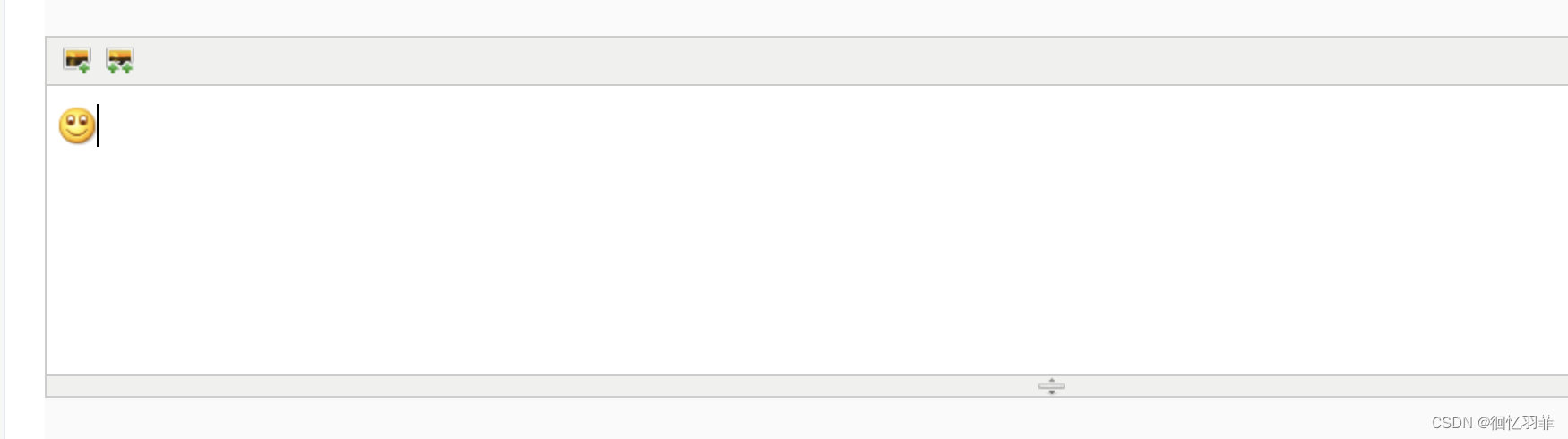
边栏推荐
猜你喜欢

Canvas draw picture

Practical analysis: implementation principle of APP scanning code landing (app+ detailed logic on the web side) with source code
简单的价格表样式代码

SSH Remote Password free login

Development of anti fleeing marketing software for health products

Operator details

Floating point notation (summarized from cs61c and CMU CSAPP)

411 stack and queue (20. valid parentheses, 1047. delete all adjacent duplicates in the string, 150. inverse Polish expression evaluation, 239. sliding window maximum, 347. the first k high-frequency
Phpstrom code formatting settings

Queue queue
随机推荐
观察者模式
Canvas draw picture
小程序学习之获取用户信息(getUserProfile and getUserInfo)
Dragging El table sortablejs
dedecms模板文件讲解以及首页标签替换
port 22: Connection refused
LeetCode: 137. Number II that appears only once
How to standardize data center infrastructure management process
植物生长h5动画js特效
CICFlowMeter源码分析以及为满足需求而进行的修改
How to solve multi-channel customer communication problems in independent stations? This cross-border e-commerce plug-in must be known!
LeetCode: 240. Search 2D matrix II
Can the long-term financial products you buy be shortened?
p5.js实现的炫酷交互式动画js特效
Array seamless scrolling demo
Thinkphp5 clear the cache cache, temp cache and log cache under runtime
canvas无限扫描js特效代码
PHP encapsulates a file upload class (supports single file and multiple file uploads)
SQL Server AVG函数取整问题
学习使用php实现无限极评论和无限极转二级评论解决方案