当前位置:网站首页>Kotlin uses viewpager2+fragment+bottomnavigationview to implement the style of the switching module of the bottom menu bar.
Kotlin uses viewpager2+fragment+bottomnavigationview to implement the style of the switching module of the bottom menu bar.
2022-06-26 03:43:00 【yyxhzdm】
design sketch :
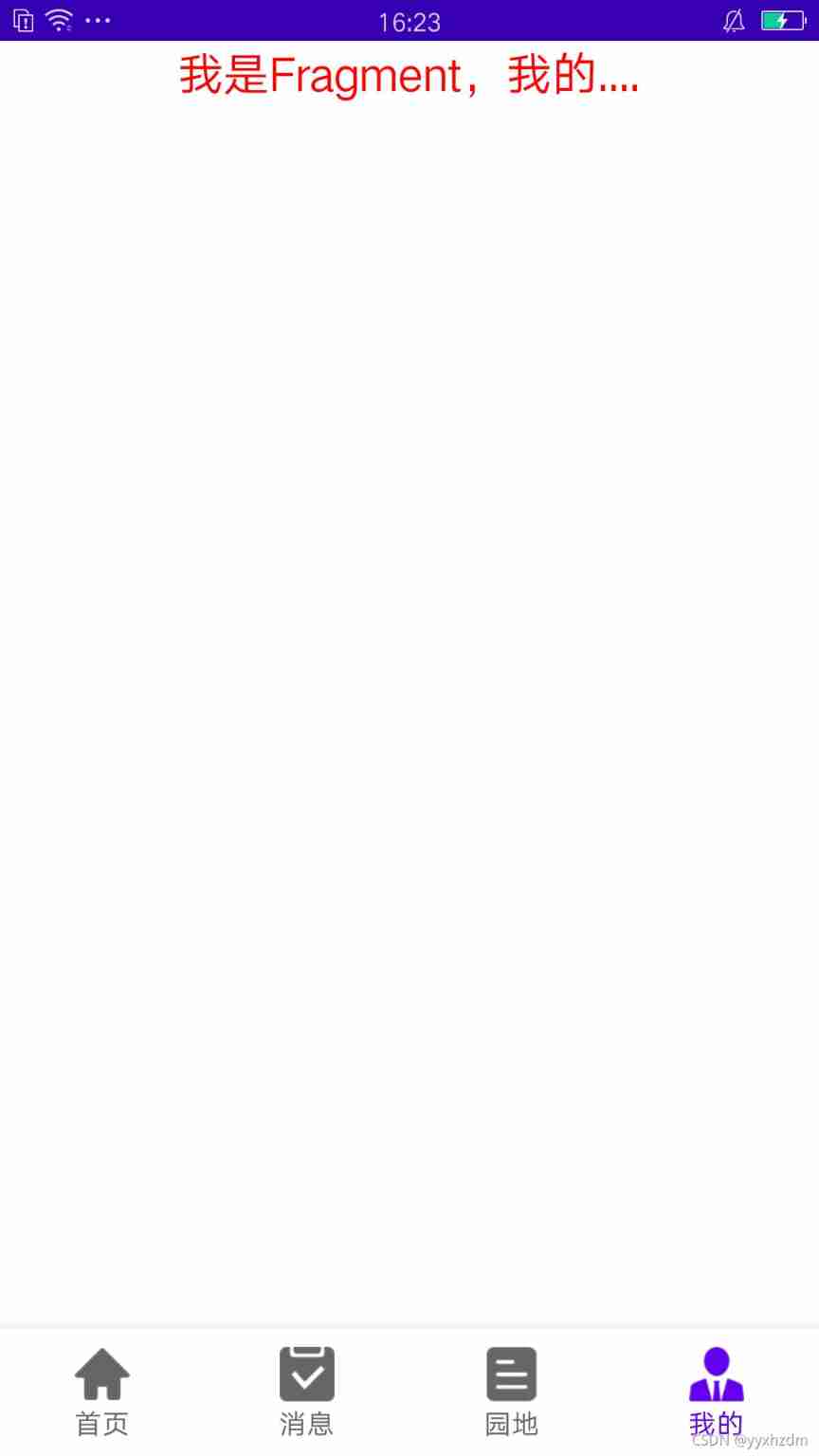

Implementation steps :
1. First, in the app Of builde Reference in file ViewPager2
implementation 'androidx.viewpager2:viewpager2:1.0.0-alpha01'
2. Add layout of first page xml
<?xml version="1.0" encoding="utf-8"?>
<RelativeLayout xmlns:android="http://schemas.android.com/apk/res/android"
    android:layout_width="match_parent"
    android:layout_height="match_parent">

    <androidx.viewpager2.widget.ViewPager2
        android:id="@+id/mainViewPager"
        android:layout_width="match_parent"
        android:layout_height="match_parent"
        android:layout_above="@+id/navigationView" />

    <com.google.android.material.bottomnavigation.BottomNavigationView
        android:id="@+id/navigationView"
        android:layout_width="match_parent"
        android:layout_height="wrap_content"
        android:layout_alignParentBottom="true"
        android:background="#FFFFFF" />

</RelativeLayout>
3. establish home Activity page
package com.example.tasklayoutdemo

import android.content.Context
import android.content.Intent
import androidx.fragment.app.Fragment
import androidx.viewpager2.widget.ViewPager2
import com.example.tasklayoutdemo.base.BaseAppActivity
import com.example.tasklayoutdemo.fragment.*
import com.google.android.material.bottomnavigation.LabelVisibilityMode
import kotlinx.android.synthetic.main.home_activity.*

class Home : BaseAppActivity() {

    companion object {
        fun startHomeActivity(context: Context) {
            context.startActivity(Intent(context, Home::class.java))
        }

        // Pass parameters
        fun startHomeActivity2(
            context: Context,
            userid: String,
            token: String
        ) {
            context.startActivity(Intent(context, Home::class.java).apply {
                putExtra("UserId", userid)
                putExtra("Token", token)
            })
        }

    }

    override fun getLayout(): Int {
        return R.layout.home_activity
    }

    override fun initView() {


    }

    override fun initDate() {
        val fragmentArr = ArrayList<Fragment>()
        fragmentArr.add(ShoeYeFragment.instance)
        fragmentArr.add(InfoFragment.instance)
        fragmentArr.add(FindFragment.instance)
        fragmentArr.add(MineFragment.instance)

        navigationView.menu.add(0, 0, 1, " home page ").setIcon(R.drawable.tab_1)
        navigationView.menu.add(0, 1, 1, " news ").setIcon(R.drawable.tab_2)
        navigationView.menu.add(0, 2, 1, " garden plot ").setIcon(R.drawable.tab_4)
        navigationView.menu.add(0, 3, 1, " my ").setIcon(R.drawable.tab_3)
        /**
         *  No prevents the user from sliding the page
         * */
        mainViewPager.isUserInputEnabled = false
        /**
         *  Set up ViewPager2 Sliding listening events for
         * isUserInputEnabled = true  when
         * */
        mainViewPager.registerOnPageChangeCallback(object : ViewPager2.OnPageChangeCallback() {
            override fun onPageSelected(position: Int) {
                // Set the selected position of the navigation bar
                navigationView.menu.getItem(position).setChecked(true)
            }
        })

        mainViewPager.adapter = PagerAdapter(this, fragmentArr)
        navigationView.labelVisibilityMode = LabelVisibilityMode.LABEL_VISIBILITY_LABELED
        /**
         *  Set navigation bar menu items Item Select monitor
         * */
        navigationView.setOnNavigationItemSelectedListener {
            mainViewPager.currentItem = it.itemId
            true
        }

    }
}
4. Create the corresponding Fragment page ( In the example, you need to create four , I posted a code , The others are the same )
package com.example.tasklayoutdemo.fragment

import android.os.Bundle
import android.view.LayoutInflater
import android.view.View
import android.view.ViewGroup
import androidx.fragment.app.Fragment
import com.example.tasklayoutdemo.R
import kotlinx.android.synthetic.main.shouye_fragment.*

class ShoeYeFragment : Fragment() {

    companion object {
        val instance: ShoeYeFragment by lazy(mode = LazyThreadSafetyMode.SYNCHRONIZED) {
            ShoeYeFragment()
        }
    }

    override fun onCreateView(
        inflater: LayoutInflater,
        container: ViewGroup?,
        savedInstanceState: Bundle?
    ): View? {
        return inflater.inflate(R.layout.shouye_fragment, container, false)
    }

    override fun onActivityCreated(savedInstanceState: Bundle?) {
        super.onActivityCreated(savedInstanceState)

        tv_content.text = " I am a Fragment, home page ...."

    }

}
Fragment Corresponding layout file
........
5. establish PagerAdapter
package com.example.tasklayoutdemo.fragment

import androidx.fragment.app.Fragment
import androidx.fragment.app.FragmentActivity
import androidx.viewpager2.adapter.FragmentStateAdapter

class PagerAdapter : FragmentStateAdapter {
    private var fragments: List<Fragment>

    constructor(fragmentActivity: FragmentActivity, fragments: List<Fragment>) : super(
        fragmentActivity
    ) {
        this.fragments = fragments
    }

    constructor(fragment: Fragment, fragments: List<Fragment>) : super(
        fragment
    ) {
        this.fragments = fragments
    }

    override fun getItemCount(): Int {
        return fragments.size
    }

    override fun createFragment(position: Int): Fragment {
        return fragments[position]
    }

}
6. Add navigation bar icon
complete , Can run
7. Advanced
among app:itemTextColor="@drawable/main_bottom" Select the color of the font when the setting button is checked and unchecked
app:itemIconTint="@drawable/main_bottom" Select the color of the icon when the setting button is checked and unchecked
main_bottom.xml File for :
<?xml version="1.0" encoding="utf-8"?>
<selector xmlns:android="http://schemas.android.com/apk/res/android">
    <item android:color="@android:color/holo_red_light" android:state_checked="true" />
    <item android:color="@color/black" android:state_checked="false" />
</selector>
边栏推荐
- 2022年挖财证券开户安全嘛?
- Butterknife unbinder uses flashback in fragment and viewpager
- Uni app Baidu cloud realizes OCR ID card recognition
- 2022.6.23-----leetcode.30
- 智能制造学习记录片和书籍
- USB driver -debug
- Kotlin quick start
- 双碳红利+基建大年 | 图扑深耕水利水电绿色智能装备领域
- Andorid hide the title bar of the system
- 360 second understanding of smartx hyper converged infrastructure
猜你喜欢




随机推荐
Preparation for wechat applet development
Request object, send request
jupyter notebook的插件安装以及快捷键
Uni app custom selection date 1 (September 16, 2021)
2022.6.25-----leetcode.剑指offer.091
评价——层次分析
Group note data representation and operation check code
Butterknife unbinder uses flashback in fragment and viewpager
mysql存儲過程
经典模型——NiN&GoogLeNet
Procédures stockées MySQL
动态线段树leetcode.715
USB driver -debug
Pay attention to the entrance components of official account in the applet
Is Guoxin golden sun reliable? Is it safe to open a securities account?
kotlin快速上手
View of MySQL
Classic model – RESNET
Double carbon bonus + great year of infrastructure construction 𞓜 deep ploughing into the field of green intelligent equipment for water conservancy and hydropower
Hardware creation principle of campus maker space