当前位置:网站首页>##Kibana+ELK集群日志处理
##Kibana+ELK集群日志处理
2022-06-22 15:40:00 【51CTO】
Elasticsearch部署
一. 安装JDK1.8
(1)创建安装目录
(2)将tar包准备好解压至安装目录
(3)设置环境变量
在末尾添加
       [[email protected] ~]# vim /etc/profile


export JAVA_HOME=/usr/local/java/jdk1.8.0_162


export JRE_HOME=${JAVA_HOME}/jre


export CLASSPATH=.:${JAVA_HOME}/lib:${JRE_HOME}/lib


export PATH=${JAVA_HOME}/bin:$PATH
- 1.
- 2.
- 3.
- 4.
- 5.

(4)使环境变量生效
(5)添加软链接
(6)检查

二. 安装es7
(1)创建安装目录
顺便到这个网址下载这个tar包
https://elasticsearch.cn/download/
(2)解压至安装目录
(3)解压至安装目录,修改配置/usr/local/es/elasticsearch-7.6.2/config/jvm.options,内存占用可以调小一点

(4)修改配置/usr/local/es/elasticsearch-7.6.2/config/elasticsearch.yml
①修改数据和日志目录

②修改绑定ip,允许远程访问

③保留一个节点

三. 修改linux内核参数
1. 修改/etc/security/limits.conf 增加下面内容
       [[email protected] ~]# vim /etc/security/limits.conf


* soft nproc 65535


* hard nproc 65535


* soft nofile 65535


* hard nofile 131072
- 1.
- 2.
- 3.
- 4.
- 5.
2. 修改/etc/sysctl.conf 增加下面内容
3.然后执行命令,使配置生效
四. 创建账户esuser,因为es默认不允许以root账户运行
//创建用户组
//创建用户
//设置权限
//设置密码
五. 启动
//切换用户
//切换目录
//启动es
//后台启动es
//查找es进程
输入 http://ip:9200,看到返回一串 JSON 格式的代码就说明已经成功了

Logstash安装部署(和es放在同一个服务器)
一、安装Ruby
       [[email protected] ~]#mkdir /usr/local/ruby/


[[email protected] ~]#tar -zxvf ruby-2.7.1.tar.gz -C /usr/local/ruby/


[[email protected] ~]#cd /usr/local/ruby/ruby-2.7.1


[[email protected] ~]#./configure


[[email protected] ~]#make


[[email protected] ~]#make install
- 1.
- 2.
- 3.
- 4.
- 5.
- 6.
安装好后,输入ruby -v查看是否安装成功:

二、安装logstash
从官网下载logstash:https://www.elastic.co/downloads/logstash
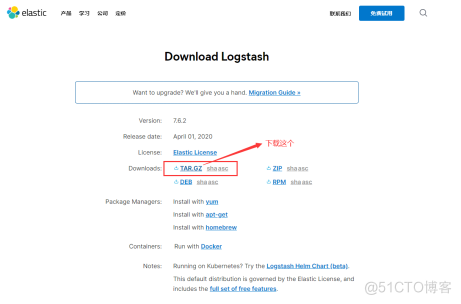
(1)创建安装目录
(2)解压至安装目录
(3)切换到bin目录
(4)查看版本号
出现如下界面,说明安装成功:

Kibana部署安装
一、安装Kibana
从官网下载Kibana:https://www.elastic.co/cn/downloads/kibana
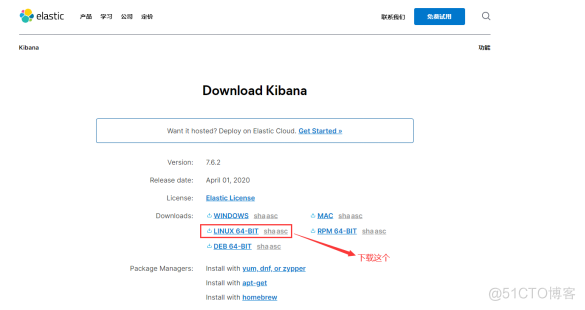
(1)创建安装目录
(2)解压至安装目录
(3) 编辑kibana.yml
       vi  /usr/local/kibana/kibana-7.6.2-linux-x86_64/config/kibana.yml


# 端口


server.port: 5601


# 允许访问的IP地址


server.host: "0.0.0.0"


# es的地址


elasticsearch.hosts: ["http://212.64.29.192:9200"]


# Kibana在es中的索引


kibana.index: ".kibana"


# es中kibana的用户名


elasticsearch.username: "kibana"


# es中kibana的密码


elasticsearch.password: "es123456"


# 设置中文显示


i18n.locale: "zh-CN"
- 1.
- 2.
- 3.
- 4.
- 5.
- 6.
- 7.
- 8.
- 9.
- 10.
- 11.
- 12.
- 13.
- 14.
- 15.
(4)切换到bin目录
(5)启动
(5)后台启动
二、访问Kibana
通过浏览器访问 http://192.168.124.184:5601,可以看到kibana的登陆界面
输入es中的elastic用户名和密码登陆主界面

边栏推荐
- spark-shuffle的读数据源码分析
- mysql账号增删改、数据导入导出命令举例
- MySQL string field to floating point field
- spark-cache的源码分析
- Problems and recovery of spark streaming checkpoint
- 购买指南丨如何购买一台高质量会议平板,这几个方面一定要对比
- 股票在哪家的平台买比较安全呢?
- Redis implements the correct posture of the delay queue
- 推荐7款超级好用的终端工具 —— SSH+FTP
- MTLs guidelines for kubernetes engineers
猜你喜欢

关于#数据库#的问题,如何解决?

In the era of video explosion, who is supporting the high-speed operation of video ecological network?

Windows8.1 64 installed by mysql5.7.27

Qt Notes - qmap Custom key

来厦门了!线上交流限额免费报名中

170million passwords of Netcom learning link have been leaked! What are the remedies?

You call this crap high availability?

企业级软件开发新模式:低代码

WPF effect chapter 190: playing listbox again

团队管理|如何提高技术 Leader 的思考技巧?
随机推荐
从Application提交角度审视Executor
华为云招募工业智能领域合作伙伴,强力扶持+商业变现
有同学问PHP要学什么框架?
推荐7款超级好用的终端工具 —— SSH+FTP
Scala for derivation: the ability to define a value in the first part of a for expression and use it in subsequent (outer) expressions
CMB model 23 ukey is not recognized on win7
You call this crap high availability?
Purchase guide - how to purchase a high-quality conference tablet, these aspects must be compared
Post to asp Net core length limitation and solution when transferring data
STM32通过DMA进行ADC采集(HAL库)
Docker之MySQL主从连接提示:Communications link failure
System throughput, TPS (QPS), user concurrency, performance test concepts and formulas
Short video source code development, high-quality short video source code need to do what?
Vs2017 solution to not displaying qstring value in debugging status
来厦门了!线上交流限额免费报名中
MTLs guidelines for kubernetes engineers
启牛学堂给的中信建投证券账户是不是真的?开户安全吗
Figure operation flow of HAMA BSP Model
ABP Framework 5.3.0 版本新增功能和变更说明
Is the CSC securities account given by qiniu school true? Is it safe to open an account