当前位置:网站首页>How to open archives in administrator mode
How to open archives in administrator mode
2022-08-11 05:45:00 【FussyCat】
Downloaded the Android source code today, and when I unzipped it, the problem of "Cannot create symbolic link xxx" "You may need to run WinRAR as administrator" was reported.
How to open it as an administrator,
1. There is no "open as administrator" menu in the right-click menu, discard it.
2. Open from the application:
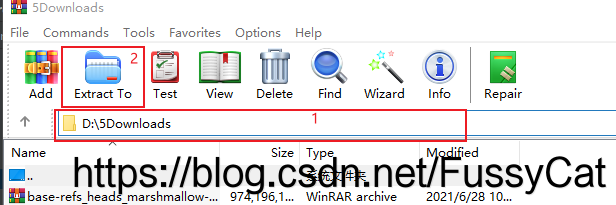
Press the "Window" key, enter "WinRAR", and click "Run as administrator"

Then enter the path of the compressed package to be opened in position 1 in the figure, and then click 2 in the figure to decompress it to the target path.
边栏推荐
猜你喜欢


随机推荐
leetcode21. Merge two ordered linked lists
第13章 类的继承-1
第二篇 DS5 Armv8 样例工程报错之GCC编译
第10章 对象和类-2
自制病毒——整蛊
【分享】一个免费语料库
开炮,开炮
QtDataVisualization 数据3D可视化
Flask框架学习:路由的尾部斜杠
第6章 分支语句和逻辑运算符
做款好喝的茶饮~
简单做份西红柿炒蛋778
2021研究生数学建模D题,BP神经网络和卷积神经网络解题代码(基于pytorch)
(2) Construction of a real-time performance monitoring platform (Grafana+Prometheus+Jmeter)
(3) How Redis performs stress testing
【备忘】从零开始搭建Yolo5训练环境
QT circle函数(图片标注)
吃瓜教程task01 第1章 绪论
06-引入Express创建web服务器、接口封装并使用postman测试,静态资源托管
selenuim使用cookie登录京东