当前位置:网站首页>Detailed explanation of MSTP protocol for layer 3 switch configuration [Huawei ENSP experiment]
Detailed explanation of MSTP protocol for layer 3 switch configuration [Huawei ENSP experiment]
2022-07-23 20:36:00 【Hua Weiyun】
One , Preface
MSTP: Operate between the access layer switch and the convergence layer switch MSTP, Prevent the infinite circulation of data in the switching network, resulting in the paralysis of the switching network , It can also balance the load
In the last article, we have successfully configured the route / Three layer switch DHCP Distribution address . Now let's complete the three-layer switch configuration MSTP The task of the agreement .
The task requirements are as follows :
8. To improve the reliability of the network , Each layer-2 access device needs to be interconnected with the convergence layer device , So you need to configure STP The protocol prevents the occurrence of loops on the basis of ensuring reliability .( expand )
10.MSTP、VRRP These technologies can be considered and implemented by students according to the situation .( expand )
Let's first look at the topology :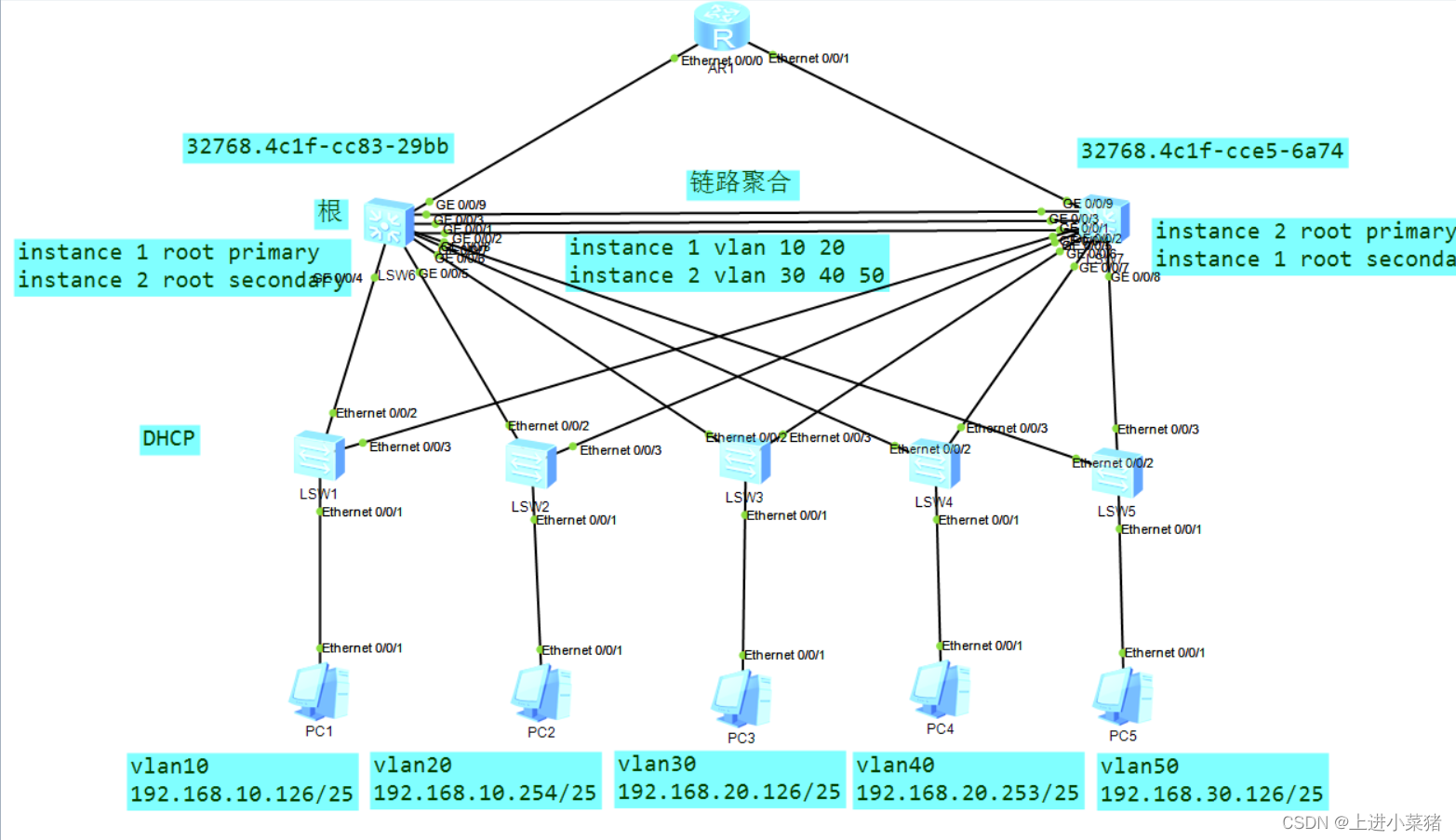
Two , Example — Simple configuration MSTP agreement
The topology is as follows :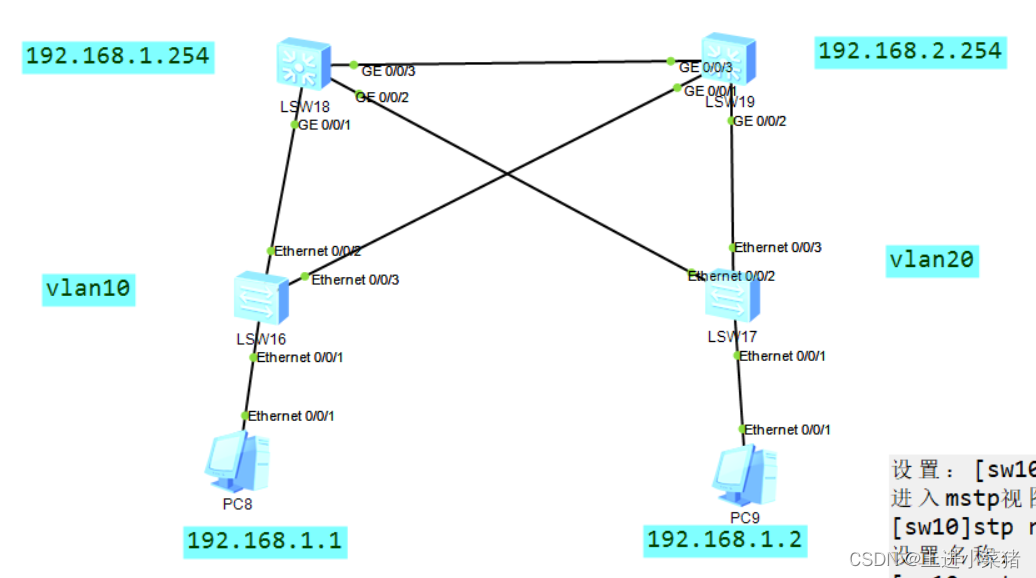
First step lsw16 To configure
1. First create vlan
vlan batch 10 202. To 1 Port configuration
int eth 0/0/13. Configure the communication mode
port link-type accessBe careful :
port default vlan 104. The other two ports
[sw1]port-group group-member Ethernet 0/0/2 to Ethernet 0/0/35. Configure to trunk
port link-type trunk6. Run through all vlan
port trunk allow-pass vlan allThe second step lsw17 To configure
Same as above .
The only difference is :
Be careful :
port default vlan 20Step 3: configure the convergence layer switch LSW18
1. First create vlan
vlan batch 10 202. grouping
port-group group-member GigabitEthernet 0/0/1 to GigabitEthernet 0/0/33. Configure to trunk
port link-type trunkOutput is as follows :
[cour1-GigabitEthernet0/0/1]port link-type trunk [cour1-GigabitEthernet0/0/2]port link-type trunk [cour1-GigabitEthernet0/0/3]port link-type trunk 4. Settings allow all vlan adopt
port trunk allow-pass vlan allStep 4 configure the convergence layer switch LSW19
And the third step is to configure the convergence layer switch LSW18 Same steps .
Step 5 configuration mstp
stay sw10 in
Set up :[sw10]stp mode mstp
stp mode mstpGet into mstp View :
stp region-configuration Set the name :
[sw10-mst-region]region-name mstp
region-name mstp Set version number
[sw10-mst-region]revision-level 0
revision-level 0 Divide into groups
[sw10-mst-region]instance 1 vlan 10
[sw10-mst-region]instance 2 vlan 20
instance 1 vlan 10instance 2 vlan 20 Activate configuration :
[sw10-mst-region]active region-configuration
active region-configuration Check the configuration :
[sw10-mst-region]dis current-configuration
dis current-configurationas follows mstp All configurations of :
stp region-configuration region-name mstprevision-level 0 instance 1 vlan 10 instance 2 vlan 20 active region-configurationThe above steps are in sw16,17,18,19 Run once each .
see
see mstp
dis stp instance 1 brief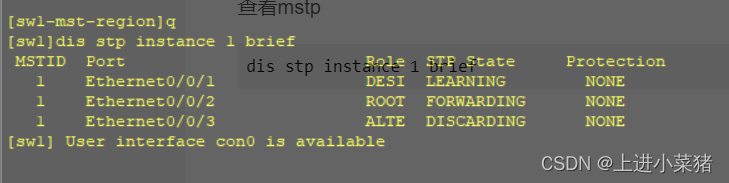
[sw1]dis stp instance 1 brief MSTID Port Role STP State Protection 1 Ethernet0/0/1 DESI LEARNING NONE 1 Ethernet0/0/2 ROOT FORWARDING NONE 1 Ethernet0/0/3 ALTE DISCARDING NONEConvenient area :
1. First create vlan
vlan batch 10 20
2. To 1 Port configuration
int eth 0/0/1
3. Configure the communication mode
port link-type access
port default vlan 10
4. The other two ports
[sw1]port-group group-member Ethernet 0/0/2 to Ethernet 0/0/3
Configure to trunk
port link-type trunk
Run through all vlan
port trunk allow-pass vlan all
Set up :[sw10]stp mode mstp
Get into mstp View :
[sw10]stp region-configuration
Set the name :
[sw10-mst-region]region-name mstp
Set version number
[sw10-mst-region]revision-level 0
Divide into groups
[sw10-mst-region]instance 1 vlan 10
[sw10-mst-region]instance 2 vlan 20
Activate configuration :
[sw10-mst-region]active region-configuration
Check the configuration :
[sw10-mst-region]dis current-configuration
as follows mstp All configurations of :
stp region-configuration
region-name mstp
revision-level 0
instance 1 vlan 10
instance 2 vlan 20
active region-configuration
see mstpdis stp instance 1 brief3、 ... and . Curriculum - Layer 3 switch configuration MSTP agreement
Look at the topology :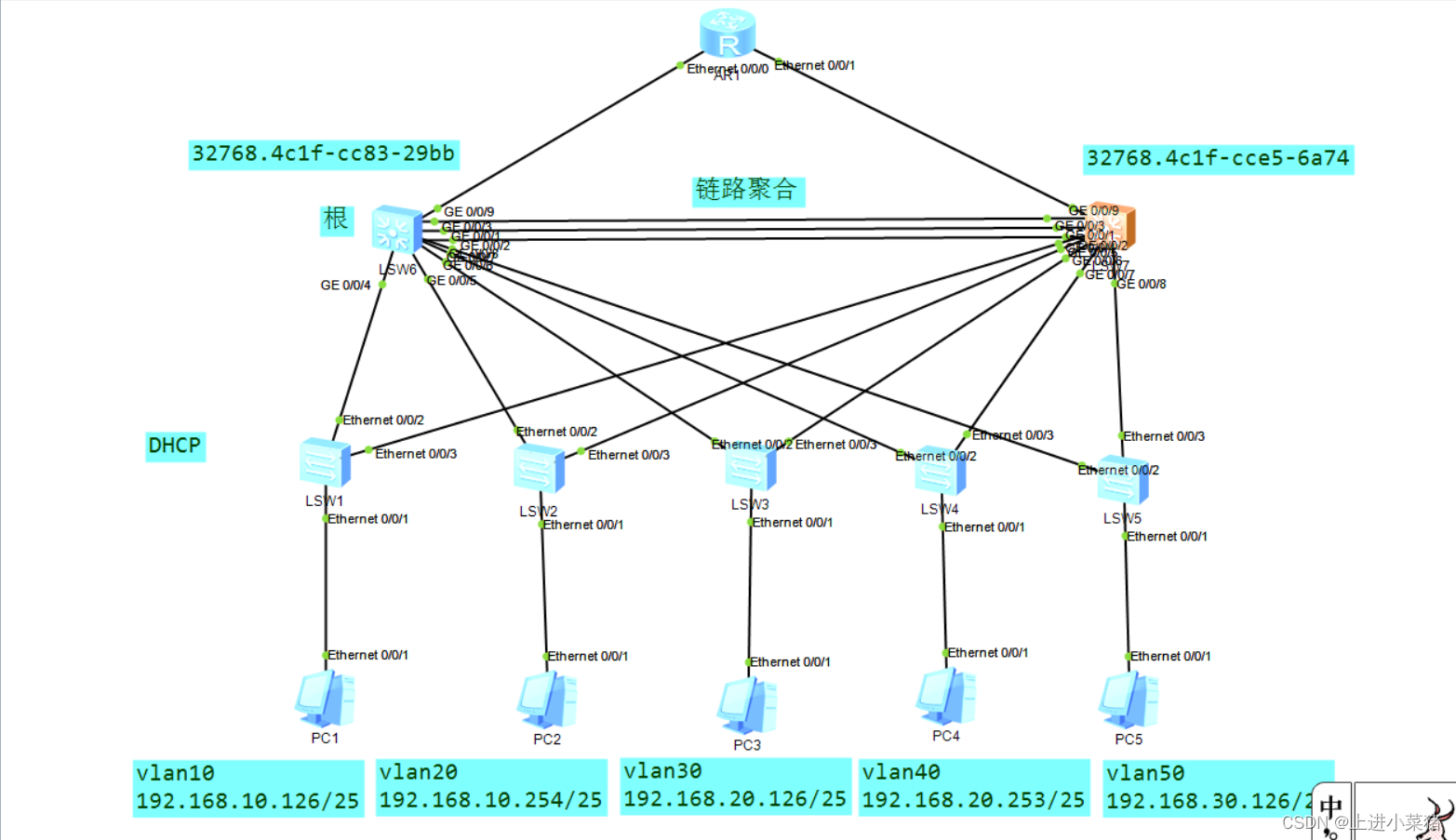
MSTP The agreement is still relatively simple .
Have a look first , What is? MSTP agreement :
MSTP Multi region spanning tree protocol :
Form trees without loops , Solve broadcast storm and realize redundant backup .
Multiple spanning trees in VLAN To achieve load balancing between , Different VLAN The traffic is forwarded in different paths .
Convergence layer : First configure the layer 3 switch :
LSW1 as follows :
stp instance 1 root primarystp instance 2 root secondaryLSW2 as follows :
stp instance 2 root primarystp instance 1 root secondaryexplain :LSW1 yes 1 The taproot of ,2 Spare root of .LSW2 yes 2 The taproot of ,1 Spare root of .
Get into stp region-configuration View :
Set the name , Divide 1 and 2 Of vlan, Activate region-configuration
stp region-configuration region-name zhubo instance 1 vlan 10 20 instance 2 vlan 30 40 50 active region-configurationsee stp To configure
display stp brief Switch layer :
It has been configured before VLAN, So we're directly :
stp region-configuration region-name zhubo instance 1 vlan 10 20 instance 2 vlan 30 40 50 active region-configurationthat will do .
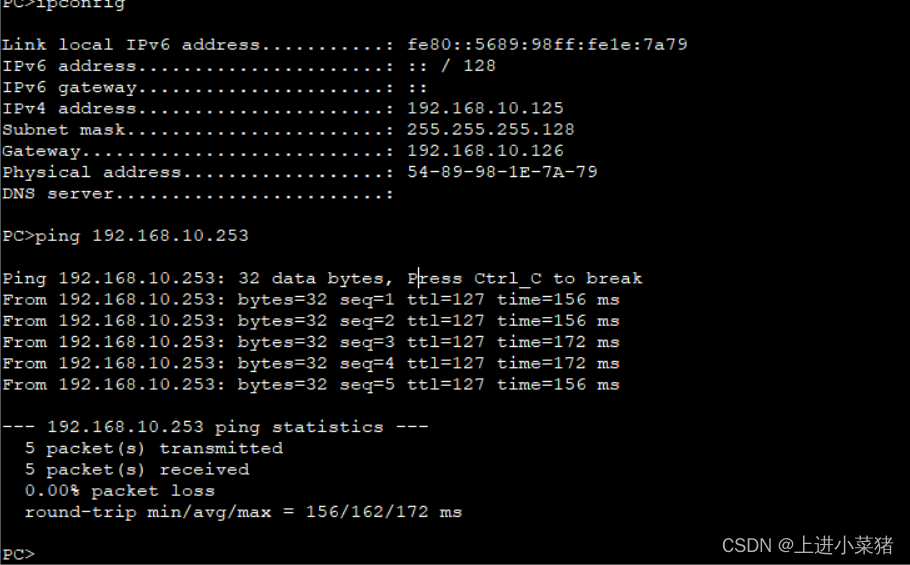
The results are as follows :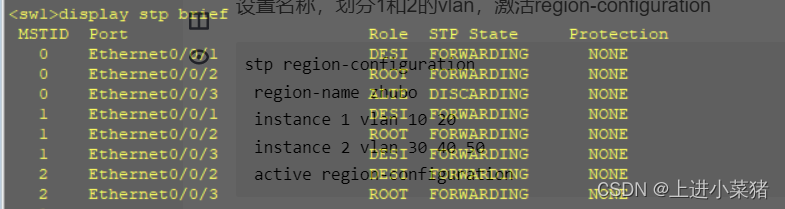
ping 192.168.10.253
边栏推荐
- Educational codeforces round 132 A-D problem solution
- Parity rearrangement of Bm14 linked list
- Leetcode 228. summary interval (yes, solved)
- ModelBox端云协同AI开发套件(RK3568)试用记录(二)
- 美团大脑百亿级知识图谱的构建及应用进展
- 从ACL 2022 Onsite经历看NLP热点
- 平安证券低佣金开户链接安全吗,怎么办理低佣金
- ApplicationContext 介绍
- Meiker Studio - Huawei 14 day Hongmeng equipment development practical notes 6
- How to add to-do items for win11 widgets? Win11 method of adding to-do widget
猜你喜欢





随机推荐
Educational Codeforces Round 132 A-D题解
哈希表、无序集合、映射的原理与实现
深度学习-NLP经典论文、课程、论文等资源整理分享
MySQL's past and present life, Hello, MySQL
JDK installation package and MySQL installation package sorting
2022DASCTF MAY
网上开通证券账户安全吗?
Excel自动化之13种方法来避免在 Microsoft Excel 中重复任务
【云享读书会第13期】第五章FFmpeg 查看媒体信息和处理音视频文件的常用方法
Parity rearrangement of Bm14 linked list
vim 常用快捷键
三层交换机配置MSTP协议详解【华为eNSP实验】
20. Ref and props
Addon plugin 003 for CDR plugin development - awareness solution (SLN) and project (csproj) files
【LeetCode】Day101-旋转图像
Meiker Studio - Huawei 14 day Hongmeng equipment development practical notes 5
2022.7.11mySQL作业
Use tinkerpop framework to add, delete, modify and check GDB
After the input error of next numerical data type () occurs, it can still be input normally next time
去广场吃饭