当前位置:网站首页>Picocli getting started
Picocli getting started
2022-06-27 12:19:00 【Ibrahimo】
Preface
Believe in everyone Java Programmers have used Scanner , Excited about writing a command line program .
Command line programs are also quite useful , However , Use Java It is not easy to write a powerful command line program , There are the following pain points :
- There is no mature framework to
Package parameter reception 、 Parameter prompt and parameter verification - It's hard to deal with
Mutex of parametersAnd the interdependencies of specific commands - Unable to proceed
Command auto-complete - because JVM Interpret execution bytecode , also JIT Cannot function in short-term execution ,Java The command line program starts slowly
- Integrate SpringBoot And other components ,
Start more slowly
These questions can be used Picocli To solve
quote :https://blog.csdn.net/qq_40419564/article/details/115290878
Picocli Basic introduction
Every main method deserves picocli!
Picocli aims to be the easiest way to create rich command line applications that can run on and off the JVM.
introduction
introduce maven rely on
<dependency>
     <groupId>info.picocli</groupId>
     <artifactId>picocli</artifactId>
     <version>4.6.3</version>
 </dependency>
application demo
@CommandLine.Command(name = "checksum", mixinStandardHelpOptions = true, version = "checksum 4.0",
        description = "Prints the checksum (SHA-256 by default) of a file to STDOUT.")
public class CheckSum implements Callable<Integer> {


    @CommandLine.Parameters(index = "0", description = "The file whose checksum to calculate.")
    private File file;

    @CommandLine.Option(names = {
    "-a", "--algorithm"}, description = "MD5, SHA-1, SHA-256, ...")
    private String algorithm = "SHA-256";

    @Override
    public Integer call() throws Exception {
     // your business logic goes here...
        byte[] fileContents = Files.readAllBytes(file.toPath());
        byte[] digest = MessageDigest.getInstance(algorithm).digest(fileContents);
        System.out.printf("%0" + (digest.length*2) + "x%n", new BigInteger(1, digest));
        return 0;
    }

    public static void main(String... args) {

        int exitCode = new CommandLine(new CheckSum()).execute(args);
        System.exit(exitCode);
    }
}
maven pack
<build>
        <finalName>demo1</finalName>
        <plugins>
            <plugin>
                <artifactId>maven-assembly-plugin</artifactId>
                <configuration>
                    <descriptorRefs>
                        <descriptorRef>jar-with-dependencies</descriptorRef>
                    </descriptorRefs>
                    <archive>
                        <manifest>
                            <mainClass>cn.jhs.CheckSum</mainClass>
                        </manifest>
                    </archive>
                </configuration>
                <executions>
                    <execution>
                        <id>make-assembly</id>
                        <phase>package</phase>
                        <goals>
                            <goal>single</goal>
                        </goals>
                    </execution>
                </executions>
            </plugin>
        </plugins>
    </build>
Carry out orders mvn clean package
Command
> java -jar target/demo1-jar-with-dependencies.jar
Missing required parameter: '<file>'
Usage: checksum [-hV] [-a=<algorithm>] <file>
Prints the checksum (SHA-256 by default) of a file to STDOUT.
      <file>      The file whose checksum to calculate.
  -a, --algorithm=<algorithm>
                  MD5, SHA-1, SHA-256, ...
  -h, --help      Show this help message and exit.
  -V, --version   Print version information and exit.

> echo "hello" > hello.txt
> java -jar target/demo1-jar-with-dependencies.jar hello.txt
5891b5b522d5df086d0ff0b110fbd9d21bb4fc7163af34d08286a2e846f6be03
Use the alias
> alias checksum=java\ -jar\ target/demo1-jar-with-dependencies.jar

> checksum hello.txt -a SHA-1
f572d396fae9206628714fb2ce00f72e94f2258f
Options and Parameters
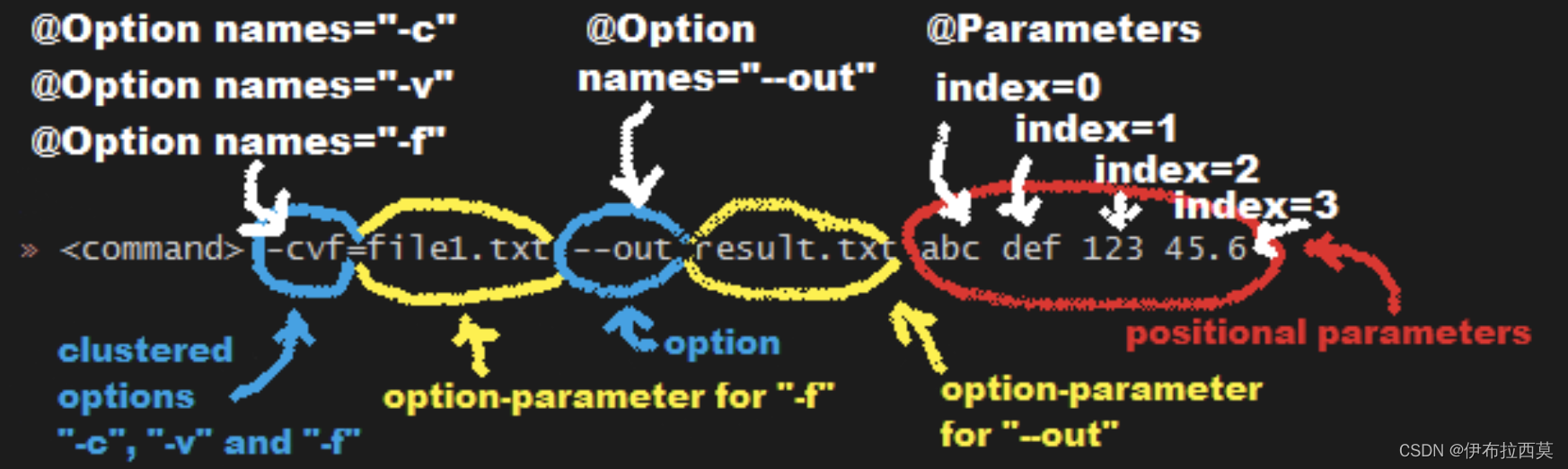
Command line arguments Can be divided into options and positional parameters.
- option Has a name
positional parametersThe position parameter is usuallyoptionValue after , But they may be mixed .
Options
option There has to be One or more names . Picocli Allows you to use any option name you want .
By default ,
optionCase sensitive names .
example
class Tar {

    @Option(names = "-c", description = "create a new archive")
    boolean create;

    @Option(names = {
     "-f", "--file" }, paramLabel = "ARCHIVE", description = "the archive file")
    File archive;

    @Parameters(paramLabel = "FILE", description = "one or more files to archive")
    File[] files;

    @Option(names = {
     "-h", "--help" }, usageHelp = true, description = "display a help message")
    private boolean helpRequested = false;
}
TestCase
String[] args = {
     "-c", "--file", "result.tar", "file1.txt", "file2.txt" };
Tar tar = new Tar();
new CommandLine(tar).parseArgs(args);

assert !tar.helpRequested;
assert  tar.create;
assert  tar.archive.equals(new File("result.tar"));
assert  Arrays.equals(tar.files, new File[] {
    new File("file1.txt"), new File("file2.txt")});
Interactive (Password) Options
For those marked as Interactive Options and positional parameters, The user will be prompted to enter a value on the console .
Interactive
example
class Login implements Callable<Integer> {

    @Option(names = {
    "-u", "--user"}, description = "User name")
    String user;

	// Response type  Option
    @Option(names = {
    "-p", "--password"}, description = "Passphrase", interactive = true)
    char[] password;

    public Integer call() throws Exception {

        byte[] bytes = new byte[password.length];
        for (int i = 0; i < bytes.length; i++) {
     bytes[i] = (byte) password[i]; }

        MessageDigest md = MessageDigest.getInstance("SHA-256");
        md.update(bytes);

        System.out.printf("Hi %s, your password is hashed to %s.%n", user, base64(md.digest()));

        // null out the arrays when done
        Arrays.fill(bytes, (byte) 0);
        Arrays.fill(password, ' ');

        return 0;
    }

    private String base64(byte[] arr) {
     /* ... */ }
}
testcase
Carry out orders :new CommandLine(new Login()).execute("-u", "user123", "-p");
The user will then be prompted to enter a value :
Enter value for --password (Passphrase):
stay Java 6 Or later , User input is not echoed to the console .
After the user enters the password value and presses enter , take call() Call the method , This method will print the following :
Hi user123, your passphrase is hashed to 75K3eLr+dx6JJFuJ7LwIpEpOFmwGZZkRiB84PURz6U8=.

####  Optional  Interactive
 By default ,` Interactive  Options` This causes the application to wait for input on standard input .
 For that, you need to interact   You also need commands that run in batch mode , If this option ** elective **, It will be useful .

**arity**
```java
@Option(names = "--user")
String user;

@Option(names = "--password", arity = "0..1", interactive = true)
char[] password;
- Enter... Through the following , The password field will be initialized to “123”, Without prompting the user to enter :
--password 123 --user Joe - however , If no password is specified ,
--password --user Joe, The user will be prompted to enter the password .
Short (POSIX) Options
class ClusteredShortOptions {

    @Option(names = "-a") boolean aaa;
    @Option(names = "-b") boolean bbb;
    @Option(names = "-c") boolean ccc;
    @Option(names = "-f") String  file;
}
The following command line arguments are equivalent , Parsing them yields the same results :
<command> -abcfInputFile.txt
<command> -abcf=InputFile.txt
<command> -abc -f=InputFile.txt
<command> -ab -cf=InputFile.txt
<command> -a -b -c -fInputFile.txt
<command> -a -b -c -f InputFile.txt
<command> -a -b -c -f=InputFile.txt
...
Boolean Options
Boolean Options Usually no parameters are required : Specifying the option name on the command line is sufficient .
class BooleanOptions {

    @Option(names = "-x") boolean x;
}
- x The default value of is false,
- If you specify... On the command line
-x, Is set to true( Contrary to the default ). - If you specify... Multiple times on the command line
-x, be x Keep the value of true
Negatable Options- Negative options
@Command(name = "negatable-options-demo")
class NegatableOptionsDemo {

    @Option(names = "--verbose",           negatable = true) boolean verbose;
    @Option(names = "-XX:+PrintGCDetails", negatable = true) boolean printGCDetails;
    @Option(names = "-XX:-UseG1GC",        negatable = true) boolean useG1GC = true;
}
Help with the above example is shown below :
Usage: negatable-options-demo
		[--[no-]verbose]
		[-XX:(+|-)PrintGCDetails]
      	[-XX:(+|-)UseG1GC]

      --[no-]verbose     Show verbose output
      -XX:(+|-)PrintGCDetails Prints GC details
	  -XX:(+|-)UseG1GC   Use G1 algorithm for GC
Positional Parameters
Explicit Index - Explicit index
Use [0,+oo) Index attributes to specify exactly which parameters to capture . An array or collection field can capture multiple values .
example
class PositionalParameters {

    @Parameters(index = "0")    InetAddress host;
    @Parameters(index = "1")    int port;
    @Parameters(index = "2..*") File[] files;

    @Parameters(hidden = true)  // "hidden": don't show this parameter in usage help message
    List<String> allParameters; // no "index" attribute: captures _all_ arguments
}
testcase
String[] args = {
     "localhost", "12345", "file1.txt", "file2.txt" };
PositionalParameters params = CommandLine.populateCommand(new PositionalParameters(), args);

assert params.host.getHostName().equals("localhost");
assert params.port == 12345;
assert Arrays.equals(params.files, new File[] {
    new File("file1.txt"), new File("file2.txt")});

assert params.allParameters.equals(Arrays.asList(args));
Omitting the Index - Omit index
It can be omitted index attribute .
- about Multivalued position parameter ( Array or collection ), Omit index Property means that this field captures all positional parameters ( amount to
index = "0..*"). - about Single value position parameter ,
- stay picocli 4.3 Before , The default index for a single valued positional parameter is also
index = "0..*", Even if there is only one value ( Usually the first parameter ) Can be captured . - from 4.3 version ,picocli Automatically allocate indexes according to other positional parameters defined in the same command .**Automatic Parameter Indexes **
- stay picocli 4.3 Before , The default index for a single valued positional parameter is also
Mixing Options and Positional Parameters
example
 class Mixed {

    @Parameters
    List<String> positional;

    @Option(names = "-o")
    List<String> options;
}
testcase
 String[] args = {
     "param0", "-o", "AAA", "param1", "param2", "-o", "BBB", "param3" };
Mixed mixed = new Mixed();
new CommandLine(mixed).parseArgs(args);

assert mixed.positional.equals(Arrays.asList("param0", "param1", "param2", "param3");
assert mixed.options.equals   (Arrays.asList("AAA", "BBB"));
Double dash (–)
When one of the command line arguments is just two dashes without any additional characters (--) when ,picocli Interpret all subsequent parameters as Positional Parameters, Even parameters that match the option name
example
class DoubleDashDemo {

    @Option(names = "-v")     boolean verbose;
    @Option(names = "-files") List<String> files;
    @Parameters               List<String> params;
}
testcase
String[] args = {
     "-v", "--", "-files", "file1", "file2" };
DoubleDashDemo demo = new DoubleDashDemo();
new CommandLine(demo).parseArgs(args);

assert demo.verbose;
assert demo.files == null;
assert demo.params.equals(Arrays.asList("-files", "file1", "file2"));
@-files
Long command line parameter file
Suppose there are documents :/home/foo/args, The contents are as follows
# This line is a comment and is ignored.
ABC -option=123
'X Y Z'
Carry out orders : java MyCommand @/home/foo/args
Equivalent to execution :java MyCommand ABC -option=123 "X Y Z"
encoding
To execute a command : java -DFile.encoding=UTF8 MyCommand ABC -option=123 "X Y Z"
Can pass :
SET JAVA_TOOL_OPTIONS=-Dfile.encoding=UTF8
java MyCommand ABC -option=123 "X Y Z"
@-files Usage Help: showAtFileInUsageHelp
@Command(name = "myapp", showAtFileInUsageHelp = true,
         mixinStandardHelpOptions = true, description = "Example command.")
class MyApp {

    @Parameters(description = "A file.") File file;
}
The result of executing the command is as follows :
Usage: myapp [-hV] [@<filename>...] <file>
Example command.
      [@<filename>...]   One or more argument files containing options.
      <file>             A file.
  -h, --help             Show this help message and exit.
  -V, --version          Print version information and exit.
Added -h -V Options .
Subcommands
Subcommands Complex command line tools , For example, famous git Tools , There are many subcommands ( for example ,commit、push etc. ), Each subcommand has its own set of options and positional parameters . Picocli Make use of subcommands and sub-subcommands The command becomes very easy , To any depth .
example 1
@Command(name = "foo", subcommands = Bar.class)
class Foo implements Callable<Integer> {

    @Option(names = "-x") int x;

    @Override public Integer call() {

        System.out.printf("hi from foo, x=%d%n", x);
        boolean ok = true;
        return ok ? 0 : 1; // exit code
    }

    public static void main(String... args) {

        int exitCode = new CommandLine(new Foo()).execute(args);
        System.exit(exitCode);
    }
}

@Command(name = "bar", description = "I'm a subcommand of `foo`")
class Bar implements Callable<Integer> {

    @Option(names = "-y") int y;

    @Override public Integer call() {

        System.out.printf("hi from bar, y=%d%n", y);
        return 23;
    }

    @Command(name = "baz", description = "I'm a subcommand of `bar`")
    int baz(@Option(names = "-z") int z) {

        System.out.printf("hi from baz, z=%d%n", z);
        return 45;
    }
}
testcase`
alias foo='java Foo'

$ foo -x 123
hi from foo, x=123

#check the exit code
$ echo $?
0

###########
$ foo -x 123 bar -y=456
hi from bar, y=456

#check the exit code
$ echo $?
23

###########
foo bar baz -z=789
hi from baz, z=789

#check the exit code
$ echo $?
45
Declarative registration subcommand
@Command(subcommands = {

    GitStatus.class,
    GitCommit.class,
    GitAdd.class,
    GitBranch.class,
    GitCheckout.class,
    GitClone.class,
    GitDiff.class,
    GitMerge.class,
    GitPush.class,
    GitRebase.class,
    GitTag.class
})
public class Git {
     /* ... */ }
Programming registration subcommand
CommandLine commandLine = new CommandLine(new Git())
        .addSubcommand("status",   new GitStatus())
        .addSubcommand("commit",   new GitCommit())
        .addSubcommand("add",      new GitAdd())
        .addSubcommand("branch",   new GitBranch())
        .addSubcommand("checkout", new GitCheckout())
        .addSubcommand("clone",    new GitClone())
        .addSubcommand("diff",     new GitDiff())
        .addSubcommand("merge",    new GitMerge())
        .addSubcommand("push",     new GitPush())
        .addSubcommand("rebase",   new GitRebase())
        .addSubcommand("tag",      new GitTag());
SpringBoot Integrate
from 4.0 version ,picocli By means of picocli-spring-boot-starter A custom factory is provided in the module to support Spring Boot.
Below Spring Boot The sample application provides a command line interface for the mail client , Available for use SMTP The server sends email . The recipient address and subject line can be given as options , The message body can be specified as the parameter text .
MAVEN rely on
<dependency>
  <groupId>info.picocli</groupId>
  <artifactId>picocli-spring-boot-starter</artifactId>
  <version>4.6.3</version>
</dependency>
example
import org.springframework.boot.*;
import org.springframework.boot.autoconfigure.SpringBootApplication;
import picocli.CommandLine;
import picocli.CommandLine.IFactory;

@SpringBootApplication
public class MySpringMailer implements CommandLineRunner, ExitCodeGenerator {

	//1.  Automatic injection  PicocliSpringFactory
    private IFactory factory;

	//2.  There will be later @CommandLine.Command  Inject
    private MailCommand mailCommand;
    private int exitCode;

    // constructor injection
    MySpringMailer(IFactory factory, MailCommand mailCommand) {

        this.factory = factory;
        this.mailCommand = mailCommand;
    }

    @Override
    public void run(String... args) {

        // let picocli parse command line args and run the business logic
        exitCode = new CommandLine(mailCommand, factory).execute(args);
    }

    @Override
    public int getExitCode() {

        return exitCode;
    }

    public static void main(String[] args) {

        // SpringApplication.exit()  Closed container .
        //System.exit() Shut down the virtual machine .
        // effect :  The execution of the spring After the task `mailCommand.run()`, close spring Containers , Shut down the virtual machine .
        System.exit(SpringApplication.exit(SpringApplication.run(MySpringMailer.class, args)));
    }
}
Command
import org.springframework.stereotype.Component;
import org.springframework.beans.factory.annotation.Autowired;
import picocli.CommandLine.*;
import java.util.List;
import java.util.concurrent.Callable;

@Component// 1. Sign up to spring Containers
@Command(name = "mailCommand")
public class MailCommand implements Callable<Integer> {


    @Autowired private IMailService mailService; //3. from spring Inject

    @Option(names = "--to", description = "email(s) of recipient(s)", required = true)
    List<String> to;

    @Option(names = "--subject", description = "Subject")
    String subject;

    @Parameters(description = "Message to be sent")
    String[] body = {
    };

    public Integer call() throws Exception {

        mailService.sendMessage(to, subject, String.join(" ", body));  //2. Business logic
        return 0;
    }
}
testcase
Carry out orders :
mvnw spring-boot:run
# ...
  .   ____          _            __ _ _
 /\\ / ___'_ __ _ _(_)_ __ __ _ \ \ \ \ ( ( )\___ | '_ | '_| | '_ \/ _` | \ \ \ \
 \\/  ___)| |_)| | | | | || (_| |  ) ) ) )
  ' |____| .__|_| |_|_| |_\__, | / / / / =========|_|==============|___/=/_/_/_/ :: Spring Boot :: (v2.3.5.RELEASE) # ... #2020-11-01 19:35:31.084 INFO 15724 --- [ main] info.picocli.demo.MySpringMailer : Started MySpringMailer in 0.821 seconds (JVM running for 1.131) Missing required option: '--to=<to>'
Usage: mailCommand [--subject=<subject>] --to=<to> [--to=<to>]... [<body>...]
      [<body>...]           Message to be sent
      --subject=<subject>   Subject
      --to=<to>             email(s) of recipient(s)
Add :
SpringBoot.exit()
SpringApplication Provides a exit Static methods , Used to turn off Spring Containers , The method also has a parameter exitCodeGenerators Express ExitCodeGenerator Array of interfaces .ExitCodeGenerator Interface is a generated exit code exitCode The generator .
public static int exit(ApplicationContext context,
		ExitCodeGenerator... exitCodeGenerators) {

	Assert.notNull(context, "Context must not be null");
	int exitCode = 0; //  The default exit code is 0
	try {

		try {

			//  structure ExitCodeGenerator aggregate
			ExitCodeGenerators generators = new ExitCodeGenerators();
			//  get Spring Everything in the container ExitCodeGenerator Type of bean
			Collection<ExitCodeGenerator> beans = context
					.getBeansOfType(ExitCodeGenerator.class).values();
			//  Set plus... In the parameter ExitCodeGenerator Array
			generators.addAll(exitCodeGenerators);
			//  Set plus Spring In container ExitCodeGenerator aggregate
			generators.addAll(beans);
			//  Through each ExitCodeGenerator, Get the final exit code exitCode
			//  Every one here ExitCodeGenerator If the generated exit code is greater than 0 Big , Then take the largest
			//  If you compare 0 Small , Then take the smallest
			exitCode = generators.getExitCode();
			if (exitCode != 0) {
     //  If the exit code exitCode Not for 0, Release ExitCodeEvent event
				context.publishEvent(new ExitCodeEvent(context, exitCode));
			}
		}
		finally {

			//  close Spring Containers
			close(context);
		}

	}
	catch (Exception ex) {

		ex.printStackTrace();
		exitCode = (exitCode == 0 ? 1 : exitCode);
	}
	return exitCode;
}
Let's say I have a controller Method :
@Autowired
private ApplicationContext applicationContext;

@PostMapping("/stop")
public String stop() {

		//  Add your own permission verification
    SpringApplication.exit(applicationContext);
    return "ok";
}
System.exit(X)
System.exit(status): No matter what status Why do all values exit the program .
System.exit(0); The whole program exits normally , Registration will be performed shutdown-hooks.System.exit( Not 0); Whole procedure Abnormal exit
边栏推荐
- 1. Mx6ull startup mode
- 盘点一些好用且小众的 Markdown 编辑器
- application.properties 的配置信息
- Unlock the secret of C language key words (issue 6)
- The DBSCAN function of FPC package in R language performs density clustering analysis on data, and the plot function visualizes the clustering graph
- Interview shock 60: what will cause MySQL index invalidation?
- Daily leetcode force deduction (21~25)
- picocli-入门
- MySQL high level statements (I)
- 【TcaplusDB知识库】TcaplusDB-tcapsvrmgr工具介绍(二)
猜你喜欢
Raspberry pie 3b+ learning
![Dynamic programming [4] (counting class DP) example: integer partition](/img/06/4b3863bbb85582348c6f4ea7c5511e.png)
Dynamic programming [4] (counting class DP) example: integer partition

Rxjs mergeMap 的使用场合

今晚战码先锋润和赛道第2期直播丨如何参与OpenHarmony代码贡献

面试突击60:什么情况会导致 MySQL 索引失效?
Interview shock 60: what will cause MySQL index invalidation?

Jwas: a Bayesian based GWAS and GS software developed by Julia

Secyun won the "2022 AI analysis · it operation and maintenance vendor panorama report" as the representative vendor of intelligent operation and maintenance aiops Market

剑指 Offer 04. 二维数组中的查找

StarCraft's Bug King ia retired for 2 years to engage in AI, and lamented that it was inferior
随机推荐
MIT6.031 软件构造 Reading7阅读笔记Designing Specifications(设计规范)
千万不要错过,新媒体运营15个宝藏公众号分享
Thymeleaf的配置
【TcaplusDB知识库】TcaplusDB-tcapsvrmgr工具介绍(二)
. Net6 access skywalking link tracking complete process
Utilisation de la file d'attente des messages
R language uses the poisgof function of epidisplay package to test the goodness of fit of Poisson regression and whether there is overdispersion
Neo4j:入门基础(一)之安装与使用
$15.8 billion! 2021 the world's top15 most profitable hedge fund giant
How to find the movie and TV clips with the same lines? These 8 movies search for artifact, and find the corresponding segment in one line
Shell script learning notes
Salesforce 容器化 ISV 场景下的软件供应链安全落地实践
Histrix工作原理
What is the TCP 3-time handshake process?
Daily leetcode force deduction (21~25)
Go Web 编程入门:验证器
R语言使用glm函数构建泊松对数线性回归模型处理三维列联表数据构建饱和模型、使用step函数基于AIC指标实现逐步回归筛选最佳模型、解读分析模型
Wechat applet payment password input
namespace ‘rlang’ 0.2.0 is being loaded, but &gt;= 0.3.0 is required
深入理解 happens-before 原则