当前位置:网站首页>New skill: accelerate node through code cache JS startup
New skill: accelerate node through code cache JS startup
2022-06-30 17:22:00 【Xianling Pavilion】
Preface : The previous article introduced how to speed up by snapshot Node.js Start of , Except for snapshots ,V8 Another technology is also provided to speed up the execution of code , That's code caching . adopt V8 First execution JS When ,V8 It needs to be parsed and compiled immediately JS Code , This will take some time , Code cache can save some information of this process , The next time you execute , Through this cached information, you can speed up JS Execution of code . This article is introduced in Node.js How to use code caching technology to speed up Node.js Start of .
Let's look at it first Node.js Build configuration for .
'actions': [
  {

    'action_name': 'node_js2c',
    'process_outputs_as_sources': 1,
    'inputs': [
      'tools/js2c.py',
      '<@(library_files)',
      '<@(deps_files)',
      'config.gypi'
    ],
    'outputs': [
      '<(SHARED_INTERMEDIATE_DIR)/node_javascript.cc',
    ],
    'action': [
      '<(python)',
      'tools/js2c.py',
      '--directory',
      'lib',
      '--target',
      '<@(_outputs)',
      'config.gypi',
      '<@(deps_files)',
    ],
  },
],
With this configuration , Compiling Node.js When , Will execute js2c.py, And write the input to node_javascript.cc file . Let's take a look at the generated content .
New skills : Accelerate through code caching Node.js Start new skills for : Accelerate through code caching Node.js Start of
It defines a function , This function goes inside source_ A series of contents are added to the field , among key yes Node.js The original in JS Module information , The value is the content of the module , Let's look at a random module assert/strict.
const data = [39,117,115,101, 32,115,116,114,105, 99,116, 39, 59, 10, 10,109,111,100,117,108,101, 46,101,120,112,111,114,116,115, 32,61, 32,114,101,113,117,105,114,101, 40, 39, 97,115,115,101,114,116, 39, 41, 46,115,116,114,105, 99,116, 59, 10];
console.log(Buffer.from(data).toString(‘utf-8’))
Output is as follows .
'use strict';
module.exports = require('assert').strict;
adopt js2c.py ,Node.js Put the original JS The contents of the module are written to the file , And compile into Node.js In the executable file of , In this way Node.js When starting, you don't need to read the corresponding file from the hard disk , Otherwise, the native code is loaded dynamically at startup or runtime JS modular , It takes more time , Because the speed of memory is much faster than that of hard disk . This is a Node.js The first optimization , Next, look at code caching , Because code caching is implemented on this basis . First, let's take a look at the compilation configuration .
['node_use_node_code_cache=="true"', {

  'dependencies': [
    'mkcodecache',
  ],
  'actions': [
    {

      'action_name': 'run_mkcodecache',
      'process_outputs_as_sources': 1,
      'inputs': [
        '<(mkcodecache_exec)',
      ],
      'outputs': [
        '<(SHARED_INTERMEDIATE_DIR)/node_code_cache.cc',
      ],
      'action': [
        '<@(_inputs)',
        '<@(_outputs)',
      ],
    },
  ],}, {

  'sources': [
    'src/node_code_cache_stub.cc'
  ],
}],
If compiling Node.js when node_use_node_code_cache by true Generate code cache . If we don't need it, we can turn it off , Specific implementation ./configure --without-node-code-cache. If we turn off code caching , Node.js The implementation of this part is empty , Specific in node_code_cache_stub.cc.
const bool has_code_cache = false;
void NativeModuleEnv::InitializeCodeCache() {
    }
Which is to do nothing . If we turn on code caching , Will execute mkcodecache.cc Generate code cache .
int main(int argc, char* argv[]) {

  argv = uv_setup_args(argc, argv);
  std::ofstream out;
  out.open(argv[1], std::ios::out | std::ios::binary);
  node::per_process::enabled_debug_list.Parse(nullptr);
  std::unique_ptrplatform = v8::platform::NewDefaultPlatform();
  v8::V8::InitializePlatform(platform.get());
  v8::V8::Initialize();
  Isolate::CreateParams create_params;
  create_params.array_buffer_allocator_shared.reset(
      ArrayBuffer::Allocator::NewDefaultAllocator());
  Isolate* isolate = Isolate::New(create_params);
  {

    Isolate::Scope isolate_scope(isolate);
    v8::HandleScope handle_scope(isolate);
    v8::Localcontext = v8::Context::New(isolate);
    v8::Context::Scope context_scope(context);
    std::string cache = CodeCacheBuilder::Generate(context);
    out << cache;
    out.close();
  }
  isolate->Dispose();
  v8::V8::ShutdownPlatform();
  return 0;
}
So let's open the file , And then there was V8 Common initialization logic , Finally through Generate Generate code cache .
std::string CodeCacheBuilder::Generate(Localcontext) {

  NativeModuleLoader* loader = NativeModuleLoader::GetInstance();
  std::vectorids = loader->GetModuleIds();
  std::mapdata;
  for (const auto& id : ids) {

    if (loader->CanBeRequired(id.c_str())) {

      NativeModuleLoader::Result result;
      USE(loader->CompileAsModule(context, id.c_str(), &result));
      ScriptCompiler::CachedData* cached_data = loader->GetCodeCache(id.c_str());
      data.emplace(id, cached_data);
    }
  }
  return GenerateCodeCache(data);
}
First, create a new one NativeModuleLoader.
NativeModuleLoader::NativeModuleLoader() : config_(GetConfig()) {

  LoadJavaScriptSource();
}
NativeModuleLoader Initialization will execute LoadJavaScriptSource, This function is through python Generated node_javascript.cc Functions in files , Once the initialization is complete NativeModuleLoader Object's source_ The fields are saved as native JS The code of the module . Then go through these primitives JS modular , adopt CompileAsModule Compile .
MaybeLocalNativeModuleLoader::CompileAsModule(
    Localcontext,
    const char* id,
    NativeModuleLoader::Result* result) {

  Isolate* isolate = context->GetIsolate();
  std::vector<1local> parameters = {

      FIXED_ONE_BYTE_STRING(isolate, "exports"),
      FIXED_ONE_BYTE_STRING(isolate, "require"),
      FIXED_ONE_BYTE_STRING(isolate, "module"),
      FIXED_ONE_BYTE_STRING(isolate, "process"),
      FIXED_ONE_BYTE_STRING(isolate, "internalBinding"),
      FIXED_ONE_BYTE_STRING(isolate, "primordials")};
  return LookupAndCompile(context, id, ¶meters, result);
}
Then look at LookupAndCompile
MaybeLocalNativeModuleLoader::LookupAndCompile(
    Localcontext,
    const char* id,
    std::vector<1local>* parameters,
    NativeModuleLoader::Result* result) {

  Isolate* isolate = context->GetIsolate();
  EscapableHandleScope scope(isolate);
  Localsource;
  //  according to  key  from  source_  Field to find module content
  if (!LoadBuiltinModuleSource(isolate, id).ToLocal(&source)) {

    return {
    };
  }
  std::string filename_s = std::string("node:") + id;
  Localfilename =
      OneByteString(isolate, filename_s.c_str(), filename_s.size());
  ScriptOrigin origin(isolate, filename, 0, 0, true);
  ScriptCompiler::CachedData* cached_data = nullptr;
  {

    Mutex::ScopedLock lock(code_cache_mutex_);
    //  Determine whether there is code cache
    auto cache_it = code_cache_.find(id);
    if (cache_it != code_cache_.end()) {

      cached_data = cache_it->second.release();
      code_cache_.erase(cache_it);
    }
  }
  const bool has_cache = cached_data != nullptr;
  ScriptCompiler::CompileOptions options =
      has_cache ? ScriptCompiler::kConsumeCodeCache
                : ScriptCompiler::kEagerCompile;
  //  If there is a code cache, pass in
  ScriptCompiler::Source script_source(source, origin, cached_data);
  //  Compile
  MaybeLocalmaybe_fun =
      ScriptCompiler::CompileFunctionInContext(context,
                                               &script_source,
                                               parameters->size(),
                                               parameters->data(),
                                               0,
                                               nullptr,
                                               options);
  Localfun;
  if (!maybe_fun.ToLocal(&fun)) {

    return MaybeLocal();
  }
  *result = (has_cache && !script_source.GetCachedData()->rejected)
                ? Result::kWithCache
                : Result::kWithoutCache;
  //  The generated code cache is saved , Finally, write the file , Next time use
  std::unique_ptrnew_cached_data(
      ScriptCompiler::CreateCodeCacheForFunction(fun));
  {

    Mutex::ScopedLock lock(code_cache_mutex_);
    code_cache_.emplace(id, std::move(new_cached_data));
  }
  return scope.Escape(fun);
}
When it was first executed , That is, compiling Node.js when ,LookupAndCompile The code cache will be generated and written to the file node_code_cache.cc in , Compile and execute files , The content is as follows .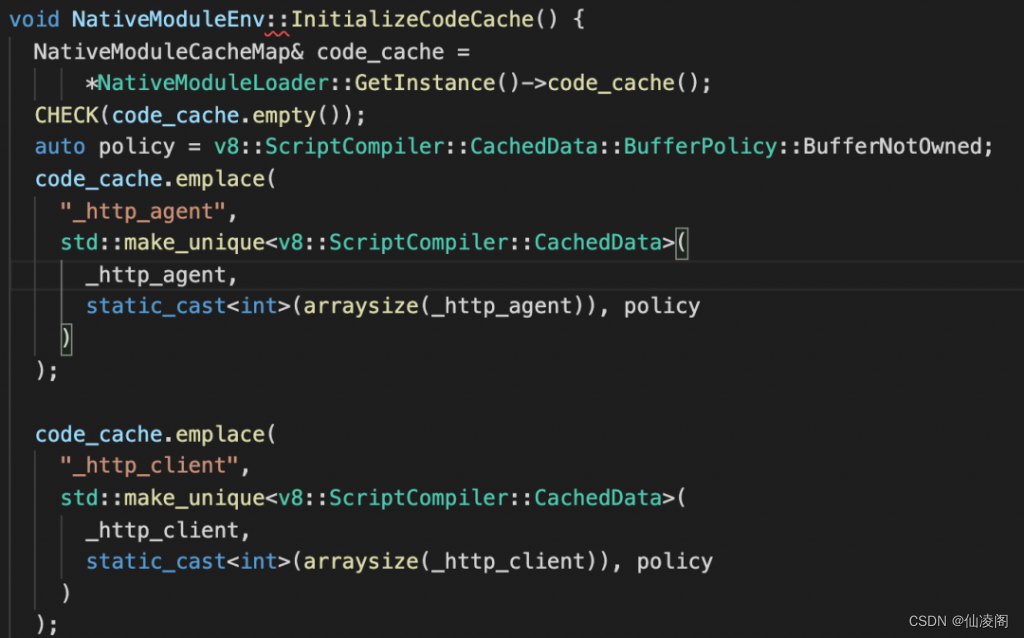
In addition to this function, there is a series of code cache data , I won't post it here . stay Node.js The initialization phase of the first execution , Will execute the above function , stay code_cache Each module and the corresponding code cache are saved in the field . After initialization , Load native files later JS When the module ,Node.js Re execution LookupAndCompile, There will be code cache soon . When code caching is turned on , On my computer Node.js The start-up time is about 40 millisecond , When the logic of removing the code cache is recompiled ,Node.js The start-up time is about 60 millisecond , The speed has been greatly improved .
summary :Node.js When compiling, first put the native JS The code of the module is written to the file and , Then perform mkcodecache.cc Put the original JS Module to compile and get the corresponding code cache , And write it to a file , Compile into Node.js In the executable file of , stay Node.js They will be collected during initialization , In this way, the native data will be loaded later JS Module, you can use these code caches to speed up code execution .
The source code attachment has been packaged and uploaded to Baidu cloud , You can download it yourself ~
link : https://pan.baidu.com/s/14G-bpVthImHD4eosZUNSFA?pwd=yu27
Extraction code : yu27
Baidu cloud link is unstable , It may fail at any time , Let's keep it tight .
If Baidu cloud link fails , Please leave me a message , When I see it, I will update it in time ~
Open source address
Code cloud address :
http://github.crmeb.net/u/defu
Github Address :
http://github.crmeb.net/u/defu
link :http://blog.itpub.net/69955379/viewspace-2892937/
边栏推荐
- 理解现货白银走势的关键
- 期未课程设计:基于SSM的产品销售管理系统
- addmodule_allmerge_ams_im
- The new version of Shangding cloud | favorites function has been launched to meet personal use needs
- Several cross end development artifacts
- 3D chart effectively improves the level of large data screen
- 3D图表有效提升数据大屏档次
- 基于51单片机的计件器设计
- MOOG servo valve d661-4577c
- Internet R & D efficiency practice qunar core field Devops landing practice
猜你喜欢

高等数学(第七版)同济大学 总习题一 个人解答

Write the simplest small program in C language Hello World
开发那些事儿:如何在视频中添加文字水印?

idea必用插件
![[200 opencv routines] 215 Drawing approximate ellipse based on polyline](/img/43/fd4245586071020e5aadb8857316c5.png)
[200 opencv routines] 215 Drawing approximate ellipse based on polyline

Bridge emqx cloud data to AWS IOT through the public network

redis数据结构分析

Construction schedule of intelligent management and control platform in Shanxi Chemical Industry Park

开发那些事儿:Linux系统中如何安装离线版本MySQL?

splitting.js密码显示隐藏js特效
随机推荐
geo 读取单细胞csv表达矩阵 单细胞 改列名 seurat
List becomes vector list becomes vector list vector
Mysql8 NDB cluster installation and deployment
【网易云信】播放demo构建:无法将参数 1 从“AsyncModalRunner *”转换为“std::nullptr_t”**
商鼎云新版来袭 | 收藏夹功能已上线,满足个人使用需求
Property or method “approval1“ is not defined on the instance but referenced during render
Map集合
Exch: database integrity checking
Hyper-V: enable SR-IOV in virtual network
More than 20million videos have been played in the business list! Why is the reform of Agricultural Academies urged repeatedly?
Cesium-1.72 learning (camera tracking)
列表变成向量 列表变向量 list vector
开发那些事儿:Linux系统中如何安装离线版本MySQL?
Course design for the end of the semester: product sales management system based on SSM
Unity particle_ Exception display processing
送受伤婴儿紧急就医,滴滴司机连闯五个红灯
Cesium-1.72 learning (China national boundary)
Data security compliance has brought new problems to the risk control team
k线图精解与实战应用技巧(见位进场)
Property or method “approval1“ is not defined on the instance but referenced during render