当前位置:网站首页>[go]沙盒环境下调用支付宝扫码支付
[go]沙盒环境下调用支付宝扫码支付
2022-06-23 16:17:00 【CRAJA】
参考于这篇博客,在此基础上进行了封装
配置支付宝开放平台


沙盒下除了组织/公司必须和商户账号一样,其他可以随便填,之后得到这几个证书

然后进入开发者平台上传csr证书来配置接口加签方式,(使用系统默认的密钥我总是没法测试成功)
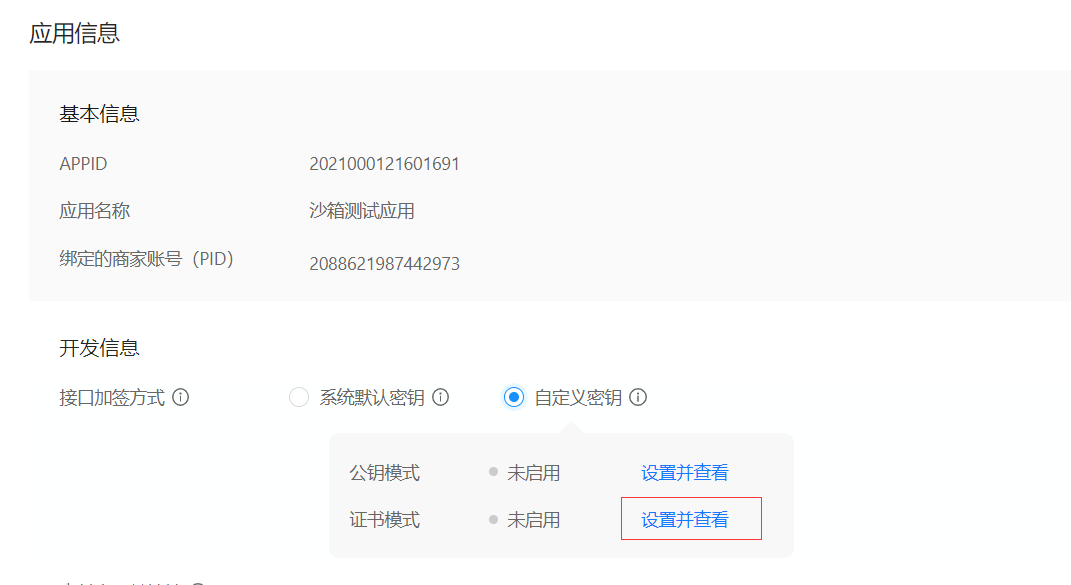
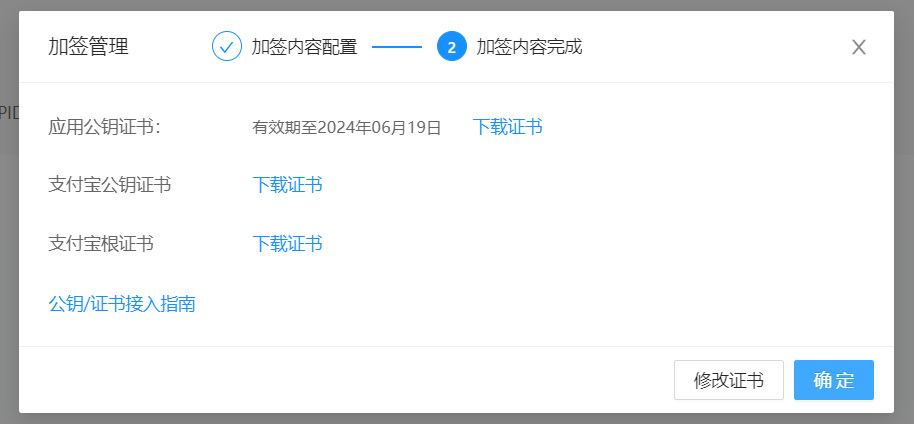
之后下载这些证书用于程序中校验使用

服务端代码
.
├── cert
│   ├── alipayCertPublicKey_RSA2.crt
│   ├── alipayRootCert.crt
│   └── appCertPublicKey.crt
├── main.go
└── pay
    └── pay.go
pay.go
package pay

import (
	"errors"
	"fmt"
	"net/url"
	"strconv"

	"github.com/smartwalle/alipay/v3"
)

type AliPayClient struct {

	client    *alipay.Client
	notifyURL string
	returnURL string
}

// Config 初始化配置文件
type Config struct {

	KAppID               string // 应用ID
	KPrivateKey          string // 应用私钥
	IsProduction         bool   // 是否是正式环境
	AppPublicCertPath    string // app公钥证书路径
	AliPayRootCertPath   string // alipay根证书路径
	AliPayPublicCertPath string // alipay公钥证书路径
	NotifyURL            string // 异步通知地址
	ReturnURL            string // 支付后回调链接地址
}

// Init 客户端初始化
func Init(config Config) *AliPayClient {

	var err error
	var aliClient *alipay.Client
	doThat := func(f func() error) {

		if err = f(); err != nil {

			panic(err)
		}
	}
	doThat(func() error {

		aliClient, err = alipay.New(config.KAppID, config.KPrivateKey, config.IsProduction)
		return err
	})
	doThat(func() error {
     return aliClient.LoadAppPublicCertFromFile(config.AppPublicCertPath) })
	doThat(func() error {
     return aliClient.LoadAliPayRootCertFromFile(config.AliPayRootCertPath) })
	doThat(func() error {
     return aliClient.LoadAliPayPublicCertFromFile(config.AliPayPublicCertPath) })
	return &AliPayClient{
    client: aliClient, notifyURL: config.NotifyURL, returnURL: config.ReturnURL}
}

type Order struct {

	ID          string      // 订单ID
	Subject     string      // 订单标题
	TotalAmount float32     // 订单总金额,单位为元,精确到小数点后两位,取值范围[0.01,100000000]
	Code        ProductCode // 销售产品码,与支付宝签约的产品码名称
}

type ProductCode string

const (
	AppPay       ProductCode = "QUICK_MSECURITY_PAY"    // app支付
	PhoneWebPay  ProductCode = "QUICK_WAP_WAY"          // 手机网站支付
	LaptopWebPay ProductCode = "FAST_INSTANT_TRADE_PAY" // 电脑网站支付
)

var (
	ErrOrderAmountOver = errors.New("订单金额超限")
	ErrVerifySign      = errors.New("异步通知验证签名未通过")
)

// Pay 订单支付请求,返回支付界面链接及可能出现的错误
func (client *AliPayClient) Pay(order Order) (payUrl string, err error) {

	if order.TotalAmount < 0.01 || order.TotalAmount > 100000000 {

		return "", ErrOrderAmountOver
	}
	var p = alipay.TradePagePay{
    }
	p.NotifyURL = client.notifyURL
	p.ReturnURL = client.returnURL
	p.Subject = order.Subject
	p.OutTradeNo = order.ID
	p.TotalAmount = strconv.FormatFloat(float64(order.TotalAmount), 'f', 2, 32)
	p.ProductCode = string(order.Code)
	pay, err := client.client.TradePagePay(p)
	if err != nil {

		return "", err
	}
	return pay.String(), nil
}

// VerifyForm 校验form表单并返回对应订单ID(注意: callback为get,notify为post)
func (client *AliPayClient) VerifyForm(form url.Values) (orderID string, err error) {

	ok, err := client.client.VerifySign(form)
	if err != nil {

		return "", err
	}
	if !ok {

		return "", ErrVerifySign
	}
	orderID = form.Get("out_trade_no")
	var p = alipay.TradeQuery{
    }
	p.OutTradeNo = orderID
	rsp, err := client.client.TradeQuery(p)
	if err != nil {

		return "", fmt.Errorf("异步通知验证订单 %s 信息发生错误: %s", orderID, err.Error())
	}
	if rsp.IsSuccess() == false {

		return "", fmt.Errorf("异步通知验证订单 %s 信息发生错误: %s-%s", orderID, rsp.Content.Msg, rsp.Content.SubMsg)
	}
	return orderID, nil
}
模拟测试
注意异步响应地址和回调地址必须是公网可以访问到的。

package main

import (
	"log"
	"net/http"
	"strconv"

	"github.com/0RAJA/TestMod/alipay/pay"
	"github.com/gin-gonic/gin"
	"github.com/smartwalle/xid"
)

func init() {

	log.SetFlags(log.Lshortfile | log.Ltime)
}

const (
	kAppID               = "2021000121601691"
	kPrivateKey          = "XXXX"
	kServerDomain        = "http://XXXX:7999"
	AppPublicCertPath    = "cert/appCertPublicKey.crt"         // app公钥证书路径
	AliPayRootCertPath   = "cert/alipayRootCert.crt"           // alipay根证书路径
	AliPayPublicCertPath = "cert/alipayCertPublicKey_RSA2.crt" // alipay公钥证书路径
	NotifyURL            = kServerDomain + "/notify"
	ReturnURL            = kServerDomain + "/callback"
	IsProduction         = false
)

var AliPayClient *pay.AliPayClient

func main() {

	AliPayClient = pay.Init(pay.Config{

		KAppID:               kAppID,
		KPrivateKey:          kPrivateKey,
		IsProduction:         IsProduction,
		AppPublicCertPath:    AppPublicCertPath,
		AliPayRootCertPath:   AliPayRootCertPath,
		AliPayPublicCertPath: AliPayPublicCertPath,
		NotifyURL:            NotifyURL,
		ReturnURL:            ReturnURL,
	})
	var s = gin.Default()
	s.GET("/alipay", payUrl)
	s.GET("/callback", callback)
	s.POST("/notify", notify)
	s.Run(":8080")
}

//重定向到支付宝二维码
func payUrl(c *gin.Context) {

	orderID := strconv.FormatInt(xid.Next(), 10)
	url, err := AliPayClient.Pay(pay.Order{

		ID:          orderID,
		Subject:     "ttms购票:" + orderID,
		TotalAmount: 30,
		Code:        pay.LaptopWebPay,
	})
	if err != nil {

		log.Println(err)
		c.JSON(http.StatusOK, "系统错误")
		return
	}
	c.Redirect(http.StatusTemporaryRedirect, url)
}

//支付后页面的重定向界面
func callback(c *gin.Context) {

	_ = c.Request.ParseForm() // 解析form
	orderID, err := AliPayClient.VerifyForm(c.Request.Form)
	if err != nil {

		log.Println(err)
		c.JSON(http.StatusOK, "校验失败")
		return
	}
	c.JSON(http.StatusOK, "支付成功:"+orderID)
}

//支付成功后支付宝异步通知
func notify(c *gin.Context) {

	_ = c.Request.ParseForm() // 解析form
	orderID, err := AliPayClient.VerifyForm(c.Request.Form)
	if err != nil {

		log.Println(err)
		return
	}
	log.Println("支付成功:" + orderID)
	// 做自己的事
}
实际测试
项目跑起来之后访问ip地址+/alipay,然后重定向到这个二维码,然后使用沙盒支付宝进行扫码支付即可。


建议测试时使用类似frp的内网穿透工具,比较方便。
边栏推荐
- The R language uses the GT package and the gtextras package to display tabular data gracefully and beautifully: gt of the gtextras package_ The sparkline function visualizes the line plot of the group
- 二分查找法思路分析
- OutputDebugString instructions and exception handling
- R language ggplot2 visualizes horizontal boxplot with coord_flip, and adds jittered data points to display the distribution
- leetcode:30. 串联所有单词的子串【Counter匹配 + 剪枝】
- IFLYTEK neuroimaging disease prediction program!
- What is an abstract class? How to define abstract classes?
- 移动云共筑信创云能力底座,助力中国信创产业发展
- Mobile cloud jointly builds the capability base of information innovation cloud and helps the development of China's information innovation industry
- 查数据库中每张表的大小
猜你喜欢

科大讯飞神经影像疾病预测方案!

NPM install problem solving (NVM installation and use)

Robot Orientation and some misunderstandings in major selection in college entrance examination

华为手机通过adb安装APK提示“签名不一致,该应用可能已被修改”
![[today in history] June 23: Turing's birthday; The birth of the founder of the Internet; Reddit goes online](/img/d5/4b3e622ab77bc546ca5d285ef67d8a.jpg)
[today in history] June 23: Turing's birthday; The birth of the founder of the Internet; Reddit goes online

Golang对JSON文件的写操作

EasyPlayer移动端播放webrtc协议时长按播放页面无法关闭“关于我们”页面

TensorRT Paser加载onnx 推理使用
Apache foundation officially announced Apache inlong as a top-level project

leetcode:面試題 08.13. 堆箱子【自頂而下的dfs + memory or 自底而上的排序 + dp】
随机推荐
How to select an oscilloscope? These 10 points must be considered!
Thinking analysis of binary search method
Jmeter压力测试教程
图扑软件以轻量化建模构建智慧城市
EasyPlayer移动端播放webrtc协议时长按播放页面无法关闭“关于我们”页面
混沌工程在云原生中间件稳定性治理中的实践分享
[today in history] June 23: Turing's birthday; The birth of the founder of the Internet; Reddit goes online
Network remote access raspberry pie (VNC viewer)
stylegan2:analyzing and improving the image quality of stylegan
Code examples of golang goroutine, channel and time
DataNode进入Stale状态问题排查
接口的所有权之争
ABAP随笔-物料主数据界面增强
Online communication - the combination of machine learning and knowledge reasoning in trusted machine learning (Qing Yuan talk, issue 20, Li Bo)
Medical image segmentation website
Another breakthrough! Alibaba cloud enters the Gartner cloud AI developer service Challenger quadrant
How to make sales management more efficient?
The company recruited a tester with five years' experience and saw the real test ceiling
After the model is created, initialize the variables in con2d, convtranspose2d, and normalized batchnorm2d functions
测试的重要性及目的