当前位置:网站首页>阿裏雲開發板HaaS510報送設備屬性
阿裏雲開發板HaaS510報送設備屬性
2022-06-12 13:47:00 【TMS320VC5257H】
摘要:HaaS510開發板可以使用移動網絡通信,從而拜托wifi信號依賴。它還支持JavaScript語言,用極簡的語句實現非常可靠的上雲操作。本文與大家分享上雲之後,如何將設備的屬性報送到物聯網平臺。

實驗目的:通過haas510間隔5秒鐘上報一次智能燈的開關屬性LightSwitch,每次翻轉。
硬件:haas510 (2.0版本),USB串口
軟件:win7 x64,vscode
目錄
1.開發環境准備
如果您已經配置好了基於vscode的haas-studio開發環境,請跳過此步。
如果沒有,請參考文章
阿裏雲開發板vscode開發環境搭建 https://blog.csdn.net/youngwah292/article/details/120356887?spm=1001.2014.3001.5501
2.物聯網雲平臺設備注册
如果已注册完成,請跳過此步。
如果沒有,請參考文章
阿裏雲開發板HaaS510連接物聯網平臺--HaaS征文https://blog.csdn.net/youngwah292/article/details/120358210?spm=1001.2014.3001.5501
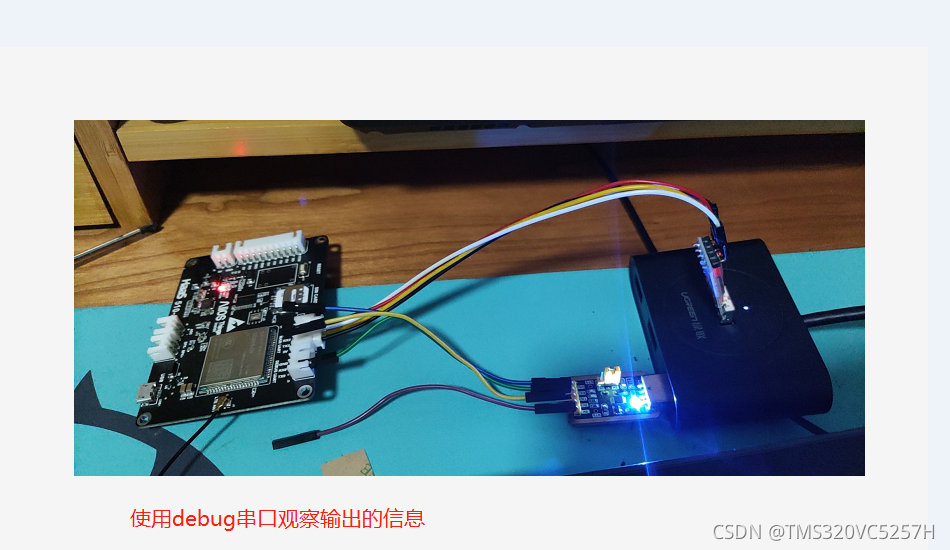
3.連接硬件
按照下圖方式進行連接
 4.編寫代碼
代碼如下所示。請注意,作者將錯誤的代碼也展示出來了,便於大家對比學習。Interval的中文意思是“間隔; (時間上的)間隙; 間歇”。這裏我們設置間隔5秒鐘。
每隔5秒的操作是通過調試串口發送一個信息,這個信息就相當於指示燈,告訴開發者,程序正常運行中。
每隔5秒鐘,510開發板還會向物聯網平臺報送一次屬性。屬性的名字是LightSwitch,值是0或者1。語句lightSwitch = 1 - lightSwitch的意思就是每次報送之前都會翻轉。
var iot = require('iot');
var network = require('network');
var net = network.openNetWorkClient();
/* 設備三元組信息獲取請參考common目錄下的iot組件說明 */
var productKey = 'gcXXXXXjX';
var deviceName = 'light001';
var deviceSecret = 'b25XXXXXXXXXXXXXXXXXXXXXXXXXXX6db';
// 構建物聯網連接實例
var device;
var lightSwitch = 0;
net.on('connect', function () {
    device = iot.device({
        productKey: productKey,
        deviceName: deviceName,
        deviceSecret: deviceSecret,
        region: 'cn-shanghai',
        success: function () {
            console.log('iot: [success] connect');
        },
        fail: function () {
            console.log('iot: [failed] connect');
        }
    });
})


setInterval(function () {
    lightSwitch = 1 - lightSwitch;

    console.log('Hello World, time: ' + new Date());

/* 錯誤示範 iot.postProps({ payload: {LightSwitch:'0'} })*/
/*正確示範,要想發送屬性,就得使用stringify才行*/
    device.postProps(
        JSON.stringify({
            LightSwitch: lightSwitch
        })
    );

  }, 5000);
注意,我們用到了一個 方法。如果不用這個方法,比如我們直接用payload: {LightSwitch:'0'}將會帶來語法錯誤。如下圖所示,這個截圖來自於連接到DEBUG UART的串口助理程序。

修改這個錯誤的方法也很簡單,就是調用JSON.stringify。這個方法起到什麼作用?
它的作用是方法用於將 JavaScript 值轉換為 JSON 字符串。
使用這個方法,就可以非常簡便地實現屬性上報。
5.運行效果
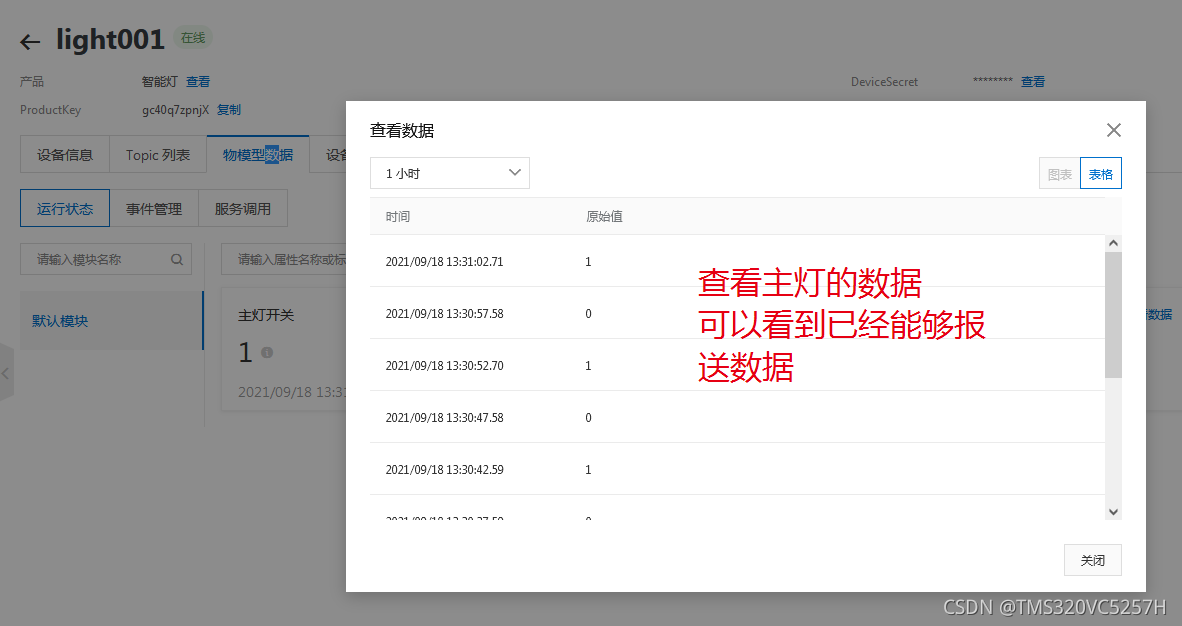
登錄物聯網平臺,觀察指定設備(本文是light001)的物模型數據,可以看到屬性成功上報。
打開串口助理,觀察DEBUG UART的輸出,可以看到間隔5秒鐘顯示hello world字符串。假如有錯誤,間隔5秒鐘,除了helloworld,還有其他錯誤信息。

也可以讓物模型實時刷新,這樣就可以觀察“主燈開關”屬性,間隔5秒鐘就變化一次。實驗成功。
haas-studio提供了一個比較完整的溫度測試程序iot-sensor(LM75溫度檢測程序)。這個例程提供的是IIC接口驅動代碼。顯得比較複雜。對於新手來說,代碼越簡單越便於學習。所以本文就做了一個簡單的定時發送翻轉屬性的例子。程序簡單,只突出關鍵問題。
上報屬性是一個基本功能,也是物聯網知識中的關鍵內容。做出物聯網設備之後,能够將設備狀態報雲平臺感知,是一項物聯網設備開發的難點,編程時,經常會犯錯。
尤其是參考阿裏雲的文檔之後,出現錯誤不知如何解决的同學,掌握本文所述的技能是一個非常必要的工作。
6.延伸閱讀:JSON.stringify
JSON.stringify() 方法用於將 JavaScript 值轉換為 JSON 字符串。
它的語法是
JSON.stringify(value, replacer, space)
要轉換的 JavaScript 值通常為對象或數組。例如我們使用的bool型數據0或者1.
如果 replacer 為函數,則 JSON.stringify 將調用該函數,並傳入每個成員的鍵和值。使用返回值而不是原始值。如果此函數返回 undefined,則排除成員。根對象的鍵是一個空字符串:""。
如果 replacer 是一個數組,則僅轉換該數組中具有鍵值的成員。成員的轉換順序與鍵在數組中的順序一樣。
space是文本添加縮進、空格和換行符,如果 space 是一個數字,則返回值文本在每個級別縮進指定數目的空格,如果 space 大於 10,則文本縮進 10 個空格。space 也可以使用非數字,如:\t。
下面用一個例子來演示JSON.stringify() 的詳細用法和運行效果。
var str = {
    "name":"菜鳥教程", "site":"http://www.runoob.com"}
str_pretty1 = JSON.stringify(str)
document.write( "只有一個參數情况:" );
document.write( "<br>" );
document.write("<pre>" + str_pretty1 + "</pre>" );

document.write( "<br>" );
str_pretty2 = JSON.stringify(str, null, 4) //使用四個空格縮進
document.write( "使用參數情况:" );
document.write( "<br>" );
document.write("<pre>" + str_pretty2 + "</pre>" ); // pre 用於格式化輸出
運行效果如下圖所示。

边栏推荐
- Application of short circuit expression (||) in C language
- Paw 高级使用指南
- Codeforces 1629 A. download more RAM - simple greed
- 2068: [example 2.6] chicken and rabbit in the same cage
- Tensorrt, onnx to tensorrt in mmclas
- When the byte jumps, the Chinese 996 is output in the United States
- Possible solutions to problems after CodeBlocks installation
- 1005: estimation of the earth's population carrying capacity
- Application of bit operation in C language
- AVFoundation
猜你喜欢
Ffmpeg Learning Guide
FFmpeg 学习指南

【SemiDrive源码分析】【X9芯片启动流程】25 - MailBox 核间通信机制介绍(代码分析篇)之 RPMSG-IPCC RTOS & QNX篇

Innovation training (XI) summary of some bugs in the development process

Paw advanced user guide

通过loganalyzer展示数据库中的日志

Record some settings for visual studio 2019
![[wustctf2020] selfie score query -1](/img/90/e4c2882357e0a1c6a80f778887e3f5.png)
[wustctf2020] selfie score query -1
![2061: [example 1.2] trapezoidal area](/img/83/79b73ca10615c852768aba8d2a5049.jpg)
2061: [example 1.2] trapezoidal area

Implementing tensorflow deep learning framework similarflow with numpy

随机推荐
1414: [17noip popularization group] score
[WUSTCTF2020]颜值成绩查询-1
Cdeforces 1638 C. inversion graph - simple thinking
Rk3399 platform development series explanation (kernel debugging chapter) 2.50 use of systrace
2068: [example 2.6] chicken and rabbit in the same cage
Install RPM package offline using yum
2061: [example 1.2] trapezoidal area
Introduction to color coding format
简述CGI与FASTCGI区别
Innovation training (x) advanced interface beautification
Use of awlive structures
How to solve the problem of data table query error when SQLite writes the registration function?
Acwing: topology sequence
Byte order data read / write
[brush title] probability of winning a draw
阿里云开发板HaaS510将串口获取数据发送到物联网平台
Innovation training (XI) summary of some bugs in the development process
Paw 高级使用指南
C language implementation of string and memory library functions
Web3.0, the era of "stimulating creativity"