当前位置:网站首页>Lac automatic dialing experiment of L2TP
Lac automatic dialing experiment of L2TP
2022-07-24 00:07:00 【Bad bad -5】
Catalog
LAC Automatic dialing (Call-LNS) To configure
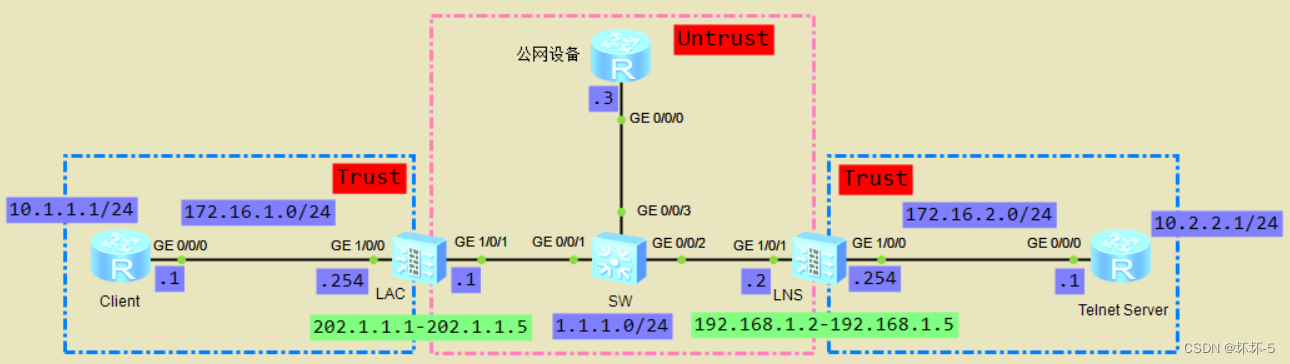
The topology
Experimental instructions
- Client As an intranet user , Use L2TP Of LAC Automatic dialing establishment VPN Tunnel , Visit the company headquarters Telnet Server The server
- LNS by LAC The distribution of IP Address pool is 192.168.1.2-192.168.1.5
- PPP Authentication method PAP authentication
- Client have access to 202.1.1.1-202.1.1.5 This public network address accesses public network devices
Basic configuration
- by Client、Telnet Server、 Public network equipment configuration IP Address
# Client | # Telnet Server set authentication password cipher [email protected] |
# Public network equipment | # SW |
- Basic firewall configuration
# LAC id 0 0 undo info en int g1/0/0 ip ad 172.16.1.254 24 int g1/0/1 ip ad 1.1.1.1 24 firewall zone trust add int g1/0/0 firewall zone untrust add int g1/0/1 | # LNS id 0 0 undo info en int g1/0/0 ip ad 172.16.2.254 24 int g1/0/1 ip ad 1.1.1.2 24 firewall zone trust add int g1/0/0 firewall zone untrust add int g1/0/1 |
LAC Automatic dialing (Call-LNS) To configure
- LAC To configure
- To configure L2TP function , Appoint LNS Of IP Address
[LAC]l2tp enable // Global enabling L2TP |
- When LAC Need to be different from LNS establish L2TP Tunnel time , Different groups can be used to build different tunnels
- To configure LNS when , The tunnel name used must be the same as LAC The tunnel names in are the same
- Appoint LNS The address of , You can specify several different LNS, High reliability has been achieved (start l2tp ip x.x.x.x ip x.x.x.x ip x.x.x.x)
- Configure virtual template interface , And divide the interface into DMZ Area
[LAC]interface Virtual-Template 1 // Enter the virtual template interface view [LAC-Virtual-Template1]call-lns local-user badboy // Use badboy Conduct L2TP Dial to LNS
|
- When configuring authentication in the virtual template interface , You can also use CHAP authentication
- In the use of badboy When dialing , Finally configure , You can grab packets to view L2TP Process information of tunnel establishment
- Configure the route to the headquarters intranet , The output interface is VT Interface . The traffic that will visit the headquarters will be introduced into the tunnel . stay LAC You also need to configure the default route , To ensure the connectivity of the public network . Configure the static route to the private network
ip route-static 10.2.2.1 32 Virtual-Template 1 |
- To configure NAT Strategy , send Client When accessing the server of the headquarters , It uses LNS The distribution of IP Address
[LAC]nat-policy |
- Because it uses Easy-ip By IP Address translation , So if there are multiple Client It's all through LAC Connect to the server accessing the headquarters , Then they are all used VT Interface IP Address access
- Configure the security policy between zones
# Configure the flow to enter from VT Interface security policy rule name trust_dmz source-zone trust destination-zone dmz source-address 10.1.1.1 32 destination-address 10.2.2.1 32 action permit | # After the configuration traffic is encapsulated again from the firewall , Security policy issued from physical interface rule name local_untrust source-zone local destination-zone untrust source-address 1.1.1.1 32 destination-address 1.1.1.2 32 service l2tp action permit |
- because VT The interface is divided into DMZ Regional , stay Client Visit the headquarters Telnet Server when , The flow is from trust Area to dmz Regional
- 10.1.1.1 visit 10.2.2.1 when , Packets arrive at the firewall , According to static routing , Bring packets into VT Tunnel interface , After repacking the packet , Then send the data from the actual physical interface , Therefore, the source area configured in the security policy is the firewall itself , namely Local, The destination area is Untrust Area , The matching source and destination address is the actual source and destination address of the tunnel , The service of release is L2TP
- Packet encapsulation process
- Packet arrival LAC after , Will be carried out in Easy-IP Address translation , Will source IP Convert to VT Interface IP Address
- After looking up the routing table , The discovery came from VT Interface send out , Then according to the forwarding , Iterate data packets to real physical interfaces , Package NEW IP Behind the headlines , Source IP by 1.1.1.1, Purpose IP by 1.1.1.2, The protocol used in the transport layer is UDP, The source port is randomly generated , The destination port is L2TP The use of 1701, The encapsulation protocol used is L2TP, The inner layer agreement is PPP, Then send it from the physical interface
- Packet arrival LNS after , Purpose of discovery IP Is your own , Unpack , Found to be L2TP Data message of , After removing the outer Baotou , View the data information of the inner layer , According to the purpose IP Forward

- LNS To configure
- To configure IP Address pool , Used to LAC Distribute IP Address
[LNS]ip pool l2tp [LNS-ip-pool-l2tp]section 1 192.168.1.2 192.168.1.5 |
- To configure L2TP Our business plan , the L2TP And IP Address pool binding
[LNS]aaa [LNS-aaa]service-scheme l2tp // To configure L2TP Our business plan [LNS-aaa-service-l2tp]ip-pool l2tp // In the business plan , Will be used to give LAC Allocate address pool to bind |
- Configure authentication domain , And configure the branch group and the user information in the branch group
[LNS-aaa]domain default // Default authentication domain [LNS-aaa-domain-default]service-type l2tp // The service type is L2TP [LNS]user-manage group /default/branch // Create an affiliate group [LNS]user-manage user badboy // Create user [LNS-localuser-badboy]alias huaihuai // Configure aliases [LNS-localuser-badboy]parent-group /default/branch // Add the user to the affiliate group [LNS-localuser-badboy]password [email protected] // Configure the password for this user |
- The user created is the user used for authentication
- To configure VT Interface , And divide the interface into DMZ Area
[LNS]interface Virtual-Template 1 [LNS-Virtual-Template1]ip ad 192.168.1.1 29 [LNS-Virtual-Template1]ppp authentication-mode pap // The configuration authentication type is PAP authentication [LNS-Virtual-Template1]remote service-scheme l2tp // And L2TP Business solutions of [LNS]firewall zone dmz [LNS-zone-dmz]add int Virtual-Template 1 |
- by VT Interface configuration IP Address , It can't be LNS by LAC The distribution of IP Addresses in the address pool
- stay VT Interface , Need and AAA Medium L2TP Business scheme binding , To allocate IP Address
- To configure L2TP Group
[LNS]l2tp enable [LNS]l2tp-group 1 [LNS-l2tp-2]allow l2tp virtual-template 1 remote LAC // Specify the name and... Of the opposite end of the tunnel when receiving the call VT Interface [LNS-l2tp-2]tunnel authentication // Enable tunnel authentication [LNS-l2tp-2]tunnel password cipher Huawei123 // Configure the password for tunnel authentication |
- When configuring the name of the opposite end tunnel when receiving calls, it must be consistent with LAC The tunnel names configured on are consistent
- Configure the default route and the static route to the private network
ip route-static 0.0.0.0 0.0.0.0 1.1.1.1 ip route-static 10.2.2.1 255.255.255.255 172.16.2.1 |
- Configure the security policy between zones
security-policy rule name untrust_local source-zone untrust destination-zone local source-address 1.1.1.1 mask 255.255.255.255 destination-address 1.1.1.2 mask 255.255.255.255 service l2tp action permit | security-policy source-zone dmz destination-zone trust source-address 192.168.1.0 mask 255.255.255.248 destination-address 10.2.2.1 mask 255.255.255.255 action permit |
- After the packet is received from the tunnel , The source address of the packet is 1.1.1.1, The destination address is 1.1.1.2, That is, the interface address of the firewall itself , So the matching source region is Untrust, The destination area is its own Local Area , It needs to be released L2TP service
- Received packet from tunnel interface , The tunnel entrance belongs to DMZ Regional , So the matching source region is DMZ, The destination address is Trust Area , Because in LAC On , It has been done. SNAT Transformation , So the matching source address is LNS by LAC Of VT Interface assigned IP Address
To configure SNAT
- stay LAC Configure source on NAT, Realization Client You can access public network devices
- To configure NAT Address pool
nat address-group ISP 0 mode pat section 1 202.1.1.1 202.1.1.5 |
- To configure NAT Strategy
nat-policy rule name ISP source-zone trust destination-zone untrust source-address 10.1.1.1 mask 255.255.255.255 action source-nat address-group ISP |
- Configure the security policy between zones
security-policy rule name ISP source-zone trust destination-zone untrust source-address 10.1.1.1 mask 255.255.255.255 action permit |
test
- stay LAC On , stay VT Interface view , Use call-lns local-user badboy Make a dial-up connection LNS
- stay LAC Of G1/0/1 Interface grab , see L2TP Connection information

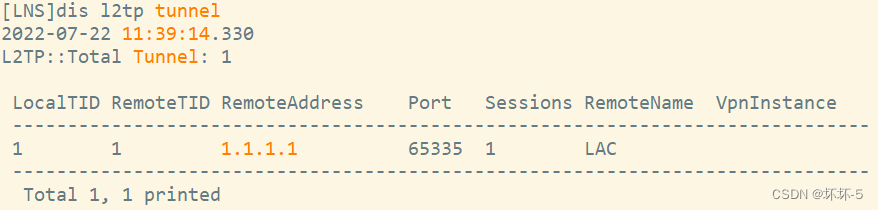
- stay LNS Check out L2TP The construction of the tunnel
- stay Client On ping Test and Telnet Server The connectivity of , And in LAC View session table entries on


- Normal access ,LAC You can see the session table entry on ,10.1.1.1 Of 59307 The port is converted to 192.168.1.2 Of 2049 port , Yes 10.2.2.1 Of 2048 Port initiation ICMP The interview of
- l2tp The session table entry of is established L2TP Tunnel , The exit address of the tunnel is 1.1.1.2, The destination port is 1701
- stay Client Try login on Tenlet Server, And look at LAC Session table entry
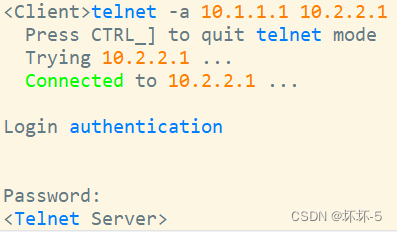

- Can log in normally , And the corresponding session table entries can be seen on the firewall
- Use Client Access public network test

- Client You can also access the public network normally
All of the above are original , If unknown or wrong , Please point out .
The author of this article : Bad
Link to this article :http://t.csdn.cn/Otfck
Copyright notice : All articles in this blog except special statement , All adopt CC BY-NC-SA 4.0 license agreement . Please contact the author to indicate the source and attach a link to this article !
边栏推荐
- Problems encountered in pytorch
- OpenFeign设置circuitbreaker=true后Feign的超时时间(readTimeout)失效
- Linked list - 206. Reverse linked list (this question is very important)
- Sum of submatrix
- Esp8266 - at command + network transparent transmission
- Regular expressions and bypass cases
- C language explanation series -- understanding of functions (2) how to use functions to exchange the values of two integer variables
- OA项目之我的会议(查询)
- 尝试新的方法
- Single target tracking - [correlation filtering] mosse:visual object tracking using adaptive correlation filters
猜你喜欢

为什么大多数人都认为编程很难?
After openfeign sets circuitbreaker=true, feign's readtimeout expires

Error handling of DGS

太空射击 第07课: 添加图形

Structured streaming programming model (input table, result table, output mode...)

加密技术应用
QT | set part size sizehint, minimumsizehint, sizepolicy, stretch factor

474-82(8、221、300)

Webrtc 1 to 1 - basic architecture and directory

ESP8266————AT指令+网络透传

随机推荐
云原生的概念
文本和图片的绘制、数据存储、localStorage、sessionStorage、cookie三者的区别
【微服务架构】分布式事务
kubernetes error
Redis cluster construction (cluster cluster mode, fragment cluster)
Write all the code as soon as you change the test steps? Why not try yaml to realize data-driven?
The QT creation window is blocked and cannot be displayed in time
[microservice Architecture] distributed transactions
尝试新的方法
[attack and defense world web] difficulty five-star 15 point advanced question: bug
Input and output of ACM mode
世界最小的物质排名,灵子,弦子,夸克
2022牛客多校联赛第二场 题解
ESP8266————AT指令+网络透传
多表查询之_外连接
Multi table query_ External connection
Chapter 6: implement a persistence adapter
IT基础英语
Windows software: how to install mysql5.7 and configure environment variables
DGS's mutations