当前位置:网站首页>1. opencv图片基础操作
1. opencv图片基础操作
2022-07-27 16:08:00 【追逐梦想的阿光】
1.导入相关的包
import cv2 as cv
import numpy as np
import matplotlib.pyplot as plt#画出效果图
2.读入图片
img = cv.imread(BASIC_PATH+"/test.jpg")
#imread(路径,读取类型)类型有IMREAD_GRAYSCALE(灰度),IMREAD_COLOR(彩色)
#默认是按原图像读入
<!--读入的图片是一个三维列表格式img[B[], G[], R[]]-->
3.显示图片窗口
def show_image(name, image):
    cv.imshow(name, image)
    <!--#cv.imshow(窗口名, 图片文件)-->
    cv.waitKey(param)#param窗口显示的秒数(毫秒级1秒=1000毫秒),为0时任意按键可以终止
    <!--# cv.destroyWindow(name)name表示需要销毁的窗口名-->
    cv.destroyAllWindows()
4.一些基础操作
    img[100, 100] = [255, 255, 255]
    blue = img[100, 100, 0] #只显示该位置蓝色的像素值,通道按照BGR序
    # print(blue)

    print(img.shape)  # 图像的shape元组返回(高h,宽w,通道数)
    print(img.size)  # 图像的size元组返回图像占有的像素点
    print(img.dtype)  # 图像的dtype返回图像的类型

5.将图片的两块替换
temp = img[280:340, 330:390]
img[273:333, 100:160] = temp
show_image("test", img)

6.单一图像的划分与合并
 	b, g, r = cv.split(img)#将图像分为三个通道的矩阵,是一项代价高昂的操作(就时间而言)。因此,只有在必要时才使用它。否则去数字索引
    b = img[:, :, 0]#将图像第一个通道的矩阵赋值给b
    img2 = cv.merge((b, g, r))#合并三个通道的矩阵
7.对图像的某一通道赋值
	img3[:, :, 0] = 0#将图片的B和G通道值设为0结果如下
    img3[:, :, 1] = 0
    show_image("test", img3)

  	img3[:, :, 0] = 0#将图片的B和R通道值设为0结果如下
    img3[:, :, 2] = 0

temp = img[:, :, 0] + 10#将某一通道的值全部加10
8.图片边缘的填充
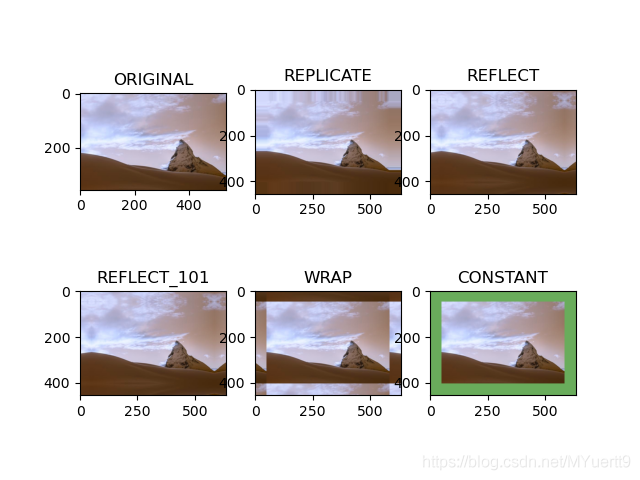
	''' cv.copyMakeBorder(imagesrc, top, bottom, left, right, borderType) borderType: cv.BORDER_REPLICATE#边缘填充,按照边缘像素填充 cv.BORDER_REFLECT#边缘反射,以边缘为界镜像反射like this : fedcba|abcdefgh|hgfedcb cv.BORDER_REFLECT_101#和上面的一样,有一点小的变化like this : gfedcb|abcdefgh|gfedcba BORDER_WRAP#无法解释,它会看起来像这样:cdefgh|abcdefgh|复制颠倒边缘的像素 BORDER_CONSTANT,value=(B, G, R) #以常量颜色来填充边缘 '''

    replicate = cv.copyMakeBorder(img3, 50, 50, 50, 50, cv.BORDER_REPLICATE)
    reflect = cv.copyMakeBorder(img3, 50, 50, 50, 50, cv.BORDER_REFLECT)
    reflect101 = cv.copyMakeBorder(img3, 50, 50, 50, 50, cv.BORDER_REFLECT_101)
    wrap = cv.copyMakeBorder(img3, 50, 50, 50, 50, cv.BORDER_WRAP)
    constant = cv.copyMakeBorder(img3, 50, 50, 50, 50, cv.BORDER_CONSTANT, value=(105, 172, 91))
    plt.subplot(231), plt.imshow(img3, 'gray'), plt.title('ORIGINAL')
    plt.subplot(232), plt.imshow(replicate, 'gray'), plt.title('REPLICATE')
    plt.subplot(233), plt.imshow(reflect, 'gray'), plt.title('REFLECT')
    plt.subplot(234), plt.imshow(reflect101, 'gray'), plt.title('REFLECT_101')
    plt.subplot(235), plt.imshow(wrap, 'gray'), plt.title('WRAP')
    plt.subplot(236), plt.imshow(constant, 'gray'), plt.title('CONSTANT')
    plt.show()
9.两张图片的重合
1.直接相加
print(img.shape, img2.shape)#查看两张图片的大小是否一致,只有两张图片宽高一致时才能相加
img + img2#直接将ndarray相加
show_image("test", img + img2)


直接相加会导致图片变色,BGR超过255时会变成超过值%256求余

2.用add()方法相加
res = cv.add(img, img2)
add()方法相加时会让相加值超过255的变为255

3.用addWeighted()相融合
res = cv.addWeighted(img, 0.3, img2, 0.7, 0)
#alpha*x1 + beta*x2 +gama

10.重设图像大小
1.按照原图像像素重设图像大小
height, width = img2.shape[:2]#获取高和宽
res = cv.resize(img2, (2*width, 2*height), interpolation=cv.INTER_CUBIC)
show_image("test", res)

2.按照尺度重设图像大小
res = cv.resize(img2, None, fx=2, fy=2, interpolation=cv.INTER_LINEAR)
show_image("test", res)
以上两种方法都是将图像扩大两倍一般来说
差值cv.INTER_AREA用于缩小
差值cv.INTER_CUBIC (slow) & cv.INTER_LINEAR用于放大
插值cv.INTER_LINEAR 用于所有调整大小的目的
边栏推荐
- Year end summary template
- The concept and characteristics of network security grid are simple and popular
- 超实用!阿里P9私藏的Kubernetes学习笔记,看完直呼NB
- Multi thread implementation loop
- MySQL solves the problem of insert failure caused by duplicate unique indexes
- Marvell announced the roadmap of its arm server chip, and the performance of the next generation will be twice that of thunderx2
- 备份表恢复表
- WPF makes login interface
- js工具-cookie简单封装
- The latest advanced interview questions for big factories are necessary
猜你喜欢
深度学习-论文阅读:动作结构性图卷积网络AS-GCN
Publish your own NPM component library

数据库的常用命令2

超实用!阿里P9私藏的Kubernetes学习笔记,看完直呼NB

深度识别:论文阅读_2S-AGCN CVPR2019(基于骨架的动作识别的两流自适应图卷积网络)

The global cloud market is growing rapidly, and data security has entered a strong regulatory era of rule of law

动态链表3队列的链式存储结构(LinkedQueue实现)

最新大厂高级面试题 必备

What every Salesforce developer should know about Dates and Times in Apex

深度学习:STGCN学习笔记
随机推荐
英伟达发布全球最小边缘AI超算:算力21TOPS,功耗仅10W!
动态链表2栈的链表存储结构(LinkedStack实现)
二叉树概念
CFA exam registration instructions
hutool 字符串工具类
org.gradle.api.UncheckedIOException: Could not load properties for module ‘gradle-kotlin-dsl‘ from C
施耐德电气、欧莱雅等企业巨头如何开放式创新?DEMO WORLD世界创新峰会揭秘
EF框架简介
Salesforce File Share and Security
Golang concurrent cache breakdown or merge request
深度学习:GAT
How do corporate giants such as Schneider Electric and L'Oreal make open innovation? Uncover secrets of demo World Innovation Summit
@Scheduled 和Quartz
@DateTimeFormat 接收不到时分秒,转换时报类型异常
年终总结模板
hutool- 数字计算
类的六大关系——依赖和关联的区别
Golang Chan implements mutual exclusion
Golang worker pool
mysql解决唯一索引重复导致的插入失败问题