当前位置:网站首页>Introduction to Qt (6) - Implementation of the lottery system
Introduction to Qt (6) - Implementation of the lottery system
2022-08-11 00:02:00 【light chases rain】
一、ui设计
1.1 图像展示

1.2 类名定义

二、代码展示
2.1 MainWindow.h
#ifndef WIDGET_H
#define WIDGET_H

#include <QWidget>
#include <QIcon>
#include <QMessageBox>
#include <QPainter>
#include <QPixmap>
#include <QPoint>
#include <QMouseEvent>
#define TITLE_MOVE_HIGHT 200

namespace Ui {

class Widget;
}

class Widget : public QWidget
{

    Q_OBJECT

public:
    explicit Widget(QWidget *parent = 0);
    void timerEvent(QTimerEvent *e); //time event function
    void paintEvent(QPaintEvent *e); //Canvas background function
    void mousePressEvent(QMouseEvent *e); //Determine the mouse press
    void mouseMoveEvent(QMouseEvent *e);  //Determine the mouse drag
    void mouseReleaseEvent(QMouseEvent *e); //Determine if the mouse is released
    ~Widget();


private slots:
    void on_StartButton_clicked(); //开始按钮

    void on_CloseButton_clicked(); //退出按钮

private:
    bool m_pressing;   //Whether the mouse is being pressed——标志位
    QPoint m_startPosition;  //Gets when the mouse just started pressing,The global position information of the mouse
    QPoint m_framePosition;  //Gets when the mouse just started pressing,窗口(左上角)的位置信息
private:
    Ui::Widget *ui;
    bool m_Drawing; //Determine if a lottery is in progress
    int myTimerId;  //确定时间ID
    QStringList m_listNum;  //Define the list to be drawn
    int m_CurPos;   //Define the list index
    QPixmap m_pix;  //定义背景图片
};

#endif // WIDGET_H
2.2 main.cpp
#include "widget.h"
#include <QApplication>

int main(int argc, char *argv[])
{

    QApplication a(argc, argv);
    Widget w;
    w.show();

    return a.exec();
}
2.3 MainWindow.cpp
#include "widget.h"
#include "ui_widget.h"

Widget::Widget(QWidget *parent) :
    QWidget(parent),
    ui(new Ui::Widget)
{

    ui->setupUi(this);
    m_pressing = false;
    m_Drawing = false;
    //不显示标题栏
    this->setWindowFlags(Qt::Window|Qt::FramelessWindowHint);
    m_pix.load("C:/Users/DELL/Desktop/lottery/img/background.jpg");
    ui->listWidget->setStyleSheet("background:gray");
    ui->StartButton->setIcon(QIcon("C:/Users/DELL/Desktop/lottery/img/start.jpg"));
    ui->CloseButton->setStyleSheet("QPushButton{border-image: url(C:/Users/DELL/Desktop/lottery/img/close1.jpg);}"
                                   "QPushButton:hover{border-image: url(C:/Users/DELL/Desktop/lottery/img/close2.jpg);}"
                                   "QPushButton:pressed{border-image: url(C:/Users/DELL/Desktop/lottery/img/close3.jpg);}");
    m_listNum.push_back("吃饭");
    m_listNum.push_back("睡觉");
    m_listNum.push_back("打游戏");
    m_listNum.push_back("锻炼");
    m_listNum.push_back("运动");
    m_listNum.push_back("跑步");
    m_listNum.push_back("读书");
    m_listNum.push_back("深度之眼");
    m_listNum.push_back("进程间通信");
}

Widget::~Widget()
{

    delete ui;
}

void Widget::timerEvent(QTimerEvent *e)
{

    if(myTimerId == e->timerId())
    {

        m_CurPos++;
        if(m_listNum.size() - 1 <= m_CurPos)
        {

            m_CurPos = 0;
        }
        if(0 == m_listNum.size())
        {

            killTimer(myTimerId);
            m_Drawing = false;
            ui->StartButton->setIcon(QIcon("C:/Users/DELL/Desktop/lottery/img/start.jpg"));
            QMessageBox::warning(this,"温馨提示","already finished");
            return;
        }
        ui->Listlabel->setText(m_listNum.at(m_CurPos));
    }
}

void Widget::on_StartButton_clicked()
{

    if(!m_Drawing)
    {

        m_Drawing = true;
        ui->StartButton->setIcon(QIcon("C:/Users/DELL/Desktop/lottery/img/close1.jpg"));
        myTimerId = this->startTimer(20);
    }
    else
    {

        m_Drawing = false;
        ui->StartButton->setIcon(QIcon("C:/Users/DELL/Desktop/lottery/img/start.jpg"));
        killTimer(myTimerId);
        if(m_listNum.size() > 0)
        {

            QString strval = m_listNum.at(m_CurPos);
            m_listNum.removeAt(m_CurPos);
            ui->listWidget->addItem(new QListWidgetItem(strval));
        }
    }
}

void Widget::on_CloseButton_clicked()
{

    if(QMessageBox::Yes == QMessageBox::question(this,"提示","Are you sure you want to quit this program?",QMessageBox::Yes | QMessageBox::No))
    {

        this->close();
    }
}

void Widget::paintEvent(QPaintEvent *e)
{

    QPainter painter(this);
    QRect rc = rect();
    painter.drawPixmap(rc,m_pix);
}

void Widget::mousePressEvent(QMouseEvent *e) //Determine the mouse press
{

    if(e->button() == Qt::LeftButton)
    {

        QRect rcTop = rect();
        rcTop.setBottom(rcTop.top() + TITLE_MOVE_HIGHT);
        if(rcTop.contains(e->pos()))
        {

            m_pressing = true;
            m_startPosition = e->globalPos();
            m_framePosition = frameGeometry().topLeft();
        }
    }
}

void Widget::mouseMoveEvent(QMouseEvent *e)  //Determine the mouse drag
{

    if(e->buttons() == Qt::LeftButton)
    {

        if(m_pressing)
        {

            QPoint delta = e->globalPos() - m_startPosition;
            move(m_framePosition + delta);
        }
    }
}

void Widget::mouseReleaseEvent(QMouseEvent *e) //Determine if the mouse is released
{

    m_pressing = false;
}
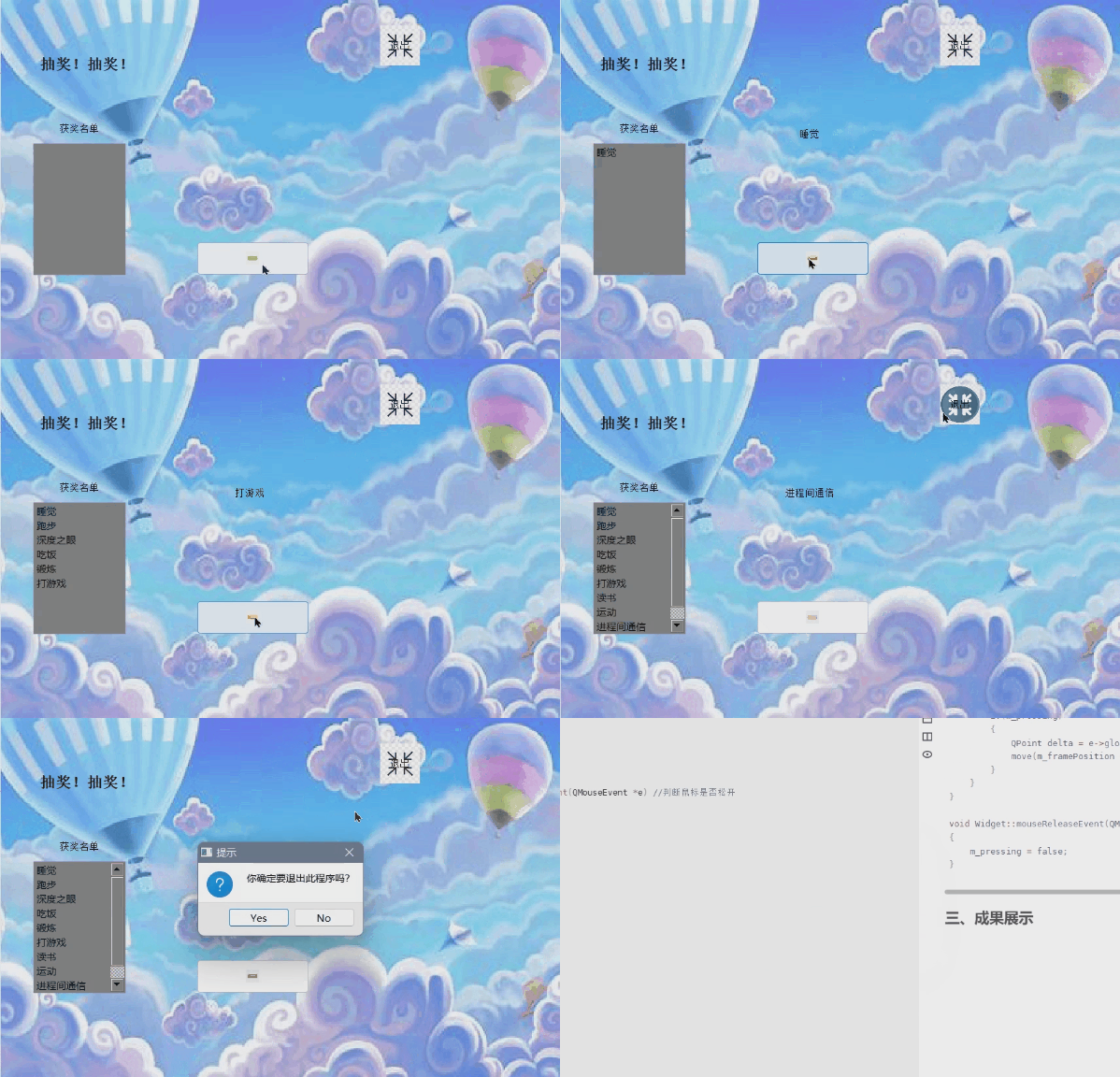
三、成果展示
边栏推荐
- 盘点美军的无人机家底
- Starting a new journey - Mr. Maple Leaf's first blog
- [C language articles] Expression evaluation (implicit type conversion, arithmetic conversion)
- [Excel知识技能] 将数值格式数字转换为文本格式
- Mysql.慢Sql
- Why do programming languages have the concept of variable types?
- SQL injection base
- ROS Experiment Notes - Validation of UZH-FPV Dataset
- [21天学习挑战赛——内核笔记](五)——devmem读写寄存器调试
- sqlmap combined with dnslog fast injection
猜你喜欢

开启新征程——枫叶先生第一篇博客
Starting a new journey - Mr. Maple Leaf's first blog

Web-based meal ordering system in epidemic quarantine area

有哪些可以投稿软件工程/系统软件/程序设计语言类外文期刊、会议?
![[C Language Chapter] Detailed explanation of bitwise operators (“<<”, “>>”, “&”, “|”, “^”, “~”)](/img/7a/4c4e74a294074e1f5fc573d21adb20.png)
[C Language Chapter] Detailed explanation of bitwise operators (“<<”, “>>”, “&”, “|”, “^”, “~”)

学习Apache ShardingSphere解析器源码(一)

ROS Experimental Notes - Install QPEP and Intel-MKL

PMP每日一练 | 考试不迷路-8.10(包含敏捷+多选)
【C语言篇】操作符之 位运算符详解(“ << ”,“ >> ”,“ & ”,“ | ”,“ ^ ”,“ ~ ”)
![[Excel knowledge and skills] Convert numeric format numbers to text format](/img/fb/79d6928456f090d47f0fe7a5074979.png)
[Excel knowledge and skills] Convert numeric format numbers to text format
随机推荐
图片懒加载(纯手写)
Lens filter---about day and night dual-pass filter
10. Notes on receiving parameters
UOJ#749-[UNR #6]稳健型选手【贪心,分治,主席树】
14. Thymeleaf
Jvm.分析工具(jconsole,jvisualvm,arthas,jprofiler,mat)
“蔚来杯“2022牛客暑期多校训练营4 ADHK题解
ROS实验笔记之——安装QPEP以及Intel-MKL
Based on the SSM to reach the phone sales mall system
Talking about cors
三栏布局实现
Qt入门(六)——抽奖系统的实现
How to recover data from accidentally deleted U disk, how to recover deleted data from U disk
excel英文自动翻译成中文教程
YOLOv5的Tricks | 【Trick12】YOLOv5使用的数据增强方法汇总
11. 自定义转换器
16. File upload
部分准备金银行已经过时
22年全国程序员1月薪资出炉,才知道年薪 40 万以上的有这么多?
2022下半年软考「高项」易混淆知识点汇总(2)