当前位置:网站首页>【Unity3D】刚体组件Rigidbody
【Unity3D】刚体组件Rigidbody
2022-06-26 04:58:00 【little_fat_sheep】
1 前言
刚体(Rigidbody)是运动学(Kinematic)中的一个概念,指在运动中和受力作用后,形状和大小不变,而且内部各点的相对位置不变的物体。在 Unity3D 中,刚体组件赋予了游戏对象一些运动学上的属性,主要包括 Mass(质量)、Drag(阻力)、Angular Drag(角阻力)、Use Gravity(是否使用重力)、Is Kinematic(是否受物理影响)、Collision Detection(碰撞检测)、 Velocity(速度)、Force(受力)、Explosion Force(爆炸力)。没有刚体(RigidBody)组件,游戏对象之间可以相互穿透,不会产生碰撞。
1)获取刚体组件
Rigidbody rig = GetComponent<Rigidbody>();2)刚体组件面板属性
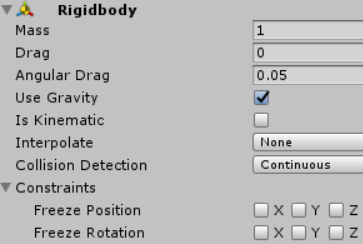
- Mass:物体的质量(默认以千克为单位)
- Drag:物体受到的空气阻力大小
- Angular Drag:物体旋转时,受到的旋转阻力大小转
- Use Gravity:如果启用,物体将受到重力的影响
- Is Kinematic:如果启用,物体将不会由物理引擎驱动,只能由其 Transform 组件操作
- Interpolate:物体运动位置的插值器
- Collision Detection:碰撞检测类型,当看到物体由于运动太快而穿墙时,可以增强碰撞检测频率,选择 Continuous 选项
- Constraints:对刚体运动和旋转的限制,限制物体运动时在某个坐标轴上的分量保持不变
- velocity:物体运动矢量速度
3)刚体组件方法
// 刚体受到的推力
public void AddForce(Vector3 force)
// 刚体受到的爆炸力,explosionForce:爆炸力大小,explosionPosition:爆炸点,explosionRadius:爆炸半径
public void AddExplosionForce(float explosionForce, Vector3 explosionPosition, float explosionRadius)
2 应用
2.1 应用一
1)创建游戏对象
创建 Cube 和 Plane 游戏对象,如下:

2)给 Cube 游戏对象添加刚体组件
选中 Cube 游戏对象,点击 Add Component 按钮,搜索 Rigidbody,添加刚体组件。

3)添加 RigidbodyController 脚本
RigidbodyController.cs
using UnityEngine;

public class RigidbodyController : MonoBehaviour {
	private Rigidbody rig;

	void Start () {
		rig = GetComponent<Rigidbody>();
	}

	void Update () {
		float hor = Input.GetAxis("Horizontal");
        float ver = Input.GetAxis("Vertical");
		float up = Mathf.Sqrt(hor * hor + ver * ver);
		if (up > 0.1) {
			rig.velocity = new Vector3(hor, up, ver);
		}
	}
}
4)运行效果
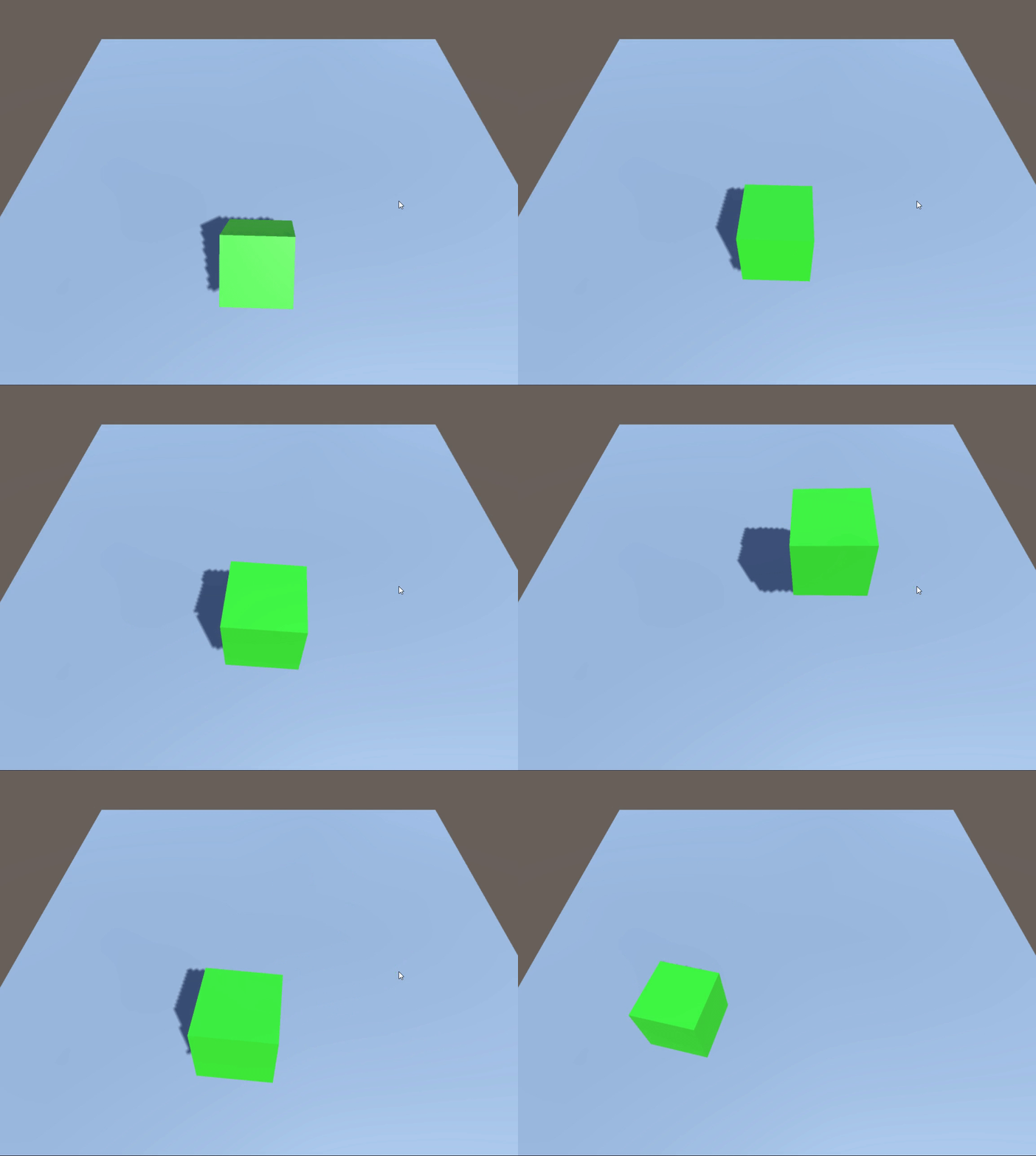
通过上下左右箭头键,控制立方体向四周的上空抬起,松开按键后,立方体由于受到重力作用掉落下来。
2.2 应用二
1)添加 RigidbodyController 脚本
在应用一的基础上,将 RigidbodyController 脚本修改如下:
RigidbodyController.cs
using UnityEngine;

public class RigidbodyController : MonoBehaviour {
	private Rigidbody rig;

	void Start () {
		rig = GetComponent<Rigidbody>();
	}

	void Update () {
		float hor = Input.GetAxis("Horizontal");
        float ver = Input.GetAxis("Vertical");
		float up = Mathf.Sqrt(hor * hor + ver * ver);
		if (up > 0.1) {
			rig.AddForce(new Vector3(hor, 0, ver) * 10); // 添加推力
		}
	}
}
2)运行效果
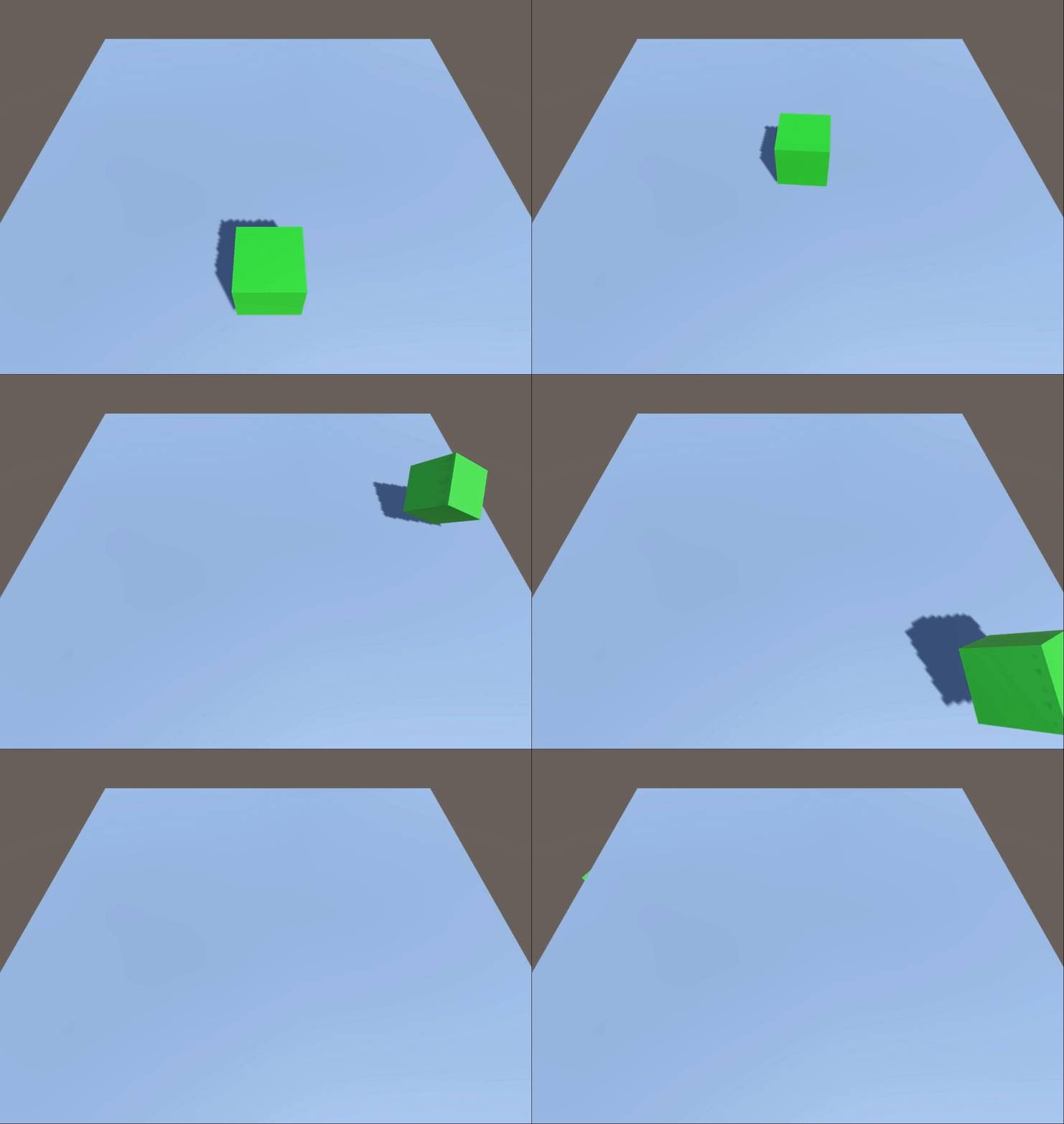
通过上下左右箭头键,控制立方体受到来自四周的推力。
2.3 应用三
1)创建游戏对象
在应用一的基础上,创建 4 个 Cube 游戏对象,position 分别为:(0, 1, 2)、(0, 1, -2)、(-2, 1, 0)、(2, 1, 0),如下:

给 4 个 Cube 游戏对象都添加 Rigidbody 组件和 RigidbodyController 脚本组件。
2)添加 RigidbodyController 脚本
using UnityEngine;

public class RigidbodyController : MonoBehaviour {
	private Rigidbody rig;

	void Start () {
		rig = GetComponent<Rigidbody>();
	}

	void Update () {
		if (Input.GetKeyDown(KeyCode.Space)) {
            // 在(0,0,0)坐标处添加10米范围内的300N的爆炸力
			rig.AddExplosionForce(300, Vector3.zero, 10);
		}
	}
}
3)运行效果
按空格键,4 个立方体受到来自中心的爆炸力。

边栏推荐
- Multipass Chinese document - use instance command alias
- Multipass Chinese document - remote use of multipass
- Anti withdrawal test record
- Install Damon database
- UWB超高精度定位系统架构图
- 基础查询
- LeetCode 94. Middle order traversal of binary tree
- Zhongshanshan: engineers after being blasted will take off | ONEFLOW u
- Multipass中文文档-远程使用Multipass
- 2022.2.15
猜你喜欢




随机推荐
How can the intelligent transformation path of manufacturing enterprises be broken due to talent shortage and high cost?
1.12 learning summary
Numpy general function
MySql如何删除所有多余的重复数据
微信小程序保存图片的方法
Comment enregistrer une image dans une applet Wechat
Wechat applet exits the applet (navigator and api--wx.exitminiprogram)
Create a binary response variable using the cut sub box operation
1.16 learning summary
2022.2.11
[quartz] read configuration from database to realize dynamic timing task
文件上传与安全狗
Zhongshanshan: engineers after being blasted will take off | ONEFLOW u
Svn error command revert error previous operation has not finished; run ‘ cleanup‘ if
1.20 learning summary
Zuul 實現動態路由
NVM installation and use and NPM package installation failure record
torchvision_ Transform (image enhancement)
numpy 数据输入输出
2022.1.23