当前位置:网站首页>Opencv image processing - grayscale processing
Opencv image processing - grayscale processing
2022-06-26 10:35:00 【The season of Ming Dynasty】
1、 linear transformation
- The linear transformation of gray scale will press the values of all pixels in the image Linear transformation function To transform .
- In the case of underexposure or overexposure , The gray value of the image will be limited to a very small range , What you see on the monitor is a blur 、 There seems to be no hierarchy of images .
- In this case , A linear single value function is used to linearly extend each pixel in the image , Will effectively Improve the visual effect of the image .
- The principle of linear transformation is shown in the figure .
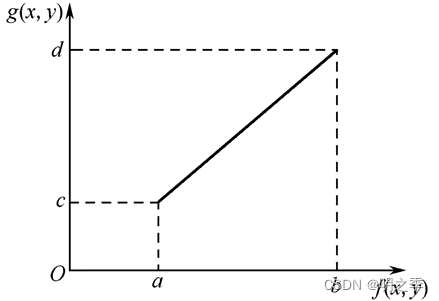
According to the picture above , Take underexposure for example , Suppose the original image f(x,y) The gray scale range of is [a,b], The image expected to be obtained after linear transformation of gray level g(x,y) The gray scale range is [c,d], Then the linear transformation process is as follows .
A more general mathematical expression is :
among ,g(x, y) Is the transformed value ,a Is the coefficient ,b Constant term .
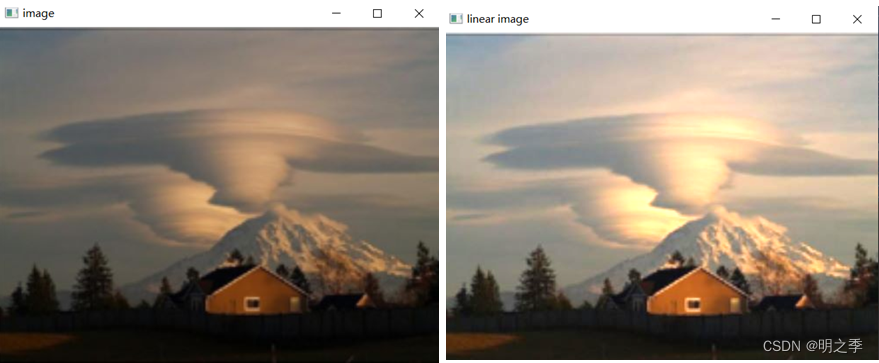
# 1、 linear transformation
import cv2
import numpy as np

img = cv2.imread('img.jpg')
cv2.imshow('image', img)
# cv2.waitKey(0)
#  linear transformation
linear_img = 1.5 * img + 10
linear_img.max()    #  Maximum 364.0
#  truncation , The greater than 255 The pixel value of becomes 255
linear_img[linear_img>255] = 255
linear_img = np.asarray(linear_img, np.uint8) #  The pixel value becomes an integer
cv2.imshow('linear image', linear_img)
cv2.waitKey(0)
2、 Nonlinear transformation
- Use non-linear function to map image gray , It can realize the nonlinear transformation of image gray , Commonly used logarithmic functions and exponential functions are typical logarithmic functions ( chart (a))、 Exponential function ( chart (b)) etc. .

2.1 Logarithmic transformation
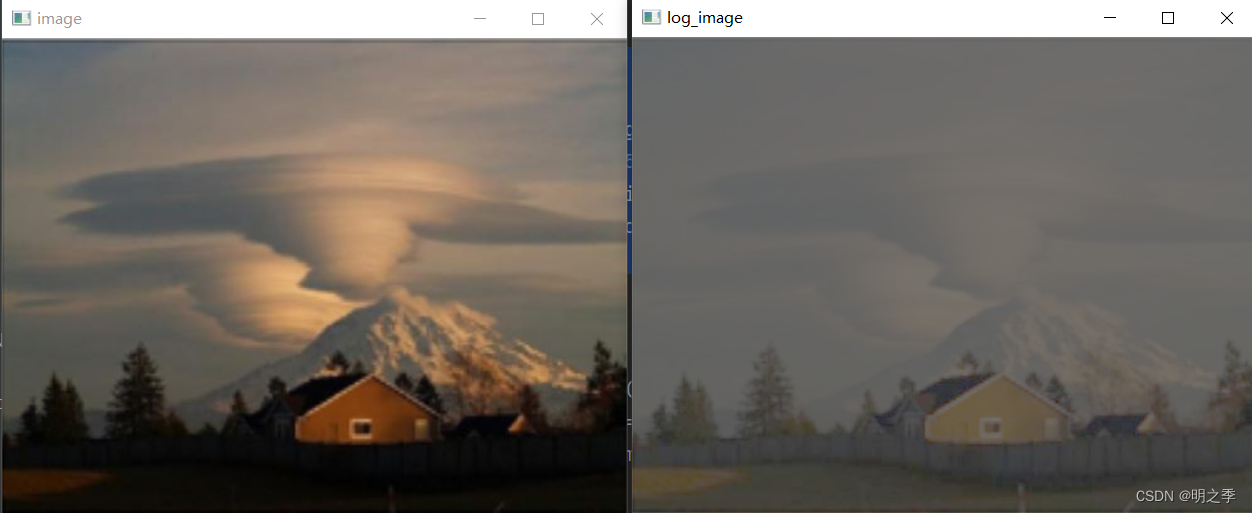
- Logarithmic transformation You can enhance pixels with low gray values , Expand the low gray area , Suppress pixels with high gray values , When you want to stretch the low gray area of an image and compress the high gray area , This transformation can be used .
- Because the logarithmic curve has a large slope in areas with low pixel values , In the area with higher pixel value, the slope is smaller , So the image is transformed by logarithm , The contrast of darker areas will be improved . Can be used for Enhance the dark details of the image , Thus, it is used to expand the darker pixels in the compressed high-value image .

# 2.  Nonlinear transformation
#  Logarithmic transformation
log_img = 10 + 20 * np.log(img+5)
#  truncation , The greater than 255 The pixel value of becomes 255
log_img[log_img>255] = 255
log_img = np.asarray(log_img, np.uint8) #  The pixel value becomes an integer
cv2.imshow('log_image', log_img)
cv2.imshow('image', img)
cv2.waitKey(0)
2.2 Exponential transformation
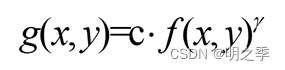
- Exponential transformation ( Gamma transform ) It is used for image enhancement , Improve dark details , In short, it is a nonlinear transformation , Let the image change from the linear response of exposure intensity to the response of human eyes , namely Will bleach ( Camera exposure ) Or too dark ( Underexposure ) Pictures of the , To correct .
- The expression of exponential transformation is shown in the formula .


#  Exponential transformation
gamma_img = 10 * np.power(img, 1.1)
#  truncation , The greater than 255 The pixel value of becomes 255
gamma_img[gamma_img>255] = 255
#  The pixel value becomes an integer
gamma_img = np.asarray(gamma_img, np.uint8)
cv2.imshow('gamma_image', gamma_img)
cv2.imshow('image', img)
cv2.waitKey(0)
3、 Histogram Processing
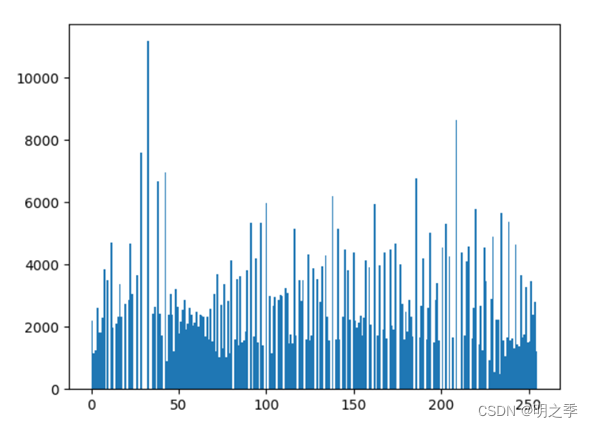
- The gray histogram of the image is shown in the figure , Use abscissa to represent gray level , The ordinate represents the number of pixels in each gray level .
- Through the gray histogram can reflect the statistical characteristics of image gray , And the proportion of the area or the number of pixels with different gray values in the whole image .

- In the two gray-scale histograms shown in the figure , If histogram is densely distributed in a very narrow area , It means that the contrast of the image is very low ; If histogram has two peaks , It indicates that there may be two areas with different brightness in the image .

- Histogram is one-dimensional feature of image , An image has a unique histogram . The distribution of gray level of image histogram can provide many features of image information , Provide a powerful argument for image analysis .
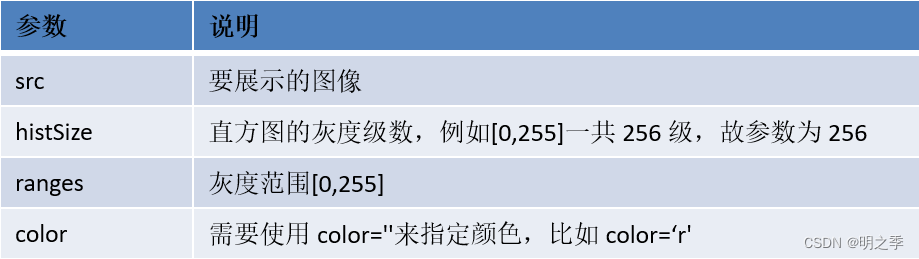
- View the histogram distribution of the image : plt.hist(src.ravel(),hitsizes, ranges, color)
import cv2
import numpy as np
import matplotlib.pyplot as plt

#  Gray histogram of the image
img = cv2.imread('img.jpg')
#  Draw a gray histogram
plt.hist(img.ravel(), 256, [0,255])

3.1 Histogram equalization
- The basic idea of histogram equalization is to do some mapping transformation on the gray level of pixels in the original image , The probability density of the gray level of the transformed image is uniformly distributed , That is, the transformed image is an image with uniform gray level distribution , This means that the dynamic range of image gray is increased , thus Improve the contrast of the image .
- To achieve histogram equalization, you can use :cv2.equalizeHist(src),
src Single channel image is required .
Histogram equalization of gray image is as follows :
#  Histogram equalization
img_gray = cv2.cvtColor(img, cv2.COLOR_BGR2GRAY)    #  Turn to grayscale
img_hist = cv2.equalizeHist(img_gray)   #  Equalize the single channel image
cv2.imshow('gray', img_gray)
cv2.imshow('hist', img_hist)
cv2.waitKey(0)
3.2 Histogram equalization of color image
- To perform histogram equalization on multi-channel images , First, separate the channels of the original image , Then histogram equalization is carried out respectively , Finally, the processed single channel images can be merged .
- Channel segmentation can be done by cv2.split() Realization , such as :b, g, r = cv2.split(img)
- Channel merging is similar to array merging , adopt cv2.merge() Realization , such as :cv2.merge((bH, gH, rH))

#  Histogram equalization of color image
def EqualizeHist(img):
    # 1.  Split channels
    (b, g, r) = cv2.split(img)
    # 2.  Equalize each channel separately
    bh = cv2.equalizeHist(b)
    gh = cv2.equalizeHist(g)
    rh = cv2.equalizeHist(r)
    # 3.  Merge
    result = cv2.merge((bh, gh, rh))
    return result

#  Histogram equalization of the original image
img_equal = EqualizeHist(img)
cv2.imshow('image', img)
cv2.imshow('image_equal', img_equal)
cv2.waitKey(0)
#  Draw histogram
plt.hist(img_equal.ravel(), 256, [0,255])
4、 Two valued
- Binarization is the value that keeps the image black and white , Black and white .
- Color images : Three channels , Pixel values 0-255,0-255,0-255, So you can have 2^24 Bitspace
- Grayscale image : A passage , Pixel values 0-255, So there is 256 Color
- Binary image : Only two colors , Black and white ,255 white ,0 black
- Image binarization (Image Binarization) Is to set the gray value of pixels on the image to 0 or 255, That is to say, the process of presenting the whole image with obvious black-and-white effect .
- In digital image processing , Binary image plays a very important role , The binarization of the image greatly reduces the amount of data in the image , So as to highlight the outline of the target .
- OpenCV There are two ways to realize the binarization of images :
• Threshold truncation : Select a global threshold , With this value as the boundary, the whole image is divided into binary images that are either black or white .
• cv2.threshold(src, thresh, maxval, type)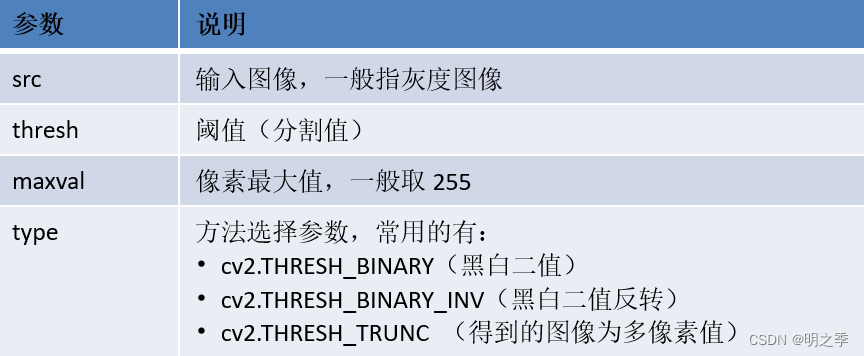
#  Two valued
# 1.  Threshold truncation
img = cv2.imread('img.jpg')
img_gray = cv2.cvtColor(img, cv2.COLOR_BGR2GRAY)
_, img_binary = cv2.threshold(src=img_gray, thresh=50, maxval=255,
                         type=cv2.THRESH_BINARY)
cv2.imshow('image_binary', img_binary)
cv2.imshow('image', img)
cv2.waitKey(0)

- OpenCV There are two ways to realize the binarization of images :
• Adaptive threshold : Adaptive threshold can be regarded as a kind of local threshold , By specifying the size of an area , Compare this point with the average value of pixels in the area size ( Or other characteristics ) The size relationship determines whether the pixel belongs to black or white .
• cv2.adaptiveThreshold(src, maxValue, adaptiveMethod, thresholdType, blockSize, C)
# 2. Adaptive threshold
adapt_thres = cv2.adaptiveThreshold(src=img_gray, maxValue=255,
                              adaptiveMethod=cv2.ADAPTIVE_THRESH_GAUSSIAN_C,
                              thresholdType=cv2.THRESH_BINARY,
                              blockSize=9, C=3)
cv2.imshow('adapt image', adapt_thres)
cv2.waitKey(0)

边栏推荐
- Express (I) - easy to get started
- 【在线仿真】Arduino UNO PWM 控制直流电机转速
- 量化投资学习——经典书籍介绍
- [untitled]
- Global and Chinese markets of children's electronic thermometers 2022-2028: Research Report on technology, participants, trends, market size and share
- MySQL Chapter 4 Summary
- 六月集训(第26天) —— 并查集
- AIX基本操作记录
- 904. 水果成篮
- Enter a positive integer with no more than 5 digits, and output the last digit in reverse order
猜你喜欢

MySQL第十三次作业-事务管理

Enter a positive integer with no more than 5 digits, and output the last digit in reverse order

方法区里面有什么——class文件、class文件常量池、运行时常量池

利用foreach循环二维数组

MySQL 9th job - connection Query & sub query

MySQL第六次作业-查询数据-多条件

Call API interface to generate QR code of wechat applet with different colors

基础-MySQL

Appium自动化测试基础 — 移动端测试环境搭建(二)

Basic string operations in C
随机推荐
The sixth MySQL job - query data - multiple conditions
MySQL第六次作业-查询数据-多条件
Threading model in webrtc native
The IE mode tab of Microsoft edge browser is stuck, which has been fixed by rolling back the update
How QT uses quazip to compress and decompress files
2. 合并两个有序数组
What is LSP
六月集训(第26天) —— 并查集
Call API interface to generate QR code of wechat applet with different colors
The first batch of 12 enterprises settled in! Opening of the first time-honored product counter in Guangzhou
Little red book - Notes inspiration - project summary
【LeetCode】59. Spiral matrix II
Global and Chinese market of aluminum sunshade systems 2022-2028: Research Report on technology, participants, trends, market size and share
MySQL Chapter 5 Summary
June training (the 26th day) - collective search
量化投资学习——经典书籍介绍
Dynamic library connection - symbol conflict - global symbol intervention
MySQL项目8总结
Selection of webrtc video codec type VP8 H264 or other? (openh264 encoding, ffmpeg decoding)
What is a botnet