当前位置:网站首页>Fastdfs offline deployment (Graphic)
Fastdfs offline deployment (Graphic)
2022-07-25 10:24:00 【Puffiness is also strong】
1. Software preparation
fastdfs-6.06.tar.gz Deployment package
link :https://pan.baidu.com/s/1KNgIV1B4IRz6ZlqSBQbk1w?pwd=1234
Extraction code :1234
fastdfs-nginx-module-1.22.tar.gz Deployment package
link :https://pan.baidu.com/s/1kpfajFrl_NYnfkLEijle8w?pwd=1234
Extraction code :1234
libfastcommon-1.0.43.tar.gz Deployment package
link :https://pan.baidu.com/s/1W5wWHJFWQId-eGgKsH1yMw?pwd=1234
Extraction code :1234
nginx-1.12.2.tar.gz Deployment package
link :https://pan.baidu.com/s/1HMCg0N65IXRi8LUuHWWBpg?pwd=1234
Extraction code :1234
Linux CentOS7 7.6_1810
link :https://pan.baidu.com/s/1NV4MjfORIj290Q3scy6iYQ?pwd=pzse
Extraction code :pzse
Fastdfs Verification tool
link :https://pan.baidu.com/s/1O6OzljP5DLoheMXxzIIYtA?pwd=1234
Extraction code :1234
Mind mapping tools
free , Succinct can be “ Mind mapping ” Copy and paste the article to get a mind map ( No joy, no spray. )

2. Installation steps
Installation environment ( The offline deployment package does not contain dependencies , It needs to be packaged and transmitted on the virtual machine )
install gcc rely on :yum install gcc-c++ -y
install pcre rely on :yum install pcre pcre-devel -y
install zlib rely on :yum install zlib zlib-devel -y
install openssl rely on :yum install openssl openssl-devel -y
install perl rely on :yum -y install perl

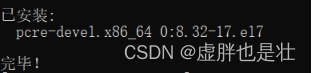


newly build fastdfs Catalog :mkdir -p /yunwei/fastdfs
Upload all deployment packages to the directory file
Enter this directory :cd /yunwei/fastdfs
decompression libfastcommon package :tar -xvf libfastcommon-1.0.43.tar.gz

Enter the decompression package :cd libfastcommon-1.0.43/

compile :./make.sh

install :./make.sh install

Put back the upper menu :cd ..
decompression fastdfs package :tar -xvf fastdfs-6.06.tar.gz

Enter the installation package : cd fastdfs-6.06/

compile :./make.sh

install :./make.sh install

Copy files cp -r conf/* /etc/fdfs/

Enter file :cd /etc/fdfs/
Modify the configuration file :vi tracker.conf
take base_path=/home/yuqing/fastdfs Change to base_path=/yunwei/fastdfs/data
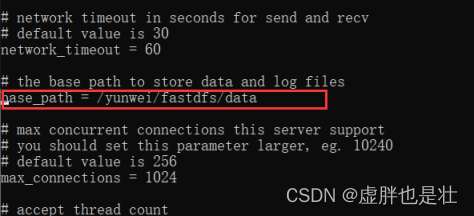
Create a directory of log files :mkdir -p /yunwei/fastdfs/data
start-up trackerd:/usr/bin/fdfs_trackerd /etc/fdfs/tracker.conf restart
testing :ps -ef|grep trackerd

Check the log :cat /yunwei/fastdfs/data/logs/trackerd.log

Modify the configuration file :vi storage.conf
base_path=/home/yuqing/fastdfs Change it to :base_path=/yunwei/fastdfs/data

store_path0=/home/yuqing/fastdfs Change it to :store_path0=/yunwei/fastdfs/data/storage

tracker_server=192.168.209.121:22122 Change it to :tracker_server= The server ip:22122
( This figure ip For the demo environment ip)

Create a directory of log files :mkdir -p /yunwei/fastdfs/data/storage
start-up storage process :/usr/bin/fdfs_storaged /etc/fdfs/storage.conf restart
testing :ps -ef|grep storaged

Enter the compressed package file :cd /yunwei/fastdfs
Extract the module file :tar -xvf fastdfs-nginx-module-1.22.tar.gz

Get into src Catalog :cd /yunwei/fastdfs/fastdfs-nginx-module-1.22/src

Copy configuration file :cp mod_fastdfs.conf /etc/fdfs/
Edit profile :cd /etc/fdfs/
vi mod_fastdfs.conf
base_path=/tmp Change to :base_path=/yunwei/fastdfs/data

tracker_server=tracker:22122 Change to :tracker_server= The server IP Address :22122

url_have_group_name = false Change to :url_have_group_name = true
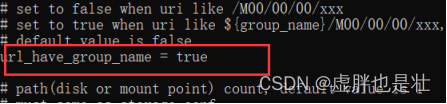
store_path0=/home/yuqing/fastdfs Change to :store_path0=/yunwei/fastdfs/data/storage

nginx Join in fastdfs modular
decompression nginx Compress :tar -xvf nginx-1.12.2.tar.gz
Enter the decompression package :cd nginx-1.12.2/

To configure nginx Join the module : ./configure --prefix=/yunwei/nginx --add-module=/yunwei/fastdfs/fastdfs-nginx-module-1.22/src

compile :make

Compilation and installation :make install

Detection module :cd /yunwei/nginx/sbin
./nginx -V

To configure nginx file :vi /yunwei/nginx/conf/nginx.conf
Add module configuration :
location /group1/M00/{
#root /home/FastDFS/fdfs_storage/data;
ngx_fastdfs_module;
}

start-up nginx
Get into sbin file :cd /yunwei/nginx/sbin/

start-up :./nginx

testing :lsof -i:80

Query log :cat /yunwei/nginx/logs/error.log

Get into nginx Webpage : The server IP Address

Turn on the machine fastdfs Test package

Click start .bat

Local access browser address ( Presentation environment address ):http://localhost:8080/client/upload?server=192.168.10.13:22122

Click on me to visit , Show pictures

Fastnfs Deployment success !!!【 thank @ Provided by default fastdfs Detection tools 】
边栏推荐
- 21. Merge Two Sorted Lists
- Duplicate SSL_ Anti spoofing, spoofing attacks and deep forgery detection using wav2vec 2.0 and data enhanced automatic speaker authentication
- Input stream in io stream
- shortest-unsorted-continuous-subarray
- SQL 题目整理
- Chrome开发者工具详解
- Pytorch 张量列表转换为张量 List of Tensor to Tensor 使用 torch.stack()
- Erlang (offline deployment)
- Number theory -- Research on divisor
- Round to the nearest
猜你喜欢

VS Code 连接远程 Jupyter 服务器

Mysql5.7 master-slave database deployment (offline deployment)

Angr(四)——angr_ctf

线程池的死锁事件

Pow(x,n)

Angr (V) - angr_ ctf

Supervisor deployment (offline deployment requires downloading the deployment package in advance)

Number theory -- Research on divisor
构建 Dompteur 容器问题小记
Fastdfs离线部署(图文)

随机推荐
IO流中的输入流
Configure FTP virtual user and access control
mysql 解决不支持中文的问题
虚拟专线网络部署
复现 ASVspoof 2021 baseline RawNet2
4、 Testfixture test fixture, or test firmware
oh-my-zsh和tmux配置(个人)
10.expect免交互
for循环:水仙花案例
When installing mysql, string the service installation failure > mysql80 startup failure
For cycle: daffodil case
Basic knapsack problem
简易加法计算器
数论--约数研究
Angr (IX) -- angr_ ctf
Storage, computing, distributed storage (collection and sorting is suitable for Xiaobai)
多线程——Runnable接口,龟兔赛跑
Snake games
MySQL solves the problem of not supporting Chinese
CentOS install redis