当前位置:网站首页>CUMT学习日记——数字图像处理考试速成笔记
CUMT学习日记——数字图像处理考试速成笔记
2022-06-22 15:11:00 【我叫方程】
CUMT学习日记——数字图像处理速成笔记
系列第十二篇 数字图像处理复习
一、数字图像处理复习回忆
这么课没有复习太长时间,因为有其他事情,很忙,最后结果还不错,差一点点满绩点。其实不是因为我学得好,我也不咋会,但是老师画重点了,我把老师画重点的地方好好琢磨了。
在网上40块钱买了个网课,讲得真的一般,不如看我这个
二、笔记


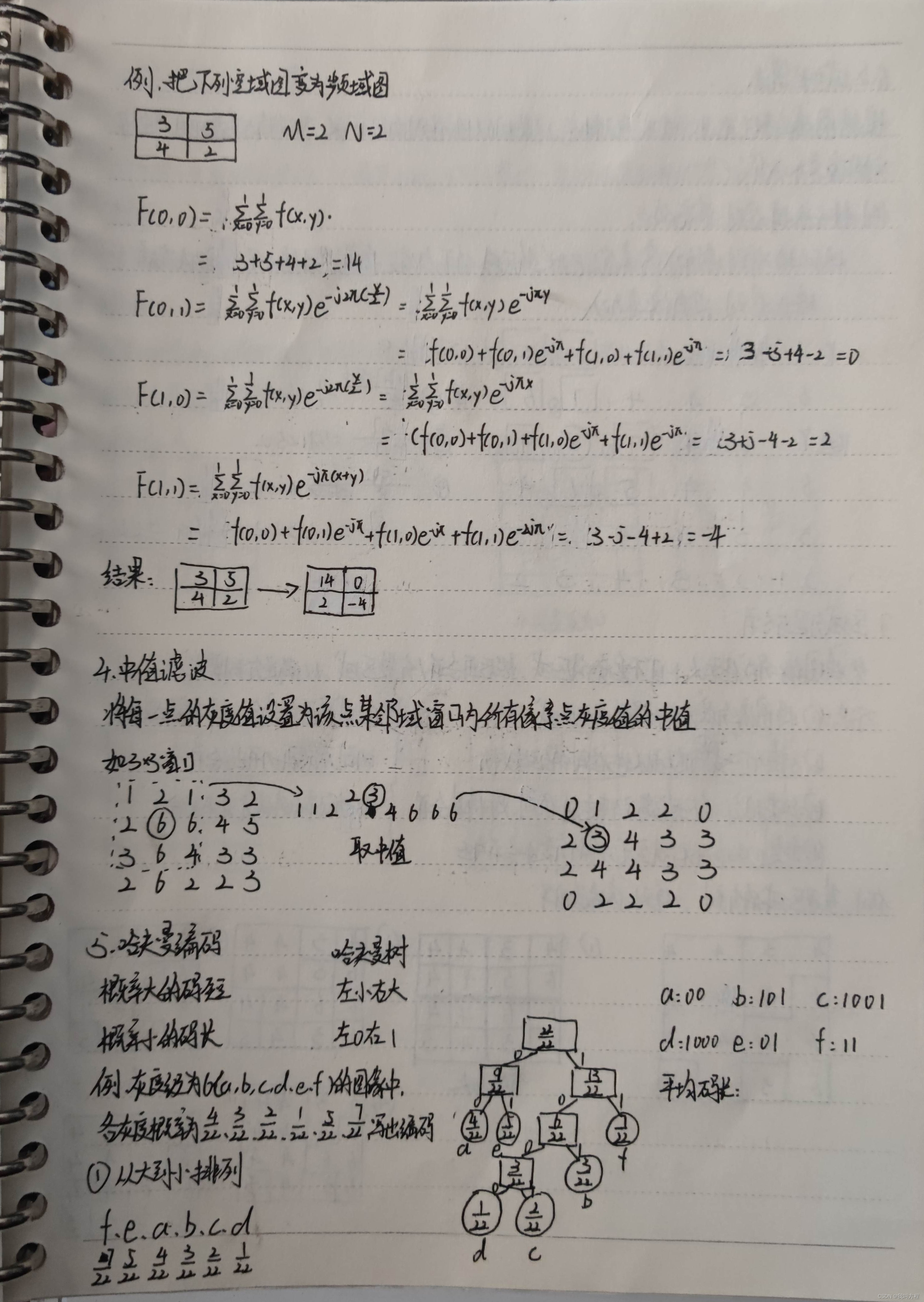

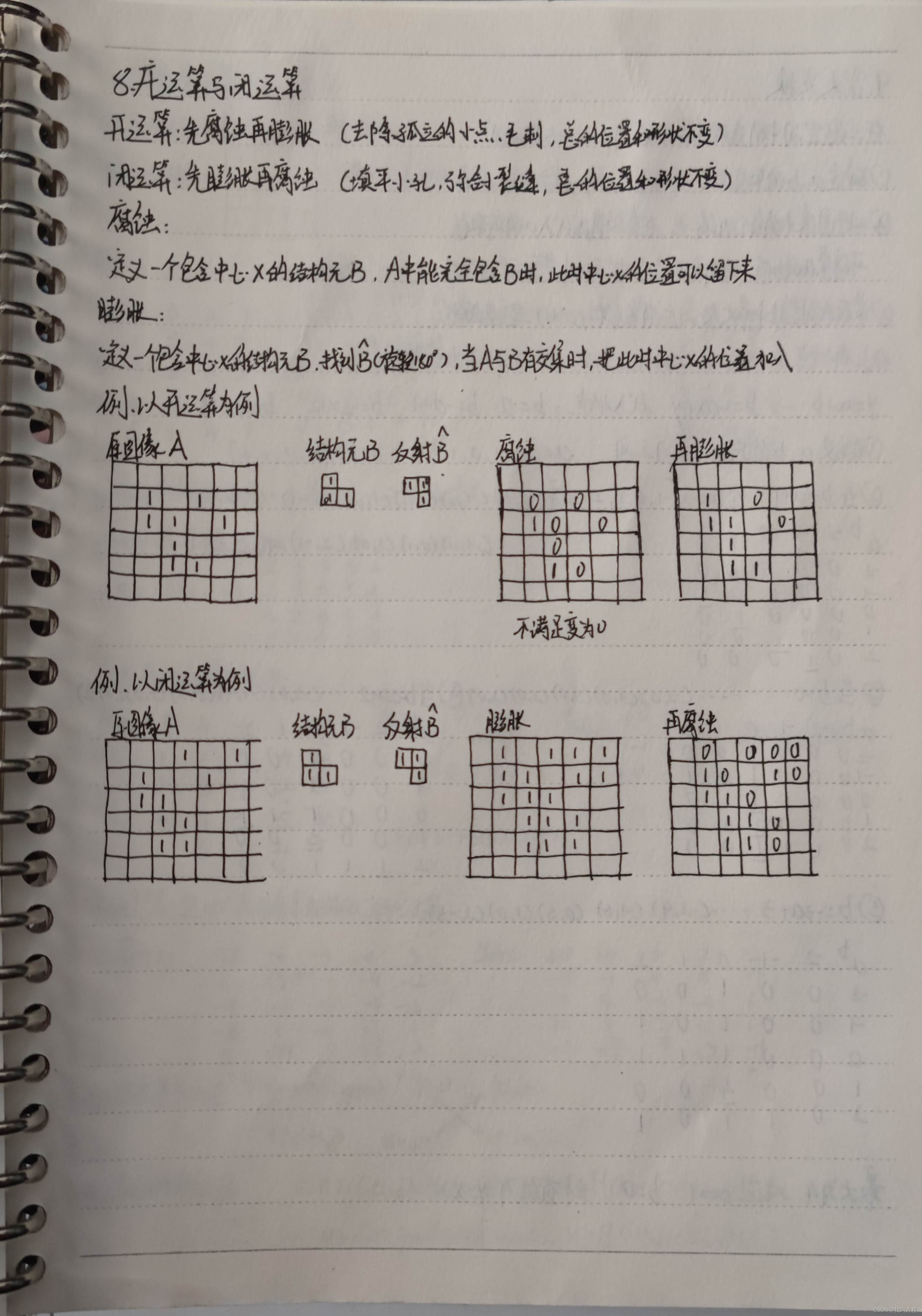

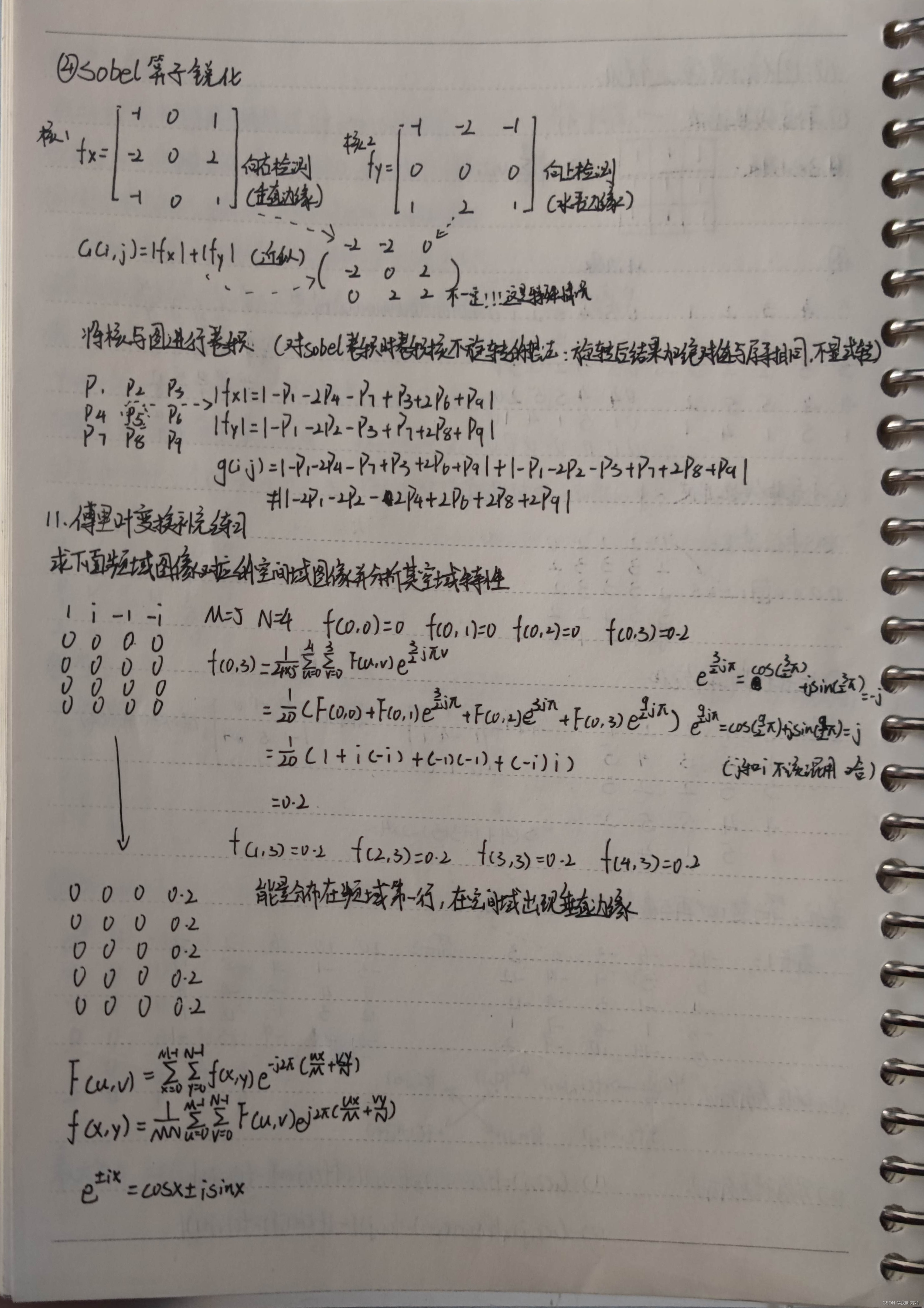
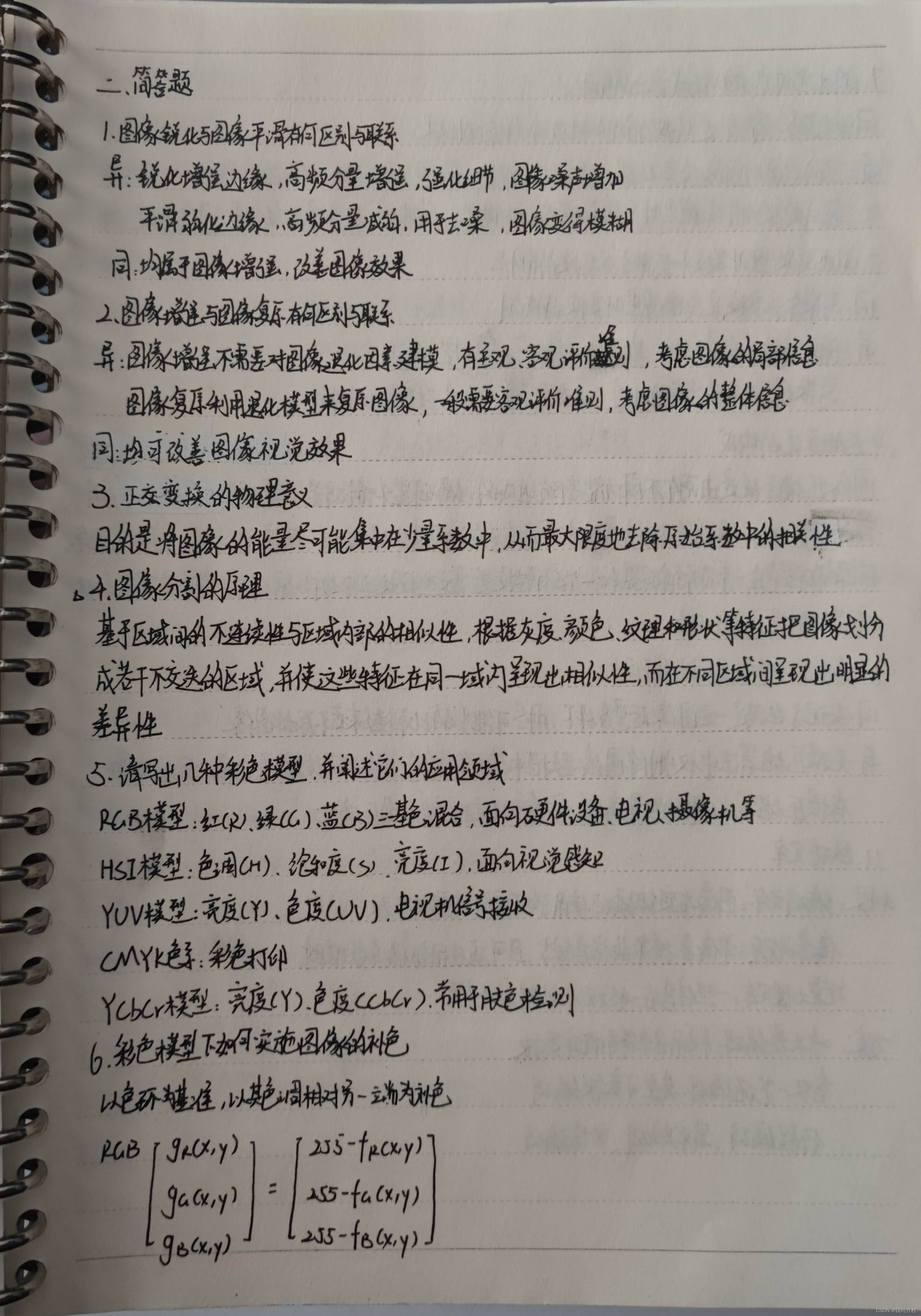
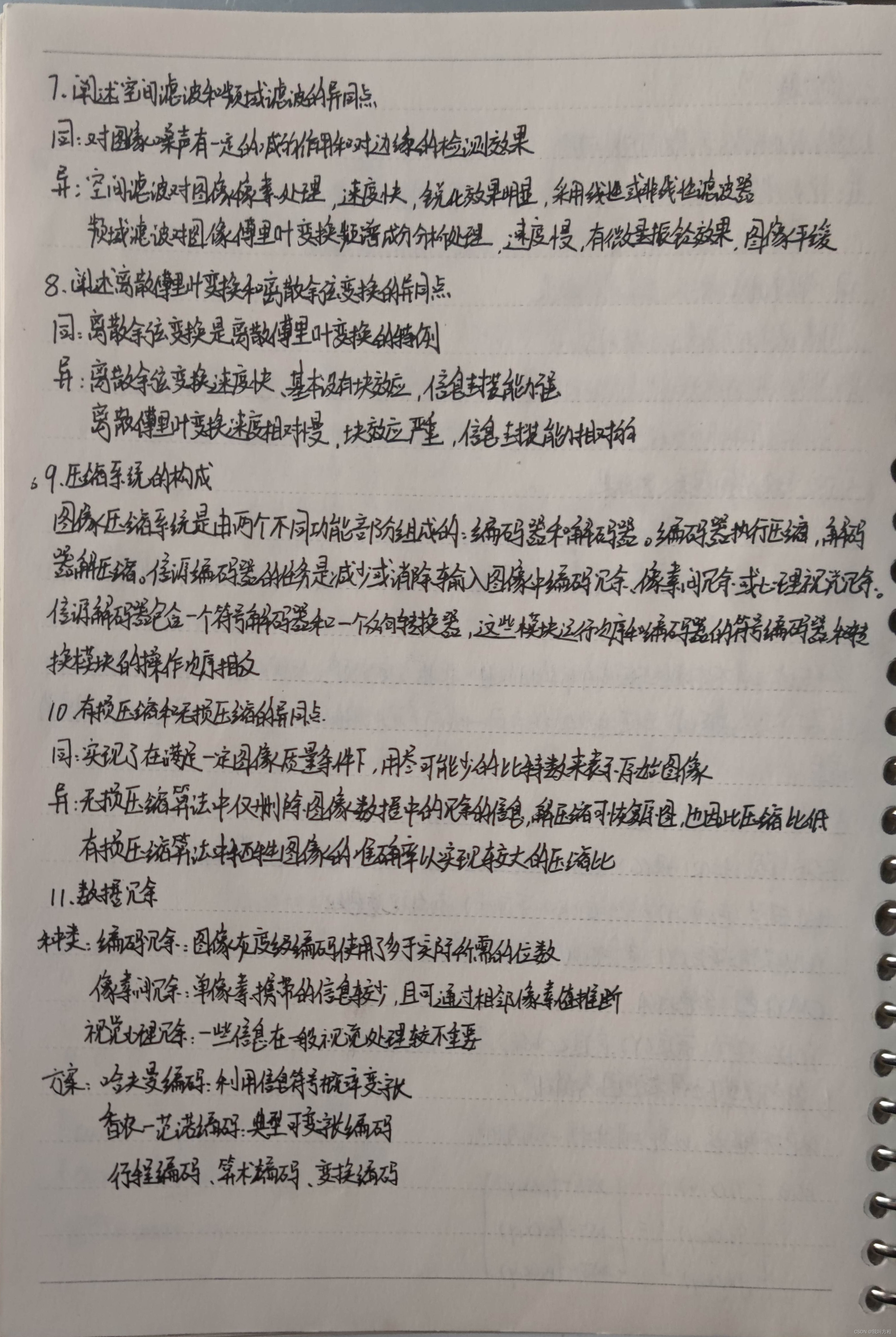
考试的时候简答题答得和笔记上稍有出入,但差别不大,反正下一年题也改了


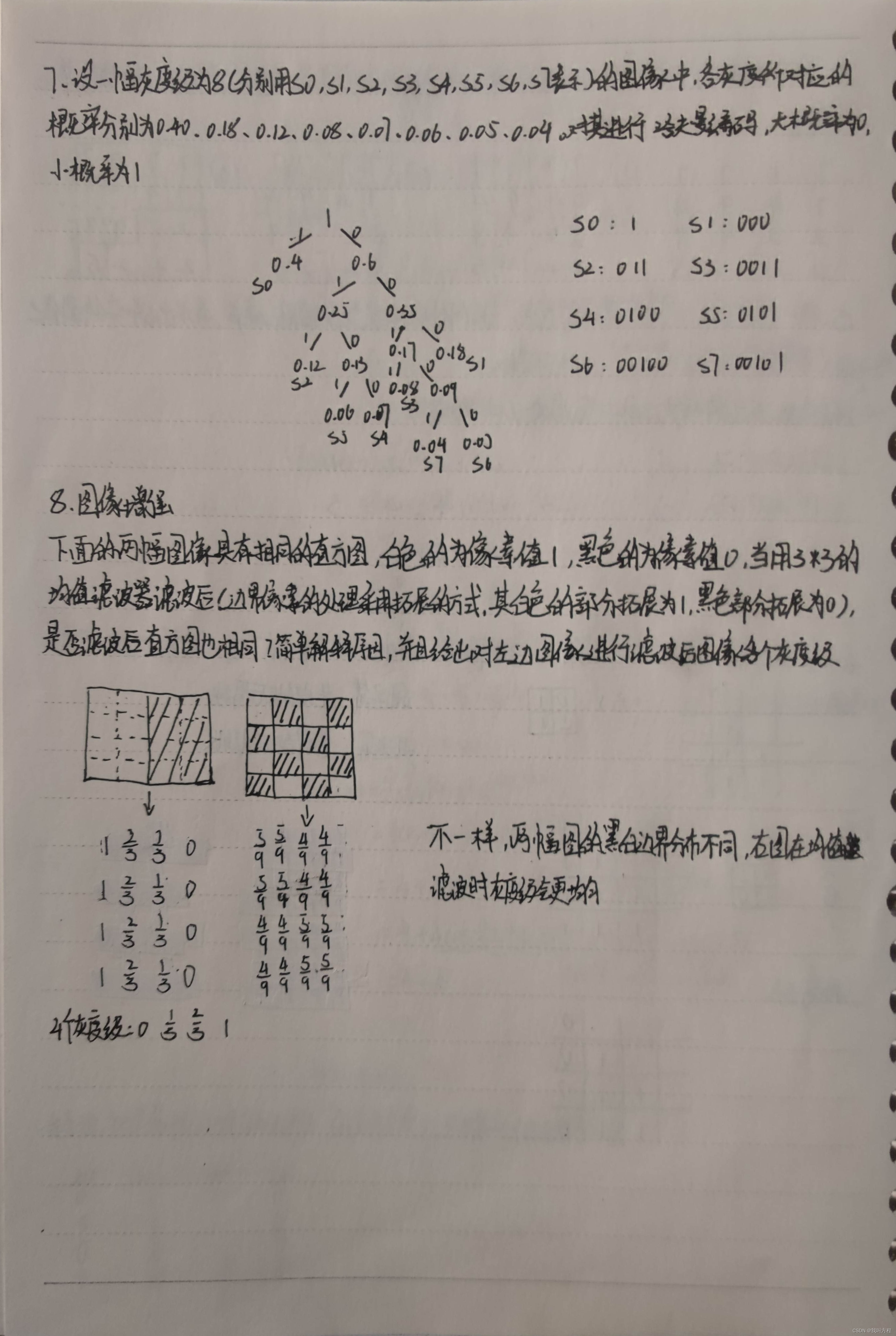

考试考了一个圆的检测,幸好看了
其实这个小道消息毫无意义
课后作业
代码都在csdn上找的,Python+opencv,代码都不是原创的,现在没能力写出来
拉普拉斯锐化
import cv2
import numpy as np
img=cv2.imread("1.jpeg")
gimg=cv2.cvtColor(img, cv2.COLOR_BGR2GRAY)
kernel=np.array([[0,-1,0],[-1,5,-1],[0,-1,0]],np.float32)
dst=cv2.filter2D(img,-1,kernel=kernel)
cv2.imshow('lapres',dst)
cv2.waitKey(0)
cv2.destroyAllWindows()
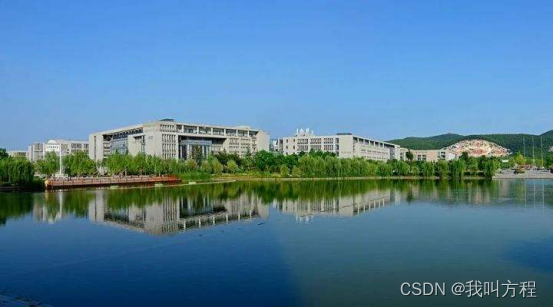
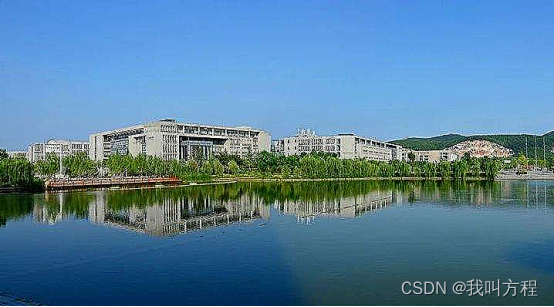
高斯平滑
import cv2
import numpy as np
from matplotlib import pyplot as plt
img=cv2.imread('123.png',cv2.IMREAD_COLOR)
blur=cv2.GaussianBlur(img,(5,5),0)
cv2.imshow('',blur)
cv2.waitKey(0)
cv2.destroyAllWindows()
刘德华是真的帅

低通滤波平滑
import cv2
import numpy as np
import math
def low_pass_filtering(image, radius):
    fft = cv2.dft(np.float32(image), flags=cv2.DFT_COMPLEX_OUTPUT)
    dshift = np.fft.fftshift(fft)
    rows, cols = image.shape[:2]
    mid_row, mid_col = int(rows / 2), int(cols / 2)
    mask = np.zeros((rows, cols, 2), np.float32)
    mask[mid_row - radius:mid_row + radius, mid_col - radius:mid_col + radius] = 1
    fft_filtering = dshift * mask
    ishift = np.fft.ifftshift(fft_filtering)
    image_filtering = cv2.idft(ishift)
    image_filtering = cv2.magnitude(image_filtering[:, :, 0], image_filtering[:, :, 1])
    cv2.normalize(image_filtering, image_filtering, 0, 1, cv2.NORM_MINMAX)
return image_filtering
if __name__ == "__main__":
    image = cv2.imread("123.png", 0)
    image_low_pass_filtering = low_pass_filtering(image, 30)
    cv2.imshow('re',image)
    cv2.imshow('low pass',image_low_pass_filtering)
    cv2.waitKey(0)
    cv2.destroyAllWindows()

我记得代码是巴图沃斯滤波器,振铃现象还是挺严重的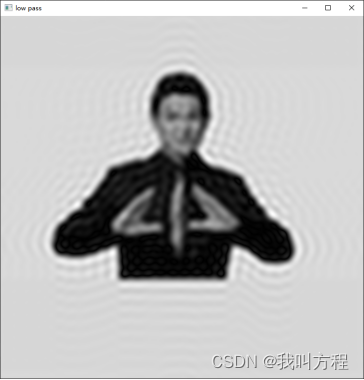
高斯滤波
import cv2
import numpy as np
import math
def high_pass_filtering(image, radius, n):
    fft = cv2.dft(np.float32(image), flags=cv2.DFT_COMPLEX_OUTPUT)
    dshift = np.fft.fftshift(fft)
    rows, cols = image.shape[:2]
    mid_row, mid_col = int(rows / 2), int(cols / 2)
    mask = np.zeros((rows, cols, 2), np.float32)
    for i in range(0, rows):
        for j in range(0, cols):
            d = math.sqrt(pow(i - mid_row, 2) + pow(j - mid_col, 2))
            try:
                mask[i, j, 0] = mask[i, j, 1] = 1 / (1 + pow(radius / d, 2 * n))
            except ZeroDivisionError:
                mask[i, j, 0] = mask[i, j, 1] = 0
    fft_filtering = dshift * mask
    ishift = np.fft.ifftshift(fft_filtering)
    image_filtering = cv2.idft(ishift)
    image_filtering = cv2.magnitude(image_filtering[:, :, 0], image_filtering[:, :, 1])
    cv2.normalize(image_filtering, image_filtering, 0, 1, cv2.NORM_MINMAX)
    return image_filtering
if __name__ == "__main__":
    image = cv2.imread("123.png", 0)
    image_high_pass_filtering = high_pass_filtering(image, 50, 1)
    cv2.imshow('re',image)
    cv2.imshow('low pass',image_high_pass_filtering )
    cv2.waitKey(0)
    cv2.destroyAllWindows()

颜色模型补色
import cv2
import math
import numpy as np
def bu(img):
    height, width, channels = img.shape
    buImg = img.copy()
    for i in range(height):
        for j in range(width):
            buImg[i, j] = (img[i][j].max() + img[i][j].min()) - img[i][j]
    return buImg
def rgb2hsv(img):
    h = img.shape[0]
    w = img.shape[1]
    H = np.zeros((h, w), np.float32)
    S = np.zeros((h, w), np.float32)
    V = np.zeros((h, w), np.float32)
    r, g, b = cv2.split(img)
    r, g, b = r / 255.0, g / 255.0, b / 255.0
    for i in range(0, h):
        for j in range(0, w):
            mx = max((b[i, j], g[i, j], r[i, j]))
            mn = min((b[i, j], g[i, j], r[i, j]))
            V[i, j] = mx
            if V[i, j] == 0:
                S[i, j] = 0
            else:
                S[i, j] = (V[i, j] - mn) / V[i, j]
            if mx == mn:
                H[i, j] = 0
            elif V[i, j] == r[i, j]:
                if g[i, j] >= b[i, j]:
                    H[i, j] = (60 * ((g[i, j]) - b[i, j]) / (V[i, j] - mn))
                else:
                    H[i, j] = (60 * ((g[i, j]) - b[i, j]) / (V[i, j] - mn)) + 360
            elif V[i, j] == g[i, j]:
                H[i, j] = 60 * ((b[i, j]) - r[i, j]) / (V[i, j] - mn) + 120
            elif V[i, j] == b[i, j]:
                H[i, j] = 60 * ((r[i, j]) - g[i, j]) / (V[i, j] - mn) + 240
            H[i, j] = H[i, j] / 2
    return H, S, V
img = cv2.imread("2.jpg")
cv2.namedWindow('Original')
cv2.namedWindow('BuSe')
BuImg = bu(img)
h, s, v = rgb2hsv(BuImg)
merged = cv2.merge([h, s, v])
cv2.imshow('Original', img)
cv2.imshow('BuSe', BuImg)
cv2.imshow("hsv", merged)
cv2.waitKey(0)
cv2.destroyAllWindows()
我其实感觉这个不对
rgb补色
补色图转hsv
hough变换检测直线
import cv2
import numpy as np
def HoughLinesP(minLineLength):
    tempIamge = scr.copy()
    lines = cv2.HoughLinesP(edges, 1, np.pi / 180, threshold=minLineLength, minLineLength=20, maxLineGap=20)
    for x1, y1, x2, y2 in lines[:, 0]:
        cv2.line(tempIamge, (x1, y1), (x2, y2), (0, 255, 0), 2)
    print(lines)
    cv2.imshow(window_name, tempIamge)
minLineLength = 20
window_name = "HoughLines Demo"
scr = cv2.imread("33.jpeg")
gray = cv2.cvtColor(scr, cv2.COLOR_BGR2GRAY)
print(gray.shape)
img = cv2.GaussianBlur(gray, (3, 3), 0)
edges = cv2.Canny(img, 50, 150, apertureSize=3)
cv2.namedWindow(window_name)
HoughLinesP(minLineLength)
cv2.imshow("org",scr)
if cv2.waitKey(0) == 27:
cv2.destroyAllWindows()

写在最后
后面好好重新学,感觉很有意思
边栏推荐
- 使用stream api替代sql
- [Shanda conference] use typescript to reconstruct the project
- Conversion between numeric types and strings
- How to embody the value of knowledge management in business
- 北京恢复堂食半月记:如何重燃门店经营烟火气
- Reddit对LaMDA模型的探讨:并非无状态,采用双重过程,相比它编辑维基百科的方式,有没有感情并不重要
- 数睿数据荣获第二届ISIG中国产业智能大会两项年度大奖
- 浙江创投圈的“半壁江山”,还得是国资
- Swift -- save print log to sandbox
- 19、 Xv6 context switching (implementation of context switching; encapsulation and recovery of state machine)
猜你喜欢

Dear students, don't read the textbooks any more. Just read this one for the complexity of time

Odoo local document function development record

北京恢复堂食半月记:如何重燃门店经营烟火气
![[译文] 弥合开源数据库和数据库业务之间的鸿沟](/img/e5/f89a8f3e2e9034f557ea3e76f37f81.jpg)
[译文] 弥合开源数据库和数据库业务之间的鸿沟

着力打造网红产品,新捷途X70S焕新上市,8.79万起售

在JFlash中添加未知类型的单片机
使用stream api替代sql

安全信得过!天翼云数据安全管理平台通过评测

【小程序项目开发-- 京东商城】uni-app开发之轮播图

Program substitution function
随机推荐
3. abstract class (shape)
解决mysql远程登录报权限问题
Alibaba cloud middleware's open source past
6.GUI(图形,填充)
【山大会议】使用TypeScript为项目进行重构
SAP abap 数据类型,操作符和编辑器-02
SAP ABAP 数据字典教程 SE11:表、锁定对象、视图和结构 -03
默认函数控制 =default 与 =delete
什么是 SAP ABAP? 类型、ABAP 完整形式和含义
pymssql模块使用指南
SLAM十四讲之第6讲--非线性优化
What is the relationship between CSC securities and qiniu school? Is it safe to open a securities account
执行逻辑大同小异的实现类使用模板模式
Basic knowledge of audio and video | analysis of ANS noise suppression principle
Default function control =default and =delete
【山大会议】一些基本工具类定义
IO模型的5中模式
[leetcode] 9. Palindromes
SAP web service 无法使用 SOAMANAGER 登陆到SOA管理页面
Adding an unknown type of MCU to jflash