当前位置:网站首页>会议OA项目进度(二)
会议OA项目进度(二)
2022-07-24 16:32:00 【安离九歌】
目录
前言
上一篇讲述了本次项目的背景,开发的目的等。
编码工作完成了会议的发布功能,本次分享的内容为我的会议功能。
一、功能需求
我的会议:
登录后,当前账号是会议的主持人则,将该会议查询并展示。
数据查询通过主次人字段查询
由我的会议产品原型图可以得知,审批人使用的是姓名而不是编号,而会议状态应该是文字描述而不是状态的编号。
而且当我的会议中,会议没有审批人时,也要显示会议。存在我发布了会议,但还在考虑会议的合理、是否需要新增内容等,暂未选择审批人的情况。
数据库中startTime和endTime 是datetime类型,页面会显示一串数字,我们需要将其进行格式化。


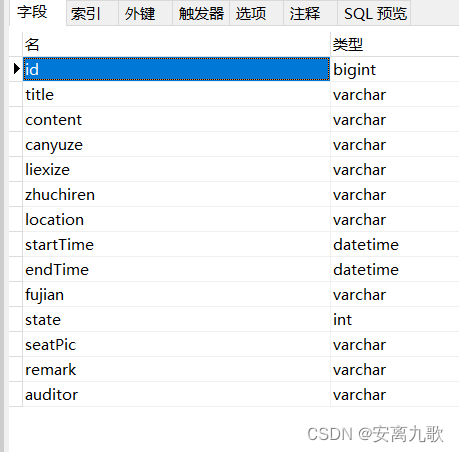
结合以上情况
编写SQL语句进行数据查询,
SELECT
	a.id,
	a.title,
	a.content,
	a.canyuze,
	a.liexize,
	a.zhuchiren,
	b.NAME zhuchirenname,
	a.location,
	DATE_FORMAT( a.startTime, '%Y-%m-%d %H-%m-%s' ) startTime,
	DATE_FORMAT( a.endTime, '%Y-%m-%d %H-%m-%s' ) endTime,
	a.state,
	(
CASE
	a.state
	WHEN 0 THEN
	'取消会议'
	WHEN 1 THEN
	'新建'
	WHEN 2 THEN
	'待审核'
	WHEN 3 THEN
	'驳回'
	WHEN 4 THEN
	'待开'
	WHEN 5 THEN
	'进行中'
	WHEN 6 THEN
	'开启投票'
	WHEN 7 THEN
	'结束会议' ELSE '其他'
END
	) meetingstate,
	a.seatPic,
	a.remark,
	a.auditor,
	c.NAME auditorname
FROM
	t_oa_meeting_info a
	INNER JOIN t_oa_user b ON a.zhuchiren = b.id
	LEFT JOIN t_oa_user c ON a.auditor = c.id

既然需求分析完,数据查询也差不多了,就开始我的会议功能的编码了。


二、编码(我的会议)
1、后台编码
MeetingInfoDao
package com.zking.dao;

import java.sql.SQLException;
import java.util.List;
import java.util.Map;

import com.zking.entity.MeetingInfo;
import com.zking.util.BaseDao;
import com.zking.util.PageBean;
import com.zking.util.StringUtils;

public class MeetingInfoDao extends BaseDao<MeetingInfo>{

//	会议信息新增
	public int add(MeetingInfo t) throws Exception {
		String sql = "insert into t_oa_meeting_info"
				+ "(title,content,canyuze,liexize,zhuchiren,location,startTime,endTime,remark) "
				+ "values(?,?,?,?,?,?,?,?,?)";
		return super.executeUpdate(sql, t, new String[] {"title","content","canyuze","liexize","zhuchiren","location","startTime","endTime","remark"});
	}

	//我的会议、其他菜单会用到。
	private String getSQL() {
		return "SELECT a.id,a.title,a.content,a.canyuze,a.liexize,a.zhuchiren,b.`name`,a.location\r\n" +
				",DATE_FORMAT(a.startTime,'%Y-%m-%d %H:%i:%s') as startTime\r\n" +
				",DATE_FORMAT(a.endTime,'%Y-%m-%d %H:%i:%s') as endTime\r\n" +
				",a.state\r\n" +
				",(case a.state\r\n" +
				"when 0 then '取消会议'\r\n" +
				"when 1 then '新建'\r\n" +
				"when 2 then '待审核'\r\n" +
				"when 3 then '驳回'\r\n" +
				"when 4 then '待开'\r\n" +
				"when 5 then '进行中'\r\n" +
				"when 6 then '开启投票'\r\n" +
				"else '结束会' end\r\n" +
				") as meetingState\r\n" +
				",a.seatPic,a.remark,a.auditor,c.`name` as auditorName\r\n" +
				"FROM t_oa_meeting_info a\r\n" +
				"inner join t_oa_user b on a.zhuchiren = b.id\r\n" +
				"left JOIN t_oa_user c on a.auditor = c.id where 1=1 ";
	}

//	我的会议
	public List<Map<String, Object>> myInfos(MeetingInfo info, PageBean pageBean) throws Exception {
		String sql = getSQL();
		String title = info.getTitle();
		if(StringUtils.isNotBlank(title)) {
			sql += " and title like '%"+title+"%'";
		}
		//根据当前登陆用户ID作为主持人字段的条件
		sql+=" and zhuchiren="+info.getZhuchiren();
		//按照会议ID降序排序
//		sql+=" order by a.id desc";
		System.out.println(sql);
		return super.executeQuery(sql, pageBean);
	}

//	取消会议
	public int updateState(MeetingInfo info) throws Exception {
		String sql = "update t_oa_meeting_info set state = 0 where  id = ?";
		return super.executeUpdate(sql, info,new String[] {"id"} );
	}

}
MeetingInfoDaoTest
package com.zking.dao;

import static org.junit.Assert.*;

import java.sql.SQLException;
import java.util.List;
import java.util.Map;

import org.junit.After;
import org.junit.Before;
import org.junit.Test;

import com.zking.entity.MeetingInfo;
import com.zking.util.PageBean;

public class MeetingInfoDaoTest {

	private MeetingInfoDao infoDao = new MeetingInfoDao();

	@Before
	public void setUp() throws Exception {
	}

	@After
	public void tearDown() throws Exception {
	}

	@Test
	public void testMyInfos() {
		MeetingInfo info = new MeetingInfo();
		PageBean pageBean = new PageBean();
		try {
			List<Map<String, Object>> myInfos = infoDao.myInfos(info, pageBean);
			for (Map<String, Object> map : myInfos) {
				System.out.println(map);
			}
			System.out.println(pageBean);
		} catch (Exception e) {
			// TODO Auto-generated catch block
			e.printStackTrace();
		}
	}

}
写好dao方法先测试一下,用junit。

MeetingInfoAction
package com.zking.web;

import java.util.Date;
import java.util.List;
import java.util.Map;

import javax.servlet.http.HttpServletRequest;
import javax.servlet.http.HttpServletResponse;

import org.apache.commons.beanutils.ConvertUtils;

import com.zking.dao.MeetingInfoDao;
import com.zking.entity.MeetingInfo;
import com.zking.framework.ActionSupport;
import com.zking.framework.ModelDriver;
import com.zking.util.MyDateConverter;
import com.zking.util.PageBean;
import com.zking.util.R;
import com.zking.util.ResponseUtil;

public class MeetingInfoAction extends ActionSupport implements ModelDriver<MeetingInfo>{
	private MeetingInfo info = new MeetingInfo();
	private MeetingInfoDao infoDao = new MeetingInfoDao();

	@Override
	public MeetingInfo getModel() {
//		注册一个转换器
		ConvertUtils.register(new MyDateConverter(), Date.class);
		return info;
	}

	public String add(HttpServletRequest req, HttpServletResponse resp) {
		try {
//			rs是sql语句执行的影响行数
			int rs = infoDao.add(info);
			if(rs > 0) {
				ResponseUtil.writeJson(resp, R.ok(200, "会议信息数据新增成功"));
			}else {
				ResponseUtil.writeJson(resp, R.error(0, "会议信息数据新增失败"));
			}

		} catch (Exception e) {
			e.printStackTrace();
			try {
				ResponseUtil.writeJson(resp, R.error(0, "会议信息数据新增失败"));
			} catch (Exception e1) {
				e1.printStackTrace();
			}
		}
		return null;
	}

//	我的会议
	public String myInfos(HttpServletRequest req, HttpServletResponse resp) {
		try {
			PageBean pageBean = new PageBean();
			pageBean.setRequest(req);
			List<Map<String, Object>> list = infoDao.myInfos(info, pageBean);
//			注意:layui中的数据表格的格式
			ResponseUtil.writeJson(resp, R.ok(0, "我的会议数据查询成功" , pageBean.getTotal(), list));
		} catch (Exception e) {
			e.printStackTrace();
			try {
				ResponseUtil.writeJson(resp, R.error(0, "我的会议数据查询失败"));
			} catch (Exception e1) {
				e1.printStackTrace();
			}
		}
		return null;
	}

//	取消会议
	public String del(HttpServletRequest req, HttpServletResponse resp) {
		try {
			PageBean pageBean = new PageBean();
			pageBean.setRequest(req);
			int upd = infoDao.updateState(info);
//			注意:layui中的数据表格的格式
			if(upd > 0) {
				ResponseUtil.writeJson(resp, R.ok(200, "会议取消成功"));
			}else {
				ResponseUtil.writeJson(resp, R.error(0, "会议取消失败"));
			}
					} catch (Exception e) {
			e.printStackTrace();
			try {
				ResponseUtil.writeJson(resp, R.error(0, "会议取消失败"));
			} catch (Exception e1) {
				e1.printStackTrace();
			}
		}
		return null;
	}
}
2、前端编码
myMeeting.jsp
<%@ page language="java" contentType="text/html; charset=UTF-8"
	pageEncoding="UTF-8"%>
<%@include file="/common/header.jsp"%>
<!DOCTYPE html>
<html>
<head>
<meta http-equiv="Content-Type" content="text/html; charset=UTF-8">
<script type="text/javascript" src="${pageContext.request.contextPath }/static/js/meeting/myMeeting.js"></script>
<title>用户管理</title>
</head>
<style>
body{
	margin:15px;
}
 .layui-table-cell {height: inherit;}
 .layui-layer-page .layui-layer-content {  overflow: visible !important;}
</style>
<body>
<!-- 搜索栏 -->
<div class="layui-form-item" style="margin:15px 0px;">
  <div class="layui-inline">
    <label class="layui-form-label">会议标题</label>
    <div class="layui-input-inline">
      <input type="hidden" id="zhuchiren" value="${user.id }"/>
      <input type="text" id="title" autocomplete="off" class="layui-input">
    </div>
  </div>
  <div class="layui-inline">
    <button id="btn_search" type="button" class="layui-btn"><i class="layui-icon layui-icon-search"></i> 查询</button>
  </div>
</div>
<!-- 数据表格 -->
<table id="tb" lay-filter="tb" class="layui-table" style="margin-top:-15px"></table>
<!-- 对话框(送审) -->
<div id="audit" style="display:none;">
	<form style="margin:20px 15px;" class="layui-form layui-form-pane" lay-filter="audit">
		<div class="layui-inline">
		   <label class="layui-form-label">送审人</label>
		   <div class="layui-input-inline">
		      <input type="hidden" id="meetingId" value=""/>
		      <select id="auditor" style="poistion:relative;z-index:1000">
				<option value="">---请选择---</option>
		      </select>
		   </div>
		   <div class="layui-input-inline">
		     <button id="btn_auditor" class="layui-btn">送审</button>
		   </div>
		</div>
	</form>
</div>
<!-- 对话框(反馈详情) -->
<div id="feedback" style="display:none;padding:15px;">
	<fieldset class="layui-elem-field layui-field-title">
	  <legend>参会人员</legend>
	</fieldset>
	<blockquote class="layui-elem-quote" id="meeting_ok"></blockquote>
	<fieldset class="layui-elem-field layui-field-title">
	  <legend>缺席人员</legend>
	</fieldset>
	<blockquote class="layui-elem-quote" id="meeting_no"></blockquote>
	<fieldset class="layui-elem-field layui-field-title">
	  <legend>未读人员</legend>
	</fieldset>
	<blockquote class="layui-elem-quote" id="meeting_noread"></blockquote>
</div>
<script type="text/html" id="tbar">
  {
   {#  if(d.state==1 || d.state==3){ }}
  <a class="layui-btn layui-btn-xs" lay-event="seat">会议排座</a>
  <a class="layui-btn layui-btn-xs" lay-event="send">送审</a>
  <a class="layui-btn layui-btn-danger layui-btn-xs" lay-event="del">删除</a>
  {
   {#  } }}
  {
   {#  if(d.state!=1 && d.state!=2 && d.state!=3){ }}
  <a class="layui-btn layui-btn-xs" lay-event="back">反馈详情</a>
  {
   {#  } }}
</script>
</body>
</html>
myMeeting.js
let layer,table,$,form;
var row;
layui.use(['layer','table','jquery','form'],function(){
	layer=layui.layer,
	table=layui.table,
	form=layui.form,
	$=layui.jquery;

	initTable();

	//查询事件
	$('#btn_search').click(function(){
		query();
	});

});

//1.初始化数据表格
function initTable(){
	table.render({          //执行渲染
        elem: '#tb',   //指定原始表格元素选择器(推荐id选择器)
        height: 400,         //自定义高度
        loading: false,      //是否显示加载条(默认 true)
        cols: [[             //设置表头
            {field: 'id', title: '会议编号', width: 90},
            {field: 'title', title: '会议标题', width: 120},
            {field: 'location', title: '会议地点', width: 140},
            {field: 'startTime', title: '开始时间', width: 120},
            {field: 'endTime', title: '结束时间', width: 120},
            {field: 'meetingState', title: '会议状态', width: 120},
            {field: 'seatPic', title: '会议排座', width: 120,
            	templet: function(d){
                    if(d.seatPic==null || d.seatPic=="")
                    	return "尚未排座";
                    else
                    	return "<img width='120px' src='"+d.seatPic+"'/>";
                }
            },
            {field: 'auditorName', title: '审批人', width: 120},
            {field: '', title: '操作', width: 200,toolbar:'#tbar'},
        ]]
   });
}

//2.点击查询
function query(){
	table.reload('tb', {
        url: 'info.action',     //请求地址
        method: 'POST',                    //请求方式,GET或者POST
        loading: true,                     //是否显示加载条(默认 true)
        page: true,                        //是否分页
        where: {                           //设定异步数据接口的额外参数,任意设
        	'methodName':'myInfos',
        	'zhuchiren':$('#zhuchiren').val(),
        	'title':$('#title').val(),
        },
        request: {                         //自定义分页请求参数名
            pageName: 'page', //页码的参数名称,默认:page
            limitName: 'rows' //每页数据量的参数名,默认:limit
        },
        done: function (res, curr, count) {
        	console.log(res);
        }
   });

	//工具条事件
	table.on('tool(tb)', function(obj){ //注:tool 是工具条事件名,test 是 table 原始容器的属性 lay-filter="对应的值"
	  row = obj.data; //获得当前行数据
	  var layEvent = obj.event; //获得 lay-event 对应的值(也可以是表头的 event 参数对应的值)
	  var tr = obj.tr; //获得当前行 tr 的 DOM 对象(如果有的话)
	  console.log(row);
	  if(layEvent === 'seat'){ //会议排座
		  layer.msg('会议排座');
	  } else if(layEvent === 'send'){ //送审
		  layer.msg('送审');
	  } else if(layEvent==="back"){ //反馈详情
		  layer.msg('反馈详情');
	  } else {
		  layer.confirm('确认取消会议吗?', {icon: 3, title:'提示'}, function(index){
			  $.post('info.action',{
				  'methodName':'del',
				  'id':row.id
			  },function(rs){
				  if(rs.success){
	        		   //调用查询方法刷新数据
	        		   query();
	        	   }else{
	        		   layer.msg(rs.msg,function(){});
	        	   }
			  },'json');
			  layer.close(index);
			});
	  }
	});
}
将会议排座,由文字变为图片

运行效果如下:


边栏推荐
- To create a private Ca, I use OpenSSL
- 我们为什么要推出Getaverse?
- Unity camera free movement control
- 期盼已久全平台支持-开源IM项目OpenIM之uniapp更新
- [Nanjing Agricultural University] information sharing of postgraduate entrance examination and re examination
- ZBar source code analysis - img_ scanner. c | [email protected]
- Minor record
- ZBar project introduction and installation configuration| [email protected]
- Educational codeforces round 100 (rated for Div. 2) B. find the array solution
- What does Baidu promote "delete and recall" mean?
猜你喜欢

我们为什么要推出Getaverse?

After data management, the quality is still poor

105 constructing binary trees from preorder and inorder traversal sequences
做完数据治理,质量依旧很差

C TCP client form application asynchronous receiving mode

Princeton calculus reader 02 Chapter 1 -- composition of functions, odd and even functions, function images

Rest style
EMQ Yingyun technology was listed on the 2022 "cutting edge 100" list of Chinese entrepreneurs

Caikeng Alibaba cloud Kex_ exchange_ identification: read: Connection reset by peer

Using native JS to realize magnifying glass function
随机推荐
Host PSQL connecting virtual machine Oracle
1184. Distance between bus stops
Qt设计仿真机器人控制器
Leetcode:162. looking for peak [two points looking for peak]
Jing Wei PS tutorial: basic part a
How to generate complex flow chart of XMIND
thinkphp3.2.5无法跳转到外部链接
QT keyboard event (I) -- detect key input
[leetcode] day103 search two-dimensional matrix II
js,for循环内callback异步转换成同步执行
Talk about C pointer
多线程(基础)
ZBar source code analysis - img_ scanner. c | [email protected]
Summary of experience in using.Net test framework xUnit, mstest, specflow
Qt键盘事件(二)——长按按键反复触发event事件问题解决
[technology] chat room demo of uniapp
PS pull out logo
"Heaven and the world, self-respect" -- single case mode
105 constructing binary trees from preorder and inorder traversal sequences
MODIS data WGet Download