当前位置:网站首页>JMeter自定义日志与日志分析
JMeter自定义日志与日志分析
2022-07-26 21:11:00 【小梧敲代码】
1 JMeter日志概览
JMeter与Java程序一样,会记录事件日志,日志文件保存在bin目录中,名称为jmeter.log。当然,我们也可以在面板中直接察看日志,点击右上角黄色标志物可以打开日志面板,再次点击收起。
可见,通过日志可以帮助我们定位一些不容易直接察觉的问题。
另外,JMeter可以很方便地设置日志输出级别:
2 JMeter自定义日志
前面所看到的都是系统日志,也就是JMeter本身所打印的日志。如果我们自己想输出一些日志,该怎么办呢?这个一般就要借助Beanshell了。
例如,一个接口响应结果如下:
在该请求下添加Beanshell断言,运行后,日志中输出了相应内容:
import org.apache.log4j.Logger;

// 获取接口的响应数据
String result = prev.getResponseDataAsString();

if(result.contains("error")){

  Failure=true;
  log.error("接口失败: " + result);
}
当然,自定义日志最重要的作用还是在Linux服务器上运行脚本时,因为没有界面,排查问题更加麻烦。
承接前文,将JMeter脚本部署到Linux服务器上进行压力测试,存在一些不便之处:
吞吐量统计中包括了所有请求,包括一些辅助请求(beanshell请求),导致真正的tps统计数据不准确。
业务是否成功,以及具体失败原因难以排查。
首先,测试接口的响应内容如图所示:
在接口下添加2个【JSON Path Extractor】,分别用于在测试接口的响应内容里提取code、orderId。
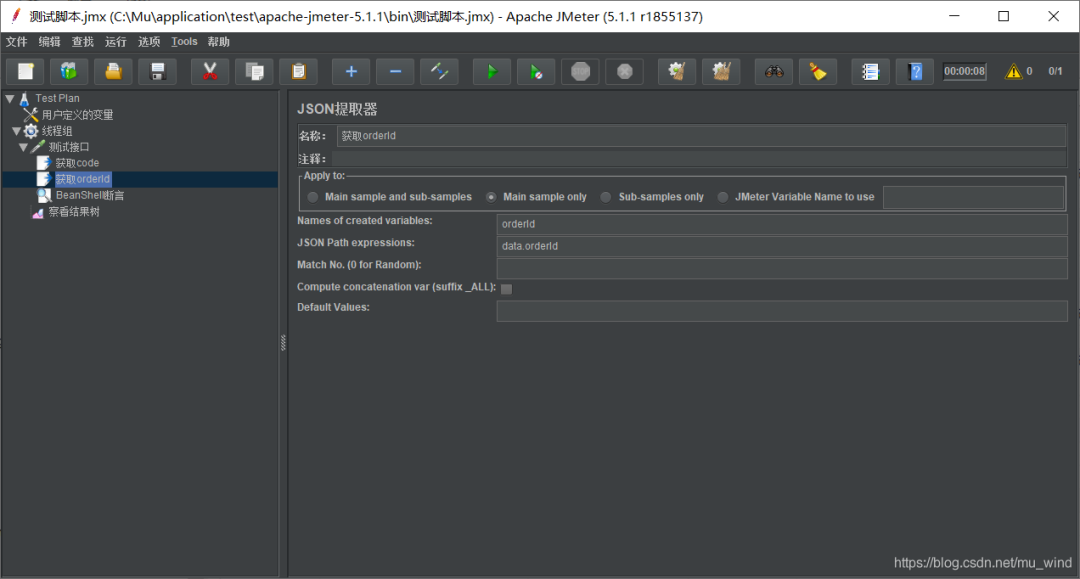
再在测试接口下添加【BeanShell断言】:
import org.apache.log4j.Logger;

// 获取接口的响应数据
String result = prev.getResponseDataAsString();
// 从JSON提取器中获取code和orderId
String code = vars.get("code");
String orderId = vars.get("orderId");

if(code.equals("0")){

  log.info("place order success, orderId=" + orderId);
}else{

  Failure=true;
  log.error("FailureMessage: " + result);
}
将该脚本上传到Linux中,顺便写个启动脚本:start.sh
#!/bin/bash
jmeter_log=/home/test/jmeter.log

if [ -f "$jmeter_log" ]; then
 // 将原日志文件备份后删除
 cp $jmeter_log /home/test/jmeter.log_back
 rm -rf $jmeter_log
fi
// 启动JMeter脚本
jmeter -n -t /home/test/test.jmx -l /home/test/result/test.jtl
运行脚本后,cat jmeter.log,效果如下:
3 JMeter日志分析
针对该日志写一个日志分析脚本logAnalysis.sh:
#!/bin/bash
jmeter_log=/home/test/jmeter.log
thread_num=`grep 'Thread started' $jmeter_log|tail -n 1|awk -F"-" '{print$6}'`
start_time=`grep 'All thread groups have been started' $jmeter_log|awk -F" " '{print $1,$2}'|awk -F"," '{print $1}'`
end_time=`grep 'Shutdown hook ended' $jmeter_log|awk -F" " '{print $1,$2}'|awk -F"," '{print $1}'`

final_success_time=`grep "place order success" $jmeter_log|tail -n 1|awk -F" " '{print$1,$2}'|awk -F"," '{print$1}'`
success_running_time=$[ $(date -d "$final_success_time" +%s) - $(date -d "$start_time" +%s) ]
running_time=$[ $(date -d "$end_time" +%s) - $(date -d "$start_time" +%s) ]
cancle_times=`grep "cancle orders success" $jmeter_log|wc -l`   //撤单次数

success_times=`grep success $jmeter_log|wc -l`   // 成功次数
failure_times=`grep FailureMessage $jmeter_log|wc -l`
request_times=$[ $success_times+$failure_times ]
error_rate=`echo "scale=2; $failure_times/$request_times*100" | bc`
qps=$[ $request_times/$running_time ]
throughput=$[ $success_times/$success_running_time ]

echo -e '线程数:'$thread_num
echo -e '请求次数:' $request_times
echo -e '成功次数:' $success_times
echo -e '失败次数:' $failure_times
echo -e '撤单次数:'$cancle_times
echo -e '错误率:' $error_rate'%'
echo -e '开始时间:'$start_time
echo -e '结束时间:'$end_time
echo -e '最后成功请求时间:'$final_success_time
echo -e '请求时间:' $running_time
echo -e '成功运行时间:'$success_running_time
echo -e '吞吐量:'$throughput'/s'
echo -e 'QPS:'$qps'/s'
当JMeter脚本运行一段时间后,执行logAnalysis.sh,效果如下:
线程数:180
请求次数: 131691
成功次数: 131493
失败次数: 198
撤单次数:141
错误率: 0%
开始时间:2018-11-28 15:34:54
结束时间:2018-11-28 15:37:17
最后成功请求时间:2018-11-28 15:37:17
请求时间: 143
成功运行时间:143
吞吐量:919/s
QPS:920/s
可以看到,输出信息全面清晰。这样,我们就可以在linux下运行JMeter压测脚本时,实时获取压测详情了。
最后感谢每一个认真阅读我文章的人,下面这个网盘链接也是我费了几天时间整理的非常全面的,希望也能帮助到有需要的你!

这些资料,对于想转行做【软件测试】的朋友来说应该是最全面最完整的备战仓库,这个仓库也陪伴我走过了最艰难的路程,希望也能帮助到你!凡事要趁早,特别是技术行业,一定要提升技术功底。希望对大家有所帮助……
如果你不想一个人野蛮生长,找不到系统的资料,问题得不到帮助,坚持几天便放弃的感受的话,可以点击下方小卡片加入我们群,大家可以一起讨论交流,里面会有各种软件测试资料和技术交流。
敲字不易,如果此文章对你有帮助的话,点个赞收个藏来个关注,给作者一个鼓励。也方便你下次能够快速查找。
自学推荐B站视频:
零基础转行软件测试:自学完软件测试,拿到了字节的测试岗offer,堪称B站最好的视频!
自动化测试进阶:已上岸华为,涨薪20K,2022最适合自学的python自动化测试教程,自己花16800买的,无偿分享

边栏推荐
- 任正非再谈美国打压:活下去就是胜利,要战胜美国
- 基于CAShapeLayer和贝塞尔曲线的圆形进度条动画
- flask 源码启动阶段
- 攻防世界----ics-07
- Resume in 2022 is dead in the sea. Don't vote. Software testing positions are saturated
- Object. getOwnPropertyNames() VS Object.keys()
- Supplement - nonlinear programming
- npm, npm中文文档, npm学习使用
- JDBC operation and entry case of MySQL
- OPPO 自研大规模知识图谱及其在数智工程中的应用
猜你喜欢
What to do if the browser home page is tampered with, and how to recover if the home page is tampered with

Vi和Vim文本编辑器
In depth analysis of the source code, why is the string class immutable? (hit me before you understand)

FreeRTOS personal notes - Software Timer

JDBC总结
LDAP——实现用户统一登录管理

成功上岸了自动化测试岗,最高月薪15.4K,自己真棒~
Selenium自动化测试面试题全家桶

1 - "pytorch deep learning practice" - linear model

Type assertion in typescript
随机推荐
七月集训(第26天) —— 并查集
Get the direction of text selection
Attack and defense world ----- ics-07
5、 Applet error: message:error: system error, error code: 80058, desc of scope userLocation is empty
虾皮shopee根据关键词取商品列表 API
Four solutions of distributed session
吃透负载均衡
也谈数据治理
基于CAShapeLayer和贝塞尔曲线的圆形进度条动画
商汤科技发布人脸识别一体机SensePass Pro
kalibr标定realsenseD435i --多相机标定
Jd.com: how does redis realize inventory deduction? How to prevent goods from being oversold?
When deploying Flink on a single machine and creating the connection table of oracle19c RAC, the error ora-12505 is reported. Who can help
Search Yiwu shopping (PAI Li Tao) API by image
Flag decodes token, mounts token, decorator, and seven cattle cloud upload
Basic operation of (C language) files
Can you use redis? Then come and learn about redis protocol
我的sql没问题为什么还是这么慢|MySQL加锁规则
My SQL is OK. Why is it still so slow? MySQL locking rules
Ren Zhengfei talked about the suppression of the United States again: to live is to win, and to defeat the United States