Preface
TPT As PikeTec The company's embedded software testing tools , It has high scalability and convenience . As software testing becomes more and more complex and the requirements are diversified ,TPT Continuously improve to meet the requirements of keeping pace with the times . You can use... At all stages of development TPT To test . Whether it is simple unit testing or complex system testing ,TPT Can make have to Testing becomes faster 、 Simple and intuitive .
that ,TPT18 How to make testing simple and fast ?
TPT18 Update overall preview :
1. Add formal needs assessment , Implementation requirements are strongly related to evaluation ;
2. More flexible requirements management , Support custom function requirements ;
3. be based on TASMO hold-all , Auto generate satisfaction MC/DC Required test cases ;
4. New coverage statistics tool TPT Coverage;
5. Enrich MATLAB Platform functions ;
6. How to add a given excitation signal (TPT Built in functions );
7. Batch Runner Interface and function update ;
8. ASAM XiL And Vector Series platform related updates ;
other :
1. newly added Simulink Real-Time XiL platform , Support the new generation Speedgoat Hardware ;
2. Carmaker Platform Optimize interface interaction , And the current test can pass IPG visualization ;
3. New evaluation function ,TPT.getConstant and TPT.isConstant(), Supports arbitrary expressions ;
4. Global assessments can be added to Assesslet in , It can be activated for any platform ;
5. Before and after test execution , Additable Python Script, Implement custom functionality ;
6. stay Test Case Details/Description Evaluation conditions can be derived from ;
7. Test Case Summary Linked requirements can be displayed in ID;
……
One 、 Formal needs assessment
Do you want to edit requirements without writing assessments ? Now? TPT18 Formal needs assessment can meet this requirement .
Formal requirements are concise 、 Clear and evaluable characteristics . stay TPT18 in , You can import Excel Requirements are translated into formal requirements assessment . Formal requirements are not just requirements covered by link relationships , It's a more direct assessment of needs .
such as , Lamp control model requirements SPEC-17, It can be translated into the following formal requirements assessment .

chart 1 Formal needs assessment
The test results are as follows .

chart 2 test result
Two 、 More flexible requirements management
TPT18 front , Functional requirements can only be imported from outside , Can't be in TPT Change in . Although this can ensure the unity of requirements , But it also brings inconvenience to the change of functional requirements . stay TPT18 in , But directly in Requirements Change in / Create a new functional requirement / Sub functional requirements , And the requirements will not change with the introduction of functional requirements .

3、 ... and 、 TASMO Support MC/DC Automatically generate test cases
What if the test coverage fails to meet the requirements ? Consider using TASMO.TASMO According to the model / Code structure generates test cases , Improve test coverage .
TPT18 In addition to supporting CC and DC Outside coverage , And support MC/DC Cover , It is easier to achieve the desired coverage .
For example, in the model OR modular , If it is necessary to meet MC/DC, The following conditions must be included :
1. All inputs are False;
2. One input is True, The rest are False;
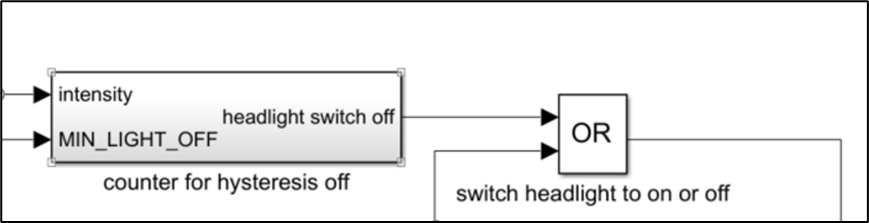
chart 4 In the model Or structure
stay TPT18 in , The following structures can be analyzed , And automatically generate test cases according to this structure .

chart 5 TPT18 Or Module structure
Four 、 New code coverage statistics tool ——TPT Coverage
TPT When calculating coverage , Offers a variety of options , During the test, it can be decided according to its own situation .
In the model phase , You can call Targetlink、CTC++ for Targetlink and Simulink V&V Statistical coverage .
In the code phase , except CTC++ and GNU gcov Outside , It also provides TPT Coverage Statistical coverage .
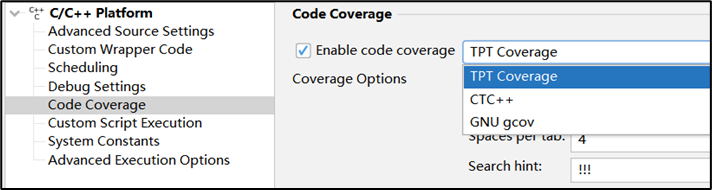
chart 6 TPT Coverage
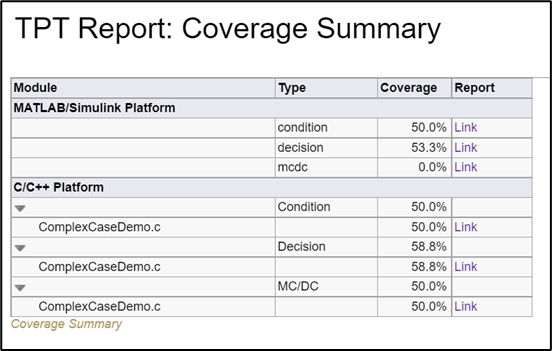
chart 7 Coverage report

5、 ... and 、 Enrich MALTAB Platform functions
1) MATLAB/Simulink Platform Accelerated operation mode
You can imagine that the data of a test case after running reaches nearly 10G Do you ?
A huge amount of data means one word —— slow , And it's super slow .
Now? , This situation is alleviated ,TPT18 Of “MATLAB/Simulink Platform” New options “Simulation Mode”, You can use “Normal”、“Accelerator”、“Rapid Accelerator” and “Software in the loop” Mode run test , It can speed up the test running .
Tip: For a large number of test cases ,TPT Support multi-core mode to accelerate operation .

chart 9 Accelerated operation mode
2) Detect specific system coverage
TPT18 front , If you need to analyze the coverage of a specific sub level , Other sub levels need to be commented out . however , If there is interaction before the sub level , Grounding and other commissioning are required , More complicated . Now? ,TPT18 Get rid of this worry , Because you can directly exclude sub levels that you do not want to detect .

chart 10 Advanced setting

chart 11 Select a specific subsystem
3) Direct import Stateflow Intermediate variable
TPT18 Pre import Stateflow Intermediate variables need to be manually created and set Import Measurements, You also need to add scripts to the test platform .TPT18 Can be clicked directly “offline logging” Import , Convenient and quick .

chart 12 Import Stateflow Intermediate variable
4) Automatic generation TPT Simulink Function Handler
When... Is used in the model Simulink Function, But test target level Function Caller And Simulink Function Not at the same level , An error will be reported when running the test ( Can't find Simulink Function).
In the face of this situation ,TPT18 Automatically generated in the test framework TPT Simulink Function Handler.
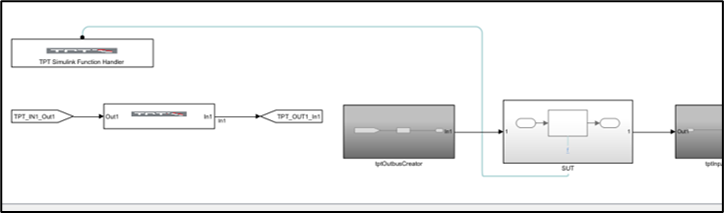
chart 13 TPT Simulink Function Handler
6、 ... and 、 Ways to enrich a given excitation signal (TPT Built in functions )
TPT18 The given mode of excitation signal is added , for example :TPT.impulse()、TPT.step()、TPT.sinwave() etc. , It is more convenient to realize the desired signal .

chart 14 TPT Built in functions
7、 ... and 、 Batch Runner Interface and function update
When there is more than one TPT The project needs to run , have access to Batch Runner Running at the same time .
stay TPT18 in , Updated interface , The following steps are added :
- TPT API-script
- Execute Tests
- Generate Testframe
- Generate Overview RePort
Support the following platforms to generate test frameworks :
- AUTOSAR
- C/C++
- MATLAB
- [email protected]
- ASCET

chart 15 Batch Runner
8、 ... and 、 ASAM XiL And Vector Related updates
1) Expanded ASAM XiL Support
Added... To the service items ASAM XiL Diag Port, It can be used directly in the test case DTC To operate , as follows :
- Read DTCs
- Clear DTCs
- Read/Write Values
- Execute Services
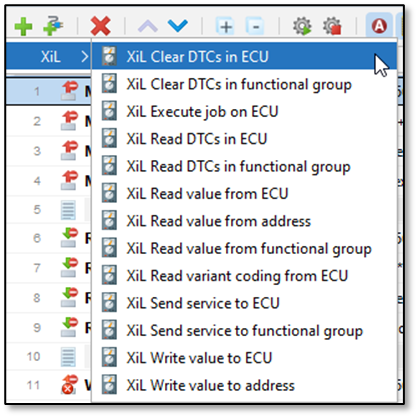
chart 16 Added service steps
2) Support import DBC Enumerating type signals in
stay DBC If... Is defined and associated in Value Table,TPT18 Support import .

chart 17 Import enumeration
3) XCP Communication control
Not only can you control before the test case is executed XCP signal communication , And it can also be controlled in the test case , Easy to test .

chart 18 XCP control

chart 19 Control in test cases
summary
And the limit of the length , We can't introduce them one by one TPT18 Changes , To learn more , Please click here .
Beihui Information Co., Ltd PikeTec, Jointly promote the development of software testing . You are welcome to give us your valuable comments ,
Let software testing become more and more “ convenient ” and “ Simple ”!