当前位置:网站首页>[yolov5 practice 3] traffic sign recognition system based on yolov5 - model training
[yolov5 practice 3] traffic sign recognition system based on yolov5 - model training
2022-07-25 06:40:00 【Make progress every day】
Practical blog Guide ( Ongoing update …):
- Construction of actual combat environment
- Custom datasets
- model training
- Evaluation of results
One 、 Parameter description
After the first two steps , Start model training and testing . First, model training . The official training order is as follows :
python train.py --data coco.yaml --cfg yolov5n.yaml --weights '' --batch-size 128
                                       yolov5s                                64
                                       yolov5m                                40
                                       yolov5l                                24
                                       yolov5x                                16
We can see train.py file , It sets the parameters we need to specify during training , As shown in the figure ( This parameter has been modified by me , The initial value is different from that shown in this figure , We should modify it according to our own situation ):
Briefly introduce the parameters :
- weights: Specify the pre training model .yolov5 Several pre training models are officially provided to improve training efficiency , I'll talk about it later .
- data: Written in the last Practical Guide myvoc.yaml, Used to specify the path of training set and verification set , And the number and name you want to classify , Must be modified

- epochs: How many rounds of training , Suggest to modify
- batch-size: Batch size , Personal understanding is how many data are read and processed each time ( Modify according to your own configuration , If you report an error of insufficient memory, you can reduce the value , Suggest to modify )
- img-size: The size of the training set and the verification set , The original data set resize Set the size for . The default is [640, 640], It can be left unchanged
- resume: Break point continued training . This is mainly because if you interrupt during training , You can continue training after the last training result . The default is False
- device: Set use CPU still GPU( If GPU How many , Specify which piece to use ).
- workers: It seems to be the number of threads , The equipment can be adjusted if allowed , Because my device is too spicy, it is set to 0
Basically, the above parameters are commonly used , Other parameters can keep their default values , You can also make corresponding modifications according to your actual situation .
Two 、 Pre training model
Officials have given the following pre training models .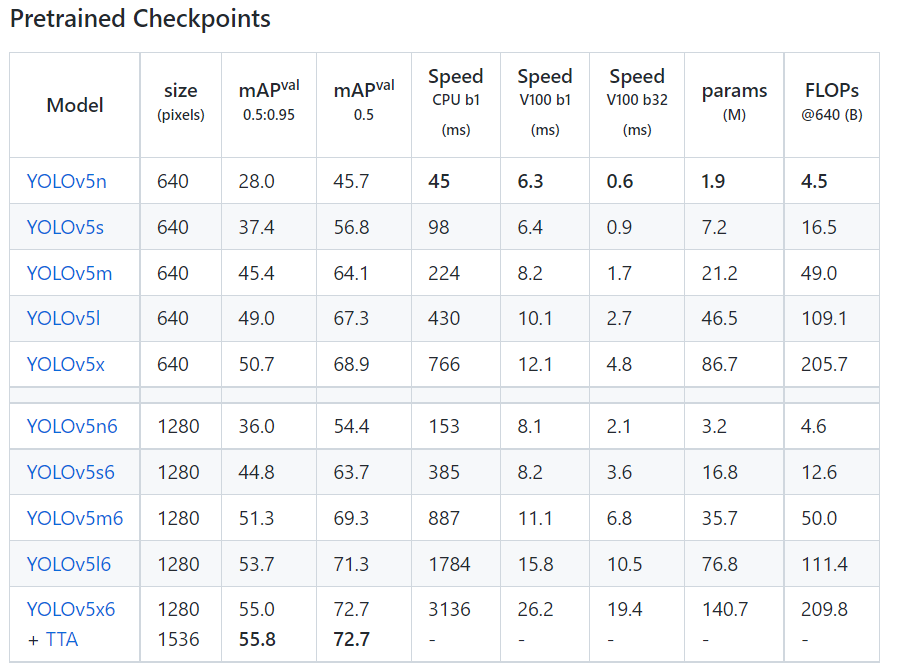
Commonly used n,s,m,l Four sizes , The specification gradually increases , The training accuracy is also gradually increasing , But the training time will also increase . As shown in the figure below :
In this blog I will use yolov5s.pt Model training .
3、 ... and 、 model training
After the above preparation steps are completed , Start training model . Training parameters can be in train.py The document specifies , You can also explicitly specify , The priority of the command line is higher than that in the file . I explicitly specify the parameters here , You may not specify , That is to use the parameter information in the file . We need to pay attention to , If you didn't download it at first yolov5s.pt( namely –weights Specified file ), Then he will download the corresponding file .( It seems that the default download path is not weights/ Next , Personal habit moves him to weights/ Under the table of contents ). If the download speed is too slow, it is recommended to modify pip Source , This can be changed by reading others' blogs , Then the speed will be much faster .
Open the terminal , Enter the following command :
python train.py --weights weights/yolov5s.pt --data data/myvoc.yaml --epochs 20 --batch-size 8
If no error is reported , You should get the following interface :
The storage location of this result training will be displayed , Put it in runs/train/ Next , from exp Start , Every training will add one to the number , I've got results here before , Therefore exp5/.
You can check in runs/train/ Whether the directory has been generated :
Four 、 Next up
The next blog will introduce how to use the trained model to verify and test your data set , And judge the quality of the model .
边栏推荐
- 【愚公系列】2022年7月 Go教学课程 016-运算符之逻辑运算符和其他运算符
- 【剑指Offer】模拟实现atoi
- When the graduation season comes, are you ready? What are we going to do
- JS 获取鼠标选中的文字并处于选中状态
- Over adapter mode
- 不只是日志收集,项目监控工具Sentry的安装、配置、使用
- [sword finger offer] analog implementation ATOI
- Some interview questions collected
- Dry goods | training AI model can't find data? Collect 20 selected open source communities!
- Baidu SEM bidding avoidance
猜你喜欢

It is said that screentogif is a GIF recording artifact, but I don't know that its strength is far from here

JSON、

容器内组播

C#开源控件MetroFramework Demo项目下载和运行
Insight into mobile application operation growth in 2022 white paper: the way to "break the situation" in the era of diminishing traffic dividends

How does vscode enable multiple terminals? How to display horizontally?
![[unity3d] ugui callback function](/img/6f/312e7f2cf76fa932e66c5ba0737219.png)
[unity3d] ugui callback function

Do you know the same period last year in powerbi

健康打卡每日提醒累了?那就让自动化帮你---HiFlow,应用连接自动化助手

Baidu xirang's first yuan universe auction ended, and Chen Danqing's six printmaking works were all sold!
随机推荐
Learning notes: detailed use of 12864 LCD module
【transformer】DeiT
Define usage method and template
JS 获取鼠标选中的文字并处于选中状态
JS array = number assignment changes by one, causing the problem of changing the original array
Use abp Zero builds a third-party login module (III): web side development
The LAF protocol elephant of defi 2.0 may be one of the few profit-making means in your bear market
Solve the problem of invalid modification of QT 5 interface. Solve the problem of invalid modification of qtdesigner
EXCEL
C#读取倍福Beckhoff变量
DOM events
JZ7 重建二叉树
[reprint] pycharm packages.Py program as executable exe
Temperature table lookup and calculation formula
[sword finger offer] analog implementation ATOI
【luogu P6629】字符串(Runs)(树状数组)
C language -c51 compilation warning "* * * warning l1: unresolved external symbol" and extern
RecycleView实现item重叠水平滑动
C # --metroframework framework calls the metromodernui library and uses it in the toolbar
在C# WinForms应用程序中安装,配置和使用MetroFramework