当前位置:网站首页>How to use the interface control telerik UI for WinForms development step progress bar?
How to use the interface control telerik UI for WinForms development step progress bar?
2022-07-24 19:27:00 【Interface development Starling】
In this paper , We will introduce Windows Forms Step Progress Bar Components , To explore in WinForms Use cases that come in handy in applications .
obtain Telerik UI for WinForms The official latest edition
Use cases
RadStepProgressBar Is an excellent control , Used to indicate a process that can be divided into different steps , Whether it's user registration 、 Ticketing or error tracking system ,RadStepProgressBar Can meet your needs . This control has rich API, And it can be easily configured to handle any scenario involving steps .

Steps aggregate
Step Progress Bar The component is exposed Steps aggregate , You can easily use it to add or remove step items and set their progress . These steps represent different tasks , And in real life , You can set their progress separately .
If you have a task that has been completed in general —— It can be Progress Set to 50, Or anything between 0 To 100 Between the integer attribute to represent the percentage . API It's that simple :
var step = new StepProgressItem()
{
Progress = 50,
FirstHeader = "Step 2",
SecondHeader = "InProgress",
SecondDescription = "Dev"
};

this.radStepProgressBar1.Steps.Add(step);
Because each step exposes its Progress attribute , You can update it dynamically , Even smooth transitions can be achieved , Like the one below gif Shown :

Progress mode
How do these steps relate to each other ? Set how the progress of the step affects other steps added to the control ? This operation depends on your actual situation .
for example , If you have a linear process , Setting the progress of one step will also complete all previous steps . In other cases , You may want these steps to be independent , So that they can be done alone ; Or your solution may need the opposite —— Complete only one step at any given time .RadStepProgressBar Through its ProgressMode Property handles all these scenarios .
Here are the options available :
- Linear: Setting the progress of a given step will change the progress of all projects before the step to 100, The progress of the project after a given step is changed to 0.

- Single: Only one step can always be active .

- Independent: You can set the step progress separately .

Layout
WinForms Step Progress Bar Components support horizontal and vertical directions , You can also use the RightToLeft Property to easily change the flow direction of step items . In the horizontal direction ,RightToLeft.Yes The step items will be arranged from right to left , Arrange vertically from bottom to top .
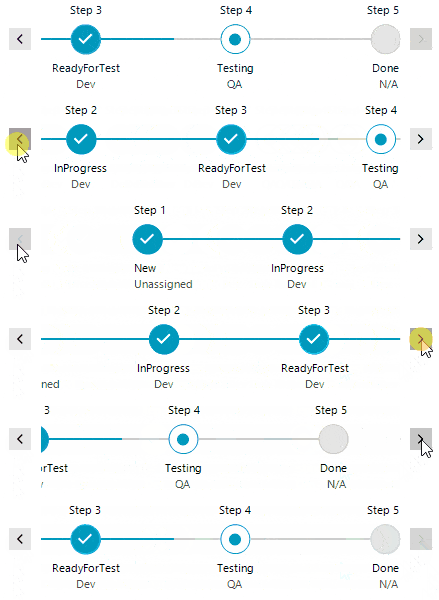
StepProgressBar It also exposes powerful LayoutMode attribute , This attribute determines how the step items will be arranged according to the connection length and available space . The steps can be extended to occupy the entire available space of the control , It can also be arranged according to the global step spacing and each connection length . In our mode of applying absolute length , If the steps are not suitable , Special buttons will be used to navigate the steps with animation .
Settings and styles
To make changes API It's simple , Directly expose properties and methods on controls and step items . Some control settings affect all step items , But you can still choose to override them in some steps . for example , You can make a step bigger , This can indicate its special state :
this.radStepProgressBar1.StepSpacing = 80;
this.radStepProgressBar1.IndicatorSize = new Size(28, 28);
this.radStepProgressBar1.ConnectionThickness = 3;

var readyForTestStep = this.radStepProgressBar1.Steps[2];
readyForTestStep.IndicatorSize = new Size(42, 42);
As for the theme , Controls are well supported in all themes —— At the time of writing , Their number is 31, To continue to check ThemeViewer Tools and choose the best theme for your application .
Customize
When studying and thinking about how to implement this control , One thing is certain , We want to be flexible and API Easy to operate ,ProgressMode、LayoutMode、Orientation and RightToLeft Property determines the operation and layout of the control .
But except for this API, We also want to provide a way to customize , So that you can completely change the appearance of the control with just a few properties .

This is the same control , We just applied custom shapes , Changed the indicator size and deleted the connection :
foreach (StepProgressItem item in this.radStepProgressBar1.Steps)
{
string shapeAsString = "20,20,200,100:20,20,False,0,0,0,0,0:200,20,False,0,0,0,0,0:220,70,False,0,0,0,0,0:200,120,False,0,0,0,0,0:20,120,False,0,0,0,0,0:40,70,False,0,0,0,0,0:";
if (item.IsFirst)
{
shapeAsString = "20,20,200,100:20,20,False,0,0,0,0,0:200,20,False,0,0,0,0,0:220,70,False,0,0,0,0,0:200,120,False,0,0,0,0,0:20,120,False,0,0,0,0,0:";
}
else if (item.IsLast)
{
shapeAsString = "20,20,200,100:20,20,False,0,0,0,0,0:180,20,True,230,20,230,120,0:180,120,False,0,0,0,0,0:20,120,False,0,0,0,0,0:40,70,False,0,0,0,0,0:";
}

item.StepIndicator.Shape = new CustomShape() { AsString = shapeAsString };
}

this.radStepProgressBar1.StepProgressBarElement.IndicatorSize = new Size(100, 40);
this.radStepProgressBar1.StepProgressBarElement.StepSpacing = 0;
The custom shape in the above code snippet uses ShapeEditor Tool created , Later serialized as a string .
Telerik UI for WinForms| Download trial
Telerik UI for WinForms Have applicable Windows Forms Of 110 Many amazing UI Control . be-all UI for WinForms Controls have full theme support , It can easily help developers provide a consistent and beautiful next-generation user experience for desktop and tablet applications .
Telerik_KendoUI Product technology exchange group :726377843 Welcome to group discussion
Stay up to date Kendo UI The latest news , Please pay attention to Telerik Chinese net !
边栏推荐
- Common methods of string class
- 文献阅读:GoPose 3D Human Pose Estimation Using WiFi
- MySQL8.0学习记录20 - Trigger
- Analysis of the basic concept of digital warehouse
- In the spring of domestic databases
- Chapter 4 compound type
- 拦截器和过滤器
- Tclsh array operation
- Solve the problem of disconnection due to long idle time after SSH login
- Timed task framework
猜你喜欢
![[face to face experience of school recruitment] 8 real questions of pointer interview. Come and test how many you have mastered.](/img/2c/e687b224285aeee66dacace6331161.png)
[face to face experience of school recruitment] 8 real questions of pointer interview. Come and test how many you have mastered.

Literature reading: gopose 3D human pose estimation using WiFi

Sequences, time series and prediction in tessorflow quizs on coursera (I)

拿捏C指针

MySQL1

FPGA 20 routines: 9. DDR3 memory particle initialization write and read through RS232 (Part 1)

day 3

OpenGL learning (IV) glut 3D image rendering
day 2

Summary of articles in 2020
随机推荐
Detailed explanation of ELF format (I)
Reading notes: you only look once:unified, real time object detection
拿捏C指针
2022 Summer Games of Hangzhou electric power multiple schools 1012aalice and Bob (game theory)
Mysql8.0 learning record 19 - Page segments and tablespaces
FPGA 20 routines: 9. DDR3 memory particle initialization write and read through RS232 (Part 2)
FPGA 20 routines: 9. DDR3 memory particle initialization write and read through RS232 (Part 1)
MySQL (data types and integrity constraints)
Nacos introduction and console service installation
Arrays
pyhanlp安装教程
First knowledge database
About the largeheap attribute
Zooinspector Download
Zooinspector Download
OpenGL learning (IV) glut 3D image rendering
Siyuan notes V2.1.2 synchronization problem
Jedi survive and eat chicken F12 screenshot save path reference
Tupu software digital twin civil aviation flight networking, building a new business form of smart Civil Aviation
JS part