当前位置:网站首页>WPF 下的自定义控件以及 Grid 中控件的自适应
WPF 下的自定义控件以及 Grid 中控件的自适应
2022-06-28 02:34:00 【雪中亮】
「博客搬家」 新地址: 简书
本文主要总结使用 C# 及 .NET 在 WPF 框架下,自定义控件的绘制以及窗体中控件的自适应。
1. WPF 下的自定义控件
WPF 下,为快速地为应用定制一个零部件,需要的是 UserControl , 为了让你打造的控件更标准化,更灵活以及更具有普遍意义,需要用到的 CustomControl 。要在 WPF 中自定义一个控件,使用 UserControl 与 CustomControl 都是不错的选择,他们的区别在于:
UserControl , 其更像 WinForm 中自定义控件的开发风格,在开发上更简单快速,几乎可以简单地理解为:利用设计器来将多个已有控件作为子元素来拼凑成一个 UserControl 并修改其外观,然后后台逻辑代码直接访问这些子元素。其最大的弊端在于: 其对模板样式等支持度不好,其重复使用的范围有限。
CustomControl , 其开发出来的控件才真正具有 WPF 风格,其对模板样式有着很好的支持,这是因为打造 CustomControl 时做到了逻辑代码与外观相分离,即使换上一套完全不同的视觉树其同样能很好的工作,就像 WPF 内置的控件一样。
在使用 Visual Studio 打造控件时 , UserControl 与 CustomControl 的差别就更加明显,在项目中添加一个 UserControl 时,我们会发现设计器为我们添加了一个 XAML 文件以及一个对应的 .CS 文件「或 .VB 等」,然后你就可以像设计普通窗体一样设计该 UserControl ; 如果我们是在项目中添加一个 CustomControl , 情况却不是这样,设计器会为我们生成一个 .CS 文件「或 .VB 等」,该文件用于编写控件的后台逻辑,而控件的外观却定义在了软件的应用主题「Theme」中了「如果你没有为软件定义通用主题,其会自动生成一个通用主题
themes\generic.xaml, 然后主题中会自动为你的控件生成一个 Style 」,并将通用主题与该控件关联了起来。这也就是 CustomControl 对样式的支持度比 UserControl 好的原因。
这里为了简便起见,使用 UserControl 创建自定义控件。
1.1 新建 UserControl
对项目点击右键,选择「添加」->「新建项」,选择 「用户控件『WPF』」”, 即可成功添加自定义控件。

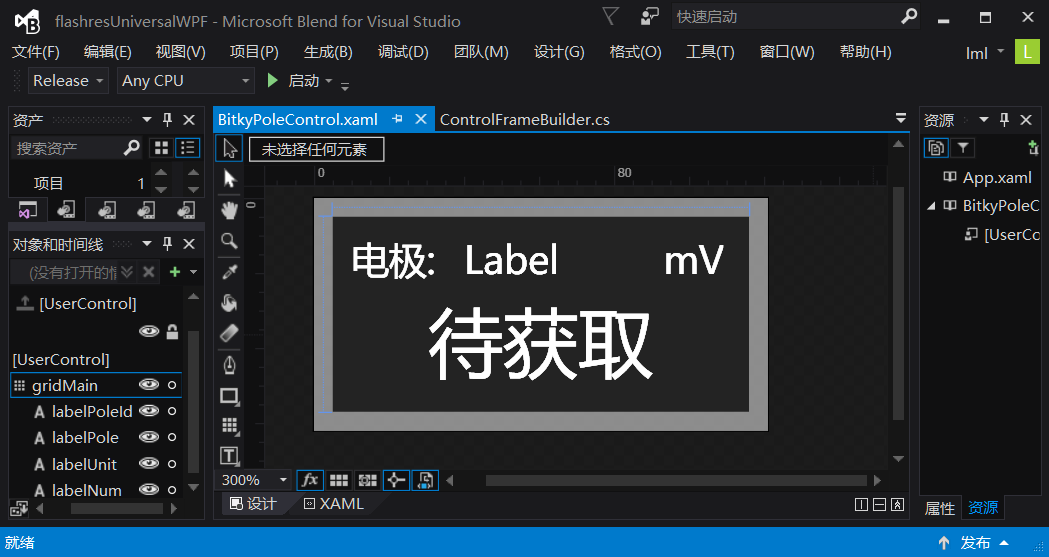
对该控件进行设计,拖入几个系统控件,并修改其参数即可。下图展示的是我使用 Microsoft Blend 设计对控件进行设计:
1.2 UserControl 的基本代码
控件设计完毕后,右键单击控件编辑窗口,选择「查看代码」,或直接按「F7」键,即可编辑该控件类的源代码。我主要添加了该控件的初始化,改变控件的背景颜色,以及动态设定控件显示的值等代码功能,具体如下:
    /// <summary>
    /// _bitkyPoleControl.xaml 的交互逻辑
    /// </summary>
    public partial class BitkyPoleControl : UserControl
    {
        private readonly Color _colorBlue = Color.FromRgb(0, 255, 200);
        //改变颜色
        private readonly Color _colorRed = Color.FromRgb(255, 0, 0);

        public BitkyPoleControl()
        {
            InitializeComponent();
        }

        public int _id { get; private set; } = -1;

        /// <summary>
        /// 根据参数初始化该控件
        /// </summary>
        /// <param name="id">输入的参数</param>
        public void setContent(int id)
        {
            Name = "bitkyPoleControl" + id;
            labelPoleId.Content = id;
            _id = id;
        }

        public void SetValue(int num)
        {
            labelNum.Content = num;
        }

        /// <summary>
        /// 设置背景颜色,0:绿 1:红
        /// </summary>
        /// <param name="i"></param>
        public void setColor(int i)
        {
            if (i == 0)
                Background = new SolidColorBrush(_colorBlue);
            if (i == 1)
                Background = new SolidColorBrush(_colorRed);
        }
    }
2. Grid 中控件的动态添加
2.1 主窗体中 Grid 的配置
我在主窗体中添加了一个 Grid , 并将该 Grid 平均分成了八行八列,如下图所示:

设置方法如下:如下图所示,通过对 Grid 的属性进行如下设置:
- 在「1」处,可添加 ColumnDefinitions 和 RowDefinitions 。
在「2」处,可设置 Grid 中单元格的最小尺寸,在 width 处,有三个选项:「Auto」,「Pixel」,「Star」。
- ”Auto”:系统根据情况自动设定尺寸。
- “Pixel”:设定为绝对尺寸,无法自适应。
- “Star”:设置比重,各个行或列按照设定的比重分配Grid的空间。
在此,为了平均分配 Grid 的空间,且可根据窗口大小自适应,故将所有行和列的该项设定为「Star」,值设为「1」,即可出现上图的效果。

2.2 Grid 中动态添加控件
在主窗体类中使用如下代码即可在 Grid 中动态添加控件 :
    /// <summary>
    /// 初始化信息显示标签界面
    /// </summary>
    private void InitBitkyPoleShow()
    {
        var controls = new List<BitkyPoleControl>();
        var id = 0;
        for (var i = 0; i < 8; i++)
        {
            for (var j = 0; j < 8; j++)
            {
                var bitkyPoleControl = new BitkyPoleControl();
                //在 Grid 中动态添加控件
                GridPoleStatusShow.Children.Add(bitkyPoleControl);
                //设定控件在 Grid 中的位置
                Grid.SetRow(bitkyPoleControl, i);
                Grid.SetColumn(bitkyPoleControl, j);
                //将控件添加到集合中,方便下一步的使用
                controls.Add(bitkyPoleControl);
                //对控件使用自定义方法进行初始化
                bitkyPoleControl.setContent(id);
                id++;
            }
        }
    }
运行程序,效果如下图所示:

观察图片可知,空间排布较为美观,如若想要子控件完全填充 Grid 中的单元格,需对子控件的属性进行配置。
3. Grid 中子控件的动态自适应
3.1 对子控件的属性进行配置

如图所示,将控件的宽度和高度设为「Auto」,将 HorizontalAlignment 和 VerticalAlignment 设为「Stretch」 , Margin 设为合适的值 , 则此时, Grid 中的子控件的即可动态自适应父控件。

4. 参考资料
边栏推荐
猜你喜欢
建立自己的网站(17)

根据Explain查看sql执行计划,对SQL进行优化

A16z: metauniverse unlocks new opportunities in game infrastructure
A16z:元宇宙解锁游戏基础设施中的新机遇

__ getitem__ And__ setitem__
Dataloader参数collate_fn的使用

Redis搭建集群【简单】

【小程序】使用font-awesome字体图标的解决文案(图文)

Tencent games released more than 40 products and projects, including 12 new games

composition api在项目中的使用总结
随机推荐
Necessary software tools in embedded software development
Ten reasons for system performance failure
Redis cluster setup [simple]
matlab习题 —— 符号运算相关练习
Is your IOT security strong enough?
将PCAP转换为Json文件的神器:joy(安装篇)
多快好省,低门槛AI部署工具FastDeploy测试版来了!
A16z: metauniverse unlocks new opportunities in game infrastructure
What are the good practices of cloud cost optimization?
如何编写简洁代码?(上)
华为设备WLAN基本业务配置命令
What are the technologies to be mastered in the test? Database design for software testing
用于 C# 的 SQL 基本语法总结
嵌入式DSP音频开发
Dataloader parameter collate_ Use of FN
学习---有用的资源
如何获取GC(垃圾回收器)的STW(暂停)时间?
Apache, IIS6 and ii7 independent IP hosts screen and intercept spider crawling (applicable to VPS virtual machine servers)
More, faster, better and cheaper. Here comes the fastdeploy beta of the low threshold AI deployment tool!
Hot! Yolov6's fast and accurate target detection framework is open source (with source code download)