当前位置:网站首页>使用 useDeferredValue 进行异步渲染
使用 useDeferredValue 进行异步渲染
2022-07-02 02:38:00 【码道人】

最近在开发一个复杂的应用程序,我发现我的 React 心智模型是错误的。这是它的简化版本:
const AppWithSynchronousRendering = () => {
  const [counter, setCounter] = useState(0);
  return (
    <div className="App" style={AppStyle}>
      <ExpensiveRenderComponent counter={counter} />
      <BasicComponent counter={counter} />
      <button onClick={() => setCounter(counter + 1)}>Increment</button>
    </div>
  );
}
人们普遍认为,只要组件的 prop 发生变化,它就会立即重新渲染。所以我希望在这里一旦counter发生变化,<ExpensiveRenderComponent/>和<BasicComponent/>就会重新渲染,显示它们各自的内容。鉴于<ExpensiveRenderComponent/>在显示其内容之前需要进行一些影响性能的处理,我希望<BasicComponent/>首先渲染。但实际上不会这样:两个组件是同时更新的。换句话说,<BasicComponent/>等待<ExpensiveRenderComponent/>出现。
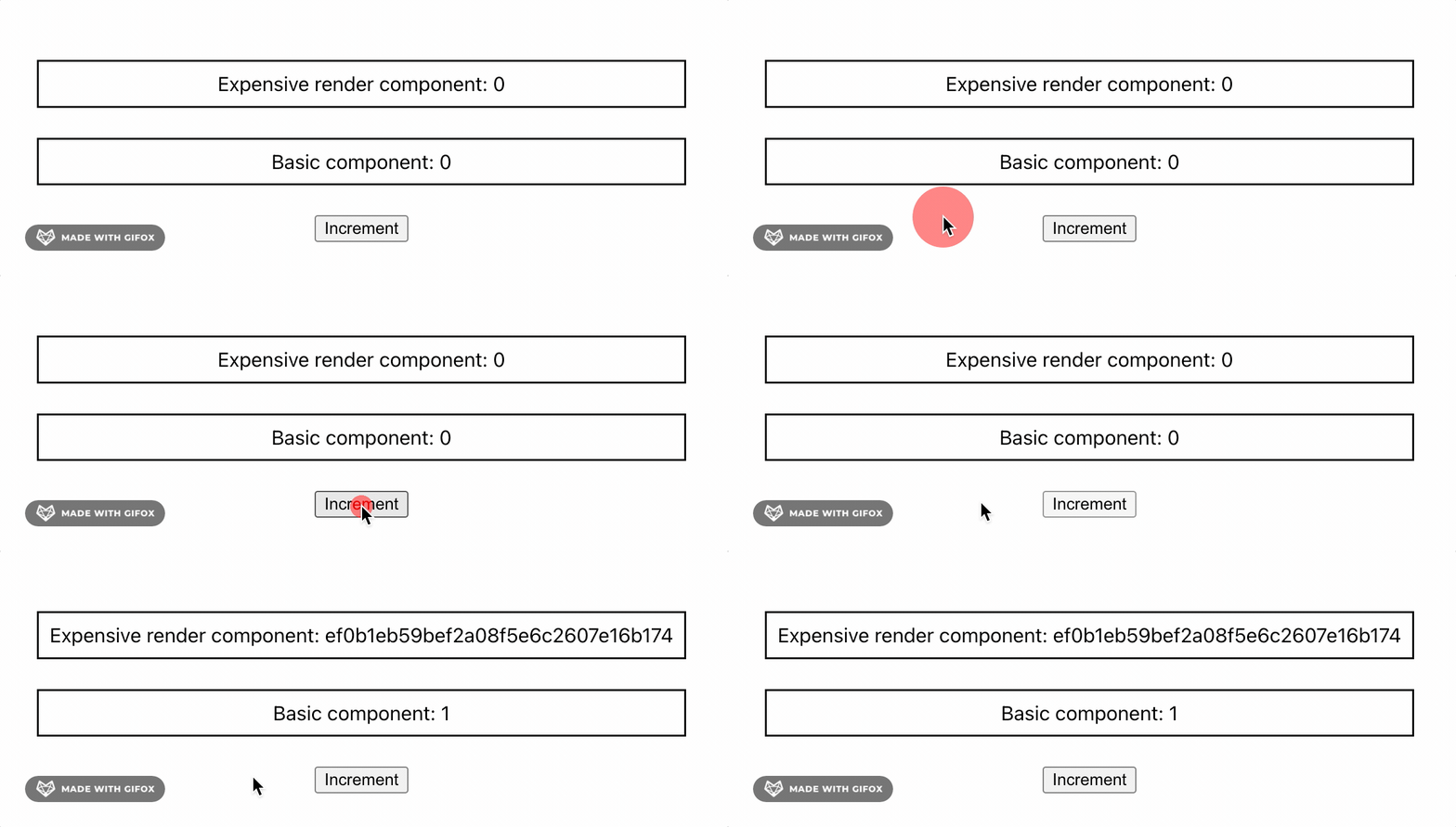
我在这个问题上花了相当长的时间,终于弄清楚了我的 React 心智模型中缺少什么。在这里,我们需要更深入地了解 React 渲染的工作原理。
React 渲染是同步的
每当组件的状态发生变化时,React 都会触发后者及其所有子组件的重新渲染。在此过程中发生三个步骤:
- React 首先计算由状态变化引起的新的虚拟 DOM。虚拟 DOM 基本上是用户界面的 Javascript 表示,相当于实际的 DOM。这里唯一的区别是不显示虚拟 DOM,因此操作起来更快。
- 当计算出新的虚拟 DOM 后,React 会将其与实际 DOM 进行比较并更新实际更改的部分。这个过程称为reconciliation。
- 作为最后一步,React 将更改应用到实际的 DOM。这称为commit阶段。

计算新的虚拟 DOM 意味着运行由于状态变化而渲染的每个组件的代码。因此,这一步的持续时间至少与计算最复杂组件所需的时间一样长。
在我们的示例中,由于相同的状态更改,<ExpensiveRenderComponent/>和<BasicComponent/>重新渲染。<ExpensiveRenderComponent/>需要执行一些昂贵的计算,因此 React 必须等待它完成才能更新实际的 DOM。在此期间,UI 变得无响应。
因此渲染是同步的。这种行为也是为了一致性而设计的。React 总是会因为相同的状态同时更新而重新渲染组件。在文档中很好地解释了这一点:
这在绝大多数情况下都是有意义的。不一致的 UI 会造成混淆,并可能误导用户。
一种解决方案是优化渲染时间最长的组件。但是如果不可能呢?这就是 React 18 的用武之地!
React 18 并发特性
React 18 于 2022 年 3 月发布,并引入了强大的并发渲染功能。之前,渲染是同步的,正如我们的示例所示:由状态更改触发的每个渲染组件都必须等待所有其他组件准备好更新。使用 React 18,可以为每个状态更改赋予不同的优先级,甚至可以为每个组件渲染赋予不同的优先级,正如我们将看到的那样。简而言之,React 18 启用了异步渲染。
让我们看看如何将新的 hook useDeferredValue 应用到我们之前的问题:
const AppWithAsynchronousRendering = () => {
  const [counter, setCounter] = useState(0);
  const deferredCounter = useDeferredValue(counter);

  return (
    <div className="App" style={AppStyle}>
      <ExpensiveRenderComponent counter={deferredCounter} />
      <BasicComponent counter={counter} />
      <button onClick={() => setCounter(counter + 1)}>Increment</button>
    </div>
  );
}在这里,useDeferredValue创建了 counter 的延迟版本,它允许解耦 <ExpensiveRenderComponent/>和<BasicComponent/>的渲染:
<BasicComponent/>可以立即使用新的counter。- 同时,
deferredCounter保持旧的counter值,直到 React 完成使用新的counter值在不阻塞主线程的情况下完成<ExpensiveRenderComponent/>的计算。完成后,<ExpensiveRenderComponent/>会立即更新,并且应用程序是完全最新的。
让我们看看这个 hook 的作用:

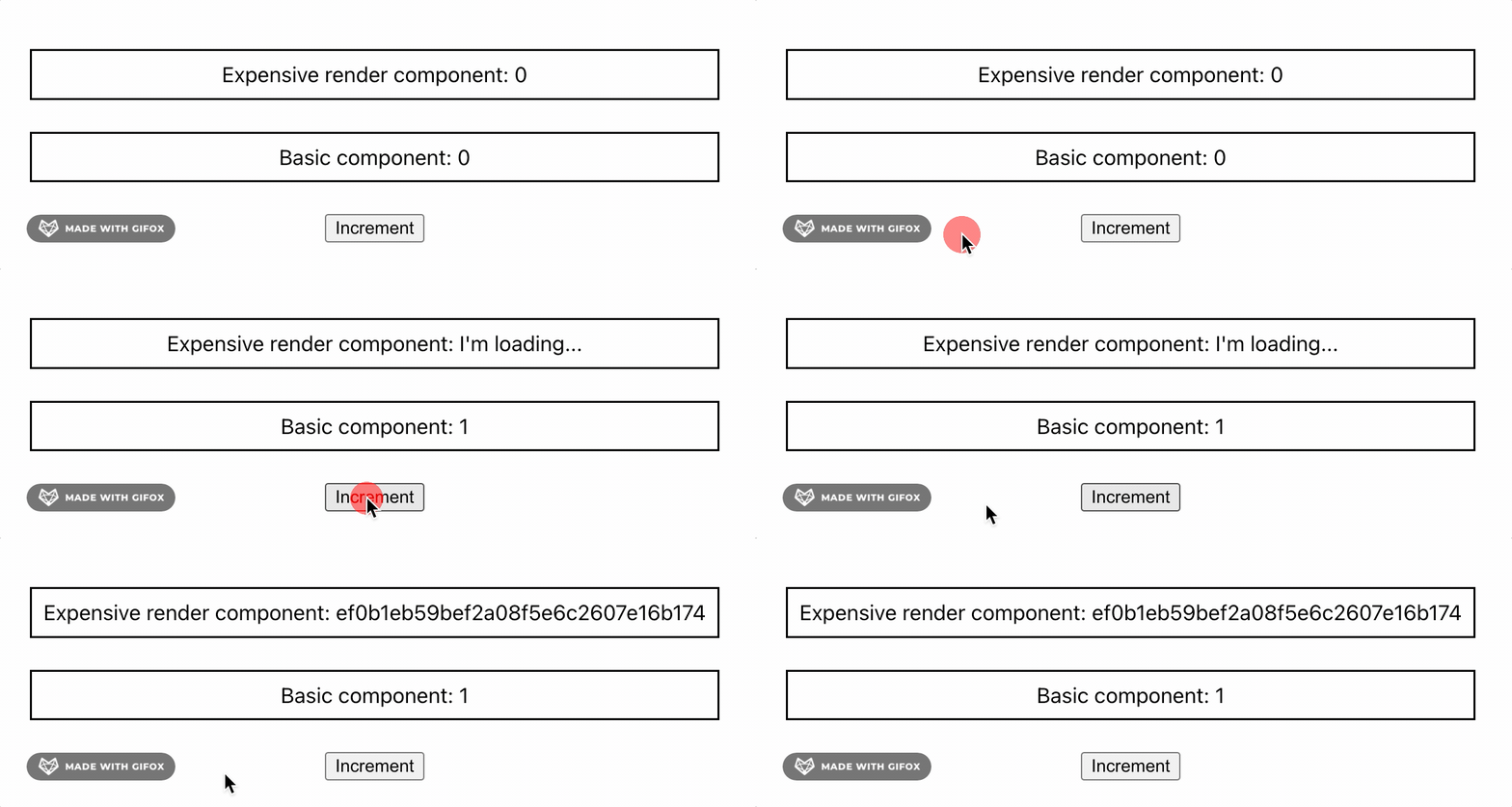
由于应用程序响应速度更快,用户体验有了很大改进!但是,你会注意到 UI 的一致性已被牺牲,因为<ExpensiveRenderComponent/>会在短时间内显示旧的 counter 值。此问题的解决方案是在 UI 不是最新的时候通知用户。它可以像引入 prop isStale一样简单:
const AppWithAsynchronousRendering = () => {
  const [counter, setCounter] = useState(0);
  const deferredCounter = useDeferredValue(counter);

  return (
    <div className="App" style={AppStyle}>
      <ExpensiveRenderComponent
        counter={deferredCounter}
        {/* You can return a loading state based on this prop */}
        isStale={deferredCounter !== counter}
      />
      <BasicComponent counter={counter} />
      <button onClick={() => setCounter(counter + 1)}>Increment</button>
    </div>
  );
}现在,通过在isStale为 true 时返回加载状态来使 UI 保持一致是很简单的:
总结
- 拥有一致的 React 心智模型不仅是理解应用怪异行为的关键,也是有效增强它的关键。
- React 渲染是同步的并强制 UI 一致性。如果某些组件需要时间来渲染,UI 可能会变得无响应。
- React 18 并发特性支持异步渲染。
useDeferredValue可以推迟昂贵组件的渲染,并以这种方式使 UI 更具响应性。但如果处理不当,可能会牺牲 UI 一致性。 - React 18 中还有许多其他的并发渲染功能:
useTransition、Suspense等。
参考
边栏推荐
- STM32__05—PWM控制直流电机
- C write TXT file
- QT实现界面跳转
- Duplicate keys detected: ‘0‘. This may cause an update error. found in
- [learn C and fly] 4day Chapter 2 program in C language (exercise 2.5 generate power table and factorial table
- flutter 中间一个元素,最右边一个元素
- [punch in questions] integrated daily 5-question sharing (phase II)
- [learn C and fly] 1day Chapter 2 (exercise 2.2 find the temperature of Fahrenheit corresponding to 100 ° f)
- An analysis of circuit for quick understanding
- Analysis of FLV packaging format
猜你喜欢
Decipher the AI black technology behind sports: figure skating action recognition, multi-mode video classification and wonderful clip editing
![[learn C and fly] 1day Chapter 2 (exercise 2.2 find the temperature of Fahrenheit corresponding to 100 ° f)](/img/39/42b1726e5f446f126a42d7ac673dce.png)
[learn C and fly] 1day Chapter 2 (exercise 2.2 find the temperature of Fahrenheit corresponding to 100 ° f)

Is bone conduction earphone better than traditional earphones? The sound production principle of bone conduction earphones is popular science

How to turn off debug information in rtl8189fs
![[graduation season] graduate seniors share how to make undergraduate more meaningful](/img/03/9adc44476e87b2499aa0ebb11cb247.png)
[graduation season] graduate seniors share how to make undergraduate more meaningful

Jvm-01 (phased learning)

A quick understanding of digital electricity

【带你学c带你飞】4day第2章 用C语言编写程序(练习 2.5 生成乘方表与阶乘表

No programming code technology! Four step easy flower store applet

pytest 测试框架
随机推荐
2022 low voltage electrician test question simulation test question bank simulation test platform operation
QT implementation interface jump
Multi threaded query, double efficiency
【带你学c带你飞】1day 第2章 (练习2.2 求华氏温度 100°F 对应的摄氏温度
What is the principle of bone conduction earphones and who is suitable for bone conduction earphones
Formatting logic of SAP ui5 currency amount display
A quick understanding of digital electricity
Realize the code scanning function of a custom layout
Questions d'entrevue
The video number will not be allowed to be put on the shelves of "0 yuan goods" in the live broadcasting room?
[learn C and fly] day 5 chapter 2 program in C language (Exercise 2)
The wave of layoffs in big factories continues, but I, who was born in both non undergraduate schools, turned against the wind and entered Alibaba
The middle element and the rightmost element of the shutter
trading
离婚3年以发现尚未分割的共同财产,还可以要么
Additional: information desensitization;
Quality means doing it right when no one is looking
STM32__05—PWM控制直流电机
QT实现界面跳转
STM32F103——两路PWM控制电机