当前位置:网站首页>Unity beginner 4 - frame animation and protagonist attack (2D)
Unity beginner 4 - frame animation and protagonist attack (2D)
2022-07-29 07:57:00 【Lin Fusheng】
This article comes from learning chutianbo Teacher's notes , link b standing
About the production of frame animation
About the animation of a character , We need to add a component to this role first Animator( Animation controller ).
Then we use ctrl+6 open Animation panel , Choose us Prefabs The next role , Click Create Animation Cilp, Put the new file animation on assets I created Animation In the folder .
Then we were in Characters Find different forms of material in the folder  Pictured above ,robot Actions are divided into idle,fixed,walk Three states , among walk The animation in is divided into four directions . We use Shift Press and hold to select the attribution down Drag four photos of into Animation You can make frames in the panel .
problem :
1. Action only left, not right 
Use Filp X Just reverse
2. The three symbols on the right side of the name respectively indicate that it is adjusted to the specified frame , Add keyframes , Join the event
3. Try not to make frame animation events lower than 0.10, Otherwise, the back of the hybrid tree tigger It is decided that bug
Use the blend tree to animate the character
After making the animation , We need to add behavioral processes to roles .
In the production animation when , He will automatically create a corresponding animator Click to enter
You will find that every animation we have done before is scattered in it , So according to the classification , We use the right button to create create stateNew Blend tree.
Because robot animation has orientation problems , So we are on the left paramemters Add parameter determination Move X, and Move Y, All are float type 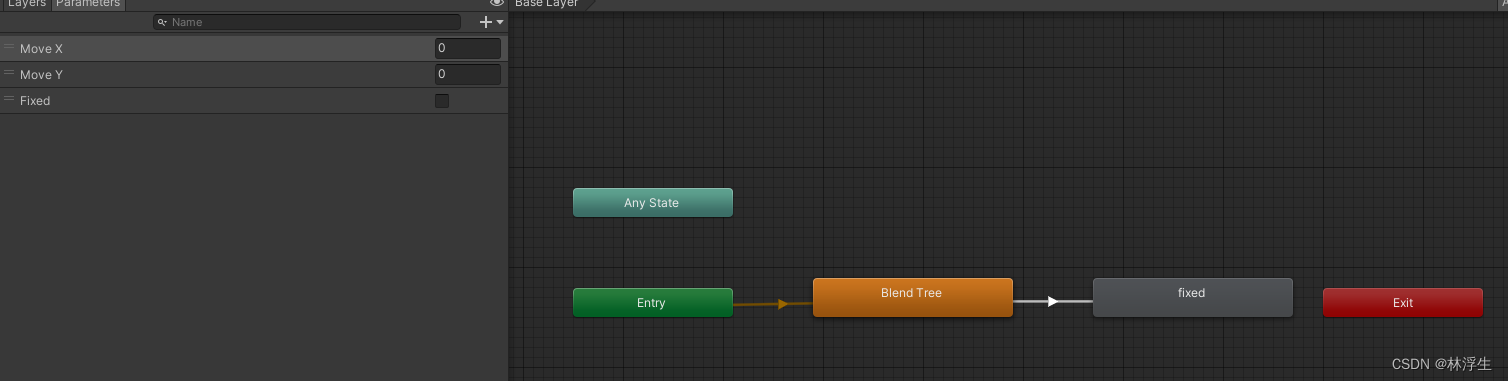
It's probably like this when it's finished
Remember here 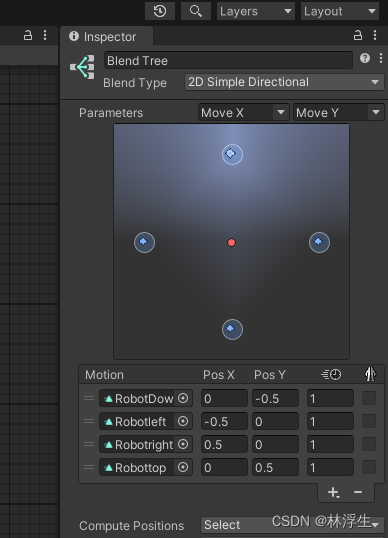
Change the mixed tree type to two control parameters , Then add your own animation
Finished the animation , Use parameters to control animation
Declare animated objects
Animator animator;
2. stay start Get animation examples in
animator = GetComponent();
3. stay FixedUpdate Add judgment in
  if (vertical)
        {
            position.y = position.y + speed * Time.deltaTime*direction;
            animator.SetFloat("Move X",0);
            animator.SetFloat("Move Y", direction);
        }
        else
        {
            position.x = position.x + speed * Time.deltaTime * direction;
            animator.SetFloat("Move X", direction);
            animator.SetFloat("Move Y", 0);
        }
        rigidbodyroot.MovePosition(position);
About the protagonist's attack
Animation production is the same as above and will not be repeated , Here we talk about the main character shooting bullets
1. Add rigid bodies and collision bodies to the bullet preform , At the same time for bullets projecttile Prefabrication hanging script
 Rigidbody2D rigidbodyproject;
  // Start is called before the first frame update
  void start()
  {
      rigidbodyproject = GetComponent<Rigidbody2D>();
  }
  public void launch(Vector2 direction,float force){
  // Give the bullet a firing force
      rigidbodyproject.AddForce(direction*force);

      }
 private void OnCollisionEnter2D(Collision2D collision)
  {
      Debug.Log($" I met {collision.gameObject}");
      // The bullet disappears when it hits the entity
      Destroy(gameObject);
      // When the bullet meets the robot , Repair robot
      EnemyController2 emenyController2 = collision.collider.GetComponent<EnemyController2>();
      if (emenyController2 != null)
      {
          emenyController2.Fix();
      }
  }
  private void Update()
  {
      // If there is no collision body , Too far automatic destruction
      if (transform.position.magnitude>100)
      {
          Destroy(gameObject);
      }
  }
2… Add
public GameObject projecttilePrefabs;// It means to obtain bullet prefabricated parts
3. Add the launch function for the protagonist
 void Launch()
  {
      // Create an object at the specified location
      GameObject projecttileObject = Instantiate(projecttilePrefabs, rigidbody2dRuby.position + Vector2.up * 0.5f, Quaternion.identity);
      projecttile projecttile = projecttileObject.GetComponent<projecttile>();
      projecttile.launch(lookDirection, 300);
  }
Above Instantiate Indicates that the creation entity is unity One of the api The first parameter is the object , The second is the creation location , The third is rotation
,Quaternion.identity Indicates no rotation ( Here we can go back to the time when we first created the protagonist mobile , If freeze is not checked z Shaft appearance )
4. meet bug 233
We will find the first thing ,unity An error will be reported, indicating that the rigid body of the bullet preform is obtained as null, This is because , The following is unity Official explanation :
This is because when you create objects Unity Will not run Start, Instead, it starts running at the next frame . therefore , Call on the missile Launch when , Just instantiate (Instantiate), Do not call Start, therefore Rigidbody2d Still empty . To solve this problem , Please put Projectile Script void Start() The function is renamed to void Awake().
And Start Just the opposite , When you create an object ( call Instantiate when ) Will immediately call Awake, So in the call Launch Initialized correctly before Rigidbody2d.
You can go deep into this problem MonoBehavior Life cycle of
5. Finish this bug, Then we will continue to meet bug
We found that the missile was created , But the protagonist disappeared in an instant , So here we need to use layers , Put the protagonist and the prefabricated missile on different layers , At the same time EditProject Settingphysical 2D Uncheck these two layers ( That is, no collision )
The material used in this article comes from unity The store Ruby’s adventure
link unity Official website
边栏推荐
- MySQL 45 | 08 is the transaction isolated or not?
- Pytest set (7) - parameterization
- MySQL uses date_ FORMAT(date,'%Y-%m')
- LANDSCAPE
- 207.课程表
- Zero technology is deeply involved in the development of privacy computing financial scenario standards of the ICT Institute
- 330. Complete the array as required
- 在一个sql文件中,上面定义一个测试表及数据,下面可以select* from 测试表
- For the application challenge of smart city, shengteng AI gives a new solution
- Dilworth theorem
猜你喜欢

10 practical uses of NFT

LANDSCAPE

Convert source package to RPM package

Keyboard processing in jetpack compose
![[cryoelectron microscope | paper reading] emclarity: software for high-resolution cryoelectron tomography and sub fault averaging](/img/1e/9f05862288261e16a6b04508b9b292.png)
[cryoelectron microscope | paper reading] emclarity: software for high-resolution cryoelectron tomography and sub fault averaging
LANDSCAPE
![[paper reading | cryoet] gum net: fast and accurate 3D subtomo image alignment and average unsupervised geometric matching](/img/dc/255bf122d5243f2a08ca0e03b53137.png)
[paper reading | cryoet] gum net: fast and accurate 3D subtomo image alignment and average unsupervised geometric matching

Solve the problem that CSDN cannot publish blog due to unknown copyright

Autojs微信研究:微信自动发送信息机器人最终成品(有效果演示)

技术分享| 快对讲综合调度系统
随机推荐
Convert source package to RPM package
Shell script - global variables, local variables, environment variables
[skill accumulation] presentation practical skill accumulation, common sentence patterns
Why don't you like it? It's easy to send email in cicd
"Swiss Army Knife" -nc in network tools
String class
MySQL 45讲 | 08 事务到底是隔离的还是不隔离的?
【无标题】格式保存
Database persistence +jdbc database connection
10 practical uses of NFT
Useful websites
2022 Shenzhen Cup Title A: get rid of "scream effect" and "echo room effect" and get out of the "information cocoon room"
Analyze the roadmap of 25 major DFI protocols and predict the seven major trends in the future of DFI
Dynamic Thresholds Buffer Management in a Shared Buffer Packet Switch论文总结
@Use of jsonserialize annotation
Actual measurement of boot and pH pins of buck circuit
Day 014 2D array exercise
技术分享| 快对讲综合调度系统
你学习·我奖励,21天学习挑战赛 | 等你来战
Limitations of push down analysis