当前位置:网站首页>SSM file upload and download
SSM file upload and download
2022-06-11 08:20:00 【WldKid_ zxy】
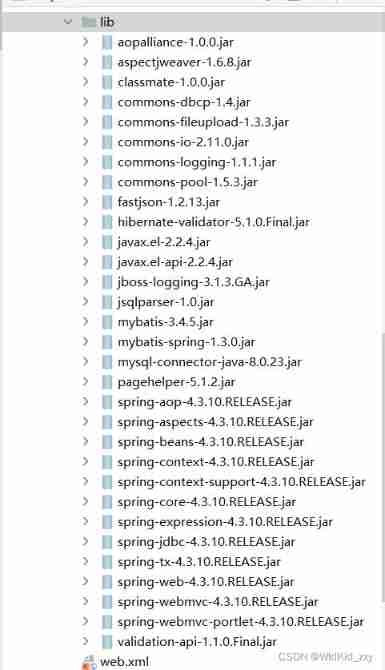
1. Add jar package (mysl Connected by different versions Jar The bag is different )
2. Upload files html page
<!DOCTYPE html>
<html lang="en">
<head>
    <meta charset="UTF-8">
    <title>Title</title>
</head>
<body>
<h2> Administrator file upload </h2>
<form method="post" action="fileUploads" enctype="multipart/form-data">
  <p> file name :<input type="file" name="file1"></p>
  <p> file name :<input type="file" name="file2"></p>
  <p> file name :<input type="file" name="file3"></p>
  <p> file name :<input type="submit" value=" Submit "></p>
</form>
</body>
</html>
3 ssm.ml File configuration (aplication.xmx Self configuring )
    <!-- File upload configuration -->
    <bean id="multipartResolver" class="org.springframework.web.multipart.commons.CommonsMultipartResolver">
        <!-- Set the size of the file (1048576=1M)-->
        <property name="maxUploadSize" value="4194304"/>
        <!-- Buffer size -->
        <property name="maxInMemorySize" value="4096"/>
        <property name="defaultEncoding" value="utf-8"/>
    </bean>
4. The code of each layer

5. Upload files Controer( Code )
    @RequestMapping("fileUploads")
    public String upload(HttpServletRequest request) throws IOException {

        //  Initialize the current context to  CommonsMutipartResolver ( Multipart parser )
        CommonsMultipartResolver multipartResolver =
                new CommonsMultipartResolver(request.getSession().getServletContext());

        //  Check form If there  enctype="multipart/form-data"
        if (multipartResolver.isMultipart(request)) {

            //  take request Become part of request
            MultipartHttpServletRequest multiRequest = (MultipartHttpServletRequest) request;
            //  obtain multiRequest  All the filenames in
            Iterator iter = multiRequest.getFileNames();
            while (iter.hasNext()) {

                //  Traverse all files at once
                MultipartFile file = multiRequest.getFile(iter.next().toString());
                if (file != null && file.getOriginalFilename() != "") {

                    // Judgment of file format   File name processing is omitted
                    String fileName = file.getOriginalFilename();
                    /*UUID Name the file to avoid duplicate file names */
                    String uuid = UUID.randomUUID().toString();
                    String path = request.getSession().getServletContext()
                            .getRealPath("/userFile/") + uuid + "_" + fileName;
                    // Need to be in web Next create a userFile Folder ( There must be a sub file under this folder )
                    file.transferTo(new File(path));
                    //  Upload to the database
                    filesService.addFile(uuid + "_" + fileName);
                }
            }
        }
        return "index";
    }
6. Upload files (javaWeb Chapter 246 )

7. File download (Controller Code )
7.1html file
<!DOCTYPE html>
<html lang="en">
<head>
    <meta charset="UTF-8">
    <title> File download </title>
</head>
<script src="js/jquery-1.12.4.min.js"></script>
<script>
    $(function () {

        $.getJSON("filesList", function (data) {

            console.log(data);
            loadData(data);
        });
    });

    function loadData(data) {

        $("#t tr:gt(0)").remove();
        for (var i = 0; i < data.length; i++) {

            var str = "<tr><td>";
            str += "<input type='checkbox' class='choose' value='" + data[i].fileId + "'/></td><td>";
            str += data[i].fileId + "</td><td>";
            str += data[i].fileName.substr(data[i].fileName).slice(37) + "</td><td>";
            str += "<a href='fileDowns?filename=" + data[i].fileName + "'> download </a></td></tr>";
            $("#t").append(str);
        }
    }

</script>
<body>

<a href="fileDowns?filename=5a54247f-2127-4f4f-b3bf-d2025077c7fc_c3p0.zip"> File download </a>
<div>
    <h3 style="color: red"> File download </h3>
    <button><a href="index.html"> home page </a></button>
    <table id="t" border="1" cellpadding="3" cellspacing="3">
        <tr>
            <th><input type="checkbox" onclick="" id="all"></th>
            <th> Serial number </th>
            <th> file name </th>
            <th> operation </th>
        </tr>
    </table>
</div>
</body>
</html>
7.2 Front end output file name ( Download according to the file name of the database )
    @RequestMapping(value = "filesList")
    @ResponseBody
    public String getFilesList() {

        System.out.println(" Get into filesList_>");

        // Call the underlying method to get the file name from the data
        List<Files> list = filesService.getFiles();
        String string = JSON.toJSONString(list);
        System.out.println(string);
        return string;
    }
7.3 File download
    @RequestMapping(value = "fileDowns")
    public void download(HttpServletRequest request, HttpServletResponse response, String filename) throws IOException {

        //checkPay.apk For files that need to be downloaded
        //String filename = "checkPay.apk"; // What I use here is a fixed file , Methods can be written without filename Parameters
        // Get the absolute path name of the file ,apk Is a folder under the root directory , This can only get the absolute path of the root folder
        String path = request.getSession().getServletContext().getRealPath("userFile") + "\\" + filename;
        System.out.println(path);

        // Get the file to download
        File file = new File(path);
        if (!file.exists()) {

            response.setContentType("text/html; charset=UTF-8");// Be careful text/html, and application/html
            response.getWriter().print("<html><body><script type='text/javascript'>alert(' The resource you are downloading has been deleted !');</script></body></html>");
            response.getWriter().close();
            System.out.println(" The resource you are downloading has been deleted !!");
            return;
        }
        // transcoding , In order to avoid Chinese garbled file names
        filename = URLEncoder.encode(filename, "UTF-8");
        // Set file download header
        response.addHeader("Content-Disposition", "attachment;filename=" + filename.substring(37));
        //1. Settings file ContentType type , Set this way , It will automatically determine the type of downloaded files
        response.setContentType("multipart/form-data");
        //  Read the file to download , Save to file input stream
        FileInputStream in = new FileInputStream(path);
        //  Create output stream
        OutputStream out = response.getOutputStream();
        //  Create buffer
        byte buffer[] = new byte[1024]; //  The buffer size setting is a mystery   I don't get it either
        int len = 0;
        // Loop reads the contents of the input stream into the buffer
        while ((len = in.read(buffer)) > 0) {

            out.write(buffer, 0, len);
        }
        // Close file input stream
        in.close();
        //  Close output stream
        out.close();
    }
7.5 File download (javaWeb Chapter six )

边栏推荐
猜你喜欢

Process control: process waiting (recycling child processes)
2022.6.7 special student simulation

@Usage details of postconstruct, initializingbean and initmethod

Asynchronous notification mechanism of character device driver

嵌入式软件面试问题总结

(taking pytorch as an example) a simple understanding of the regularization method of path (depth) -drop path

Js学习基础document.write在页面中写一行文字

Empty difference between postgrepsql and Oracle

结果和目标出入太大?不妨借助目标管理精准直达目标!

使用 COCO 数据集训练 YOLOv4-CSP 模型
随机推荐
How CSDN reports plagiarized articles
TypeScript-unknown类型
Figure seamless database integration tushare interface
Printing diamond of beginner C
Return in foreach and break in for
Post - form data of interface test
Xshell7 and xftp7 to continue using this program, you must apply the latest updates or use a new version
Space geometry
Use Jackson's @jsonproperty annotation to add one more field to the property name. Solution to the problem
Typescript class and interface, class and generic, interface merging
避免list的并发修改异常的几种方式
Icml2022 article intéressant
centos随笔03:centos8.2安装mysql
JS learning basics document Write write a line of text in the page
Shell Programming Notes
Dameng database login
TRUNC in pytorch_ normal_ principle
字符设备驱动程序之异步通知机制
Js基础学习Script
TypeScript-类和接口、类和泛型、接口合并现象