当前位置:网站首页>Data Lake (XV): spark and iceberg integrate write operations
Data Lake (XV): spark and iceberg integrate write operations
2022-07-24 02:34:00 【Lanson】
Spark And Iceberg Consolidated write operations
One 、INSERT INTO
"insert into" Is to Iceberg Insert data into the table , There are two forms of grammar :"INSERT INTO tbl VALUES (1,"zs",18),(2,"ls",19)"、"INSERT INTO tbl SELECT ...", The above two methods are relatively simple , No more detailed records here .
Two 、MERGE INTO
Iceberg "merge into" Syntax can update or delete table data at row level , stay Spark3.x Support for , The principle is to rewrite the file containing the row data that needs to be deleted and updated data files."merge into" You can use a query result data to update the data of the target table , Its syntax is similar to join Connection way , Perform corresponding operations on the matched row data according to the specified matching conditions ."merge into" The grammar is as follows :
MERGE INTO tbl t
USING (SELECT ...) s
ON t.id = s.id
WHEN MATCHED AND ... THEN DELETE // Delete
WHEN MATCHED AND ... THEN UPDATE SET ... // to update
WHEN MATCHED AND ... AND ... THEN UPDATE SET ... // Multi condition update
WHEN NOT MATCHED ADN ... THEN INSERT (col1,col2...) VALUES(s.col1,s.col2 ...)// Do not match up to insert data into the target table
The specific cases are as follows :
1、 First create a Table and b surface , And insert data
val spark: SparkSession = SparkSession.builder().master("local").appName("SparkOperateIceberg")
  // Appoint hadoop catalog,catalog The name is hadoop_prod
  .config("spark.sql.catalog.hadoop_prod", "org.apache.iceberg.spark.SparkCatalog")
  .config("spark.sql.catalog.hadoop_prod.type", "hadoop")
  .config("spark.sql.catalog.hadoop_prod.warehouse", "hdfs://mycluster/sparkoperateiceberg")
  .config("spark.sql.extensions", "org.apache.iceberg.spark.extensions.IcebergSparkSessionExtensions")
  .getOrCreate()

// Create a table  a , And insert data
spark.sql(
  """
    |create table  hadoop_prod.default.a (id int,name string,age int) using iceberg
  """.stripMargin)
spark.sql(
  """
    |insert into hadoop_prod.default.a values (1,"zs",18),(2,"ls",19),(3,"ww",20)
  """.stripMargin)

// Create another table b , And insert data
spark.sql(
  """
    |create table  hadoop_prod.default.b (id int,name string,age int,tp string) using iceberg
  """.stripMargin)
spark.sql(
  """
    |insert into hadoop_prod.default.b values (1,"zs",30,"delete"),(2," Li Si ",31,"update"),(4," Wang Wu ",32,"add")
  """.stripMargin)
2、 Use MERGE INTO Syntax updates to the target table 、 Delete 、 The new data
Here we plan to b Table and a Table matching id, If b In the table tp The fields are "delete" that a Corresponding to id Data deletion , If b In the table tp The fields are "update", that a Corresponding to id Update other fields of data , If a Table and b surface id Can't match , It will be b The data in the table is inserted into a In the table , The specific operation is as follows :
// Will table b  Middle and table a In the same way id The data of is updated to the table a, surface a Not in the table b In some id Corresponding data writing is added to the table a
spark.sql(
  """
    |merge into hadoop_prod.default.a  t1
    |using (select id,name ,age,tp from hadoop_prod.default.b) t2
    |on t1.id = t2.id
    |when matched and t2.tp = 'delete' then delete
    |when matched and t2.tp = 'update' then update set t1.name = t2.name,t1.age = t2.age
    |when not matched then insert (id,name,age) values (t2.id,t2.name,t2.age)
  """.stripMargin)

spark.sql("""select * from hadoop_prod.default.a """).show()
The final results are as follows :

Be careful : When updating data , Only one matching piece of data in the queried data can be updated to the target table , Otherwise, an error will be reported .
3、INSERT OVERWRITE
"insert overwrite" You can override Iceberg Table data , This operation will replace all the data in the table , It is recommended to use "merge into" operation .
about Iceberg Partition table use "insert overwrite" In operation , There are two situations , The first is “ Dynamic coverage ”, The second is “ Static coverage ”.
Dynamic partition coverage :
Dynamic coverage will fully cover the original data , And insert the newly inserted data according to Iceberg Table partition rules automatically partition , similar Hive Dynamic partitioning in .
Static partition coverage :
Static coverage needs to be directed Iceberg You need to manually specify the partition when inserting data in , If at present Iceberg The table exists in this partition , Then only the data of this partition will be overwritten , Other partition data will not be affected , If Iceberg This partition does not exist in the table , Then it's equivalent to giving Iceberg The table adds a partition . The specific operation is as follows :
3.1、 Create three tables
establish test1 Partition table 、test2 Common watch 、test3 Ordinary table three tables , And insert data , The fields of each table are the same , But inserting data is different .
// establish  test1  Partition table , And insert data
spark.sql(
  """
    |create table  hadoop_prod.default.test1 (id int,name string,loc string)
    |using iceberg
    |partitioned by (loc)
  """.stripMargin)

spark.sql(
  """
    |insert into hadoop_prod.default.test1 values (1,"zs","beijing"),(2,"ls","shanghai")
  """.stripMargin)


// establish  test2  Common watch , And insert data
spark.sql(
  """
    |create table  hadoop_prod.default.test2 (id int,name string,loc string)
    |using iceberg
  """.stripMargin)

spark.sql(
  """
    |insert into hadoop_prod.default.test2 values (10,"x1","shandong"),(11,"x2","hunan")
  """.stripMargin)


// establish  test3  Common watch , And insert data
spark.sql(
  """
    |create table  hadoop_prod.default.test3 (id int,name string,loc string)
    |using iceberg
  """.stripMargin)

spark.sql(
  """
    |insert into hadoop_prod.default.test3 values (3,"ww","beijing"),(4,"ml","shanghai"),(5,"tq","guangzhou")
  """.stripMargin)
3.2、 Use insert overwrite Read test3 The data in the table covers test2 In the table
// Use insert overwrite  Read test3  The data in the table covers test2  In ordinary table
spark.sql(
  """
    |insert overwrite hadoop_prod.default.test2
    |select id,name,loc from  hadoop_prod.default.test3
  """.stripMargin)

// Inquire about  test2  Table data
spark.sql(
  """
    |select * from hadoop_prod.default.test2
  """.stripMargin).show()
Iceberg surface test2 give the result as follows :

3.3、 Use insert overwrite Read test3 Table data , The dynamic partition mode covers the table test1
//  Use insert overwrite  Read test3 Table data   The dynamic partition mode covers the table  test1
spark.sql(
  """
    |insert overwrite hadoop_prod.default.test1
    |select id,name,loc from  hadoop_prod.default.test3
  """.stripMargin)

// Inquire about  test1  Table data
spark.sql(
  """
    |select * from hadoop_prod.default.test1
  """.stripMargin).show()
Iceberg surface test1 give the result as follows :

3.4、 Static partition , take iceberg surface test3 Data coverage to Iceberg surface test1 in
I can put test1 Table delete , Then recreate , Load data , It can also be read directly test3 The data static partition mode in is updated to test1. in addition , Use insert overwrite When the syntax overrides the static partition mode , Do not write partition columns again in the query statement , Otherwise it will repeat .
// Delete table test1, Recreate table test1  Partition table , And insert data
spark.sql(
  """
    |drop table hadoop_prod.default.test1
  """.stripMargin)

spark.sql(
  """
    |create table  hadoop_prod.default.test1 (id int,name string,loc string)
    |using iceberg
    |partitioned by (loc)
  """.stripMargin)

spark.sql(
  """
    |insert into hadoop_prod.default.test1 values (1,"zs","beijing"),(2,"ls","shanghai")
  """.stripMargin)

spark.sql("select * from hadoop_prod.default.test1").show()
Iceberg surface test1 give the result as follows :

// Be careful : Specify static partition "jiangsu", Under static partition , Don't inquire  “loc"  Listed , Otherwise repeat
spark.sql(
  """
    |insert overwrite hadoop_prod.default.test1
    |partition (loc = "jiangsu")
    |select id,name from  hadoop_prod.default.test3
  """.stripMargin)

// Inquire about  test1  Table data
spark.sql(
  """
    |select * from hadoop_prod.default.test1
  """.stripMargin).show()
Iceberg surface test1 give the result as follows :

Be careful : Use insert overwrite Read test3 Table data The static partition mode covers the table test1, Other partition data in the table is not affected , Only the specified static partition data will be overwritten .
3、 ... and 、DELETE FROM
Spark3.x Support for "Delete from" According to the specified where Condition to delete data in the table . If where Matching conditions Iceberg Table the data of a partition ,Iceberg Only metadata will be modified , If where A single row of a table with matching conditions , be Iceberg The data file of the affected row will be overwritten . The specific operation is as follows :
// Create table  delete_tbl , And load the data
spark.sql(
  """
    |create table hadoop_prod.default.delete_tbl (id int,name string,age int) using iceberg
    |""".stripMargin)

spark.sql(
  """
    |insert into hadoop_prod.default.delete_tbl values (1,"zs",18),(2,"ls",19),(3,"ww",20),(4,"ml",21),(5,"tq",22),(6,"gb",23)
  """.stripMargin)

// Delete the table according to the condition range  delete_tbl  Data in
spark.sql(
  """
    |delete from hadoop_prod.default.delete_tbl where id >3 and id <6
  """.stripMargin)

spark.sql("select * from hadoop_prod.default.delete_tbl").show()
Iceberg surface delete_tbl give the result as follows :

// Delete the table according to the condition  delete_tbl  One of the data in
spark.sql(
  """
    |delete from hadoop_prod.default.delete_tbl where id = 2
  """.stripMargin)

spark.sql("select * from hadoop_prod.default.delete_tbl").show()
Iceberg surface delete_tbl give the result as follows :

Four 、UPDATE
Spark3.x+ Version supports update Update data operations , You can update the data according to the matching conditions .
The operation is as follows :
// Create table  delete_tbl , And load the data
spark.sql(
  """
    |create table hadoop_prod.default.update_tbl (id int,name string,age int) using iceberg
    |""".stripMargin)
spark.sql(
  """
    |insert into hadoop_prod.default.update_tbl values (1,"zs",18),(2,"ls",19),(3,"ww",20),(4,"ml",21),(5,"tq",22),(6,"gb",23)
  """.stripMargin)
adopt “update” Update the table id Less than or equal to 3 The data of name Column to “zhangsan”,age Column to 30, The operation is as follows :
// to update  delete_tbl  surface
spark.sql(
  """
    |update hadoop_prod.default.update_tbl set name = 'zhangsan' ,age = 30
    |where id <=3
  """.stripMargin)
spark.sql(
  """
    |select * from hadoop_prod.default.update_tbl
  """.stripMargin).show()
Iceberg surface update_tbl give the result as follows :

5、 ... and 、DataFrame API write in Iceberg surface
Spark towards Iceberg When writing data in, you can not only use SQL The way , You can also use DataFrame Api Way to operate Iceberg, It is recommended to use SQL Way to operate .
DataFrame establish Iceberg Tables are divided into creating ordinary tables and partitioned tables , You need to specify partition columns when creating partition tables , Partition columns can be multiple columns . The syntax for creating a table is as follows :
df.write(tbl).create() amount to CREATE TABLE AS SELECT ... df.write(tbl).replace() amount to REPLACE TABLE AS SELECT ... df.write(tbl).append() amount to INSERT INTO ... df.write(tbl).overwritePartitions() Equivalent to dynamic INSERT OVERWRITE ...
The specific operation is as follows :
//1. Prepare the data , Use DataFrame Api  write in Iceberg Table and partition table
val nameJsonList = List[String](
  "{\"id\":1,\"name\":\"zs\",\"age\":18,\"loc\":\"beijing\"}",
  "{\"id\":2,\"name\":\"ls\",\"age\":19,\"loc\":\"shanghai\"}",
  "{\"id\":3,\"name\":\"ww\",\"age\":20,\"loc\":\"beijing\"}",
  "{\"id\":4,\"name\":\"ml\",\"age\":21,\"loc\":\"shanghai\"}")

import spark.implicits._
val df: DataFrame = spark.read.json(nameJsonList.toDS)

// Create a normal table df_tbl1, And write the data to Iceberg surface , among DF The column in is Iceberg Column in table
df.writeTo("hadoop_prod.default.df_tbl1").create()

// Query table  hadoop_prod.default.df_tbl1  Data in , And check the data storage structure
spark.read.table("hadoop_prod.default.df_tbl1").show()
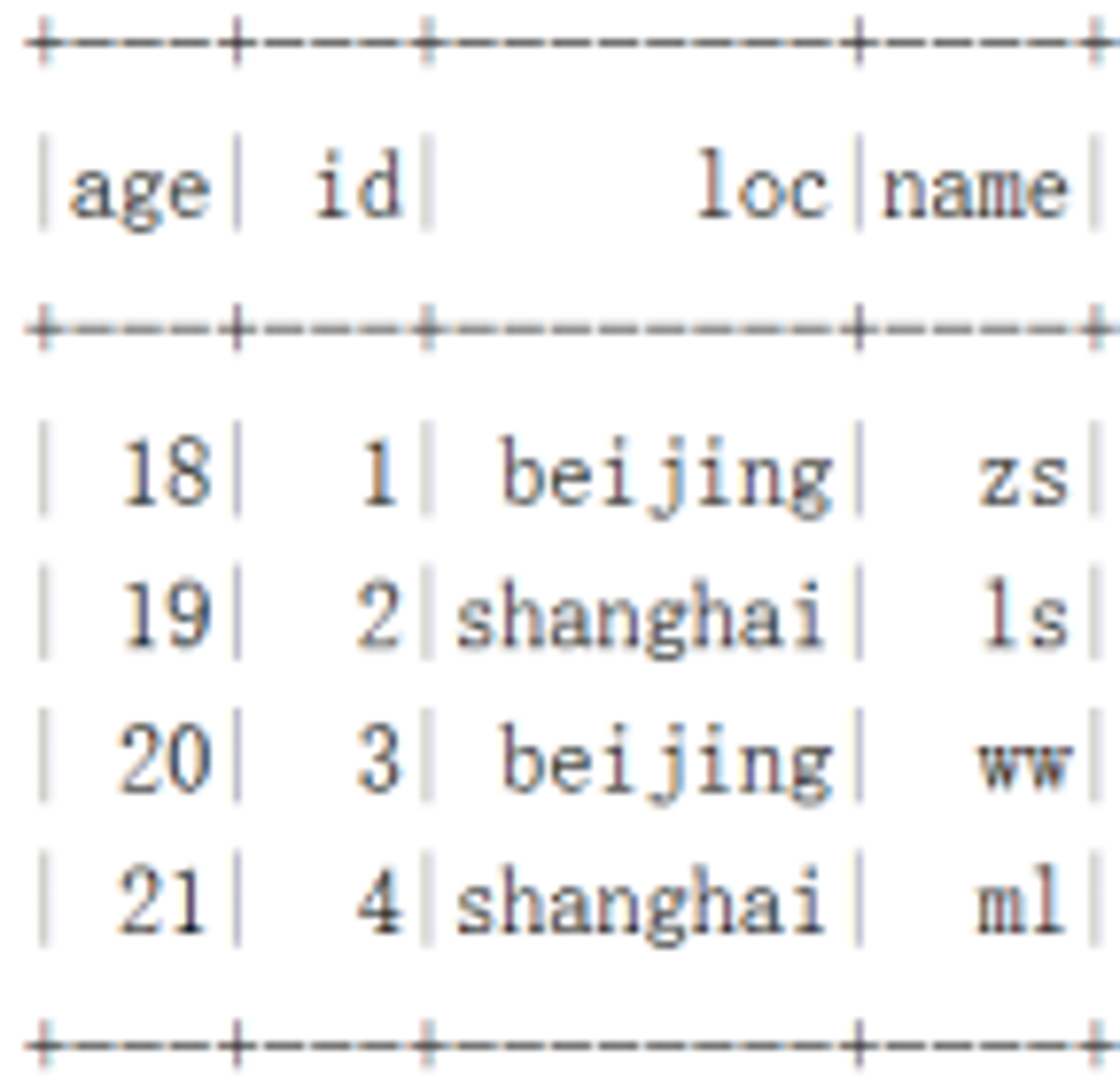
Iceberg surface df_tbl1 give the result as follows :
Iceberg surface df_tbl1 Store as follows :

// Create a partition table df_tbl2, And write the data to Iceberg surface , among DF The column in is Iceberg Column in table
df.sortWithinPartitions($"loc")// Write to partition table , Must be sorted by partition column
  .writeTo("hadoop_prod.default.df_tbl2")
  .partitionedBy($"loc")// Here, you can specify multiple columns as joint partitions
  .create()
// Query partition table  hadoop_prod.default.df_tbl2  Data in , And check the data storage structure
spark.read.table("hadoop_prod.default.df_tbl2").show()
Iceberg Partition table df_tbl2 give the result as follows :

Iceberg Partition table df_tbl2 Store as follows :

边栏推荐
- No coding is required, and the "asynchronous request reply" mode is automatically implemented
- 微信小程序实现折线面积图-玫瑰图-立体柱状图
- [diary of supplementary questions] [2022 Niuke summer school 1] d-mocha and railgun
- ggplot2显示png
- Wechat applet setting background image does not display problem solution
- Unity TimeLine使用教程
- NetApp FAS系列一个CIFS bug引起的控制器重启案例分享
- 22 -- range and of binary search tree
- 分享一个基于Abp 和Yarp 开发的API网关项目
- 【补题日记】[2022牛客暑期多校1]I-Chiitoitsu
猜你喜欢

Share an API Gateway project based on ABP and yarp

Combined with actual combat, analyze gb/t 28181 (II) -- equipment directory synchronization
![[knowledge atlas] practice -- Practice of question and answer system based on medical knowledge atlas (Part2): Atlas data preparation and import](/img/4b/c24ac8a11d15285a49d7b3b9bde4e3.png)
[knowledge atlas] practice -- Practice of question and answer system based on medical knowledge atlas (Part2): Atlas data preparation and import

因果学习开源项目:从预测到决策!

餐饮连锁门店重塑增长背后的数字化转型

Codeworks 5 questions per day (average 1500) - day 23

网络协议详解 :UDP

wallys/WiFi6 MiniPCIe Module 2T2R2 × 2.4GHz 2x5GHz MT7915 MT7975

Use of component El scrollbar

C language actual combat guessing game
随机推荐
Implementation of POP3 client code
Today's code farmer girl learned about the express framework under node
[untitled]
【补题日记】[2022牛客暑期多校2]K-Link with Bracket Sequence I
“我们为什么要做 iVX ? ” ——访 iVX CEO 孟智平 了解 iVX 企业文化
[diary of supplementary questions] [2022 Niuke summer multi school 2] k-link with bracket sequence I
Use the hiflow scene connector to view the epidemic situation in the region every day
Use of component El scrollbar
微信小程序實現折線面積圖-玫瑰圖-立體柱狀圖
7 issues to consider before website construction
BPG notes (III)
UIE: 信息抽取的大一统模型
输入cnpm -v出现cnpm : 无法加载文件 C:\Users\19457\AppData\Roaming\npm\cnpm.ps1,因为在此系统上禁止运行脚本。
How to judge null for different types of fields, sets, lists / sets / maps, and objects
wallys/WiFi6 MiniPCIe Module 2T2R2 × 2.4GHz 2x5GHz MT7915 MT7975
Network protocol details: UDP
Ggplot2 displays png
Resumption: a deck of cards (54), three people fighting the landlord, what is the probability that the big and small kings are in the same family
Network protocol details: TCP part1
Reading notes: self cultivation of programmers - Chapter 3