当前位置:网站首页>Differences between modems and routers (powercert animated videos)
Differences between modems and routers (powercert animated videos)
2022-06-25 20:58:00 【Leap soil and tea】
Modem vs Router
This article is derived from the subtitles of the following video links :
The difference between modem and router
modems ( Be commonly called “ cat ”)
If you want to use the Internet at home or in your business , You must have a modem , Modems can bring the Internet to homes or businesses , The modem establishes and maintains a dedicated link with your Internet service provider , To enable you to access the Internet .
Why modems must be used : Two different types of signals are used on computers and the Internet :
- The computer can only read digital signals
- The signals on the Internet are analog signals

When analog signals come in from the Internet , The modem demodulates the input analog signal into a digital signal , So that the computer can understand

The modem also modulates the output digital signal from the computer into an analog signal , Because they're going to go out to the Internet

- ” modems “ Short for modulator and demodulator , This is what modems do , It modulates the outgoing data from the computer , Demodulate incoming data from the Internet
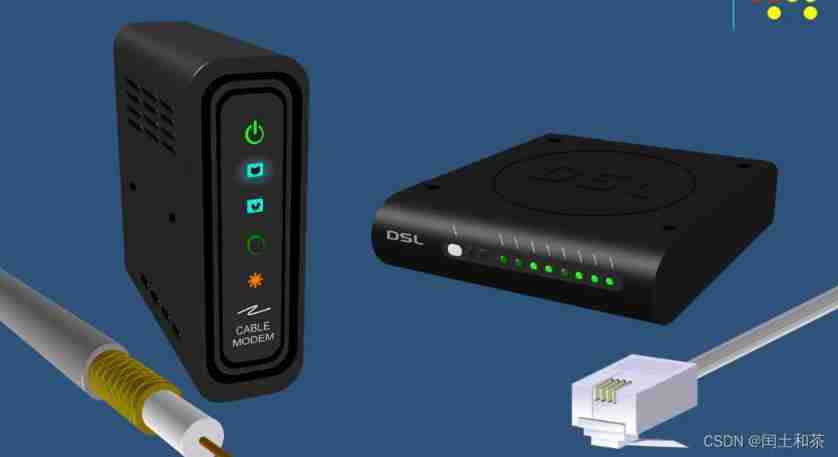
There are different types of modems , The two most commonly used are Cable modem and DSL modems , Depending on the type of Internet you want to use , You need to use the correct type of modem .
- Cable modems use coaxial cables to connect to the home
- DSL The modem uses a typical telephone line connection
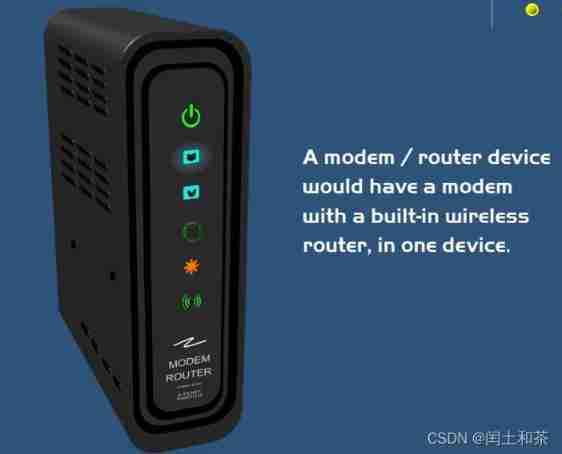
A modem / The router device should have a modem with a built-in router , In a device . That is, a wireless router is integrated into the modem
Router
There are different types of routers , There are larger routers for enterprises and large organizations , There are also smaller routers for homes and small businesses , But their functions are the same

Small office / Home office router
A router is a network interconnection device that routes or transmits Internet connections to all devices in a home or enterprise , It directs the Internet to the computer 、 Tablet, etc , So these devices can access the Internet . A typical small office / Home office routers are like this , There is a built-in multi port switch , You can connect multiple devices with Ethernet cables , And it can also act as a wireless access point , For wireless devices ( Like tablets and laptops ) Visit the Internet .

Technically speaking , You don't need a router . If you only want one device to access the Internet , Just plug the device's network cable directly into the modem , You can access the Internet . However , Like most families and businesses , You will have multiple devices that need access to the Internet , This requires the use of routers .

This example demonstrates how many different networks are connected to the Internet .
- The network on the left uses a cable modem and a small office / Home office router , All computers and tablets in the network can access the Internet .
- There is another network at the bottom , This network uses a DSL modems , It also uses a small office / Home office router , So all the computers in this network 、 Both laptops and tablets can access the Internet .
- The network on the right is an enterprise network , It uses a cable modem , An enterprise router is also used , So we can connect the computers and servers in it .
- Last , There is also a network at the top , Only one device in the network needs to access the Internet , So it doesn't need a router , Just connect this device directly to the modem , Because only one device needs access to the Internet .

- Most routers have a switch inside , therefore , If you already have a router with a built-in switch , You no longer need a separate switch .
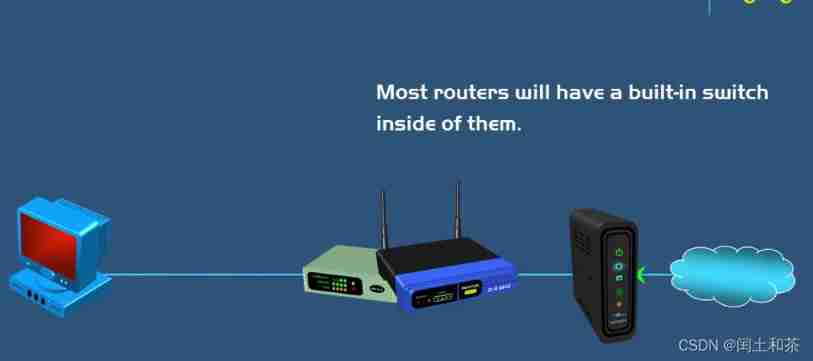
- for instance , A router like this integrates a four port switch , So you can use four Ethernet cables to connect to your wired devices , Only in one case do you need to add a switch to the network , That is, you have more devices that need wired connections , So you just connect the switch to the router , Then connect more wired devices to the switch .

To make things clearer , This is the Internet interconnected by routers , When the Internet is routed to this private network , Get to the modem first , Then from the modem to the router integrated with the switch , Finally reach all the computers .

边栏推荐
- Installing mysql8 under centos8
- Jmeter+grafana+influxdb build visual performance test monitoring platform (full)
- Share several Threat Intelligence platforms
- How to close gracefully after using jedis
- Mysqldumpslow out slow statements in the database
- A simple file searcher
- "Space guard soldier" based on propeller -- geosynchronous geostationary orbit space target detection system
- Leetcode daily [2022 - 02 - 17]
- Why doesn't anyone read your hard-working blog? Do you really understand the skills of framing, typesetting and drawing?
- Day 28/100 CI CD basic introductory concepts
猜你喜欢
Jingxi Pinpin wechat applet -signstr parameter encryption
Chrome plugin installation
Boomfilter learning

A simple file searcher
8 minutes to understand the wal mechanism of tdengine

Jmeter+grafana+influxdb build visual performance test monitoring platform (full)

Splunk series: Splunk data import (II)

Decryption of APP parameters of a cross-border export e-commerce - dunhuang.com

Soft test intermediate simple notes
Tencent music knowledge map search practice


随机推荐
Baidu AI Financing Innovation workshop enrollment!
Installing and configuring redis under Linux
银河证券靠谱吗?开证券账户安全吗?
Leetcode daily [2022 - 02 - 17]
2022 oceanbase technical essay contest officially opened | come and release your force
Ensure the decentralization and availability of Oracle network
What is API
lombok
Barrier of cursor application scenario
ZK implementation of distributed global counter for cursor application scenario analysis
Docker failed to remotely access 3306 after installing MySQL
Reasons for network timeout app flash back
What is machine learning? (Fundamentals)
[opencv] opencv from introduction to mastery -- detailed explanation of input and output XML and yaml files
Lesson 3 urllib
Log4j2 vulnerability detection tool list
Redis core principle and design idea
Nine built-in objects of JSP and four scopes of Servlet
Live broadcast preview | front line experts invite you to talk: the value of data science enabling multiple application scenarios
Basic process of configuring utf8 in idea