当前位置:网站首页>Beego development blog system learning (II)
Beego development blog system learning (II)
2022-06-30 12:03:00 【Lingmu lsj:fly】
1 Article writing function development
1) Database design
util add to article Table operations :
// Create an article table
func CreateTableWithArticle(){
	sql:=`create table if not exists article(
		id int(4) primary key auto_increment not null,
		title varchar(30),
		author varchar(20),
		tags varchar(30),
		short varchar(255),
		content longtext,
		createtime int(10)
		);`
	ModifyDB(sql)
}
2)model layer

3) Control layer

4) The routing layer
beego.Router("/article/add", &controllers.AddArticleController{})
5) View layer

6)js
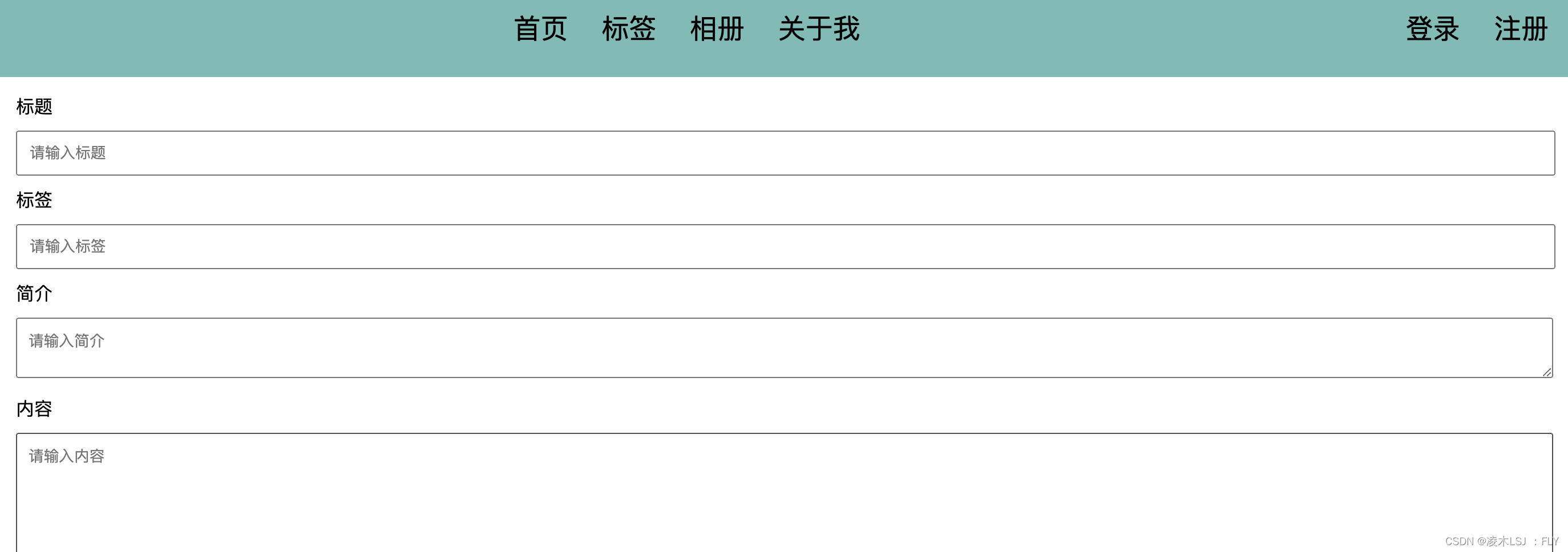
 Take a look at the preliminary results :
2 Article display
2.1 Home page display
1)home_controller.go file , stay Get() In the method , Check all the articles first , And display it on the page .
func (this *HomeController) Get() {
	page, _ := this.GetInt("page")
	if page <= 0 {
		page = 1
	}
	var artList []models.Article
	artList, _ = models.FindArticleWithPage(page)
	this.Data["PageCode"] = 1
	this.Data["HasFooter"] = true
	fmt.Println("IsLogin:", this.IsLogin, this.Loginuser)
	this.Data["Content"] = models.MakeHomeBlocks(artList, this.IsLogin)
	this.TplName = "home.html"
}
2)article_model.go In file , Add the query of the article
// Query the article according to the page number
func FindArticleWithPage(page int) ([]Article, error) {
	// Get the number of articles per page from the configuration file
	num, _ := beego.AppConfig.Int("articleListPageNum")
	page--
	fmt.Println("---------->page", page)
	return QueryArticleWithPage(page, num)
}

/**
 Paging query database
limit Paging query statement ,
	 grammar :limit m,n

	m Represents how many digits to start with , And id Value independent
	n Represents how many pieces of data are obtained

 Be careful limit What's ahead where
 */
func QueryArticleWithPage(page, num int) ([]Article, error) {
	sql := fmt.Sprintf("limit %d,%d", page*num, num)
	return QueryArticlesWithCon(sql)
}

func QueryArticlesWithCon(sql string) ([]Article, error) {
	sql = "select id,title,tags,short,content,author,createtime from article " + sql
	rows, err := utils.QueryDB(sql)
	if err != nil {
		return nil, err
	}
	var artList []Article
	for rows.Next() {
		id := 0
		title := ""
		tags := ""
		short := ""
		content := ""
		author := ""
		var createtime int64
		createtime = 0
		rows.Scan(&id, &title, &tags, &short, &content, &author, &createtime)
		art := Article{id, title, tags, short, content, author, createtime}
		artList = append(artList, art)
	}
	return artList, nil
}
3) establish home_module.go Show the articles on the home page

//---------- Home page display content ---------
func MakeHomeBlocks(articles []Article, isLogin bool) template.HTML {
	htmlHome := ""
	for _, art := range articles {
		// Will database model Required to convert to the homepage template model
		homeParam := HomeBlockParam{}
		homeParam.Id = art.Id
		homeParam.Title = art.Title
		homeParam.Tags = createTagsLinks(art.Tags)
		fmt.Println("tag-->", art.Tags)
		homeParam.Short = art.Short
		homeParam.Content = art.Content
		homeParam.Author = art.Author
		var timeLayoutStr = "2006-01-02 15:04:05"
		homeParam.CreateTime = time.Unix(art.Createtime,0).Format(timeLayoutStr)
		homeParam.Link = "/article/" + strconv.Itoa(art.Id)
		homeParam.UpdateLink = "/article/update?id=" + strconv.Itoa(art.Id)
		homeParam.DeleteLink = "/article/delete?id=" + strconv.Itoa(art.Id)
		homeParam.IsLogin = isLogin

		// Handling variables
		//ParseFile Parse the file , Used to insert variables
		t, _ := template.ParseFiles("views/block/home_block.html")
		buffer := bytes.Buffer{}
		// Will be html Replace the two in the file with the data inserted
		t.Execute(&buffer, homeParam)
		htmlHome += buffer.String()
	}
	return template.HTML(htmlHome)
}

// take tags String into the data structure required by the home page template
func createTagsLinks(tags string) []TagLink {
	var tagLink [] TagLink
	tagsPamar := strings.Split(tags, "&")
	for _, tag := range tagsPamar {
		tagLink = append(tagLink, TagLink{tag, "/?tag=" + tag})
	}
	return tagLink
}
4) View layer
stay model Of MakeHomeBlocks() In the method , You need to fill in and format with templates html The page content , So we are views/block Next, create another html page :home_block.html


5) Effect display 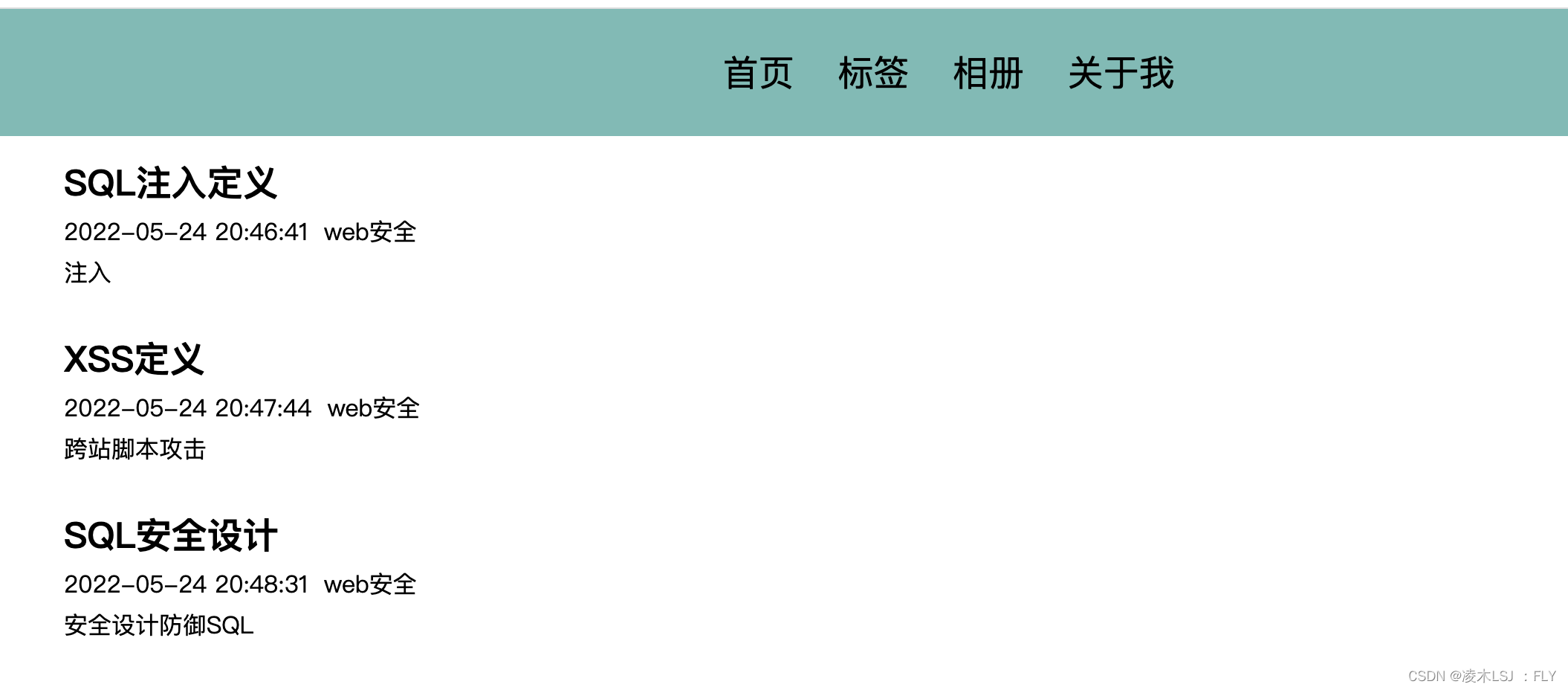
2.2 Paging display
1)home_module Design
Paging structure object
type HomeFooterPageCode struct {
	HasPre bool
	HasNext bool
	ShowPage string
	PreLink string
	NextLink string
}
//----------- Page turning -----------
//page Is the current number of pages
func ConfigHomeFooterPageCode(page int) HomeFooterPageCode {
pageCode := HomeFooterPageCode{}
// Find the total number of entries
num := GetArticleRowsNum()
// Read the number of entries displayed per page from the configuration file
pageRow, _ := beego.AppConfig.Int("articleListPageNum")
// Calculate the total number of pages
allPageNum := (num-1)/pageRow + 1
pageCode.ShowPage = fmt.Sprintf("%d/%d", page, allPageNum)
// The current number of pages is less than or equal to 1, Then the button on the previous page cannot be clicked
if page <= 1 {
pageCode.HasPre = false
} else {
pageCode.HasPre = true
}
// The current number of pages is greater than or equal to the total number of pages , Then the button on the next page cannot be clicked
if page >= allPageNum {
pageCode.HasNext = false
} else {
pageCode.HasNext = true
}
pageCode.PreLink = "/?page=" + strconv.Itoa(page-1)
pageCode.NextLink = "/?page=" + strconv.Itoa(page+1)
return pageCode
}2)article_model.go In file , Add the method of querying the total amount of data

There is also a question to consider , When adding or deleting articles , The total amount of data will change , So we need to modify the method of adding articles

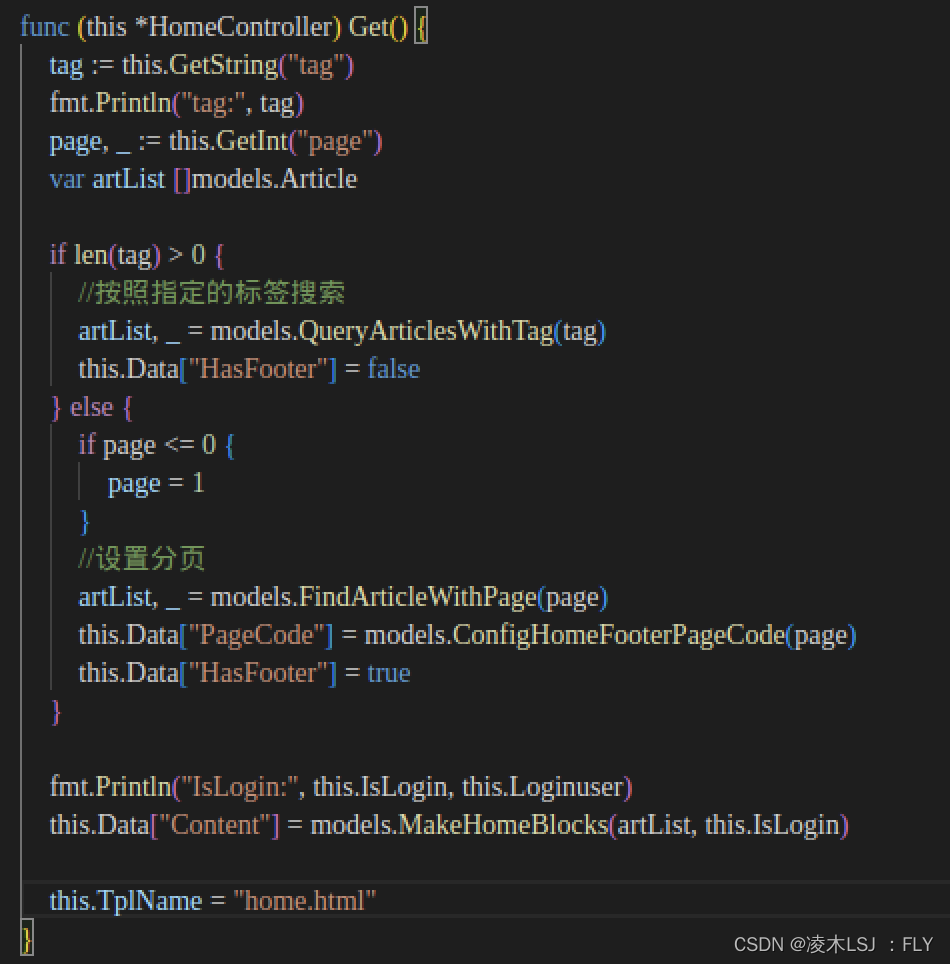
3)home_controller.go
4)home.html

5) effect
 2.3 Show article details
1) Route add

2)show_article_controller.go

3)article_model.go In file , Add method , according to id Search article
//---------- Search article -------------
func QueryArticleWithId(id int) Article {
	row := utils.QueryRowDB("select id,title,tags,short,content,author,createtime from article where id=" + strconv.Itoa(id))
	title := ""
	tags := ""
	short := ""
	content := ""
	author := ""
	var createtime int64
	createtime = 0
	row.Scan(&id, &title, &tags, &short, &content, &author, &createtime)
	art := Article{id, title, tags, short, content, author, createtime}
	return art
}
4) stay views Under the table of contents , newly build html pagefile ,show_article.html

2.4 Revise article
1)update_rticle_control.go
/**
 *  Update the controller of the article
 */
type UpdateArticleController struct {
	BaseController
}

// When accessing /update The path is triggered back Get() Method , The response page is through TplName This property specifies the page returned to the client
func (this *UpdateArticleController) Get() {
	id, _ := this.GetInt("id")
	fmt.Println(id)

	// obtain id Corresponding article information
	art := models.QueryArticleWithId(id)

	this.Data["Title"] = art.Title
	this.Data["Tags"] = art.Tags
	this.Data["Short"] = art.Short
	this.Data["Content"] = art.Content
	this.Data["Id"] = art.Id

	this.TplName = "write_article.html"
}

// Revise article
func (this *UpdateArticleController) Post() {
	id, _ := this.GetInt("id")
	fmt.Println("postid:", id)

	// Get the data transmitted by the browser , Through the form name Property gets value
	title := this.GetString("title")
	tags := this.GetString("tags")
	short := this.GetString("short")
	content := this.GetString("content")

	// Instantiation model, modify the database
	art := models.Article{id, title, tags, short, content, "", 0}
	_, err := models.UpdateArticle(art)

	// Return the data to the browser
	if err == nil {
		this.Data["json"] = map[string]interface{}{"code": 1, "message": " The update is successful "}
	} else {
		this.Data["json"] = map[string]interface{}{"code": 0, "message": " Update failed "}
	}

	this.ServeJSON()
}
2)write_article.html
<div id="main">
    <form id="write-art-form" method="post">
        <div> title </div>
        <input type="text" placeholder=" Please enter a title " name="title" value="{
   {.Title}}">
        <div> label </div>
        <input type="text" placeholder=" Please enter the label " name="tags" value="{
   {.Tags}}">
        <div> brief introduction </div>
        <textarea placeholder=" Please enter the profile " name="short">{
   {.Short}}</textarea>
        <div> Content </div>
        <textarea id="content" placeholder=" Please enter the content " name="content">{
   {.Content}}</textarea>
        <input id="write-article-id" hidden name="id" value="{
   {.Id}}">
        <button type="button" onclick="history.back()"> return </button>
        <button type="submit" id="write-art-submit"> Submit </button>
    </form>
</div>
Modify or add , Actually, it depends on the page id Value , If you are adding, use the default value 0, If it is modified, it is the real value queried from the database , So it needs to be modified js Script files :

3)model Layer add modify article database operation
//---------- Modifying data ----------
func UpdateArticle(article Article) (int64, error) {
	// Database operation
	return utils.ModifyDB("update article set title=?,tags=?,short=?,content=? where id=?",
		article.Title, article.Tags, article.Short, article.Content, article.Id)
}
3 Label development
1) stay article_model.go Query all tags existing in the database in the file

2) establish tags_model.go

3) establish tags_controller.go

4) Routing settings
beego.Router("/tags", &controllers.TagsController{})
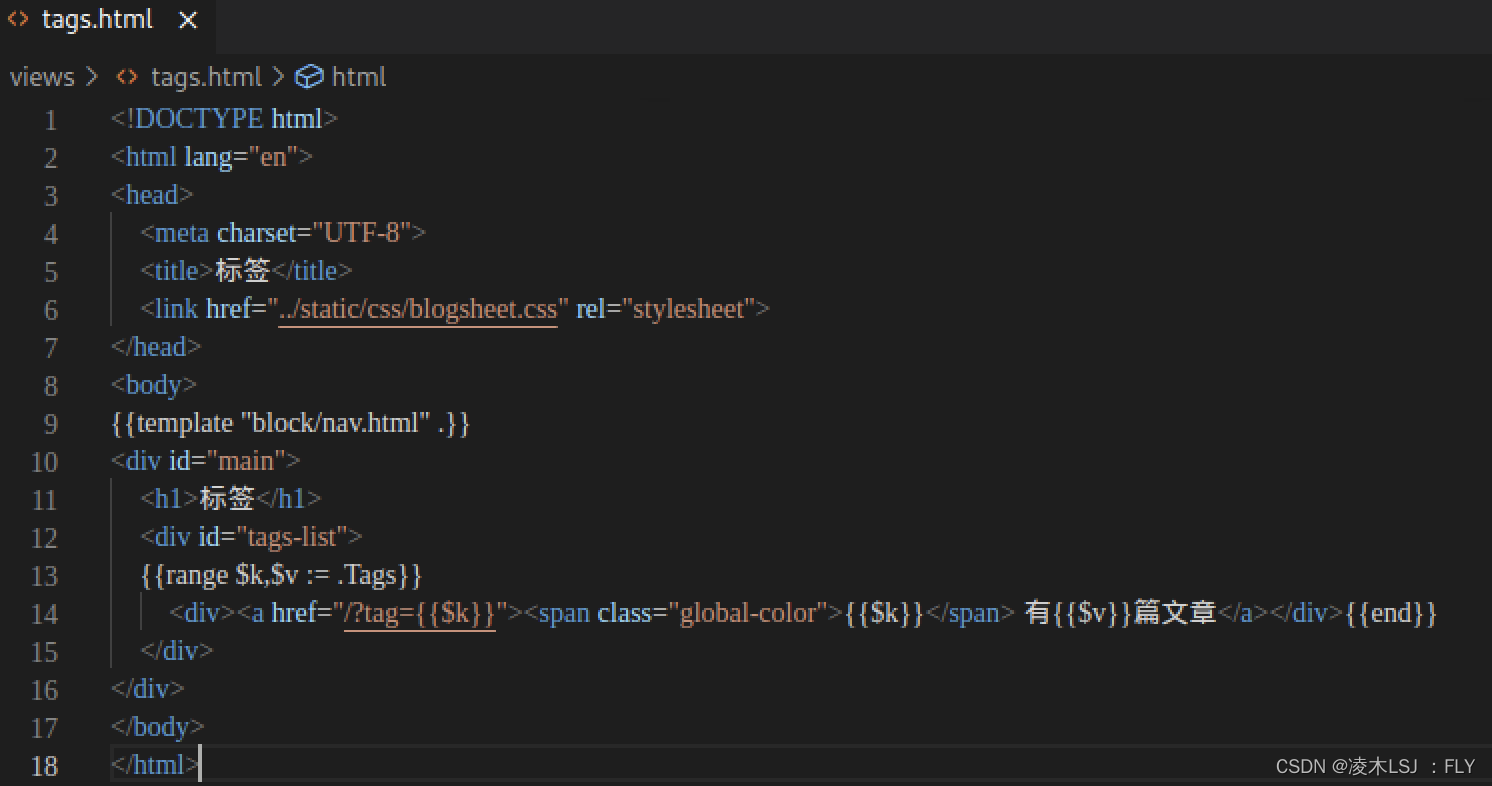
5) View layer add tags.html
 6)tags Effect display

边栏推荐
- Pointdistiller: structured knowledge distillation for efficient and compact 3D detection
- Evaluation of IP location query interface Ⅲ
- 串行通信接口8250
- TypeScript ReadonlyArray(只读数组类型) 详细介绍
- 再不上市,旷视科技就熬不住了
- If it is not listed again, Kuangshi technology will not be able to endure
- Lucene full text search toolkit learning notes summary
- R language ggplot2 visualization: use ggplot2 to visualize the scatter diagram and use scale_ The size function configures the measurement adjustment range of the size of the data point
- led背光板的作用是什麼呢?
- 这些电影中的科幻构想,已经用AI实现了
猜你喜欢

A Generic Deep-Learning-Based Approach for Automated Surface Inspection-论文阅读笔记

STM32F407ZGT6使用SDIO方式驱动SD卡

Boost研究:Boost Log

限时预约|6 月 Apache Pulsar 中文开发者与用户组会议

It is said that with this, the boss opened the test overnight

【模式识别大作业】

HMS core audio editing service 3D audio technology helps create an immersive auditory feast

If it is not listed again, Kuangshi technology will not be able to endure

nvm安装node后,在使用npm指令时候显示不是内部或外部指令

Analysis of KOA - onion model
随机推荐
Using cookie technology to realize historical browsing records and control the number of displays
他是上海两大产业的第一功臣,却在遗憾中默默离世
“\“id\“ contains an invalid value“
麒麟软件韩乃平:数字中国建设需要自己的开源根社区
go-zero微服务实战系列(八、如何处理每秒上万次的下单请求)
又被 Kotlin 语法糖坑惨的一天
并行接口8255A
一个悄然崛起的国产软件,低调又强大!
Boost研究:Boost Log
聊聊怎么做硬件兼容性检测,快速迁移到openEuler?
wallys/3×3 MIMO 802.11ac Mini PCIe Wi-Fi Module, QCA9880, 2,4GHz / 5GHzDesigned for Enterprise
光谱共焦位移传感器的原理是什么?能应用那些领域?
Multiparty cardinality testing for threshold private set-2021: Interpretation
Set up your own website (13)
R语言ggplot2可视化:使用ggplot2可视化散点图、在geom_point参数中设置alpha参数指定数据点的透明度级别(points transparent、从0到1)
Pointdistiller: structured knowledge distillation for efficient and compact 3D detection
Flutter 从零开始 005 图片及Icon
[cf] 803 div2 B. Rising Sand
自定义一个注解来获取数据库的链接
对象映射 - Mapping.Mapster