当前位置:网站首页>Double machine hot standby of firewall on ENSP
Double machine hot standby of firewall on ENSP
2022-06-22 09:33:00 【A clever lamb】
Build a network topology 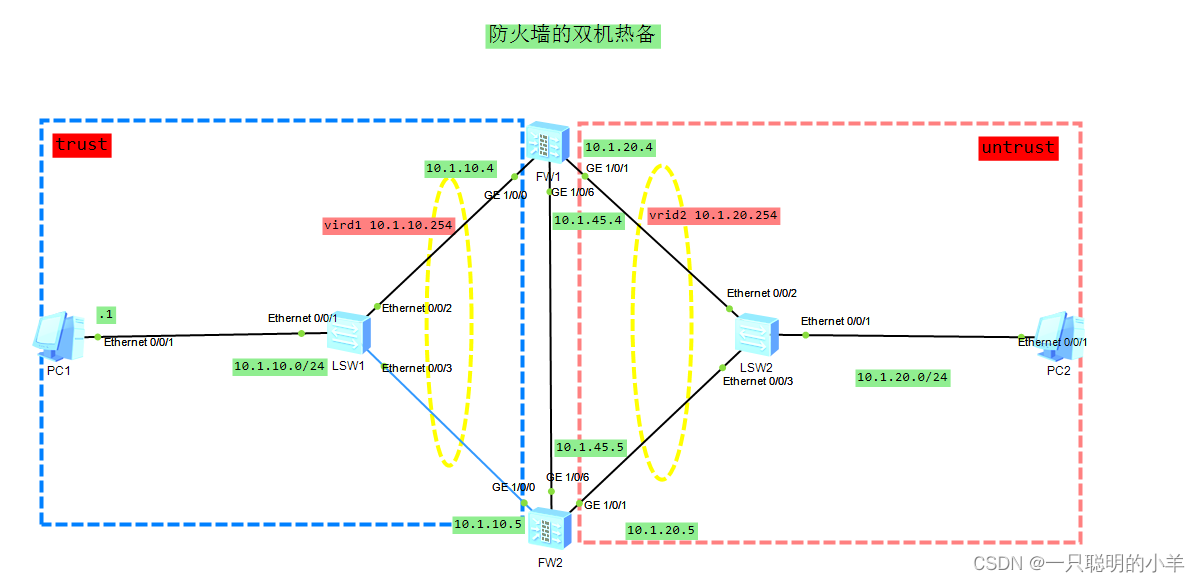
Configure the server and client IP Address


Main firewall
<USG6000V1>
<USG6000V1>u t  m   // Turn off message push
<USG6000V1>system-view 	// Enter the system view
[USG6000V1]sysname FW4    // Change the name to FW4
[FW4]
// Add interface IP Address
[FW4]int g1/0/0  // Access interface
[FW4-GigabitEthernet1/0/0]ip add 10.1.10.4 24   // add to IP Address
[FW4-GigabitEthernet1/0/0]q    // sign out
[FW4]int g1/0/1
[FW4-GigabitEthernet1/0/1]ip add 10.1.20.4 24
[FW4-GigabitEthernet1/0/1]q
[FW4]int g1/0/6
[FW4-GigabitEthernet1/0/6]ip add 10.1.45.4 24
[FW4-GigabitEthernet1/0/6]q
[FW4]
// Add the interface address to the corresponding security zone
[FW4]firewall zone trust       // Get into trust Area
[FW4-zone-trust]add int g1/0/0  // Add the interface to the security zone
[FW4-zone-trust]q
[FW4]
[FW4]firewall zone untrust
[FW4-zone-untrust]add int g1/0/1
[FW4-zone-untrust]q
[FW4]
[FW4]firewall zone name hrp_zone    // Create a name hrp_zone Safety zone of
[FW4-zone-hrp_zone]set priority 20   // Set the security level to 20
[FW4-zone-hrp_zone]add int g1/0/6   // Add the interface to the security zone
[FW4-zone-hrp_zone]q
[FW4]
// Access interface , To configure vrrp
[FW4]
[FW4]int g1/0/0   // Access interface
[FW4-GigabitEthernet1/0/0]vrrp vrid 1 virtual-ip 10.1.10.254 active
                                                                             // To configure vrrp, The name is vrid1, fictitious IP by 10.1.10.254, The role of active
[FW4-GigabitEthernet1/0/0]q
[FW4]int g1/0/1
[FW4-GigabitEthernet1/0/1]
[FW4-GigabitEthernet1/0/1]vrrp vrid 2 virtual-ip 10.1.20.254 active
                                                                             // To configure vrrp, The name is vrid2, fictitious IP by 10.1.20.254, The role of active
[FW4-GigabitEthernet1/0/1]q
[FW4]

Backup firewall
<USG6000V1>u t m
<USG6000V1>system-view
[USG6000V1]sysname FW5
[FW5]
[FW5]int g1/0/0
[FW5-GigabitEthernet1/0/0]ip add 10.1.10.5 24
[FW5-GigabitEthernet1/0/0]q
[FW5]int g1/0/1
[FW5-GigabitEthernet1/0/1]ip add 10.1.20.5 24
[FW5-GigabitEthernet1/0/1]q
[FW5]int g1/0/6
[FW5-GigabitEthernet1/0/6]ip add 10.1.45.5 24
[FW5-GigabitEthernet1/0/6]q
[FW5]firewall zone trust
[FW5-zone-trust]add int g1/0/0
[FW5-zone-trust]q
[FW5]firewall zone untrust
[FW5-zone-untrust]add int g1/0/1
[FW5-zone-untrust]q
[FW5]firewall zone name hrp_zone
[FW5-zone-hrp_zone]set priority 20
[FW5-zone-hrp_zone]add int g1/0/6
[FW5-zone-hrp_zone]q
[FW5]
[FW5]
[FW5]int g1/0/0
[FW5-GigabitEthernet1/0/0]vrrp vrid 1 virtual-ip 10.1.10.254 standby
[FW5-GigabitEthernet1/0/0]q
[FW5]int g1/0/1
[FW5-GigabitEthernet1/0/1]vrrp vrid 2 virtual-ip 10.1.20.254 standby
[FW5-GigabitEthernet1/0/1]q
[FW5]

Configure heartbeat line
[FW4]hrp int g1/0/6 remote 10.1.45.5
[FW4]hrp enable
HRP_S[FW4]
HRP_S[FW4]

[FW5]hrp int g1/0/6 remote 10.1.45.4
[FW5]hrp enable
HRP_S[FW5]
HRP_S[FW5]

take FW5 After setting the backup firewall ,FW4 Will become the main firewall 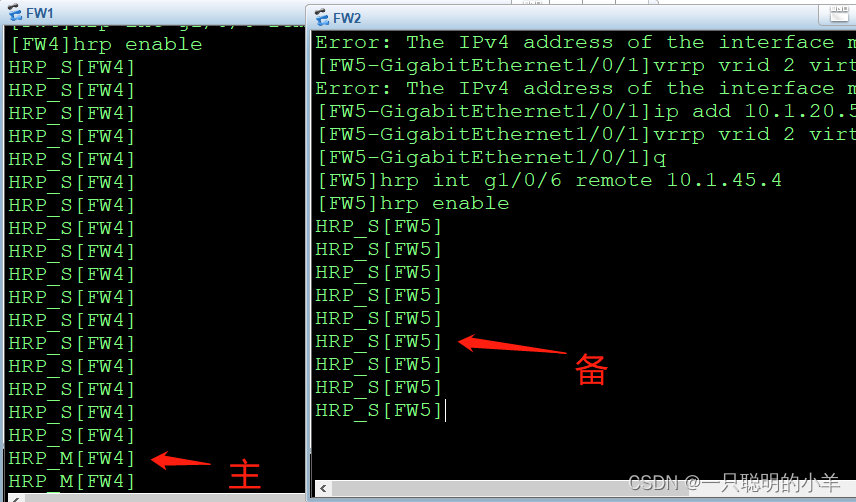
see vrrp
HRP_M[FW4]
HRP_M[FW4]dis vrrp brief

HRP_S[FW5]
HRP_S[FW5]dis vrrp brief

Configure security policy
Configure on the main firewall , The backup firewall will back up automatically
Configure on the main firewall
HRP_M[FW4]security-policy (+B)
HRP_M[FW4-policy-security]rule name 123 (+B)
HRP_M[FW4-policy-security-rule-123]source-zone trust (+B)
HRP_M[FW4-policy-security-rule-123]destination-zone untrust (+B)
HRP_M[FW4-policy-security-rule-123]action permit (+B)
HRP_M[FW4-policy-security-rule-123]dis this
#
 rule name 123
  source-zone trust
  destination-zone untrust
  action permit
#
return
HRP_M[FW4-policy-security-rule-123]q
HRP_M[FW4-policy-security]q

View on the standby firewall
HRP_S[FW5]dis security-policy all

The verification results
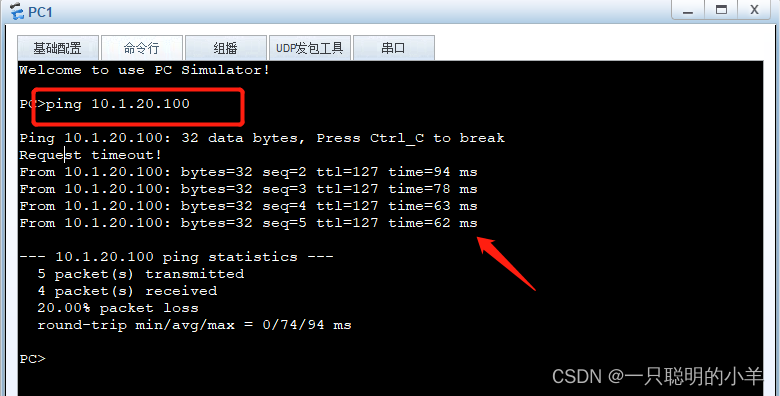
close FW4 Of g1/0/1 After the interface , The primary firewall becomes the standby firewall , The standby firewall becomes the primary firewall .

边栏推荐
- C语言刷题 | 判断某年是否只闰年(12)
- There are three ways to traverse the map. Second, you know
- Originality: dozens of lines of pure PHP code decrypt goto encrypted PHP single file [for learning only]
- C语言刷题 | 用%f控制符输出6位小数(17)
- 一个老开源人的自述-如何干好开源这件事
- 求余弦的大小
- OpenCV每日函数 直方图相关(3)
- list_head
- [node] please accept the crawler. We won't worry about the data any more
- rewrite? Reload? Are you dizzy?
猜你喜欢
5道面试题,拿捏String底层原理!

性能优化专题

论文笔记:DETR: End-to-End Object Detection with Transformers (from 李沐老师and朱老师)

Win+sublime Text3 + go 1.9.2 environment setup diagram

实现AD环境下多用户隔离FTP
景联文科技:机器学习AI数据集产品汇总(三)

OpenCV每日函数 直方图相关(3)
机器学习|nltk_Data下载错误|nltk的stopwords语料下载错误解决方法
![[uni app] actual combat summary (including multi terminal packaging)](/img/35/6b0672311b033bc89f1518dd794777.png)
[uni app] actual combat summary (including multi terminal packaging)
[Architect (Part 39)] connecting MySQL database developed by server
![[Architect (Part 39)] connecting MySQL database developed by server](/img/5f/7e046fb4bd589729ad7fc1abb42254)
随机推荐
Langchao state-owned assets cloud: state-owned assets as a guide to help state-owned enterprises use data to enrich their wisdom in the cloud
架设多个web站点
机器学习|nltk_Data下载错误|nltk的stopwords语料下载错误解决方法
性能优化专题
[Architect (Part 39)] connecting MySQL database developed by server
Byte/byte?别搞晕了!
Summary and future prospect of transfer learning | community essay solicitation
copy_ from_ User and copy_ to_ user
Let you get started [uni app]
在ensp上做防火墙的双机热备
重写?重载?你晕了吗?
IS_ ERR()
Map三种遍历方式,秒懂,你懂
Feedforward and backpropagation
为啥要使用梯度下降法
==Classic interview questions
. A use of file link library
Recruitment order | data visualization development platform "flyfish" super experience Officer Recruitment
Performance optimization topics
Find the size of cosine