当前位置:网站首页>Vite 配置 Eslint 规范代码
Vite 配置 Eslint 规范代码
2022-07-26 19:18:00 【前端小小白zyw】
在经历过比较大型的项目协同开发后,代码规范成为了团队协同开发的棘手问题。今天,准备从头整理一份从编辑器 -> 代码编写过程中的规范总结。
一、代码风格统一
这里推荐使用 EditorConfig 配置,来规范不同的编辑器,不同的编辑器配置,所造成的代码风格不一致问题。
项目根目录创建 .editorconfig 配置文件
# 表示是最顶层的 EditorConfig 配置文件
root = true

[*] # 表示所有文件适用
charset = utf-8 # 设置文件字符集为 utf-8
indent_style = space # 缩
indent_size = 2 # 缩进大小
end_of_line = lf # 控制换行类型(lf | cr | crlf)
trim_trailing_whitespace = true # 去除行首的任意空白字符
insert_final_newline = true # 始终在文件末尾插入一个新行

[*.py] # 表示仅 py文件适用以下规则
max_line_length = off
trim_trailing_whitespace = false
这里要注意,如果使用的 VSCode 需要下载插件 EditorConfig VS Code ,其他的编译器( WebStorm,IDEA ),直接上配置即可。
二、集成 Eslint 配置
安装
npm i eslint -D
yarn add eslint --dev初始化配置,这里根据当前的开发环境,框架以及项目的风格来决定配置项
npx eslint --init
(1):如何使用
Eslint,这里我们选择第三种:检查语法、发现问题并强制执行代码风格
(2):当前项目使用的模块化类型,我们这里选择
Javascript modules
(3):当前项目使用的框架,
Vue.js
(4):是否使用
Typescript,到这里我们搭建的环境还没有配置TS,暂时跳过
(5):运行的环境,这里我们选择浏览器

(6):选择代码风格指南,这里我们选择较为流行的
Airbnb
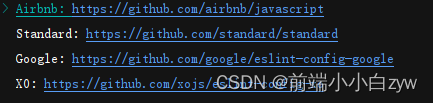
(7):最后选择
Javascript风格
(8):初始化结束,使用哪一种放视安装所需的插件,这里我们选择
yarn
(9):添加
Vite运行的时候自动检测eslint规范yarn add vite-plugin-eslint --D
import {
       defineConfig } from 'vite'
import vue from '@vitejs/plugin-vue'
import eslintPlugin from 'vite-plugin-eslint'

export default defineConfig({

	 plugins: [
	    vue(),
	    // 增加下面的配置项,这样在运行时就能检查 eslint 规范
	    eslintPlugin({

	      include: ['src/**/*.js', 'src/**/*.vue', 'src/*.js', 'src/*.vue']
	    })
	  ]
})
(10):配置
eslintrc.js文件安装
babel插件yarn add @babel/core @babel/eslint-parser --dev
配置
Eslint基本配置module.exports = { env: { browser: true, node: true }, extends: [ "eslint:recommended", // 使用推荐的eslint 'plugin:vue/vue3-recommended' // 使用插件支持vue3 ], parserOptions: { parser: '@babel/eslint-parser', sourceType: 'module', ecmaVersion: 12, allowImportExportEverywhere: true, // 不限制eslint对import使用位置 ecmaFeatures: { modules: true, legacyDecorators: true }, requireConfigFile: false // 解决报错:vue--Parsing error: No Babel config file detected for }, plugins: [ 'vue' ], rules: { ... } }配置
Eslint rules规则
这里可以根据团队规范去配置对应的规则,贴下我的一部分规则。更多配置可以去官网查阅:eslint rules 配置'semi': ['warn', 'never'], // 禁止尾部使用分号 'no-console': 'warn', // 禁止出现console 'no-debugger': 'warn', // 禁止出现debugger 'no-duplicate-case': 'warn', // 禁止出现重复case 'no-empty': 'warn', // 禁止出现空语句块 'no-extra-parens': 'warn', // 禁止不必要的括号 'no-func-assign': 'warn', // 禁止对Function声明重新赋值 'no-unreachable': 'warn', // 禁止出现[return|throw]之后的代码块 'no-else-return': 'warn', // 禁止if语句中return语句之后有else块 'no-empty-function': 'warn', // 禁止出现空的函数块 'no-lone-blocks': 'warn', // 禁用不必要的嵌套块 'no-multi-spaces': 'warn', // 禁止使用多个空格 'no-redeclare': 'warn', // 禁止多次声明同一变量 'no-return-assign': 'warn', // 禁止在return语句中使用赋值语句 'no-return-await': 'warn', // 禁用不必要的[return/await] 'no-self-compare': 'warn', // 禁止自身比较表达式 'no-useless-catch': 'warn', // 禁止不必要的catch子句 'no-useless-return': 'warn', // 禁止不必要的return语句 'no-mixed-spaces-and-tabs': 'warn', // 禁止空格和tab的混合缩进 'no-multiple-empty-lines': 'warn', // 禁止出现多行空行 'no-trailing-spaces': 'warn', // 禁止一行结束后面不要有空格 'no-useless-call': 'warn', // 禁止不必要的.call()和.apply() 'no-var': 'warn', // 禁止出现var用let和const代替 'no-delete-var': 'off', // 允许出现delete变量的使用 'no-shadow': 'off', // 允许变量声明与外层作用域的变量同名 ...
(11): 启动项目,测试效果
可以看到,完美生效

边栏推荐
- 2022/07/26 learning notes (day16) linked list and stack
- .NET GC工作流程
- Scope in JS
- [PHP] MySQL native PHP operation - Tianlong eight steps
- Training embedded representation of large categories using triple loss and twin neural networks
- 答应我,看完别再写狗屎代码了。。
- [shell] Reprint: batch replacement find awk sed xargs
- plsql包
- Kingbases SQL language reference manual of Jincang database (13. SQL statement: alter synonym to comment)
- C# 使用默认转型方法
猜你喜欢

KVM virtualization
DevOps 实践多年,最痛的居然是?

Use of load balancing
操作系统常见面试题目总结,含答案

Zhongtian steel uses tdengine in GPS and AIS scheduling
金融机构导图

2022年下半年(软考高级)信息系统项目管理师报名条件

企业内部信息碎片化该怎么办?不妨试试这样做

直播预约有奖| 高级咨询顾问徐雁斐:效能度量如何助力高效精细的外包管理

eadiness probe failed: calico/node is not ready: BIRD is not ready: Error querying BIRD: unable to c
随机推荐
Summary of iPhone development data persistence (final) - Comparison of five data persistence methods
Jincang database kingbasees SQL language reference manual (18. SQL statement: drop materialized view to drop synonym)
Linux 定时备份数据库并删除 N 天以前的数据
中天钢铁在 GPS、 AIS 调度中使用 TDengine
three.js 给地球加标签和弹窗
负载均衡的使用
go+mysql+redis+vue3简单聊室,第5弹:使用消息队列和定时任务同步消息到mysql
【OBS】Dropped Frames And General Connection Issues
Kingbasees SQL language reference manual of Jincang database (20. SQL statements: merge to values)
金仓数据库 KingbaseES SQL 语言参考手册 (13. SQL语句:ALTER SYNONYM 到 COMMENT)
猎聘问卷星,成为微信「寄生虫」
FastTunnel-开源内网穿透框架
tf.GraphKeys
N圆最密堆积、最小外接正方形的matlab求解(二维、三维等圆Packing 问题)
Codeforces Round #810 (Div. 2)(A~C)
【PHP】将 SESSION 数据保存到 Redis
金仓数据库 KingbaseES SQL 语言参考手册 (20. SQL语句: MERGE 到 VALUES)
What is a knowledge management system? You need to know this
DevSecOps,让速度和安全兼顾
Detailed explanation of Yolo V2