当前位置:网站首页>OBS keyboard plug-in custom DIY
OBS keyboard plug-in custom DIY
2022-07-28 02:21:00 【Tgmmmmmmmm】
Make your own OBS Keyboard plug in
List of articles
Reference documents :OBS plug-in unit input overlay Customize keyboard keys and interface - Bili, Bili (bilibili.com)
Currently, there are two schemes input overlay One is responsible for the keyboard , One is responsible for the mouse , It is expected that this mode will still be used .
One 、 keyboard input overlay Configuration learning
1.1 This time, refer to the final effect drawing of the plug-in


1.2 Material pictures


1.3 Material configuration
# Input Overlay config v.4
#
#  Number of all keys , This finished product 14*5+7=77 A button
0_key_count=77
#  Type of finished product ,1 It's the mouse ,2 It's the keyboard ,3 Is to control the (controller), Make sure this is before all details
#  In this finished product, the keyboard type
0_layout_type=2
#  Number of key lines , This finished product has 6 That's ok
0_key_rows=6
#  Number of cases , This finished product has 14 Column
0_key_cols=14
#  Global key size , The height of this finished product is 128, Width is also 128( Tentatively, it's pixels px)
0_key_abs_w=128
0_key_abs_h=128
# Space vertically and horizontally (Negative numbers for left/up offset)
0_key_space_v=5
0_key_space_h=5
#  How many keys are there in each line of the material
0_texture_w=13
#  Height between two lines , Usually twice the height of the button , If the button is pressed
0_texture_v_space=256
#  Press the key in turn to command , From left to right , From top to bottom
1_key_order=0x0001,0x003B,0x003C,0x003D,0x003E,0x003F,0x0040,0x0041,0x0042,0x0043,0x0044,0x0057,0x0058,0x0029,0x0002,0x0003,0x0004,0x0005,0x0006,0x0007,0x0008,0x0009,0x000A,0x000B,0x000C,0x000D,0x000E,0x000F,0x0010,0x0011,0x0012,0x0013,0x0014,0x0015,0x0016,0x0017,0x0018,0x0019,0x001A,0x001B,0x002B,0x003A,0x001E,0x001F,0x0020,0x0021,0x0022,0x0023,0x0024,0x0025,0x0026,0x0027,0x0028,0x001C,0x002A,0x002C,0x002D,0x002E,0x002F,0x0030,0x0031,0x0032,0x0033,0x0034,0x0035,0x0036,0x001D,0x0E5B,0x0038,0x0039,0x0E38,0x0E5C,0x0E1D,0xEE48,0xEE50,0xEE4B,0xEE4D
#  Wide and high pen  1 It means the same height ,2 Means width 2, Height 1, The cardinality is set previously 0_key_abs_w etc.
1_key_width=1,1,1,1,1,1,1,1,1,1,1,1,1,1,1,1,1,1,1,1,1,1,1,1,1,1,1,1,1,1,1,1,1,1,1,1,1,1,1,1,1,1,1,1,1,1,1,1,1,1,1,1,1,1,1,1,1,1,1,1,1,1,1,1,1,1,1,1,1,8,1,1,1,1,1,1,1
1_key_height=1,1,1,1,1,1,1,1,1,1,1,1,1,1,1,1,1,1,1,1,1,1,1,1,1,1,1,1,1,1,1,1,1,1,1,1,1,1,1,1,1,1,1,1,1,1,1,1,1,1,1,1,1,1,1,1,1,1,1,1,1,1,1,1,1,1,1,1,1,1,1,1,1,1,1,1
#  Offset based on pixel image , That is, the offset on the original material , Corresponding to each key of the finished product
1_key_row=0,0,0,0,0,0,0,0,0,0,0,0,0,1,1,1,1,1,1,1,1,1,1,1,1,1,0,2,2,2,2,2,2,2,2,2,2,2,2,2,1,3,3,3,3,3,3,3,3,3,3,3,3,2,4,4,4,4,4,4,4,4,4,4,4,3,5,5,5,5,5,5,5,3,4,4,4
1_key_col=0,1,2,3,4,5,6,7,8,9,10,11,12,0,1,2,3,4,5,6,7,8,9,10,11,12,13,0,1,2,3,4,5,6,7,8,9,10,11,12,13,0,1,2,3,4,5,6,7,8,9,10,11,13,0,1,2,3,4,5,6,7,8,9,10,13,0,1,2,3,11,12,13,12,12,11,13
Two 、 mouse input overlay Configuration learning
2.1 design sketch


2.2 Material pictures


2.3 Material configuration
# Input Overlay config v.4
#
#  Yes 8 Number of keys
0_key_count=8
# 1 It's the mouse
0_layout_type=1
#  Set the layout width and height
1_mouse_layout_w_h=285,420
#
# *_u_v:
#  Material location , Absolute pixels
# *_w_h:
#  Material width and height
# *_x_y:
#  Finished product layout
#
# lmb:  left-click
# rmb:  Right click
# mmb:  middle
# mwu:  On the roller
# mwd:  Under the wheel
# smb1:  Side button 1
# smb2:  Side button 2
1_mouse_lmb_u_v=1,1
1_mouse_lmb_w_h=139,174
1_mouse_lmb_x_y=2,0
#
1_mouse_rmb_u_v=143,1
1_mouse_rmb_w_h=139,174
1_mouse_rmb_x_y=145,0
#
1_mouse_mmb_u_v=285,1
1_mouse_mmb_w_h=48,95
1_mouse_mmb_x_y=119,78
#
1_mouse_mwu_u_v=336,1
1_mouse_mwu_w_h=48,95
1_mouse_mwu_x_y=119,78
#
1_mouse_mwd_u_v=387,1
1_mouse_mwd_w_h=48,95
1_mouse_mwd_x_y=119,78
#
#Right
1_mouse_smb1_u_v=840,1
1_mouse_smb1_w_h=50,120
1_mouse_smb1_x_y=234,213
#
#Left
1_mouse_smb2_u_v=780,1
1_mouse_smb2_w_h=50,120
1_mouse_smb2_x_y=1,213
#
#1_mouse_smb1_u_v=437,1
#1_mouse_smb1_w_h=40,62
#1_mouse_smb1_x_y=12,274
#
#1_mouse_smb0_u_v=438,1
#1_mouse_smb0_w_h=40,62
#1_mouse_smb0_x_y=0,210
#
#  Overall material body Layout , Make him look like a mouse, not just buttons
1_mouse_body_u_v=481,1
1_mouse_body_w_h=283,242
1_mouse_body_x_y=2,179
3、 ... and 、 Make my keyboard input overlay
3.1 Design my keyboard

3.2 Making raw materials

3.3 Configure mapping relationships ini file
# Input Overlay config v.4
#
#  Number of all keys , This finished product 12*4+7=55 A button
0_key_count=55
#  Type of finished product ,1 It's the mouse ,2 It's the keyboard ,3 Is to control the (controller), Make sure this is before all details
#  In this finished product, the keyboard type
0_layout_type=2
#  Number of key lines , This finished product has 5 That's ok
0_key_rows=5
#  Number of key columns , This finished product has 12 Column
0_key_cols=12
#  Global key size , The height of this finished product is 126px, Width is also 126px
0_key_abs_w=126
0_key_abs_h=126
#  The finished product is free horizontally and vertically , Between each key 8px interval
0_key_space_v=8
0_key_space_h=8
#  How many keys are there in each line of the material
0_texture_w=12
#  Height between two lines , Usually twice the height of the button , If the button is pressed, it is convenient to switch the upper and lower correspondence
0_texture_v_space=252
#  Press the key in turn to command , From left to right , From top to bottom
1_key_order=0x0001,0x0002,0x0003,0x0004,0x0005,0x0006,0x0007,0x0008,0x0009,0x000A,0x000B,0x000E,0x000F,0x0010,0x0011,0x0012,0x0013,0x0014,0x0015,0x0016,0x0017,0x0018,0x0019,0x002B,0x002A,0x001E,0x001F,0x0020,0x0021,0x0022,0x0023,0x0024,0x0025,0x0026,0x0028,0x001C,0x0E5B,0x002C,0x002D,0x002E,0x002F,0x0030,0x0031,0x0032,0x0033,0x0034,0x0027,0x0035,0x001D,0x0038,0x0039,0x001A,0x001B,0x0E38,0x0E1D
#  Aspect ratio  1 It means the same height ,2 Means width 2, Height 1, The cardinality is set previously 0_key_abs_w etc.
#  Aspect ratio  1 It means the same height ,2 Means width 2, Height 1, The cardinality is set previously 0_key_abs_w etc.
1_key_width= 1,1,1,1,1,1,1,1,1,1,1,1,1,1,1,1,1,1,1,1,1,1,1,1,1,1,1,1,1,1,1,1,1,1,1,1,1,1,1,1,1,1,1,1,1,1,1,1,1,1,6,1,1,1,1
1_key_height=1,1,1,1,1,1,1,1,1,1,1,1,1,1,1,1,1,1,1,1,1,1,1,1,1,1,1,1,1,1,1,1,1,1,1,1,1,1,1,1,1,1,1,1,1,1,1,1,1,1,1,1,1,1,1
#  Offset based on pixel image , That is, the offset on the original material , Corresponding to each key of the finished product
1_key_row=0,0,0,0,0,0,0,0,0,0,0,0,1,1,1,1,1,1,1,1,1,1,1,1,2,2,2,2,2,2,2,2,2,2,2,2,3,3,3,3,3,3,3,3,3,3,3,3,4,4,4,4,4,4,4
1_key_col=0,1,2,3,4,5,6,7,8,9,10,11,0,1,2,3,4,5,6,7,8,9,10,11,0,1,2,3,4,5,6,7,8,9,10,11,0,1,2,3,4,5,6,7,8,9,10,11,0,1,2,8,9,10,11
3.4 Results display
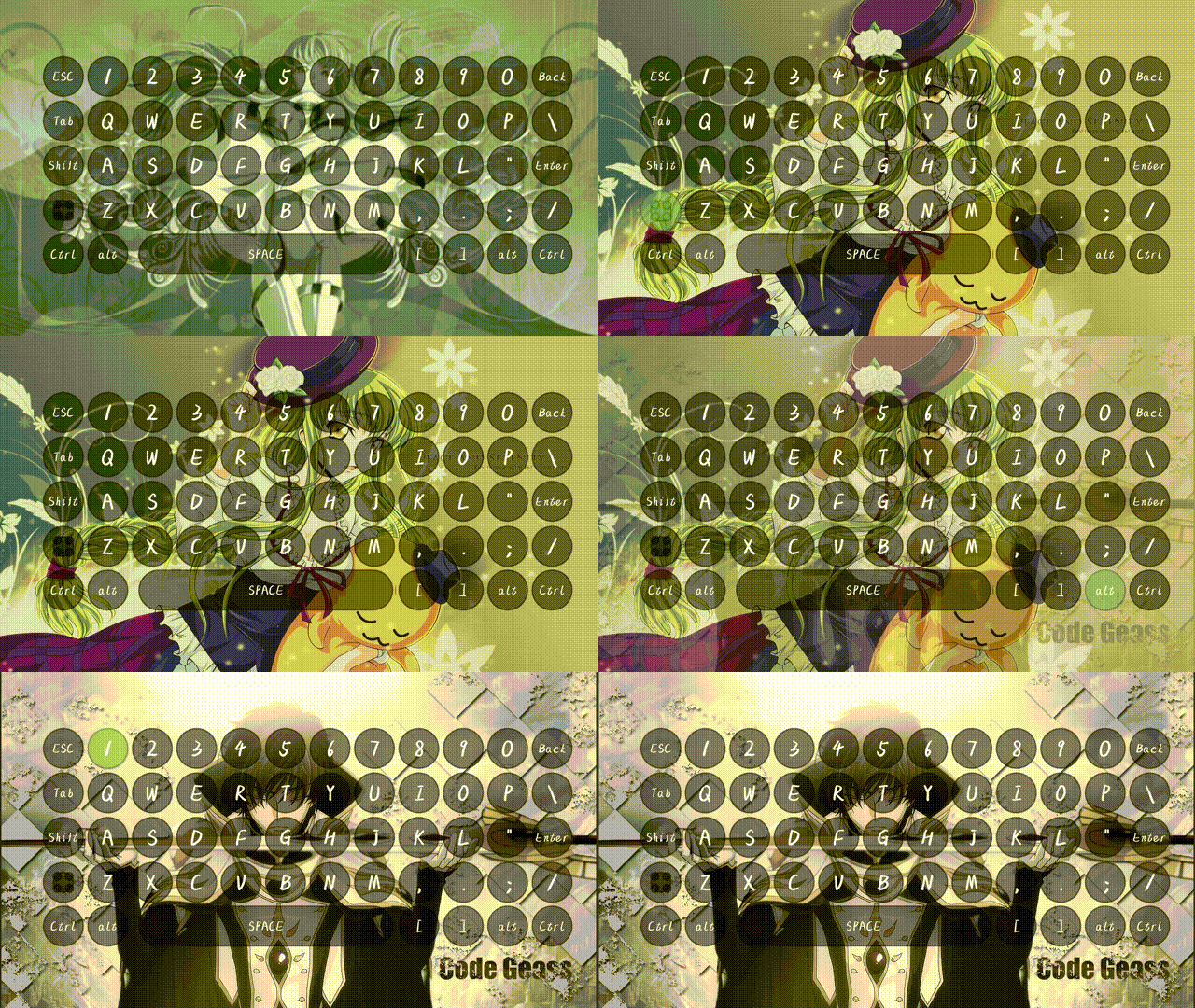
Four 、 Make my mouse input overlay
4.1 Design my mouse

4.2 Making raw materials

4.3 Configuration mapping ini file
# Input Overlay config v.4
#
#  Yes 8 Number of keys
0_key_count=7
# 1 It's the mouse
0_layout_type=1
#  Set the layout width and height
1_mouse_layout_w_h=330,330
# *_u_v:
#  Material location , Absolute pixels
# *_w_h:
#  Material width and height
# *_x_y:
#  Finished product layout
#
# lmb:  left-click
# rmb:  Right click
# mmb:  middle
# mwu:  On the roller
# mwd:  Under the wheel
# smb1:  Side button 1
# smb2:  Side button 2
1_mouse_lmb_u_v=0,0
1_mouse_lmb_w_h=160,320
1_mouse_lmb_x_y=0,0

1_mouse_rmb_u_v=170,0
1_mouse_rmb_w_h=160,320
1_mouse_rmb_x_y=170,0

1_mouse_mmb_u_v=340,0
1_mouse_mmb_w_h=160,178
1_mouse_mmb_x_y=85,80

1_mouse_mwu_u_v=510,0
1_mouse_mwu_w_h=160,178
1_mouse_mwu_x_y=85,80

1_mouse_mwd_u_v=680,0
1_mouse_mwd_w_h=160,178
1_mouse_mwd_x_y=85,80
4.4 Results display
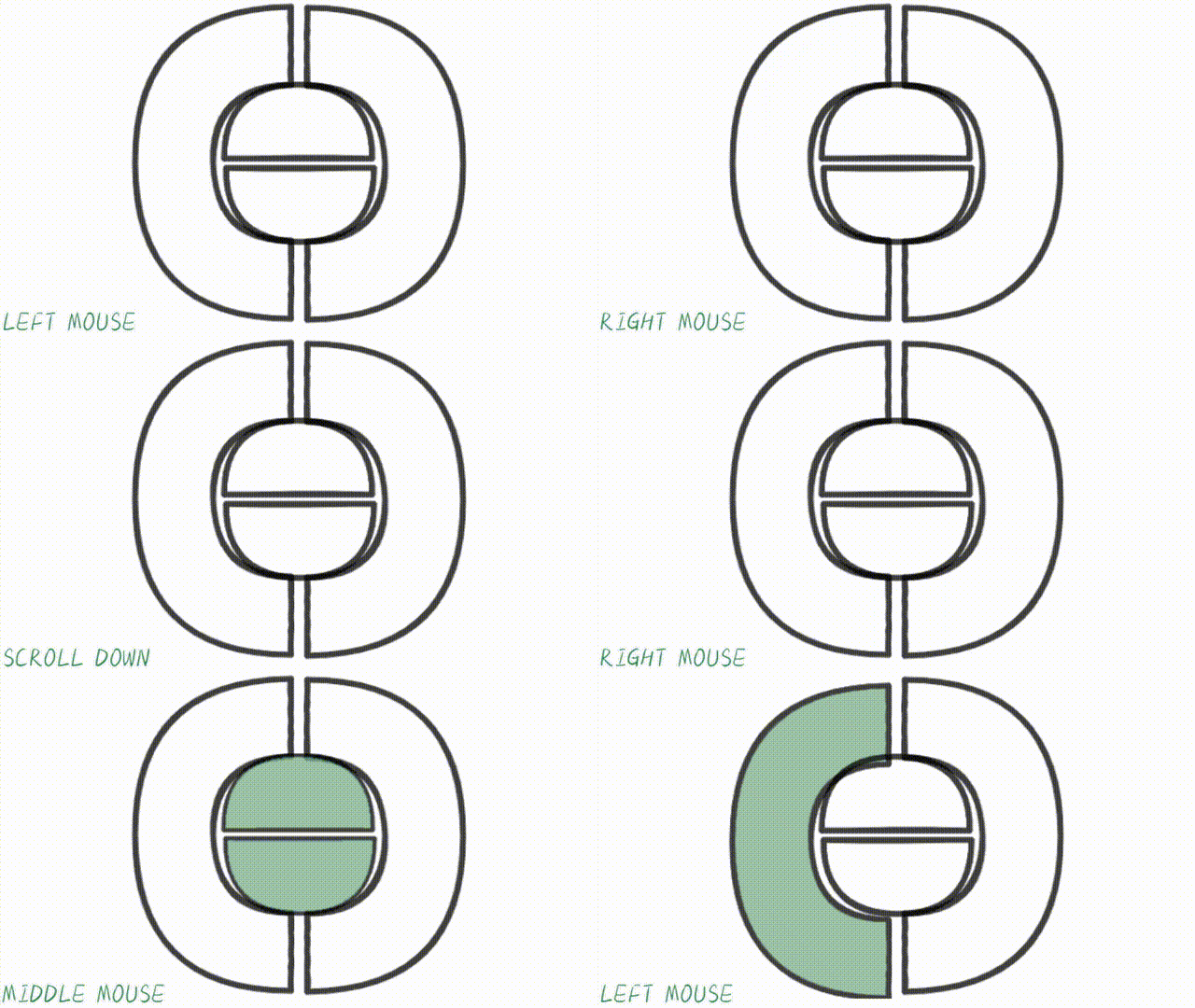
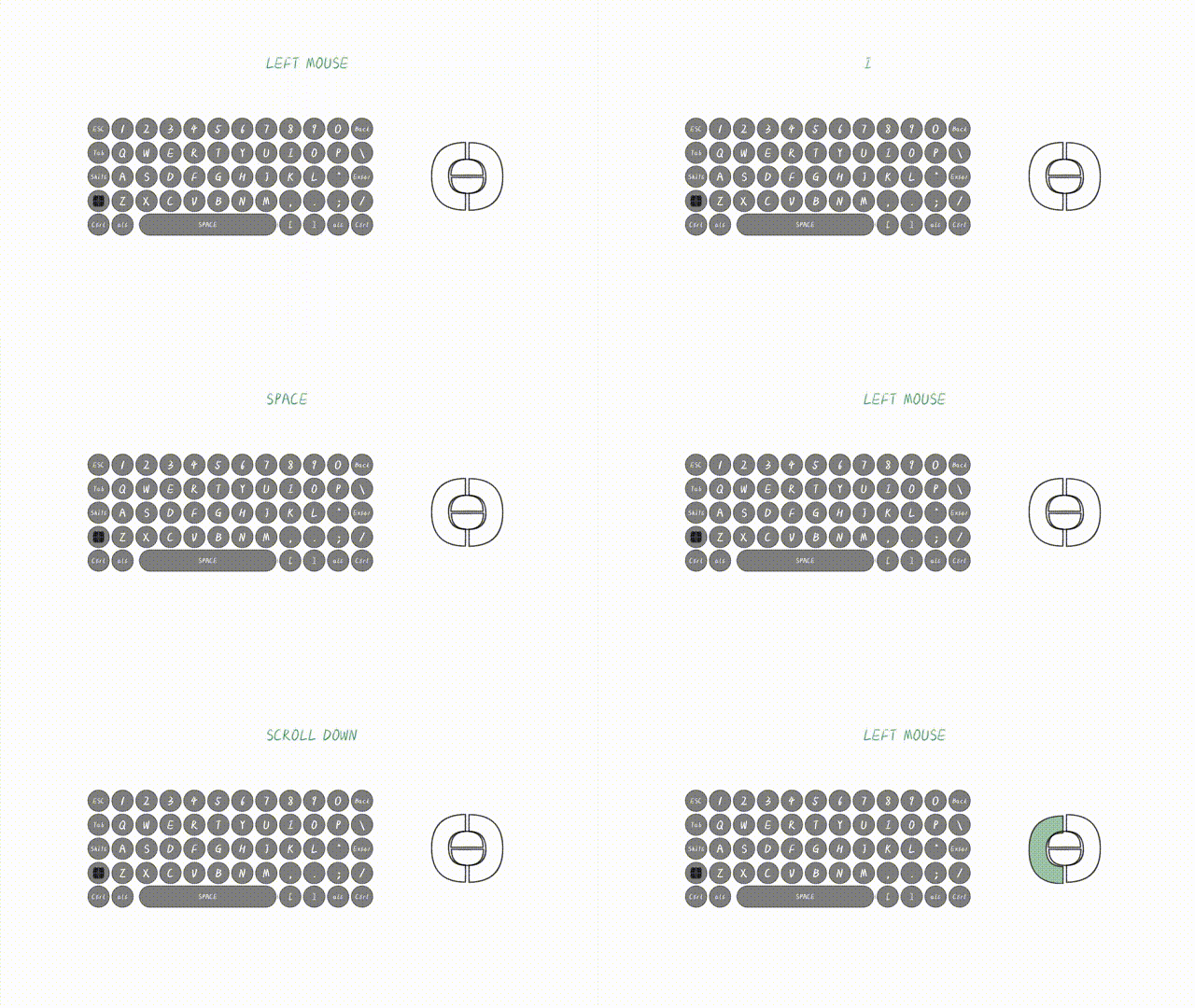
5、 ... and 、 Linkage use
Test statement : Just test this sentence
边栏推荐
猜你喜欢

MySQL高可用和主从同步

【愚公系列】2022年07月 Go教学课程 019-循环结构之for

支付宝小程序授权/获取用户信息

The cooperation between starfish OS and metabell is just the beginning

Traversal and properties of binary trees

Ceresdao: the world's first decentralized digital asset management protocol based on Dao enabled Web3.0

一种比读写锁更快的锁,还不赶紧认识一下

Clear the cause of floating and six methods (solve the problem that floating affects the parent element and the global)

Structure pseudo class selector - find single - find multiple - nth of type and pseudo elements
![[database data recovery] data recovery case of insufficient disk space of SQL Server database](/img/0e/908db40e1e8b7dd62e12558c1c6dc4.png)
[database data recovery] data recovery case of insufficient disk space of SQL Server database
随机推荐
Promise from introduction to mastery (Chapter 1 Introduction and basic use of promise)
Traversal and properties of binary trees
go 学习01
Codeforces Round #807 (Div. 2) A-C题解
Go learning 01
Appium 点击操作梳理
Codeworks round 810 (Div. 2) a~c problem solution
埃睿迪再度亮相数字中国峰会 持续深化用科技守护绿水青山
sftp文件/文件夹上传服务器
小程序毕设作品之微信校园浴室预约小程序毕业设计成品(2)小程序功能
C # using ABP warehouse to access the database error record set
【数据库数据恢复】SQL Server数据库磁盘空间不足的数据恢复案例
产品解读丨MeterSphere UI测试模块的设计与分布式扩展
Two ways for wechat applet to realize dynamic horizontal step bar
53:第五章:开发admin管理服务:6:开发【admin管理员退出登录,接口】;(一个点:我们想要修改一个采用了某种编码方式的值时,新的值最好也按照这种编码方式编码后,再去修改;)
53: Chapter 5: develop admin management service: 6: develop [admin administrator exit login, interface]; (one point: when we want to modify a value with a certain coding method, the new value should b
【网站搭建】使用acme.sh更新ssl证书:将zerossl改为letsencrypt
WMS you don't know
Shell regular and metacharacters
Data output - dynamic drawing