当前位置:网站首页>Huid learning 7: Hudi and Flink integration
Huid learning 7: Hudi and Flink integration
2022-07-28 08:52:00 【NC_ NE】
One 、 Environmental preparation
1、 Basic framework version
frame | edition | remarks |
Apache Hadoop | 2.7.5 | |
Apache Hudi | 0.9.0 | |
Apache Flink | 1.12 | be based on Scala 2.12 |
2、 Execute environment installation deployment
2.1、Flink The framework outlined
Apache Flink Is a framework and distributed processing engine , Used for stateful computation of unbounded and bounded data flows .Flink Designed to run in all common cluster environments , Perform calculations at memory execution speed and at any size

2.2、 Installation and deployment
This document uses Flink 1.12 edition , Deploy Flink Standalone Cluster pattern
1)、 Download installation package , Official website address
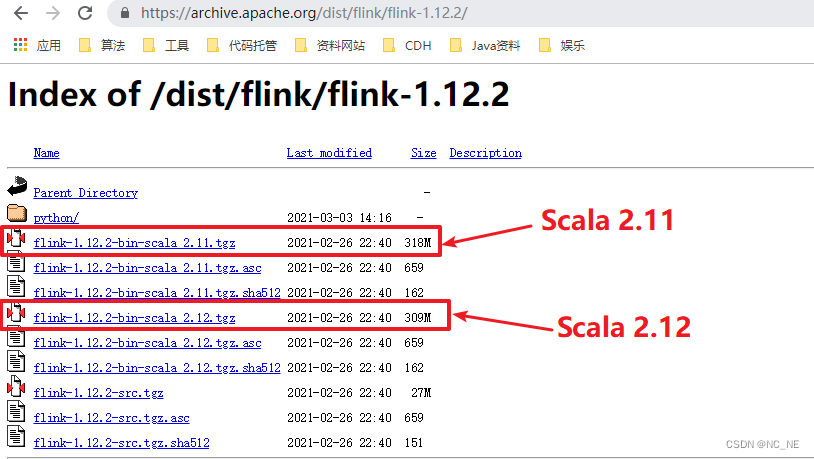
2)、 Upload the software package to the specified directory and decompress
tar -zxvf flink-1.12.2-bin-scala_2.12.tgz -C /opt/module/3)、 start-up Flink Local clusters
bin/start-cluster.sh4)、 visit Flink Of Web UI
http://hadoop100:8081/#/overview
5)、 Execute the official example , You can see flink The task runs successfully , thus flink The installation and deployment of is completed .
bin/flink run examples/batch/WordCount.jar

2.3、 add to Hudi rely on
1)、 add to Hudi rely on jar package
Compiled from Hudi Under the table of contents /hudi-0.9.0/packaging/hudi-flink-bundle/target/ take hudi-flink-bundle_2.12-0.9.0.jar, Put in Flink Installed lib Under the directory


2.4、 modify hadoop Environment variables of
vim /etc/profile.d/env.sh ( Modify the environment variable file according to your own machine )

##HADOOP_HOME
export HADOOP_HOME=/opt/module/hadoop-2.7.2
export PATH=$PATH:$HADOOP_HOME/bin
export PATH=$PATH:$HADOOP_HOME/sbin
export HADOOP_CONF_DIR=${HADOOP_HOME}/etc/hadoop
export HADOOP_CLASSPATH=`hadoop classpath
2.5、 Start cluster
1)、 Set up hadoop environment variable , Very important
export HADOOP_CLASSPATH=`$HADOOP_HOME/bin/hadoop classpath`2)、 start-up Flink
bin/start-cluster.sh3)、 start-up Flink SQL Cli Command line
bin/sql-client.sh embedded shell
4)、 Set the return result mode to tableau, Let the results show directly , Set the processing mode to batch
set execution.result-mode = tableau;
set execution.type = batch;
Two 、Flink SQL Client operation Hudi
1、 establish MOR surface
( If you don't specify table.type The default is copy on write surface )
CREATE TABLE mor_test1(
    uuid        VARCHAR(20),
    name        VARCHAR(10),
    age         INT,
    ts          TIMESTAMP(3),
    `partition` VARCHAR(20)
)PARTITIONED BY (`partition`)
WITH (
'connector' = 'hudi',
'path' = 'hdfs://hadoop100/datas/hudi-warehouse/Flink-Hudi/mor_test1',
'table.type' = 'MERGE_ON_READ'
);

2、 insert data
2.1、 Insert multiple data
INSERT INTO  VALUES
('id1','Danny',23,TIMESTAMP '1970-01-01 00:00:01','par1'),
('id2','Stephen',33,TIMESTAMP '1970-01-01 00:00:02','par1'),
('id3','Julian',53,TIMESTAMP '1970-01-01 00:00:03','par2'),
('id4','Fabian',31,TIMESTAMP '1970-01-01 00:00:04','par2'),
('id5','Sophia',18,TIMESTAMP '1970-01-01 00:00:05','par3'),
('id6','Emma',20,TIMESTAMP '1970-01-01 00:00:06','par3'),
('id7','Bob',44,TIMESTAMP '1970-01-01 00:00:07','par4'),
('id8','Han',56,TIMESTAMP '1970-01-01 00:00:08','par4');
2.2、 Successfully inserted data , Query data
1)、sql Inquire about

2)、UI The execution of the task can be seen on the interface

3)、hdfs Check out Hudi Table data

3、 Modifying data
flink sql operation hudi Many parameters are not like spark It needs to be set one by one , But there are default The default value is , When inserting data, it doesn't look like spark Specify a unique key as , Actually flink There is only one key in the table, and the default value is uuid

3.1、 modify uuid by id1 The data of
The original age 23 Change to 27 year (flink sql Unless the data mode of the first table creation and insertion is overwrite, All subsequent operations default to append Pattern , The modification operation can be triggered directly )
insert into mor_test1 values ('id1','Danny',27,TIMESTAMP '1970-01-01 00:00:01','par1');

3、 ... and 、 Streaming query (Streaming query)
Streaming reading cannot be done in a FlinkSQL Client Finish in , Two clients are required , A client is responsible for writing data into the table , Another client reads data in real time
1、 Start another client , Create table mor_test2
Set related properties , Query and read by stream , Map to the previous table :mor_test1, Storage path and mor_test1 identical , And real-time reading mor_test1 The data of
CREATE TABLE mor_test2(
    uuid        VARCHAR(20),
    name        VARCHAR(10),
    age         INT,
    ts          TIMESTAMP(3),
    `partition` VARCHAR(20)
)PARTITIONED BY (`partition`)
WITH (
'connector' = 'hudi',
'path' = 'hdfs://hadoop100:9000/datas/hudi-warehouse/Flink-Hudi/mor_test1',
'table.type' = 'MERGE_ON_READ',
'read.streaming.enabled' = 'true',
'read.streaming.start-commit' = '2022070323131133',
'read.streaming.check-interval' = '4'
);
Parameter description
read.streaming.enabled  Set to  true, Show pass  streaming  Read table data in the same way ;
read.streaming.check-interval  It specifies  source  Monitor the new  commits  The interval is  4s;
2、 Inquire about mor_test2 Report error

1)、 Set the execution mode to flow , The query
set execution.type=streaming;2)、 Streaming query succeeded

3、 Use code to stream queries
public static void main(String[] args) throws Exception {
    // Create an execution environment
    StreamExecutionEnvironment env = StreamExecutionEnvironment.getExecutionEnvironment();
    EnvironmentSettings setting = EnvironmentSettings.newInstance()
            .inStreamingMode() // Set streaming mode
            .build();
    StreamTableEnvironment tableEnv = StreamTableEnvironment.create(env, setting);

    // Create table
    tableEnv.executeSql("" +
            "CREATE TABLE mor_test2( \n" +
            "    uuid        VARCHAR(20), \n" +
            "    name        VARCHAR(10), \n" +
            "    age         INT, \n" +
            "    ts          TIMESTAMP(3), \n" +
            "    `partition` VARCHAR(20)\n" +
            ")PARTITIONED BY (`partition`)\n" +
            "WITH ( \n" +
            "'connector' = 'hudi', \n" +
            "'path' = 'hdfs://hadoop100:9000/datas/hudi-warehouse/Flink-Hudi/mor_test1', \n" +
            "'table.type' = 'MERGE_ON_READ',\n" +
            "'read.streaming.enabled' = 'true',\n" +
            "'read.streaming.start-commit' = '2022070323131133',\n" +
            "'read.streaming.check-interval' = '4'\n" +
            ")");
    tableEnv.executeSql("select *  from mor_test2").print();
}
Waiting for data to be written

Four 、Flink SQL Write in real time Hudi
1、 The overall architecture
Use the previous article StructuredStreaming The streaming program is changed to Flink SQL Program , Real time slave Kafka consumption Topic data , After parsing transformation , Store in Hudi In the table , The schematic diagram is shown below

2、 consumption Kafka data
2.1、 establish kafka Of topic (hudi_flink)
bin/kafka-topics.sh --zookeeper hadoop100:2181 --create --replication-factor 1 --partitions 1 --topic hudi_flink2.2、Flink SQL Client consumption kafka data
1)、 establish kafka surface
CREATE TABLE hudi_flink_kafka_source (
  orderId STRING,
  userId STRING,
  orderTime STRING,
  ip STRING,
  orderMoney DOUBLE,
  orderStatus INT
) WITH (
  'connector' = 'kafka',
  'topic' = 'hudi_flink',
  'properties.bootstrap.servers' = 'hadoop100:9092',
  'properties.group.id' = 'gid-1001',
  'scan.startup.mode' = 'latest-offset',
  'format' = 'json',
  'json.fail-on-missing-field' = 'false',
  'json.ignore-parse-errors' = 'true'
);
2) Query table hudi_kafka_source
Remember to add flink sql Connect kafka Of jar package , Corresponding to oneself kafka edition , Download from the official website

We went to kafka Of topic insert data , You can see Flink sql Fast consumption data
{"orderId": "20211122103434136000001","userId": "300000971","orderTime": "2021-11-22 10:34:34.136","ip": "123.232.118.98","orderMoney": 485.48,"orderStatus": 0}
3、 consumption Kafka Data written to Hudi surface
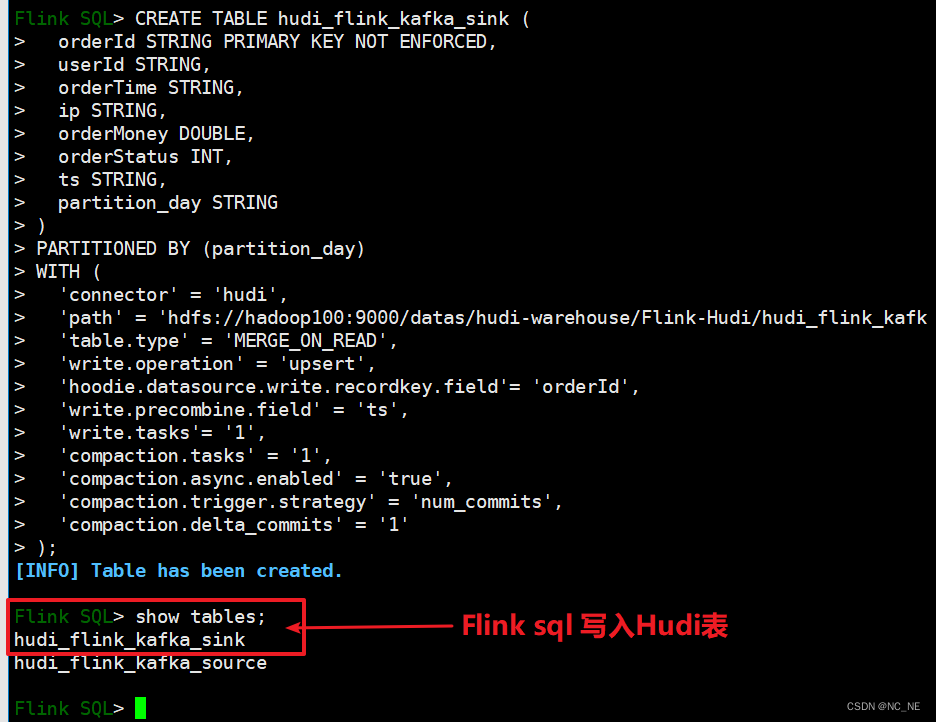
3.1、 establish Hudi surface
CREATE TABLE hudi_flink_kafka_sink (
  orderId STRING PRIMARY KEY NOT ENFORCED,
  userId STRING,
  orderTime STRING,
  ip STRING,
  orderMoney DOUBLE,
  orderStatus INT,
  ts STRING,
  partition_day STRING
)
PARTITIONED BY (partition_day)
WITH (
  'connector' = 'hudi',
  'path' = 'hdfs://hadoop100:9000/datas/hudi-warehouse/Flink-Hudi/hudi_flink_kafka_sink',
  'table.type' = 'MERGE_ON_READ',
  'write.operation' = 'upsert',
  'hoodie.datasource.write.recordkey.field'= 'orderId',
  'write.precombine.field' = 'ts',
  'write.tasks'= '1',
  'compaction.tasks' = '1',
  'compaction.async.enabled' = 'true',
  'compaction.trigger.strategy' = 'num_commits',
  'compaction.delta_commits' = '1'
);
3.2、 Write data to Hudi
1) Read first hudi_flink_kafka_source Table data , Write again hudi_flink_kafka_sink Inside the watch
Why do I need to be right hudi_flink_kafka_source Data processing , Because we deposit Hudi Three fields need to be configured , Primary key field ( Default UUID)、 Data merge field timestamp , Default name ts、 Partition field , build hudi The primary key field has been specified in the table ('hoodie.datasource.write.recordkey.field'= 'orderId'), Data merge fields ('write.precombine.field' = 'ts')
INSERT INTO hudi_flink_kafka_sink
SELECT
  orderId, userId, orderTime, ip, orderMoney, orderStatus,
  substring(orderId, 0, 17) AS ts, substring(orderTime, 0, 10) AS partition_day
FROM hudi_flink_kafka_source ;
2) Inquire about hudi_flink_kafka_sink Table data

3)、 Inquire about hdfs file

3.3、 Code realizes consumption Kafka Data written to Hudi surface
1) simulation kafka producer
/**
  * @author oyl
  * @create 2022-07-10 10:44
  * @Description  simulation kafka The producer generates order data
  */
object MockOrderProducer {

  def main(args: Array[String]): Unit = {

    // 1. Kafka Client Producer  Configuration information
    val pro: Properties = new Properties()
    pro.put("bootstrap.servers","hadoop100:9092,hadoop101:9092")
    pro.put("acks","1")
    pro.put("retries","3")
    pro.put("key.serializer",classOf[StringSerializer].getName)
    pro.put("value.serializer",classOf[StringSerializer].getName)

    // establish kafkaProducer object , Pass in configuration information

    val myProducer: KafkaProducer[String, String] = new KafkaProducer[String,String](pro)

    // Random number instance object
    val random: Random = new Random()

    // The order status
    val allStatus = Array(0,1,2,0,0,0,0,0,0,0,3,0)

    // Control the number of data
    val batchNumber: Int = random.nextInt(1)+5

    try {
      (1 to batchNumber).foreach { number =>
        val currentTime: Long = System.currentTimeMillis()
        val orderId: String = s"${getDate(currentTime)}%06d".format(number)
        val userId: String = s"${1 + random.nextInt(5)}%08d".format(random.nextInt(1000))
        val orderTime: String = getDate(currentTime, format = "yyyy-MM-dd HH:mm:ss.SSS")
        val orderMoney: String = s"${5 + random.nextInt(500)}.%02d".format(random.nextInt(100))
        val orderStatus: Int = allStatus(random.nextInt(allStatus.length))
        // 3.  Order record data
        val orderRecord: OrderRecord = OrderRecord(
          orderId, userId, orderTime, getRandomIp, orderMoney.toDouble, orderStatus
        )
        //  Convert to JSON Format data
        val orderJson = new Json(org.json4s.DefaultFormats).write(orderRecord)
        println(orderJson)
        // 4.  structure ProducerRecord object
        val record = new ProducerRecord[String, String]("hudi_flink", orderId, orderJson)
        // 5.  send data :def send(messages: KeyedMessage[K,V]*),  Send data to Topic
        myProducer.send(record)
      }
    } catch {
      case e: Exception => e.printStackTrace()
    } finally {
      if (null != myProducer) myProducer.close()
    }
  }

  /** ================= Get the current time ================= */
  def getDate(time: Long, format: String = "yyyyMMddHHmmssSSS"): String = {
    val fastFormat: FastDateFormat = FastDateFormat.getInstance(format)
    val formatDate: String = fastFormat.format(time) //  Format date
    formatDate
  }

  /** =================  Get random IP Address  ================= */
  def getRandomIp: String = {
    // ip Range
    val range: Array[(Int, Int)] = Array(
      (607649792, 608174079), //36.56.0.0-36.63.255.255
      (1038614528, 1039007743), //61.232.0.0-61.237.255.255
      (1783627776, 1784676351), //106.80.0.0-106.95.255.255
      (2035023872, 2035154943), //121.76.0.0-121.77.255.255
      (2078801920, 2079064063), //123.232.0.0-123.235.255.255
      (-1950089216, -1948778497), //139.196.0.0-139.215.255.255
      (-1425539072, -1425014785), //171.8.0.0-171.15.255.255
      (-1236271104, -1235419137), //182.80.0.0-182.92.255.255
      (-770113536, -768606209), //210.25.0.0-210.47.255.255
      (-569376768, -564133889) //222.16.0.0-222.95.255.255
    )
    //  random number :IP Address range subscript
    val random = new Random()
    val index = random.nextInt(10)
    val ipNumber: Int = range(index)._1 + random.nextInt(range(index)._2 - range(index)._1)

    //  transformation Int type IP The address is IPv4 Format
    number2IpString(ipNumber)
  }

  /** ================= take Int type IPv4 Address conversion to string type ================= */
  def number2IpString(ip: Int): String = {
    val buffer: Array[Int] = new Array[Int](4)
    buffer(0) = (ip >> 24) & 0xff
    buffer(1) = (ip >> 16) & 0xff
    buffer(2) = (ip >> 8) & 0xff
    buffer(3) = ip & 0xff
    //  return IPv4 Address
    buffer.mkString(".")
  }
}
Sample class
case class OrderRecord (
                         orderId:String,
                        userId:String,
                         orderTime:String,
                         ip:String,
                         orderMoney:Double,
                          orderStatus:Int
                       )
2)、 consumption kafka Data and write to Hudi surface
/**
 * @author oyl
 * @create 2022-07-10 11:31
 * @Description : FlinkSQL Read kafka Data writing Hudi
 */
public class FlinkSQLReadKafkaToHudi {

    public static void main(String[] args) {

        //1、 Set up the execution environment , Use streaming API

        StreamExecutionEnvironment streamEnv = StreamExecutionEnvironment.getExecutionEnvironment();

        // Set up CheckPoint
        streamEnv.setParallelism(1)
                .enableCheckpointing(5000);

        EnvironmentSettings setting = EnvironmentSettings
                .newInstance()
                .inStreamingMode()  // Set streaming mode
                .build();

        StreamTableEnvironment streamTableEnv = StreamTableEnvironment.create(streamEnv, setting);

        // 2- Create input table , from Kafka Consumption data
        streamTableEnv.executeSql("CREATE TABLE hudi_flink_kafka_source (\n" +
                "  orderId STRING,\n" +
                "  userId STRING,\n" +
                "  orderTime STRING,\n" +
                "  ip STRING,\n" +
                "  orderMoney DOUBLE,\n" +
                "  orderStatus INT\n" +
                ") WITH (\n" +
                "  'connector' = 'kafka',\n" +
                "  'topic' = 'hudi_flink',\n" +
                "  'properties.bootstrap.servers' = 'hadoop100:9092',\n" +
                "  'properties.group.id' = 'gid-1009',\n" +
                "  'scan.startup.mode' = 'latest-offset',\n" +
                "  'format' = 'json',\n" +
                "  'json.fail-on-missing-field' = 'false',\n" +
                "  'json.ignore-parse-errors' = 'true'\n" +
                ")");
        // 3- Conversion data
        Table etltable = streamTableEnv.from("hudi_flink_kafka_source")
                .addColumns($("orderId").substring(0, 17).as("ts"))
                .addColumns($("orderTime").substring(0, 10).as("partition_day"));

        streamTableEnv.createTemporaryView("kafka_table",etltable);

        //streamTableEnv.executeSql("select * from kafka_table").print();

        // 4- Create output table , Related to Hudi surface , Appoint Hudi The name of the table , Storage path , Field name and other information
        streamTableEnv.executeSql("CREATE TABLE hudi_flink_kafka_sink (\n" +
                "  orderId STRING PRIMARY KEY NOT ENFORCED,\n" +
                "  userId STRING,\n" +
                "  orderTime STRING,\n" +
                "  ip STRING,\n" +
                "  orderMoney DOUBLE,\n" +
                "  orderStatus INT,\n" +
                "  ts STRING,\n" +
                "  partition_day STRING\n" +
                ")\n" +
                "PARTITIONED BY (partition_day) \n" +
                "WITH (\n" +
                "  'connector' = 'hudi',\n" +
                "  'path' = 'hdfs://hadoop100:9000/datas/hudi-warehouse/Flink-Hudi/hudi_flink_kafka_sink',\n" +
                "  'table.type' = 'MERGE_ON_READ',\n" +
                "  'write.operation' = 'upsert',\n" +
                "  'hoodie.datasource.write.recordkey.field'= 'orderId',\n" +
                "  'write.precombine.field' = 'ts',\n" +
                "  'write.tasks'= '1',\n" +
                "  'compaction.tasks' = '1', \n" +
                "  'compaction.async.enabled' = 'true', \n" +
                "  'compaction.trigger.strategy' = 'num_commits', \n" +
                "  'compaction.delta_commits' = '1'\n" +
                ")"
        );
        // 5- Through sub query , Write data to the output table
        streamTableEnv.executeSql(
                "INSERT INTO hudi_flink_kafka_sink " +
                        "SELECT orderId, userId, orderTime, ip, orderMoney, orderStatus, ts, partition_day FROM kafka_table"
        );
    }
}
3) Read Hudi Table data
/**
 * @author oyl
 * @create 2022-07-10 14:34
 * @Description  Use Flink SQL Read Hudi Table data
 */
public class FlinkSQLReadHudi {

    public static void main(String[] args) {
        // 1- Get the table execution environment
        EnvironmentSettings settings = EnvironmentSettings
                .newInstance()
                .inStreamingMode()
                .build();
        TableEnvironment tableEnv = TableEnvironment.create(settings) ;

        // 2- Create input table , load Hudi Table data
        tableEnv.executeSql(
                "CREATE TABLE order_hudi(\n" +
                        "  orderId STRING PRIMARY KEY NOT ENFORCED,\n" +
                        "  userId STRING,\n" +
                        "  orderTime STRING,\n" +
                        "  ip STRING,\n" +
                        "  orderMoney DOUBLE,\n" +
                        "  orderStatus INT,\n" +
                        "  ts STRING,\n" +
                        "  partition_day STRING\n" +
                        ")\n" +
                        "PARTITIONED BY (partition_day)\n" +
                        "WITH (\n" +
                        "    'connector' = 'hudi',\n" +
                        "    'path' = 'hdfs://hadoop100:9000/datas/hudi-warehouse/Flink-Hudi/hudi_flink_kafka_sink',\n" +
                        "    'table.type' = 'MERGE_ON_READ',\n" +
                        "    'read.streaming.enabled' = 'true',\n" +
                        "    'read.streaming.check-interval' = '4'\n" +
                        ")"
        );

        // 3- Execute query statement , Read streaming read Hudi Table data
        tableEnv.executeSql(
                "SELECT orderId, userId, orderTime, ip, orderMoney, orderStatus, ts, partition_day FROM order_hudi"
        ).print() ;
    }
}
4)、 see hdfs The file of

5)、 Finally, paste POM File reference
<?xml version="1.0" encoding="UTF-8"?>
<project xmlns="http://maven.apache.org/POM/4.0.0"
         xmlns:xsi="http://www.w3.org/2001/XMLSchema-instance"
         xsi:schemaLocation="http://maven.apache.org/POM/4.0.0 http://maven.apache.org/xsd/maven-4.0.0.xsd">
    <parent>
        <artifactId>bigdata-parent</artifactId>
        <groupId>com.ouyangl</groupId>
        <version>1.0-SNAPSHOT</version>
    </parent>
    <modelVersion>4.0.0</modelVersion>
    <artifactId>bigdata-flink</artifactId>

    <properties>
        <project.build.sourceEncoding>UTF-8</project.build.sourceEncoding>
        <maven.compiler.source>${java.version}</maven.compiler.source>
        <maven.compiler.target>${java.version}</maven.compiler.target>
        <java.version>1.8</java.version>
        <scala.binary.version>2.12</scala.binary.version>
        <flink.version>1.12.2</flink.version>
        <hadoop.version>2.7.3</hadoop.version>
        <mysql.version>8.0.16</mysql.version>
    </properties>

    <dependencies>
        <!-- Flink Client -->
        <dependency>
            <groupId>org.apache.flink</groupId>
            <artifactId>flink-clients_${scala.binary.version}</artifactId>
            <version>${flink.version}</version>
        </dependency>
        <dependency>
            <groupId>org.apache.flink</groupId>
            <artifactId>flink-java</artifactId>
            <version>${flink.version}</version>
        </dependency>
        <dependency>
            <groupId>org.apache.flink</groupId>
            <artifactId>flink-streaming-java_${scala.binary.version}</artifactId>
            <version>${flink.version}</version>
        </dependency>
        <dependency>
            <groupId>org.apache.flink</groupId>
            <artifactId>flink-runtime-web_${scala.binary.version}</artifactId>
            <version>${flink.version}</version>
        </dependency>
        <!-- Flink Table API & SQL -->
        <dependency>
            <groupId>org.apache.flink</groupId>
            <artifactId>flink-table-common</artifactId>
            <version>${flink.version}</version>
        </dependency>
        <dependency>
            <groupId>org.apache.flink</groupId>
            <artifactId>flink-table-planner-blink_${scala.binary.version}</artifactId>
            <version>${flink.version}</version>
        </dependency>
        <dependency>
            <groupId>org.apache.flink</groupId>
            <artifactId>flink-table-api-java-bridge_${scala.binary.version}</artifactId>
            <version>${flink.version}</version>
        </dependency>
        <dependency>
            <groupId>org.apache.flink</groupId>
            <artifactId>flink-connector-kafka_${scala.binary.version}</artifactId>
            <version>${flink.version}</version>
        </dependency>
        <dependency>
            <groupId>org.apache.flink</groupId>
            <artifactId>flink-json</artifactId>
            <version>${flink.version}</version>
        </dependency>
        <dependency>
            <groupId>org.apache.hudi</groupId>
            <artifactId>hudi-flink-bundle_${scala.binary.version}</artifactId>
            <version>0.9.0</version>
        </dependency>
        <dependency>
            <groupId>org.apache.flink</groupId>
            <artifactId>flink-shaded-hadoop-2-uber</artifactId>
            <version>2.7.5-10.0</version>
        </dependency>
        <!-- MySQL/FastJson/lombok -->
        <dependency>
            <groupId>mysql</groupId>
            <artifactId>mysql-connector-java</artifactId>
            <version>${mysql.version}</version>
        </dependency>
        <dependency>
            <groupId>com.alibaba</groupId>
            <artifactId>fastjson</artifactId>
            <version>1.2.68</version>
        </dependency>
        <dependency>
            <groupId>org.projectlombok</groupId>
            <artifactId>lombok</artifactId>
            <version>1.18.12</version>
        </dependency>
        <!-- slf4j And log4j -->
        <dependency>
            <groupId>org.slf4j</groupId>
            <artifactId>slf4j-log4j12</artifactId>
            <version>1.7.7</version>
            <scope>runtime</scope>
        </dependency>
        <dependency>
            <groupId>log4j</groupId>
            <artifactId>log4j</artifactId>
            <version>1.2.17</version>
            <scope>runtime</scope>
        </dependency>
    </dependencies>
</project>
边栏推荐
- When I use MySQL CDC, there are 100 million pieces of data in the source table. In the full volume phase, when I synchronize 10 million, I stop, and then pass
- Wechat applet - wechat applet browsing PDF files
- JS手写函数之slice函数(彻底弄懂包头不包尾)
- Service current limiting and fusing of micro service architecture Sentinel
- How to configure phpunit under window
- Hcip --- LDP and MPLS Technology (detailed explanation)
- Network interface network crystal head RJ45, Poe interface definition line sequence
- XMIND Zen installation tutorial
- An article to understand data warehouse: metadata classification, metadata management
- Redis 基本知识,快来回顾一下
猜你喜欢
![[activity registration] User Group Xi'an - empowering enterprise growth with modern data architecture](/img/92/88be42faf0451cb19067672dab69c8.jpg)
[activity registration] User Group Xi'an - empowering enterprise growth with modern data architecture

SQL Server查询结果导出到EXCEL表格

Service current limiting and fusing of micro service architecture Sentinel

看完这12个面试问题,新媒体运营岗位就是你的了

Js继承方法

Chapter 2-14 sum integer segments

Quickly build a gateway service, dynamic routing and authentication process, and watch the second meeting (including the flow chart)
Export SQL server query results to excel table

Gbase appears in Unicom cloud Tour (Sichuan Station) to professionally empower cloud ecology

Hcip --- LDP and MPLS Technology (detailed explanation)
随机推荐
When I use MySQL CDC, there are 100 million pieces of data in the source table. In the full volume phase, when I synchronize 10 million, I stop, and then pass
Image batch processing | necessary skills
Can‘t connect to server on ‘IP‘ (60)
View the dimensions of the list
The cooperation between starfish OS and metabell is just the beginning
SQL Server查询结果导出到EXCEL表格
Customer first | domestic Bi leader, smart software completes round C financing
GBASE亮相联通云巡展(四川站) 以专业赋能云生态
图片批处理|必备小技能
How can MySQL query judge whether multiple field values exist at the same time
PostgreSQL:无法更改视图或规则使用的列的类型
Basic syntax of jquey
PHP Basics - PHP uses mysqli
创建线程的3种方式
GB/T 41479-2022信息安全技术 网络数据处理安全要求 导图概览
Recycling of classes loaded by classloader
Quickly build a gateway service, dynamic routing and authentication process, and watch the second meeting (including the flow chart)
Solution: indexerror: index 13 is out of bounds for dimension 0 with size 13
Opengauss synchronization status query
postgresql查询【表字段类型】和库中【所有序列】